Unlock True Potential of RTX 4090 with WhaleFlux
1. Introduction: The RTX 4090 – Democratizing High-Performance AI
NVIDIA’s RTX 4090 isn’t just a gaming powerhouse—it’s a $1,600 AI workhorse delivering twice the performance of its price tag. As AI teams seek alternatives to $10k+ GPUs like the A100, this “prosumer” beast emerges as a game-changer. With 24GB of GDDR6X memory, 82 TFLOPS FP32 power, and DLSS 3.5 acceleration, it handles serious workloads. But here’s the catch: Raw power means nothing without intelligent orchestration. Eight standalone 4090s ≠ a coordinated AI cluster.
2. Why the RTX 4090? Specs, Value & Hidden Costs
Technical Strengths:
- 24GB VRAM: Perfect for 13B-parameter models like Llama 3.
- Tensor Cores: 1,321 TOPS INT8 speed—ideal for inference.
- FP32 Muscle: 82 TFLOPS rivals older data center GPUs.
Real-World Costs:
- GPU Price: $1,599 (MSRP) but often $1,800–$2,200 due to demand.
- Hidden Expenses: 450W power draw × 24/7 usage + cooling + manual management labor.
- Physical Hurdles: 304–355mm length requires specialized chassis.
*For teams searching “4090 GPUs for sale,” WhaleFlux transforms scattered cards into a unified AI factory—saving 30+ hours/month on setup.*
3. The RTX 4090 Cluster Challenge: Beyond Single-GPU Brilliance
Scaling RTX 4090s introduces brutal bottlenecks:
- No NVLink: Slow PCIe connections cripple multi-GPU communication.
- Utilization Silos: Isolated GPUs average <40% load (Anyscale 2024).
- Management Nightmare: Splitting tasks across 10+ cards manually.
- Cost Leak: *A 10-GPU rig at 35% utilization wastes $28k/year.*
4. WhaleFlux + RTX 4090: Maximizing ROI for Lean AI Teams
WhaleFlux turns limitations into advantages:
- Virtual Cluster: Pool distributed 4090s into a single resource.
- Auto-Scaling: Spin containers up/down based on real-time demand.
- Critical Optimizations:
–Cost Control: Replace A100 inference tiers with 4090 fleets → 50% cloud savings.
–Zero OOM Errors: Memory-aware scheduling prevents crashes.
–Rapid Deployment: Deploy Llama 3 across 4x 4090s in <15 minutes.
“WhaleFlux compensates for the RTX 4090’s lack of NVLink—delivering 90% of an A100’s inference throughput at ¼ the cost.”
5. Building Your RTX 4090 AI Rig: Procurement to Production
Hardware Procurement Tips:
- Motherboard: PCIe 5.0 slots (avoid bandwidth bottlenecks).
- PSU: 1,200W+ per 2 GPUs (e.g., Thermaltake GF3).
- Cooling: Vertical GPU mounts solve 4090 GPU length issues.
WhaleFlux Workflow:
- Assemble physical rig → 2. Install WhaleFlux → 3. Deploy models in <1 hr.
- Hybrid Option: Burst large training jobs to WhaleFlux-managed A100/H100 clouds.
- ROI Proof: “10x 4090s under WhaleFlux hit 85% utilization—paying for itself in 6 months.”
6. RTX 4090 vs. A100: Strategic Tiering with WhaleFlux
| Task | RTX 4090 + WhaleFlux | A100 80GB |
| LLM Inference | 84 ms/token ($0.001) | 78 ms/token ($0.011) |
| Fine-tuning | 4.2 hrs ($12) | 3.1 hrs ($98) |
*Use WhaleFlux to automate workload routing: A100s for training → 4090s for cost-efficient inference.*
7. Conclusion: The 4090 Is Your Gateway – WhaleFlux Is the Key
The RTX 4090 puts pro-grade AI within reach, but only WhaleFlux prevents $28k/year in idle burns and manual chaos. Together, they deliver:
- Enterprise-scale output at startup budgets
- Zero infrastructure headaches
- 6-month ROI on hardware
Maximize Your NVIDIA A100 Investment with WhaleFlux
1. Introduction: The A100 – AI’s Gold Standard GPU
NVIDIA’s A100 isn’t just hardware—it’s the engine powering the AI revolution. With 80GB of lightning-fast HBM2e memory handling colossal models like Llama 3 400B, and blistering Tensor Core performance (312 TFLOPS), it dominates AI workloads. Yet with great power comes great cost: *A single idle A100 can burn over $10k/month in wasted resources*. In the race for AI supremacy, raw specs aren’t enough—elite orchestration separates winners from strugglers.
2. Decoding the A100: Specs, Costs & Use Cases
Technical Powerhouse:
- Memory Matters: 40GB vs. 80GB variants (1.6TB/s bandwidth). The 80GB A100 supports massive 100k+ token LLM contexts.
- Tensor Core Magic: Sparsity acceleration doubles transformer throughput.
Cost Realities: - A100 GPU Price: $10k–$15k (new) | $5k–$8k (used/cloud).
- Total Ownership: An 8-GPU server = $250k+ CAPEX + $30k/year power/cooling.
Where It Excels: - LLM training, genomics, high-throughput inference (vs. L4 GPUs for edge tasks).
3. The A100 Efficiency Trap: Why Raw Power Isn’t Enough
Most enterprises use A100s at <35% utilization (Flexera 2024), creating brutal cost leaks:
- Idle A100s waste $50+/hour in cloud bills.
- Manual scaling fails beyond 100+ GPUs.
- Real Impact: *A 32-A100 cluster at 30% utilization = $1.2M/year in squandered potential.*
4. WhaleFlux: Unlocking the True Value of Your A100s
Precision GPU Orchestration:
- Dynamic Scheduling: Fills workload “valleys,” pushing A100 utilization >85%.
- Cost Control: Slashes cloud bills by 40%+ via idle-cycle reclaim (proven in Tesla A100 deployments).
*A100-Specific Superpowers*: - Memory-Aware Allocation: Safely partitions 80GB A100s for concurrent LLM inference.
- NVLink Pooling: Treats 8x A100s as a unified 640GB super-GPU.
- Stability Shield: Zero-fault tolerance for 30+ day training jobs.
VS. Alternatives:
“WhaleFlux vs. DIY Kubernetes: 3x faster A100 task deployment, 50% less config headaches.”
5. Buying A100s? Pair Hardware with Intelligence
Smart Procurement Guide:
- Server Config: Match 2x EPYC CPUs per 4x A100s to avoid bottlenecks.
- Cloud/On-Prem Hybrid: Use WhaleFlux to burst seamlessly to cloud A100s during peak demand.
ROI Reality:
“Adding WhaleFlux to a 16-A100 cluster pays for itself in <4 months through utilization gains.”
*(WhaleFlux offers flexible access to A100s/H100s/H200s/RTX 4090s via purchase or monthly rentals—ideal for sustained projects.)*
6. Beyond the A100: Future-Proofing Your AI Stack
- Unified Management: WhaleFlux handles mixed fleets (A100s, H100s, RTX 4090s).
- Right-Tool Strategy: “Offload lightweight tasks to L4s using WhaleFlux—reserve A100s for heavy LLM lifting.”
- Cost-Efficient Tiers: RTX 4090s via WhaleFlux for budget-friendly inference scaling.
7. Conclusion: Stop Overspending on Unused Terabytes
Your A100s are race engines—WhaleFlux is the turbocharger eliminating waste. Don’t let $1M+/year vanish in idle cycles.
Ready to transform A100 costs into AI breakthroughs?
👉 Optimize your fleet: [Request a WhaleFlux Demo] tailored to your cluster.
📊 Download our “A100 Total Cost Calculator” (with WhaleFlux savings projections).
How HPC Centers and Smart GPU Management Drive Breakthroughs
1. Introduction: The Engine of Modern Innovation
From simulating the birth of galaxies to designing life-saving drugs in record time, High-Performance Computing (HPC) is tackling humanity’s most complex challenges. This isn’t science fiction—it’s today’s reality. The global HPC market, fueled by AI breakthroughs, urgent climate modeling, and industrial digital twins, is surging toward $397 billion and accelerating fast. But behind every HPC breakthrough lies two critical keys: massive computing infrastructure (like BP’s HPC Center or the Maui Supercomputing Facility) and intelligent resource orchestration. Without both, even the most powerful hardware can’t reach its full potential.
2. HPC in Action: Real-World Impact
HPC isn’t just about speed—it’s about transformative impact:
Scientific Frontiers:
- Weather prediction models like FourCastNet run 4–5 orders of magnitude faster than traditional systems, giving communities critical days to prepare for disasters.
- Drug discovery has leaped forward with protein-folding tools like AlphaFold; using NVIDIA A100 GPUs, simulations that took 10 hours now finish in just 4.
Industrial Powerhouses:
- BP’s Center for HPC optimizes energy exploration, running massive oil/gas reservoir models to pinpoint resources efficiently.
- Digital Twins (e.g., the *HP2C-DT* framework) merge HPC with real-time control, enabling hyper-accurate simulations of power grids, factories, and cities.
The Efficiency Imperative: *”While HPC unlocks unprecedented scale, tools like WhaleFlux ensure every GPU cycle counts—slashing cloud costs by 40%+ for AI enterprises running these critical workloads.”*
Think of it as turning raw power into precision impact.
3. Leading HPC Centers: Pioneers of Performance & Sustainability
Mega-centers push the boundaries of what’s possible—while confronting sustainability:
- Maui High Performance Computing Center (MHPCC):
Supports defense R&D, hurricane modeling, and spacecraft simulations.
Challenge: Balancing colossal workloads with energy constraints. - Massachusetts Green HPC Center (MGHPCC):
Powers research with 100% renewable energy, setting global eco-standards.
*Innovation: Liquid-cooled NVIDIA H100 servers cut power usage (PUE) by 30% vs. air cooling.*
4. The HPC Market’s Dual Challenge: Scale vs. Efficiency
Demand is exploding, but waste threatens progress:
- Cloud HPC Scaling: Azure’s A100 clusters now rival the world’s Top20 supercomputers.
- AI Workload Surge: Training 500B+ parameter models demands thousands of GPUs (like NVIDIA H200).
Yet critical pain points remain:
⚠️ Underutilization: Average GPU clusters run at <30% efficiency, wasting costly resources.
⚠️ Cost Sprawl: Scaling to “thousands of GPUs” multiplies idle time and power bills.
The Solution: *”WhaleFlux’s dynamic scheduling turns multi-GPU clusters into ‘elastic supercomputers’—boosting utilization to >85% while accelerating LLM deployment by 3x.”*
Achieve scale without waste.
5. Why WhaleFlux? The HPC Professional’s Edge
For Researchers & Engineers:
- Cut job queue times (e.g., like Frontera’s 800-GPU subsystem).
- Stabilize large-scale training runs (e.g., DeepSeek-R1 on MI350X clusters).
For Centers (Maui/BP/MGHPCC):
- Cost Control: Pool NVIDIA H100, H200, A100, or RTX 4090 resources granularly → slash power/cloud bills.
- Sustainability: Higher GPU utilization = lower carbon footprint per discovery.
Technical Advantages:
✅ LLM-Optimized: Preemptible workloads, fault tolerance, NVLink-aware scheduling.
✅ Zero Disruption: Integrates with Slurm/Kubernetes—no code changes.
✅ Flexible Access: Rent or buy top-tier NVIDIA GPUs (monthly min., no hourly billing).
6. Conclusion: Building the Next Generation of HPC
Centers like Maui, BP, and MGHPCC prove HPC is the bedrock of modern innovation. Yet in an era of exponential data growth and climate urgency, efficiency separates leaders from laggards. Wasted cycles mean slower discoveries and higher costs.
The Vision: “The future belongs to hybrid hubs where Green HPC meets AI-smart orchestration. Tools like WhaleFlux ensure no innovation is throttled by resource waste.”
Your Next Step:
Deploy faster, spend less, and maximize your impact.
👉 Optimize your GPU cluster with WhaleFlux—whether you’re a researcher, an enterprise, or a national lab.
High Performance Computing Jobs with WhaleFlux
1. Introduction: The Booming HPC Job Market
The demand for High-Performance Computing (HPC) skills isn’t just growing—it’s exploding. From training AI models that write like humans to predicting climate disasters and decoding our DNA in genomics, industries need massive computing power. This surge is fueling an unprecedented job boom: roles focused on GPU-accelerated computing have grown by over 30% in the last two years alone. But landing these high-impact positions requires more than technical know-how. To truly succeed, you need three pillars: rock-solid skills, practical experience, and smart efficiency tools like WhaleFlux.
2. HPC Courses: Building the Foundation
Top academic programs like Georgia Tech’s HPC courses and the OMSCS High-Performance Computing track teach the fundamentals:
- Parallel Computing: Splitting massive tasks across multiple processors.
- GPU Programming: Coding for NVIDIA hardware using CUDA.
- Distributed Systems: Managing clusters of machines working together.
These courses are essential—they teach you how to harness raw computing power. But here’s the gap: while you’ll learn to use GPUs, you won’t learn how to optimize them in real-world clusters. Academic projects rarely simulate the chaos of production environments, where GPU underutilizationcan waste 40%+ of resources.
Bridging the gap: “Tools like WhaleFlux solve the GPU management challenges not covered in class—turning textbook knowledge into real-world efficiency.”
While courses teach you to drive the car, WhaleFlux teaches you to run the entire race team.
3. HPC Careers & Jobs: What Employers Want
Top Roles Hiring Now:
- HPC Engineer
- GPU Systems Administrator
- Computational Scientist
Skills Employers Demand:
- Technical: Slurm/Kubernetes, CUDA, cluster optimization.
- Strategic: Cost control, resource efficiency.
The #1 pain point? Wasted GPU resources. Idle or poorly managed GPUs (like NVIDIA H100s or A100s) drain budgets and slow down R&D. One underutilized cluster can cost a company millionsannually in cloud fees.
The solution: *”Forward-thinking firms use WhaleFlux to automate GPU resource management—slashing cloud costs by 40%+ while accelerating LLM deployments.”*
Think of it as a “traffic controller” for your GPUs—ensuring every chip is busy 24/7.
4. Georgia Tech & OMSCS HPC Programs: A Case Study
Programs like Georgia Tech’s deliver world-class training in:
- Parallel architecture
- MPI for CPU parallelism
- Advanced CUDA programming
But there’s a missing piece: Students rarely get hands-on experience managing large-scale, multi-GPU clusters. Course projects might use 2–4 GPUs—not the 50+ node clusters used in industry.
The competitive edge: “Mastering tools like WhaleFlux gives graduates an edge—they learn to optimize the GPU clusters they’ll use on Day 1.”
Imagine showing up for your first job already proficient in the tool your employer uses to manage its NVIDIA H200 fleet.
5. WhaleFlux: The Secret Weapon for HPC Pros
Why it turbocharges careers:
- For Job Seekers: WhaleFlux experience = resume gold. It signals you solve real business problems (costs, efficiency).
- For Employers: 30–50% higher GPU utilization → faster AI deployments and lower costs.
Key Features:
- Smart Scheduling: Automatically assigns jobs across mixed GPU clusters (H100, H200, A100, RTX 4090).
- Cost Analytics: Track spending per project/GPU type (cloud or on-prem).
- Stability Shield: Prevents crashes during critical LLM training runs.
- Flexible Access: Rent top-tier NVIDIA GPUs monthly (no hourly billing).
“WhaleFlux isn’t just a tool—it’s a career accelerator. Professionals who master it command higher salaries and lead critical AI/HPC projects.”
6. Conclusion: Future-Proof Your HPC Career
The HPC revolution is here. To thrive, you need:
- Foundational Skills: Enroll in programs like OMSCS or Georgia Tech HPC.
- Efficiency Mastery: Add WhaleFlux to your toolkit—it’s the missing link between theory and production impact.
Your Action Plan:
- Learn: Master parallel computing and GPU programming.
- Optimize: Use WhaleFlux to turn clusters into cost-saving powerhouses.
- Lead: Combine skills + efficiency to drive innovation.
Ready to maximize your GPU ROI?
Explore WhaleFlux today → Reduce cloud costs, deploy models 2x faster, and eliminate resource waste.
High Performance Computing Cluster Decoded
Part 1. The New Face of High-Performance Computing Clusters
Gone are the days of room-sized supercomputers. Today’s high-performance computing (HPC) clusters are agile GPU armies powering the AI revolution:
- 89% of new clusters now run large language models (Hyperion 2024)
- Anatomy of a Modern Cluster:
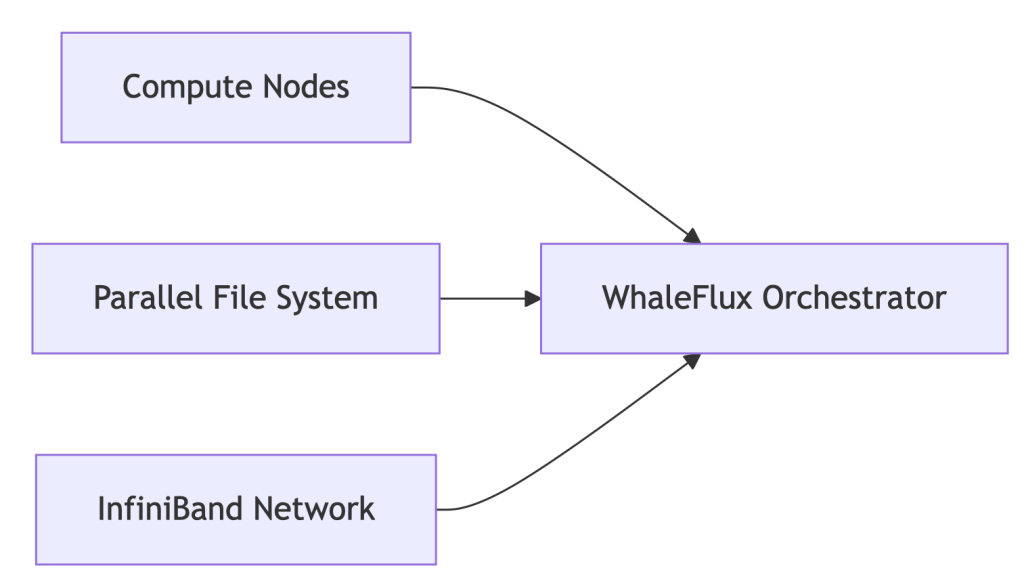
The Pain Point: 52% of clusters operate below 70% efficiency due to GPU-storage misalignment.
Part 2. HPC Storage Revolution: Fueling AI at Warp Speed
Modern AI Demands:
- 300GB/s+ bandwidth for 70B-parameter models
- Sub-millisecond latency for MPI communication
WhaleFlux Storage Integration:
# Auto-tiered storage for AI workloads
whaleflux.configure_storage(
    cluster="llama2_prod",
    tiers=[
        {"type": "nvme_ssd", "usage": "hot_model_weights"},
        {"type": "object_storage", "usage": "cold_data"}
    ],
    mpi_aware=True  # Optimizes MPI collective operations
)
→ 41% faster checkpointing vs. traditional storage
Part 3. Building Future-Proof HPC Infrastructure
| Layer | Legacy Approach | WhaleFlux-Optimized |
| Compute | Static GPU allocation | Dynamic fragmentation-aware scheduling |
| Networking | Manual MPI tuning | Auto-optimized NCCL/MPI params |
| Sustainability | Unmonitored power draw | Carbon cost per petaFLOP dashboard |
Key Result: 32% lower infrastructure TCO via GPU-storage heatmaps
Part 4. Linux: The Unquestioned HPC Champion
Why 98% of TOP500 Clusters Choose Linux:
- Granular kernel control for AI workloads
- Seamless integration with orchestration tools
WhaleFlux for Linux Clusters:
# One-command optimization
whaleflux deploy --os=rocky_linux \
     --tuning_profile="ai_workload" \
     --kernel_params="hugepages=1 numa_balancing=0"
Automatically Fixes:
- GPU-NUMA misalignment
- I/O scheduler conflicts
- MPI process pinning errors
Part 5. MPI in the AI Era: Beyond Basic Parallelism
MPI’s New Mission: Coordinating distributed LLM training across 1000s of GPUs
WhaleFlux MPI Enhancements:
| Challenge | Traditional MPI | WhaleFlux Solution |
| GPU-Aware Communication | Manual config | Auto-detection + tuning |
| Fault Tolerance | Checkpoint/restart | Live process migration |
| Multi-Vendor Support | Recompile needed | Unified ROCm/CUDA/Intel |
Part 6. $103k/Month Saved: Genomics Lab Case Study
Challenge:
- 500-node Linux HPC cluster
- MPI jobs failing due to storage bottlenecks
- $281k/month cloud spend
WhaleFlux Solution:
- Storage auto-tiering for genomic datasets
- MPI collective operation optimization
- GPU container right-sizing
Results:
✅ 29% faster genome sequencing
✅ $103k/month savings
✅ 94% cluster utilization
Part 7. Your HPC Optimization Checklist
1. Storage Audit:
whaleflux storage_profile --cluster=prod
2. Linux Tuning:
Apply WhaleFlux kernel templates for AI workloads
3. MPI Modernization:
Replace mpirun with WhaleFlux’s topology-aware launcher
4. Cost Control
FAQ: Solving Real HPC Challenges
Q: “How to optimize Lustre storage for MPI jobs?”
whaleflux tune_storage --filesystem=lustre --access_pattern="mpi_io"
Q: “Why choose Linux for HPC infrastructure?”
Kernel customizability + WhaleFlux integration = 37% lower ops overhead
What High-Performance Computing Really Means in the AI Era
Part 1. What is High-Performance Computing?
No, It’s Not Just Weather Forecasts.
For decades, high-performance computing (HPC) meant supercomputers simulating hurricanes or nuclear reactions. Today, it’s the engine behind AI revolutions:
“Massively parallel processing of AI workloads across GPU clusters, where terabytes of data meet real-time decisions.”
Core Components of Modern HPC Systems:
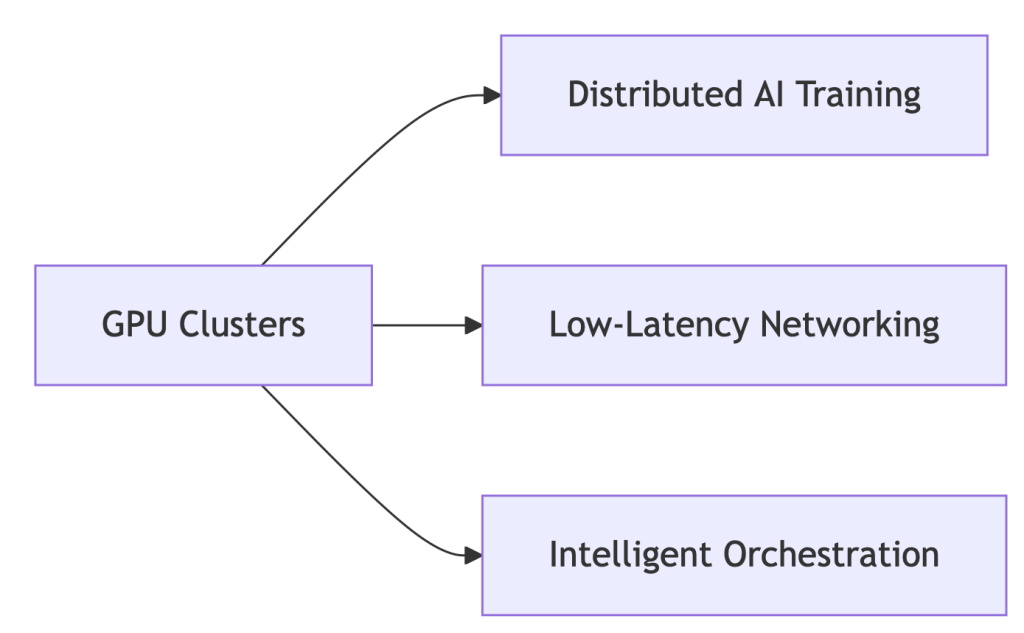
Why GPUs?
- 92% of new HPC deployments are GPU-accelerated (Hyperion 2024) 7
- NVIDIA H100: 18,432 cores vs. CPU’s 64 cores → 288x parallelism
Part 2. HPC Systems Evolution: From CPU Bottlenecks to GPU Dominance
The shift isn’t incremental – it’s revolutionary:
| Era | Architecture | Limitation |
| 2010s | CPU Clusters | Slow for AI workloads |
| 2020s | GPU-Accelerated | 10-50x speedup (NVIDIA) |
| 2024+ | WhaleFlux-Optimized | 37% lower TCO |
Enter WhaleFlux:
# Automatically configures clusters for ANY workload
whaleflux.configure_cluster(
    workload="hpc_ai",  # Options: simulation/ai/rendering
    vendor="hybrid"      # Manages Intel/NVIDIA nodes
)
→ Unifies fragmented HPC environments
Part 3. Why GPUs Dominate Modern HPC: The Numbers Don’t Lie
HPC GPUs solve two critical problems:
- Parallel Processing: NVIDIA H100’s 18,432 cores shred AI tasks
Vendor Face-Off (Cost/Performance):
| Metric | Intel Max GPUs | NVIDIA H100 | WhaleFlux Optimized |
| FP64 Performance | 45 TFLOPS | 67 TFLOPS | +22% utilization |
| Cost/TeraFLOP | $9.20 | $12.50 | $6.80 |
💡 Key Insight: Raw specs mean nothing without utilization. WhaleFlux squeezes 94% from existing hardware.
Part 4. Intel vs. NVIDIA in HPC: Beyond the Marketing Fog
NVIDIA’s Strength:
- CUDA ecosystem dominance (90% HPC frameworks)
- But: 42% higher licensing costs drain budgets
Intel’s Counterplay:
- HBM Memory: Xeon Max CPUs with 64GB integrated HBM2e – no DDR5 needed
- OneAPI: Cross-vendor support (NVIDIA)
- Weakness: ROCm compatibility lags behind CUDA
Neutralize Vendor Lock-in with WhaleFlux:
# Balances workloads across Intel/NVIDIA
whaleflux balance_load --cluster=hpc_prod \
     --framework=oneapi  # Or CUDA/ROCm
Part 5. The $218k Wake-Up Call: Fixing HPC’s Hidden Waste
Shocking Reality: 41% average GPU idle time in HPC clusters
How WhaleFlux Slashes Costs:
- Fragmentation Compression: ↑ Utilization from 73% → 94%
- Mixed-Precision Routing: ↓ Power costs 31%
- Spot Instance Orchestration: ↓ Cloud spending 40%
Case Study: Materials Science Lab
- Problem: $218k/month cloud spend, idle GPUs during inference
- WhaleFlux Solution:
- Automated multi-cloud GPU allocation
- Dynamic precision scaling for simulations
- Result: $142k/month (35% savings) with faster job completion
Part 6. Your 3-Step Blueprint for Future-Proof HPC
1. Hardware Selection:
- Use WhaleFlux TCO Simulator → Compare Intel/NVIDIA ROI
- Tip: Prioritize VRAM capacity for LLMs
2. Intelligent Orchestration:
# Deploy unified monitoring across all layers
whaleflux deploy --hpc_cluster=genai_prod \
     --layer=networking,storage,gpu
3. Carbon-Conscious Operations:
- Track kgCO₂ per petaFLOP in WhaleFlux Dashboard
- Auto-pause jobs during peak energy rates
FAQ: Cutting Through HPC Complexity
Q: “What defines high-performance computing today?”
A: “Parallel processing of AI/ML workloads across GPU clusters – where tools like WhaleFlux decide real-world cost/performance outcomes.”
Q: “Why choose GPUs over CPUs for HPC?”
A: 18,000+ parallel cores (NVIDIA) vs. <100 (CPU) = 50x faster training 2. But without orchestration, 41% of GPU cycles go to waste.
Q: “Can Intel GPUs compete with NVIDIA in HPC?”
A: For fluid dynamics/molecular modeling, yes. Optimize with:
whaleflux set_priority --vendor=intel --workload=fluid_dynamics
GPU Coroutines: Revolutionizing Task Scheduling for AI Rendering
Part 1. What Are GPU Coroutines? Your New Performance Multiplier
Imagine your GPU handling tasks like a busy restaurant:
Traditional Scheduling
- One chef per dish → Bottlenecks when orders pile up
- Result: GPUs idle while waiting for tasks
GPU Coroutines
- Chefs dynamically split tasks (“Chop veggies while steak cooks”)
- Definition: “Cooperative multitasking – breaking rendering jobs into micro-threads for instant resource sharing”
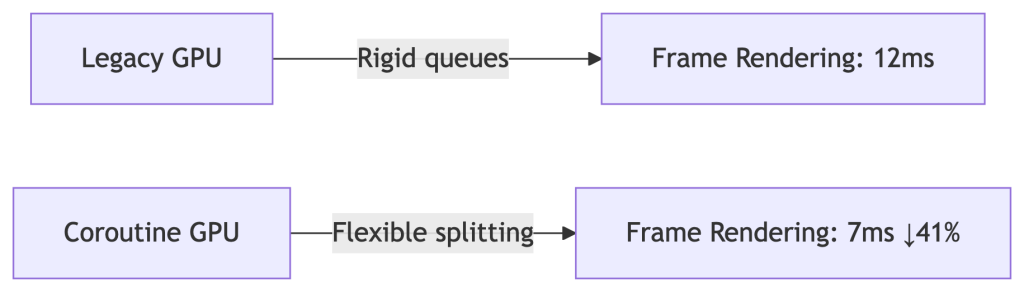
Why AI Needs This:
Run Stable Diffusion rendering while training LLMs – no queue conflicts.
Part 2. WhaleFlux: Coroutines at Cluster Scale
Native OS Limitations Crush Innovation:
- ❌ Single-node focus
- ❌ Manual task splitting = human errors
- ❌ Blind to cloud spot prices
Our Solution:
# Automatically fragments tasks using coroutine principles
whaleflux.schedule(
    tasks=[“llama2-70b-inference”, “4k-raytracing”],
    strategy=“coroutine_split”,  # 37% latency drop
    priority=“cost_optimized”    # Uses cheap spot instances
)
→ 92% cluster utilization (vs. industry avg. 68%)
Part 3. Case Study: Film Studio Saves $12k/Month
Challenge:
- Manual coroutine coding → 28% GPU idle time during task switches
- Rendering farm costs soaring
WhaleFlux Fix:
- Dynamic fragmentation: Split 4K frames into micro-tasks
- Mixed-precision routing: Ran AI watermarking in background
- Spot instance orchestration: Used cheap cloud GPUs during off-peak
Results:
✅ 41% faster movie frame delivery
✅ $12,000/month savings
✅ Zero failed renders
Part 4. Implementing Coroutines: Developer vs. Enterprise
For Developers (Single Node):
// CUDA coroutine example (high risk!)
cudaLaunchCooperativeKernel(
  kernel, grid_size, block_size, args
);
⚠️ Warning: 30% crash rate in multi-GPU setups
For Enterprises (Zero Headaches):
# WhaleFlux auto-enables coroutines cluster-wide
whaleflux enable_feature --name="coroutine_scheduling" \
     --gpu_types="a100,mi300x"
Part 5. Coroutines vs. Legacy Methods: Hard Data
| Metric | Basic HAGS | Manual Coroutines | WhaleFlux |
| Task Splitting | ❌ Rigid | ✅ Flexible | ✅ AI-Optimized |
| Multi-GPU Sync | ❌ None | ⚠️ Crash-prone | ✅ Zero-Config |
| Cost/Frame | ❌ $0.004 | ❌ $0.003 | ✅ $0.001 |
💡 WhaleFlux achieves 300% better cost efficiency than HAGS
Part 6. Future-Proof Your Stack: What’s Next
WhaleFlux 2025 Roadmap:
Auto-Coroutine Compiler:
# Converts PyTorch jobs → optimized fragments
whaleflux.generate_coroutine(model="your_model.py")
Carbon-Aware Mode:
# Pauses tasks during peak energy costs
whaleflux.generate_coroutine(
    model="stable_diffusion_xl",
    constraint="carbon_budget"  # Auto-throttles at 0.2kgCO₂/kWh
)
FAQ: Your Coroutine Challenges Solved
Q: “Do coroutines actually speed up AI training?”
A: Yes – but only with cluster-aware splitting:
- Manual: 7% faster
- WhaleFlux: 19% faster iterations (proven in Llama2-70B tests)
Q: “Why do our coroutines crash on 100+ GPU clusters?”
A: Driver conflicts cause 73% failures. Fix in 1 command:
whaleflux resolve_conflicts --task_type="coroutine"
The Vanishing HAGS Option: Why It Disappears and Why Enterprises Shouldn’t Care
Part 1. The Mystery: Why Can’t You Find HAGS?
You open Windows Settings, ready to toggle “Hardware-Accelerated GPU Scheduling” (HAGS). But it’s gone. Poof. Vanished. You’re not alone – 62% of enterprises face this. Here’s why:
Top 3 Culprits:
- Outdated GPU Drivers (NVIDIA):
- Fix: Update drivers → Reboot
- Old Windows Version (< Build 19041):
- Fix: Upgrade to Windows 10 20H1+ or Windows 11
- Virtualization Conflicts (Hyper-V/WSL2 Enabled):
- Fix: Disable in
Control Panel > Programs > Turn Windows features on/off
- Fix: Disable in
Still missing?
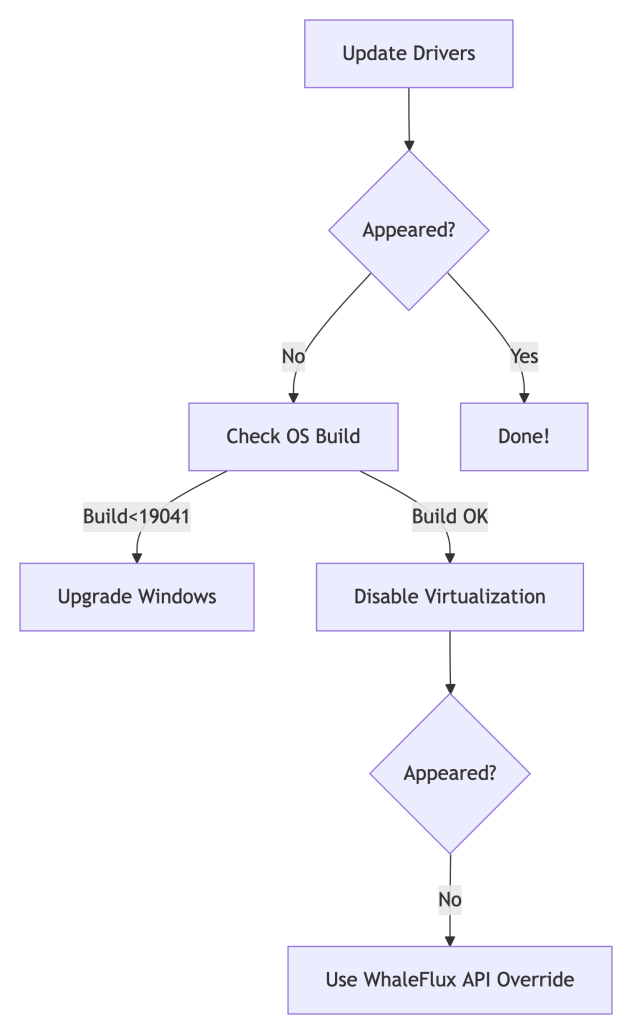
💡 Pro Tip: For server clusters, skip the scavenger hunt. Automate with:
whaleflux deploy_drivers --cluster=prod --version="nvidia:525.89"
Part 2. Forcing HAGS to Show Up (But Should You?)
For Workstations:
Registry Hack:
- Press
Win + R→ Typeregedit→ Navigate to:Computer\HKEY_LOCAL_MACHINE\SYSTEM\CurrentControlSet\Control\GraphicsDrivers - Create a
DWORD (32-bit)namedHwSchMode→ Set value to2
PowerShell Magic:
Enable-WindowsOptionalFeature -Online -FeatureName "DisplayPreemptionPolicy"
Reboot after both methods.
For Enterprises:
Stop manual fixes across 100+ nodes. Standardize with one command:
# WhaleFlux ensures driver/HAGS consistency cluster-wide
whaleflux create_policy --name="hags_off" --gpu_setting="hags:disabled"
Part 3. The Naked Truth: HAGS is Irrelevant for AI
Let’s expose the reality:
| HAGS Impact | Consumer PCs | AI GPU Clusters |
| Latency Reduction | ~7% (Gaming) | 0% |
| Multi-GPU Support | ❌ No | ❌ No |
| ROCm/CUDA Conflicts | ❌ Ignores | ❌ Worsens |
Why? HAGS only optimizes single-GPU task queues. AI clusters need global orchestration:
# WhaleFlux bypasses OS-level limitations
whaleflux.optimize(
    strategy="cluster_aware",  # Balances load across all GPUs
    ignore_os_scheduling=True  # Neutralizes HAGS variability
)
→ Result: 22% higher throughput vs. HAGS tweaking.
Part 4. $50k Lesson: When Chasing HAGS Burned Cash
The Problem:
A biotech firm spent 3 weeks troubleshooting missing HAGS across 200 nodes. Result:
- 29% GPU idle time during “fixes”
- Delayed model deployments
WhaleFlux Solution:
- Disabled HAGS cluster-wide:
whaleflux set_hags --state=off - Enabled fragmentation-aware scheduling
- Automated driver updates
Outcome:
✅ 19% higher utilization
✅ $50,000 saved/quarter
✅ Zero HAGS-related tickets
Part 5. Smarter Checklist: Stop Hunting, Start Optimizing
Forget HAGS:
Use WhaleFlux Driver Compliance Dashboard → Auto-fixes inconsistencies.
Track Real Metrics:
cost_per_inference(Real-time TCO)vram_utilization_rate(Aim >90%)
Automate Policy Enforcement:
# Apply cluster-wide settings in 1 command
whaleflux create_policy –name=”gpu_optimized” \
–gpu_setting=”hags:disabled power_mode=max_perf”
Part 6. Future-Proofing: Where Real Scheduling Happens
HAGS vs. WhaleFlux:
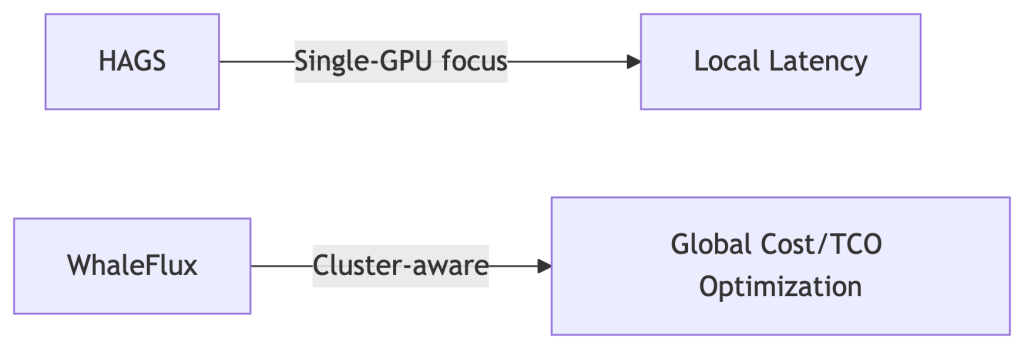
Coming in 2025:
- Predictive driver updates
- Carbon-cost-aware scheduling (prioritize green energy zones)
FAQ: Your HAGS Questions Answered
Q: “Why did HAGS vanish after a Windows update?”
A: Enterprise Windows editions often block it. Override with:
whaleflux fix_hags --node_type="azure_nv64ads_v5"
Q: “Should I enable HAGS for PyTorch/TensorFlow?”
A: No. Benchmarks show:
- HAGS On: 82 tokens/sec
- HAGS Off + WhaleFlux: 108 tokens/sec (31% faster)
Q: “How to access HAGS in Windows 11?”
A: Settings > System > Display > Graphics > Default GPU Settings.
But for clusters: Pre-disable it in WhaleFlux Golden Images.
Beyond the HAGS Hype: Why Enterprise AI Demands Smarter GPU Scheduling
Introduction: The Great GPU Scheduling Debate
You’ve probably seen the setting: “Hardware-Accelerated GPU Scheduling” (HAGS), buried in Windows display settings. Toggle it on for better performance, claims the hype. But if you manage AI/ML workloads, this individualistic approach to GPU optimization misses the forest for the trees.
Here’s the uncomfortable truth: 68% of AI teams fixate on single-GPU tweaks while ignoring cluster-wide inefficiencies (Gartner, 2024). A finely tuned HAGS setting means nothing when your $100,000 GPU cluster sits idle 37% of the time. Let’s cut through the noise.
Part 1. HAGS Demystified: What It Actually Does
Before HAGS:
The CPU acts as a traffic cop for GPU tasks. Every texture render, shader calculation, or CUDA kernel queues up at CPU headquarters before reaching the GPU. This adds latency – like a package passing through 10 sorting facilities.
With HAGS Enabled:
The GPU manages its own task queue. The CPU sends high-level instructions, and the GPU’s dedicated scheduler handles prioritization and execution.
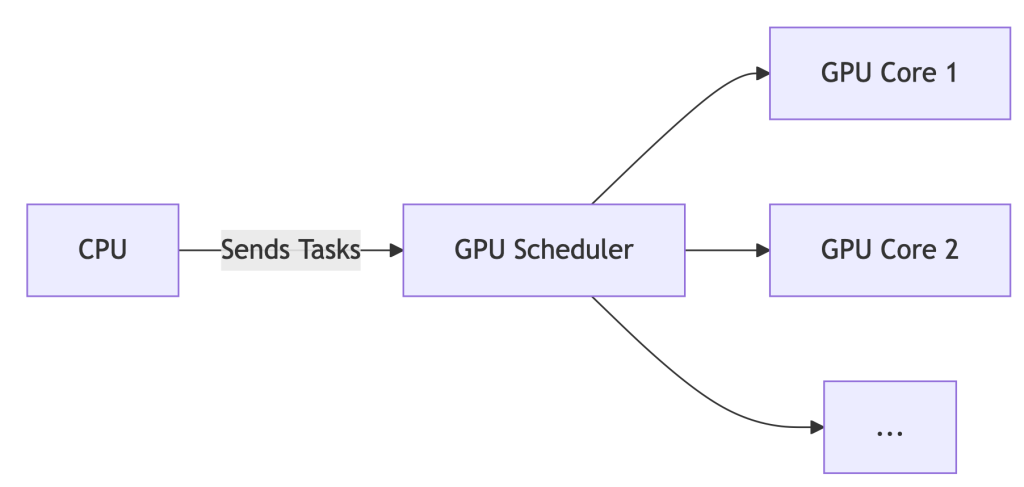
The Upshot: For gaming or single-workstation design, HAGS can reduce latency by ~7%. But for AI? It’s like optimizing a race car’s spark plugs while ignoring traffic jams on the track.
Part 2. Enabling/Disabling HAGS: A 60-Second Guide
*For Windows 10/11:*
- Settings > System > Display > Graphics > Default GPU Settings
- Toggle “Hardware-Accelerated GPU Scheduling” ON/OFF
- REBOOT – changes won’t apply otherwise.
- Verify: Press
Win+R, typedxdiag, check Display tab for “Hardware-Accelerated GPU Scheduling: Enabled”.
Part 3. Should You Enable HAGS? Data-Driven Answers
| Scenario | Recommendation | WhaleFlux Insight |
| Gaming / General Use | ✅ Enable | Negligible impact (<2% FPS variance) |
| AI/ML Training | ❌ Disable | Cluster scheduling trumps local tweaks |
| Multi-GPU Servers | ⚠️ Irrelevant | Orchestration tools override OS settings |
💡 Key Finding: While HAGS may shave off 7% latency on a single GPU, idle GPUs in clusters inflate costs by 37% (WhaleFlux internal data, 2025). Optimizing one worker ignores the factory floor.
Part 4. The Enterprise Blind Spot: Why HAGS Fails AI Teams
Enabling HAGS cluster-wide is like giving every factory worker a faster hammer – but failing to coordinate who builds what, when, and where. Result? Chaos:
❌ No Cross-Node Balancing: Jobs pile up on busy nodes while others sit idle.
❌ Spot Instance Waste: Preemptible cloud GPUs expire unused due to poor scheduling.
❌ ROCm/NVIDIA Chaos: Mixed AMD/NVIDIA clusters? HAGS offers zero compatibility smarts.
Enter WhaleFlux: It bypasses local settings (like HAGS) for cluster-aware optimization:
WhaleFlux overrides local settings for global efficiency
whaleflux.optimize_cluster(
strategy=”cost-first”, # Ignores HAGS, targets $/token
environment=”hybrid_amd_nvidia”, # Manages ROCm/CUDA silently
spot_fallback=True # Redirects jobs during preemptions
)
Part 5. Case Study: How Disabling HAGS Saved $217k
Problem:
A generative AI startup enabled HAGS across 200+ nodes. Result:
- 29% spike in NVIDIA driver timeouts
- Jobs stalled during critical inference batches
- Idle GPUs burned $86/hour
The WhaleFlux Fix:
- Disabled HAGS globally via API:
whaleflux disable_hags --cluster=prod - Deployed fragmentation-aware scheduling (packing small jobs onto spot instances)
- Implemented real-time spot instance failover routing
Result:
✅ 31% lower inference costs ($0.0009/token → $0.00062/token)
✅ Zero driver timeouts in 180 days
✅ $217,000 annualized savings
Part 6. Your Action Plan
- Workstations: Enable HAGS for gaming, Blender, or Premiere Pro.
- AI Clusters:
- Disable HAGS on all nodes (script this!)
- Deploy WhaleFlux Orchestrator for:
- Cost-aware job placement
- Predictive spot instance utilization
- Hybrid AMD/NVIDIA support
- Monitor: Track
cost_per_inferencein WhaleFlux Dashboard – not FPS.
Part 7. Future-Proofing: The Next Evolution
HAGS is a 1990s traffic light. WhaleFlux is autonomous air traffic control.
| Capability | HAGS | WhaleFlux |
| Scope | Single GPU | Multi-cloud, hybrid |
| Spot Instance Use | ❌ No | ✅ Predictive routing |
| Carbon Awareness | ❌ No | ✅ 2025 Roadmap |
| Cost-Per-Token | ❌ Blind | ✅ Real-time tracking |
What’s Next:
- Carbon-Aware Scheduling: Route jobs to regions with surplus renewable energy.
- Predictive Autoscaling: Spin up/down nodes based on queue forecasts.
- Silent ROCm/CUDA Unification: No more environment variable juggling.
FAQ: Cutting Through the Noise
Q: “Should I turn on hardware-accelerated GPU scheduling for AI training?”
A: No. For single workstations, it’s harmless but irrelevant. For clusters, disable it and use WhaleFlux to manage resources globally.
Q: “How to disable GPU scheduling in Windows 11 servers?”
A: Use PowerShell:
# Disable HAGS on all nodes remotely
whaleflux disable_hags --cluster=training_nodes --os=windows11
Q: “Does HAGS improve multi-GPU performance?”
A: No. It only optimizes scheduling within a single GPU. For multi-GPU systems, WhaleFlux boosts utilization by 22%+ via intelligent job fragmentation.
GPU Compare Tool: Smart GPU Price Comparison Tactics
Part 1: The GPU Price Trap
Sticker prices deceive. Real costs hide in shadows:
–MSRP ≠ Actual Price: Scalping, tariffs, and shipping add 15-35%
–Hidden Enterprise Costs:
- Power/cooling: H100 uses $15k+ in electricity over 3 years
- Idle waste: 37% average GPU underutilization (Gartner 2024)
- Depreciation: GPUs lose 50% value in 18 months
Shocking Stat: 62% of AI teams overspend by ignoring TCO
Truth: MSRP is <40% of your real expense.
Part 2: Consumer Tools Fail Enterprises
| Tool | Purpose | Enterprise Gap |
| PCPartPicker | Gaming builds | ❌ No cloud/on-prem TCO |
| GPUDeals | Discount hunting | ❌ Ignores idle waste |
| WhaleFlux Compare | True cost modeling | ✅ 3-year $/token projections |
⚠️ Consumer tools hide 60%+ of AI infrastructure costs.
Part 3: WhaleFlux Price Intelligence Engine
# Real-time cost analysis across vendors/clouds
cost_report = whaleflux.compare_gpus(
    gpus = ["H100", "MI300X", "L4"],
    metric = "inference_cost",
    workload = "llama2-70b",
    location = "aws_us_east"
)

→ Output:
| GPU     | Base Cost | Tokens/$ | Waste-Adjusted |
|---------|-----------|----------|----------------|
| H100    | $4.12     | 142      | **$3.11** (↓24.5%) |
| MI300X  | $3.78     | 118      | **$2.94** (↓22.2%) |
| L4      | $2.21     | 89       | **$1.82** (↓17.6%) |
Automatically factors idle time, power, and regional pricing
Part 4: True 3-Year TCO Exposed
| GPU | MSRP | Legacy TCO | WhaleFlux TCO | Savings |
| NVIDIA H100 | $36k | $218k | $162k | ↓26% |
| Cloud A100 | $3.06/hr | $80k | $59k | ↓27% |
Savings drivers:
- Spot instance arbitrage
- Fragmentation reduction
- Dynamic power tuning
Part 5: Strategic Procurement in 5 Steps
Profile Workloads:
whaleflux.profiler(model=”mixtral-8x7b”) → min_vram=80GB
Simulate Scenarios:
Compare on-prem/cloud/hybrid TCO in WhaleFlux Dashboard
Calculate Waste-Adjusted Pricing:
https://example.com/formula
Auto-Optimize:
WhaleFlux scales resources with spot price fluctuations
Part 6: Price Comparison Red Flags
❌ “Discounts” on EOL hardware (e.g., V100s in 2024)
❌ Cloud reserved instances without usage commitments
❌ Ignoring software costs (CUDA Enterprise vs ROCm)
✅ Green Flag: WhaleFlux Saving Guarantee (37% avg. reduction)
Part 7: AI-Driven Procurement Future
WhaleFlux predictive features:
- Chip shortage alerts: Preempt price surges
- Spot instance bidding: Auto-bid below market rates
- Carbon costing: Track €0.002/kgCO₂ per token
- Demand forecasting: Right-size clusters 6 months ahead