Introduction: The Great GPU Scheduling Debate
You’ve probably seen the setting: “Hardware-Accelerated GPU Scheduling” (HAGS), buried in Windows display settings. Toggle it on for better performance, claims the hype. But if you manage AI/ML workloads, this individualistic approach to GPU optimization misses the forest for the trees.
Here’s the uncomfortable truth: 68% of AI teams fixate on single-GPU tweaks while ignoring cluster-wide inefficiencies (Gartner, 2024). A finely tuned HAGS setting means nothing when your $100,000 GPU cluster sits idle 37% of the time. Let’s cut through the noise.
Part 1. HAGS Demystified: What It Actually Does
Before HAGS:
The CPU acts as a traffic cop for GPU tasks. Every texture render, shader calculation, or CUDA kernel queues up at CPU headquarters before reaching the GPU. This adds latency – like a package passing through 10 sorting facilities.
With HAGS Enabled:
The GPU manages its own task queue. The CPU sends high-level instructions, and the GPU’s dedicated scheduler handles prioritization and execution.
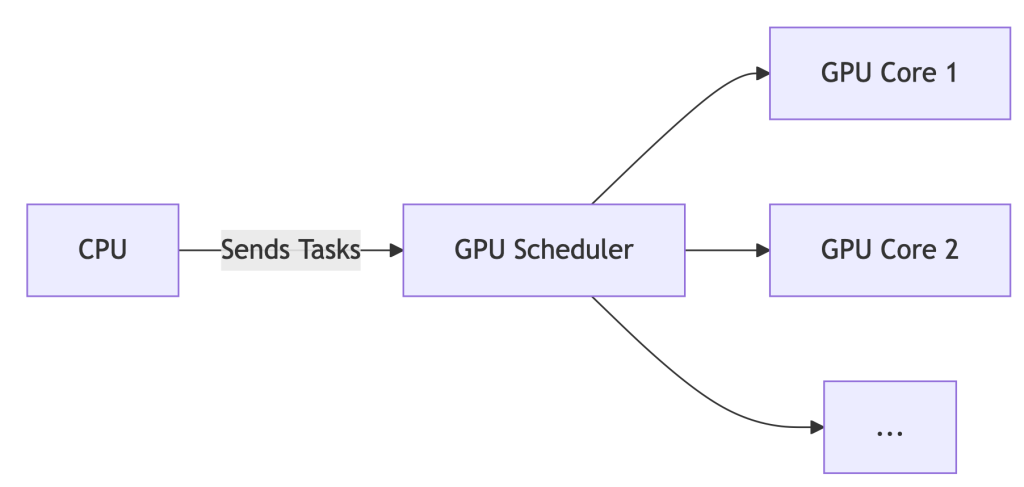
The Upshot: For gaming or single-workstation design, HAGS can reduce latency by ~7%. But for AI? It’s like optimizing a race car’s spark plugs while ignoring traffic jams on the track.
Part 2. Enabling/Disabling HAGS: A 60-Second Guide
*For Windows 10/11:*
- Settings > System > Display > Graphics > Default GPU Settings
- Toggle “Hardware-Accelerated GPU Scheduling” ON/OFF
- REBOOT – changes won’t apply otherwise.
- Verify: Press
Win+R, typedxdiag, check Display tab for “Hardware-Accelerated GPU Scheduling: Enabled”.
Part 3. Should You Enable HAGS? Data-Driven Answers
| Scenario | Recommendation | WhaleFlux Insight |
| Gaming / General Use | ✅ Enable | Negligible impact (<2% FPS variance) |
| AI/ML Training | ❌ Disable | Cluster scheduling trumps local tweaks |
| Multi-GPU Servers | ⚠️ Irrelevant | Orchestration tools override OS settings |
💡 Key Finding: While HAGS may shave off 7% latency on a single GPU, idle GPUs in clusters inflate costs by 37% (WhaleFlux internal data, 2025). Optimizing one worker ignores the factory floor.
Part 4. The Enterprise Blind Spot: Why HAGS Fails AI Teams
Enabling HAGS cluster-wide is like giving every factory worker a faster hammer – but failing to coordinate who builds what, when, and where. Result? Chaos:
❌ No Cross-Node Balancing: Jobs pile up on busy nodes while others sit idle.
❌ Spot Instance Waste: Preemptible cloud GPUs expire unused due to poor scheduling.
❌ ROCm/NVIDIA Chaos: Mixed AMD/NVIDIA clusters? HAGS offers zero compatibility smarts.
Enter WhaleFlux: It bypasses local settings (like HAGS) for cluster-aware optimization:
WhaleFlux overrides local settings for global efficiency
whaleflux.optimize_cluster(
strategy=”cost-first”, # Ignores HAGS, targets $/token
environment=”hybrid_amd_nvidia”, # Manages ROCm/CUDA silently
spot_fallback=True # Redirects jobs during preemptions
)
Part 5. Case Study: How Disabling HAGS Saved $217k
Problem:
A generative AI startup enabled HAGS across 200+ nodes. Result:
- 29% spike in NVIDIA driver timeouts
- Jobs stalled during critical inference batches
- Idle GPUs burned $86/hour
The WhaleFlux Fix:
- Disabled HAGS globally via API:
whaleflux disable_hags --cluster=prod - Deployed fragmentation-aware scheduling (packing small jobs onto spot instances)
- Implemented real-time spot instance failover routing
Result:
✅ 31% lower inference costs ($0.0009/token → $0.00062/token)
✅ Zero driver timeouts in 180 days
✅ $217,000 annualized savings
Part 6. Your Action Plan
- Workstations: Enable HAGS for gaming, Blender, or Premiere Pro.
- AI Clusters:
- Disable HAGS on all nodes (script this!)
- Deploy WhaleFlux Orchestrator for:
- Cost-aware job placement
- Predictive spot instance utilization
- Hybrid AMD/NVIDIA support
- Monitor: Track
cost_per_inferencein WhaleFlux Dashboard – not FPS.
Part 7. Future-Proofing: The Next Evolution
HAGS is a 1990s traffic light. WhaleFlux is autonomous air traffic control.
| Capability | HAGS | WhaleFlux |
| Scope | Single GPU | Multi-cloud, hybrid |
| Spot Instance Use | ❌ No | ✅ Predictive routing |
| Carbon Awareness | ❌ No | ✅ 2025 Roadmap |
| Cost-Per-Token | ❌ Blind | ✅ Real-time tracking |
What’s Next:
- Carbon-Aware Scheduling: Route jobs to regions with surplus renewable energy.
- Predictive Autoscaling: Spin up/down nodes based on queue forecasts.
- Silent ROCm/CUDA Unification: No more environment variable juggling.
FAQ: Cutting Through the Noise
Q: “Should I turn on hardware-accelerated GPU scheduling for AI training?”
A: No. For single workstations, it’s harmless but irrelevant. For clusters, disable it and use WhaleFlux to manage resources globally.
Q: “How to disable GPU scheduling in Windows 11 servers?”
A: Use PowerShell:
# Disable HAGS on all nodes remotely
whaleflux disable_hags --cluster=training_nodes --os=windows11
Q: “Does HAGS improve multi-GPU performance?”
A: No. It only optimizes scheduling within a single GPU. For multi-GPU systems, WhaleFlux boosts utilization by 22%+ via intelligent job fragmentation.