Cost-Optimizing Your Agent Workforce: TCO in the Era of LLMs
Introduction: The Invisible Tax on Autonomy
The promise of the Autonomous Agent is a business that runs while you sleep. But for many CTOs, the reality is a budget that disappears while they watch. In 2026, the primary barrier to the “Agentic Enterprise” isn’t a lack of reasoning capability—it’s the Inference Tax.
Scaling an agent workforce from ten to ten thousand agents requires an exponential increase in compute power. However, traditional cloud infrastructure is poorly equipped for the “bursty,” multi-step nature of agentic workflows. This results in GPU Waste: expensive H200s and B200s sitting idle while an agent “thinks” or waits for a tool response, yet billing you for every millisecond of uptime. To survive the era of LLMs, businesses must move from “throwing hardware at the problem” to Intelligent Workforce Orchestration.
1. Decoding the Agent TCO: More Than Just Tokens
When calculating the TCO of an AI agent workforce, most organizations make the mistake of only looking at API costs. In reality, the cost structure of a self-hosted or hybrid agent ecosystem is a four-headed beast:
Compute Idle Time:
Agents don’t use GPUs 100% of the time. They spend 60-80% of their lifecycle waiting for API responses, database queries, or “thinking” between multi-step tasks. In a standard setup, that GPU is reserved and wasted during these gaps.
Memory Overhead:
Each agent maintains a context window. As agents become more sophisticated, their “memory” consumes massive amounts of VRAM, leading to memory-bound bottlenecks that force companies to buy more hardware than they actually need for the raw compute.
Network Latency Costs:
In distributed agent systems, data movement between nodes can become the dominant bottleneck, causing GPUs to wait for data (IO wait), further driving up the cost per task.
Maintenance & Retraining:
The “hidden” 20% of TCO involves the human cost of managing the infrastructure and fine-tuning models to stay relevant.
2. The WhaleFlux Solution: Reducing TCO by 40-70%
This is where WhaleFlux enters the equation. We recognized that the only way to make a large-scale agent workforce economically viable is to treat AI compute like a living utility, not a static server.
WhaleFlux is an orchestration layer designed specifically for the Agentic Era. By implementing Intelligent Schedulingand Dynamic Quantization, WhaleFlux allows enterprises to slash their TCO by 40% to 70% without sacrificing agent performance.
WhaleFlux Intelligent Scheduling
Traditional schedulers treat an LLM request like a black box. WhaleFlux’s scheduler is “Agent-Aware.” It predicts the gaps in an agent’s reasoning chain and fills those GPU micro-seconds with tasks from other agents.
This “Hyper-Batching” technique means you can run 3x to 5x the number of agents on the same cluster of GPUs. Instead of 100 agents per node, WhaleFlux pushes the boundaries of hardware density, effectively turning your GPU “waste” back into “work.”
3. Avoiding GPU Waste via Model Quantization
Not every task requires the full FP16 precision of a 70B parameter model. One of the most effective ways WhaleFlux optimizes costs is through Adaptive Quantization.
For routine administrative tasks or initial data parsing, WhaleFlux dynamically switches the agent to a quantized version of the model (e.g., 4-bit or 8-bit). This reduces the memory footprint by up to 75%, allowing more agents to stay resident in the VRAM simultaneously. This prevents the costly “context-swapping” that occurs when an agent has to be moved in and out of the GPU memory, which is one of the biggest silent killers of TCO.
4. Scaling Without the Budget Bloat
The ultimate goal of WhaleFlux is to decouple your workforce growth from your budget growth. With our 40-70% cost-reduction advantage, a company that previously could only afford 50 autonomous agents can now deploy 150-200 agents under the same budget cap.
By utilizing WhaleFlux, you aren’t just saving money; you are gaining Compute Elasticity. You can scale your agentic operations during peak market hours and throttle back during lulls, ensuring that every dollar spent on a GPU core is directly tied to a business outcome.
Conclusion: The Efficiency Frontier
In the era of LLMs, the competitive advantage belongs to the companies that can generate the most “intelligence per dollar.” GPU waste is the friction that stops innovation.
By addressing the core drivers of TCO—idle time, memory mismanagement, and static scheduling—WhaleFlux provides the “efficiency engine” required to run a truly autonomous enterprise. Don’t let your GPU budget dictate the size of your ambitions. Optimize your perimeter, eliminate the waste, and scale your workforce into the future.
Stop paying for idle time. Start scaling with WhaleFlux.
FAQ: Optimizing Agent Workforce Costs
1. Why is the TCO of AI Agents higher than traditional software?
Traditional software has a predictable “compute-per-user” cost. AI Agents have an “inference-per-thought” cost. Because agents perform multi-step reasoning, a single user request might trigger 20 different LLM calls, tool uses, and self-corrections, leading to a much higher and more volatile cost profile.
2. How does WhaleFlux achieve a 70% reduction in TCO?
We achieve this through a “Stack of Gains”: 30% from Intelligent Scheduling (reducing idle time), 20% from Dynamic Quantization (packing more agents into VRAM), and 20% from optimized IO paths that reduce data bottlenecking. Combined, these factors dramatically lower the cost per agent task.
3. Does reducing costs with Quantization affect the quality of the agent’s work?
WhaleFlux uses Adaptive Quantization. For complex reasoning (like legal or medical analysis), the system uses full precision. For simpler “routing” or “summarization” tasks, it uses quantized models. This ensures quality is maintained exactly where it’s needed while saving costs on simpler sub-tasks.
4. Can WhaleFlux work with my existing cloud provider (AWS/Azure)?
Yes. WhaleFlux is designed as an orchestration layer that sits on top of your existing infrastructure. Whether you are using bare-metal H100s in a private data center or spot instances on AWS, WhaleFlux optimizes the scheduling layer to ensure you get the most out of every rented or owned GPU.
5. What is “GPU Waste” exactly?
GPU Waste occurs when a GPU is “allocated” to a process but its cores are at 0% utilization. In agent workflows, this happens during “IO-wait” (waiting for data) or “Logic-wait” (waiting for the next step of an agent’s plan). WhaleFlux eliminates this by interleaving other tasks into those empty slots.
From RAG to Agents: The Evolution of Contextual Intelligence and Action
For the past two years, the corporate world has been obsessed with Retrieval-Augmented Generation (RAG). It was the first “bridge” that allowed static Large Language Models (LLMs) to talk to dynamic, private data. RAG solved the hallucination problem for many, turning AI into an incredibly efficient librarian. But as we move into 2026, the librarian is no longer enough. Enterprises are demanding Action.
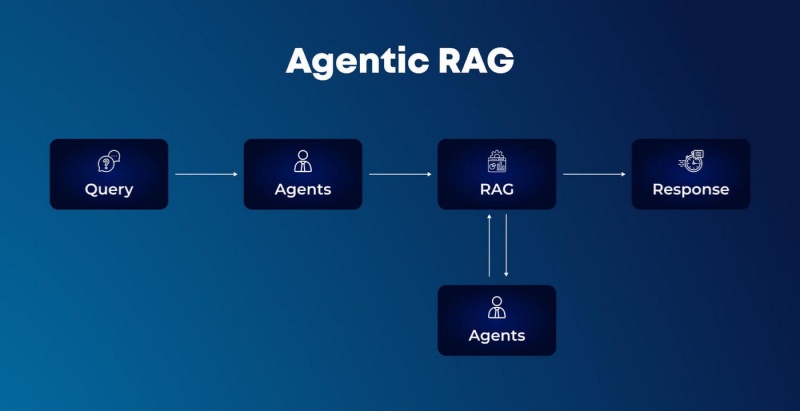
The industry is currently undergoing a fundamental shift: the evolution from Contextual Retrieval (RAG) to Contextual Agency (AI Agents). We are moving from systems that simply “find and tell” to systems that “reason and do.” This evolution marks the birth of true Contextual Intelligence—where an AI doesn’t just understand the query but has the agency to call tools, execute workflows, and complete closed-loop tasks.
However, the leap from a RAG pipeline to a reliable AI Agent is fraught with technical hurdles, particularly the “reliability gap” in tool-calling. This is where the underlying infrastructure and Model Refinement processes, such as those pioneered by WhaleFlux, become the deciding factor in a project’s success.
The Limitation of RAG: Knowledge Without Power
RAG was a massive leap forward. By fetching relevant document chunks and stuffing them into the prompt’s context window, we gave LLMs a “temporary memory” of enterprise facts.
The RAG workflow is essentially linear:
User Query: “What was our Q3 churn rate?”
Retrieval: Search the vector database.
Augmentation: Attach the churn report to the prompt.
Generation: The model summarizes the report.
While powerful, RAG is inherently passive. It is a one-way street ending in a text response. If the user asks the follow-up, “Fix the underlying billing issue causing the churn,” a RAG system hits a wall. It has the knowledge, but it lacks the agency to interact with the billing system.
The Rise of the Agent: Intelligence with Agency
An AI Agent differs from a RAG system because it possesses a Loop of Reasoning. It doesn’t just generate text; it generates a Plan. Agents are equipped with “Tools”—APIs, Python interpreters, or database connectors—and the autonomy to decide when and how to use them.
The Agentic workflow is iterative:
- Perception: Understand the goal.
- Planning: “First, I need to check the billing logs. Then, I need to identify the affected users. Finally, I will apply a credit to their accounts.”
- Action (Tool Calling): The agent generates a specific JSON command to call the
Billing_API. - Observation: The agent reads the API’s response. Did it work? If not, refine the plan and try again.
This “Closed-Loop” capability is what transforms AI from a consultant into a Digital Worker. But for this loop to hold, the agent must be nearly perfect at Tool-calling. If the agent misses a comma in an API call or confuses a “User_ID” with an “Account_ID,” the loop breaks, and the automation fails.
The Reliability Gap: Why “Off-the-Shelf” Models Fail
Most developers start by using “frontier” models (like GPT-4 or Claude 3.5) for their agents. While these models are brilliant at general reasoning, they often stumble when faced with proprietary enterprise tools.
Generic models are trained on the open internet. They don’t know your company’s specific Legacy_ERP_v2 API schema. They might struggle with the nuances of your internal data structures, leading to “Near-Miss Tool Calls”—where the model tries to use a tool but provides the wrong parameters. In a production environment, a 90% success rate in tool-calling is a failure; you need 99.9%.
WhaleFlux: Refining the Brain for Precision Action
This is where WhaleFlux enters the architectural stack. WhaleFlux isn’t just a place to host models; it is a Model Refinery.
We believe that true agency requires Specialized Intelligence. To bridge the gap between “Contextual Retrieval” and “Autonomous Action,” models must be refined for the specific environment they inhabit.
WhaleFlux Model Refinement provides the precision tools necessary to transform a general-purpose base model into a highly specialized Agentic Engine. Through our integrated Fine-tuning pipelines, enterprises can train their models on their specific API schemas, internal documentation, and historical “correct” tool-calling logs.
By performing Supervised Fine-Tuning (SFT) on WhaleFlux’s high-performance Compute Infra, you aren’t just teaching the model facts; you are teaching it the Grammar of your Business.
The WhaleFlux Advantage in Tool-Calling Accuracy:
Schema Mastery:
Fine-tuning on WhaleFlux ensures your agent understands the exact JSON requirements of your private APIs, reducing syntax errors to near zero.
Domain Alignment:
WhaleFlux helps align the model’s reasoning path with your industry’s specific logic (e.g., medical triage or financial risk assessment).
Low-Latency Execution:
Because WhaleFlux synchronizes the Compute Infra with the refined models, the “Reasoning-to-Action” latency is minimized, which is critical for agents performing multi-step tasks.
From Retrieval to Closed-Loop Workforces
When you combine Contextual Intelligence (the “What”) with Refined Agency (the “How”), you create an Autonomous Agent Workforce.
Imagine a Customer Success Agent on the WhaleFlux platform:
- Retrieval: It uses RAG to understand the customer’s history.
- Refinement: Using its Fine-tuned brain, it identifies that the customer is eligible for a loyalty discount based on a complex internal policy.
- Action: It calls the
Discount_Servicetool to apply the credit. - Verification: It calls the
Email_Serviceto notify the customer and logs the action in the CRM.
This is a Closed-Loop Task. The human is no longer the “middleman” who has to take the information from the AI and manually type it into another system. The AI has become the executor.
Conclusion
RAG was the necessary first step, proving that AI could be grounded in reality. But the future of enterprise AI belongs to Agents. The transition from “finding information” to “executing workflows” is the most significant leap in productivity we will see this decade.
However, agency requires a level of precision that general-purpose models cannot provide out of the box. By utilizing WhaleFlux and its Model Refinement capabilities, organizations can harden their agents, ensuring that every tool call is accurate, every plan is logical, and every loop is closed. Don’t just build an AI that knows your business—build one that works for it.
Frequently Asked Questions (FAQ)
1. Is RAG still useful if I am building an AI Agent?
Yes, absolutely. Think of RAG as the agent’s “Reference Library.” Agents use RAG to gather the context they need before they decide which tool to call. RAG provides the knowledge, while the Agent provides the action.
2. How does fine-tuning on WhaleFlux improve tool-calling?
Standard models are “jacks of all trades.” When you fine-tune on WhaleFlux, you are giving the model thousands of examples of your specific API calls. This teaches the model to recognize the patterns and constraints of your specific tools, drastically reducing the hallucination of parameters.
3. Do I need massive amounts of data for Model Refinement on WhaleFlux?
Not necessarily. For tool-calling specialization, “quality over quantity” is key. A few hundred high-quality examples of correct tool interactions can significantly boost an agent’s performance on the WhaleFlux platform.
4. What is “Closed-Loop” automation?
Closed-loop automation refers to a process where the AI identifies a problem, plans a solution, executes the necessary actions via tools, and then verifies that the problem is solved—all without requiring a human to manually bridge the gap between steps.
5. How does WhaleFlux ensure the security of my proprietary tool-calling data?
WhaleFlux utilizes Hardware-Level Sovereignty. Your fine-tuning datasets and the resulting model weights are sequestered in secure enclaves. This ensures that your “Business Grammar”—the secret sauce of how your company operates—remains strictly under your control.
Hardware-Level Sovereignty: Architecting Zero-Trust GPU Enclaves for Proprietary AI
Introduction
In the industrial AI landscape of 2026, a company’s most valuable asset is no longer its software code or its brand—it is its Proprietary AI Weights. These digital “brains,” refined through millions of dollars in compute and curated datasets, represent the definitive competitive edge. However, as enterprises move these models into production, they face a harrowing security paradox: How do you run your most sensitive intelligence on high-performance infrastructure without exposing it to the underlying host, the cloud provider, or malicious lateral actors?
Traditional perimeter-based security is dead. In its place, the industry is shifting toward Hardware-Level Sovereignty. This architectural shift moves beyond firewalls and encryption-at-rest to create Zero-Trust GPU Enclaves—secure, isolated environments where data and models are only decrypted within the silicon itself. This article explores the mechanics of this high-stakes security evolution and why WhaleFlux is the cornerstone for enterprises that refuse to compromise on data sovereignty.
The Death of Implicit Trust in the AI Era
Until recently, cloud security relied on a chain of “implicit trust.” You trusted the hypervisor, you trusted the system administrator, and you trusted that the data in the GPU memory was isolated from other tenants. In 2026, this model is insufficient for Mission-Critical AI.
The rise of “Confidential Computing” has turned the focus toward the hardware. Zero-Trust GPU Enclaves utilize Trusted Execution Environments (TEEs) provided by modern silicon—such as NVIDIA’s Hopper (H100) and Blackwell (B200) architectures. These enclaves ensure that even if the host operating system is compromised, the model weights and inference data remain encrypted and inaccessible to everyone except the authorized hardware root of trust.
WhaleFlux: The Bastion for Proprietary Intelligence
While many cloud providers offer “security as a service,” WhaleFlux approaches security as a foundational architectural requirement. We recognize that for global innovators, sovereignty isn’t a feature—it’s the prerequisite for scaling.
WhaleFlux implements a Security-By-Design framework that provides Hardware-Level Isolation across our entire Compute Infra. By leveraging advanced GPU partitioning and automated failover protocols, WhaleFlux ensures that your Model Refinement and Agent Orchestration workflows are sequestered within hardened enclaves. Unlike legacy cloud providers where data “friction” can lead to leaks, WhaleFlux offers a Hardened Control Plane that mathematically proves the integrity of your environment before a single weight is loaded.
By building on WhaleFlux, enterprises move from “hope-based security” to Deterministic Sovereignty, where the silicon itself acts as the ultimate gatekeeper of your intellectual property.
Architecting the Zero-Trust GPU Enclave
A true Zero-Trust architecture for AI must secure the three primary states of data: At Rest, In Transit, and In Use.
1. Remote Attestation: The Cryptographic Handshake
Before your proprietary model is deployed on a WhaleFlux cluster, the hardware undergoes Remote Attestation. The system generates a cryptographic proof that the GPU enclave is in a known, secure state. Only once this proof is verified does the Key Management Service (KMS) release the decryption keys directly into the hardware-protected memory.
2. Memory Encryption and Isolation
Once the model is active, the data “In Use” is encrypted within the GPU’s VRAM. This prevents “cold boot” attacks or memory scraping. At WhaleFlux, we utilize Hardware-Level Sovereignty to ensure that even our own engineers cannot view the plaintext prompts or outputs of your Autonomous Agents.
3. Zero-Trust Orchestration
Security must scale. WhaleFlux’s Agent Orchestration layer extends these hardware protections to multi-step workflows. As your agents call external tools or access vector databases, the identity-based access controls ensure that data remains siloed, preventing lateral movement across your enterprise stack.
Why Sovereignty is the New ROI
The push for hardware-level sovereignty is driven by more than just fear; it’s driven by the economics of Risk Management. In 2026, a single leak of a specialized model’s weights can lead to immediate commoditization of a company’s niche advantage.
Enterprises choosing WhaleFlux typically see a 40-70% reduction in TCO not just through compute efficiency, but through the avoidance of “Sovereignty Premiums” charged by legacy hyperscalers. By providing an integrated stack where security is built-in rather than “bolted-on,” WhaleFlux allows you to scale your intelligence without scaling your risk surface.
Conclusion
The era of “experimental AI” is over. We have entered the era of Industrial-Scale Autonomy, where the resilience of your infrastructure is just as important as the accuracy of your models. Hardware-Level Sovereignty is the only way to ensure that as your AI becomes more powerful, it remains strictly under your control.
Through WhaleFlux, the promise of a Zero-Trust AI future is a reality. By providing the hardened enclaves and the architectural intelligence needed to protect your proprietary assets, WhaleFlux empowers you to build the future with absolute confidence. In the high-stakes world of AI, don’t just build—secure your sovereignty.
Frequently Asked Questions (FAQ)
1. What exactly is a “Zero-Trust GPU Enclave”?
It is a hardware-enforced “black box” within the GPU where data is processed in an encrypted state. It ensures that the model and data are invisible to the host OS, the hypervisor, and the infrastructure provider, allowing for truly confidential AI.
2. How does WhaleFlux handle my model weights differently than other providers?
WhaleFlux uses Remote Attestation to ensure the hardware is secure before loading weights. We provide a Hardened Control Plane where weights remain encrypted until they reach the secure enclave of the GPU, ensuring that your IP never exists in plaintext on our servers.
3. Does hardware-level isolation impact the performance of AI inference?
While there is a minimal overhead for encryption, modern architectures like NVIDIA’s Blackwell (B200) are designed for confidential computing at line-rate. WhaleFlux optimizes this to ensure that security does not come at the cost of your 99.9% SLA.
4. Is this level of security necessary for all AI models?
If your model is built on proprietary data or represents a unique competitive advantage (e.g., specialized medical, financial, or engineering models), hardware-level sovereignty is essential to prevent IP theft and ensure regulatory compliance.
5. Can I use WhaleFlux for sovereign AI requirements in specific jurisdictions?
Yes. WhaleFlux is designed to meet the growing global demand for Sovereign AI Stacks. Our infrastructure allows for regional isolation and strict data residency, making it the ideal platform for multinational enterprises navigating complex regulatory environments.
The Architecture of Autonomy: Building an AI Agent Platform for Scale
In 2026, the corporate world has moved beyond the excitement of “chatting with data.” We are now in the era of the Autonomous Agent Workforce. Organizations are no longer looking for simple chatbots; they are building sophisticated, multi-agent platforms capable of reasoning, calling tools, and executing complex business logic with minimal human intervention.
However, moving from a prototype agent to an enterprise-grade AI agent platform is a monumental engineering challenge. Scaling autonomy requires more than just a powerful LLM; it requires a robust, layered architecture that can handle non-deterministic behavior, manage high-density compute, and ensure absolute reliability. This article deconstructs the blueprint of modern autonomy—the perception, decision, and execution layers—and introduces how WhaleFlux provides the critical Agent Orchestration foundation needed to turn these blueprints into reality.
The Blueprint: Three Pillars of Agentic Architecture
To build an agent that truly scales, we must separate its “intelligence” from its “operational logic.” A production-ready architecture is typically divided into three functional layers.
1. The Perception Layer: The Interface with Reality
The Perception Layer is the agent’s sensory system. In an enterprise environment, this isn’t just about reading text; it’s about Data Ingestion and Semantic Normalization.
Multimodal Input:
Processing structured SQL data, unstructured PDFs, real-time sensor streams, and API webhooks.
Contextual Filtering:
Not every piece of data is relevant. This layer must sanitize and filter noise to prevent “context overflow” in the reasoning engine.
Observation Loop:
Unlike a traditional program, an agent constantly “observes” the results of its previous actions. The perception layer feeds this feedback back into the system.
2. The Decision Layer: The Reasoning Engine
This is where the LLM resides, but the Decision Layer is more than just a model. It is the Reasoning and Planning hub.
Goal Decomposition:
Taking a high-level command (e.g., “Analyze the Q3 supply chain risks”) and breaking it into sub-tasks.
Memory Management:
Short-term memory (conversation buffer) and long-term memory (vector databases) allow the agent to learn from past interactions.
Constraint Enforcement:
Ensuring the agent operates within defined guardrails, such as budget limits or safety protocols.
3. The Execution Layer: Turning Logic into Action
If the decision layer is the “brain,” the Execution Layer is the “hands.” It is responsible for Tool Calling and System Interaction.
API Integration:
Interacting with ERP, CRM, or custom internal systems.
Sandbox Execution:
Running code or scripts in a secure environment to validate results before they go live.
Error Recovery:
Handling “retry” logic when a tool fails or an API returns a 404 error.
The Scaling Bottleneck: Why Orchestration is the Missing Link
While building a single agent is straightforward, managing a Multi-Agent Ecosystem is where most enterprises fail. When you have hundreds of agents performing concurrent tasks, you encounter the “Orchestration Gap”:
Resource Contention:
Which agent gets priority on the H100 cluster?
State Drift:
How do you keep state consistent across asynchronous workflows?
Data Friction:
The latency and overhead caused by moving data between fragmented service providers.
This is precisely where WhaleFlux transforms the architecture from a collection of scripts into a high-performance industrial platform.
WhaleFlux: The Hardened Control Plane for Autonomy
WhaleFlux is engineered for the “Execution” and “Orchestration” of autonomous intelligence. We provide the unified control plane that synchronizes your entire agentic stack.
WhaleFlux provides a production-hardened Agent Orchestration layer that abstracts the complexity of the underlying Compute Infra. By integrating model refinement and agent execution into a single, Hardened Control Plane, WhaleFlux eliminates the data friction that plagues multi-vendor setups. Our platform ensures that whether you are running a single reasoning agent or a massive autonomous workforce, every task is executed with 99.9% resilience and deterministic stability.
How WhaleFlux Powers the Autonomous Architecture:
Simplified Workflows:
WhaleFlux’s control plane allows architects to define complex “Agent Graphs” without worrying about the underlying GPU scheduling.
Silicon-Level Integration:
Because WhaleFlux manages the Compute Infra, your agents have direct, low-latency access to Fine-tuned Models, reducing the “time-to-action” for real-time agents.
Predictable ROI:
Through intelligent orchestration, WhaleFlux typically delivers a 40-70% reduction in TCO, allowing you to scale your agent platform without a linear increase in costs.
Conclusion
Building an AI Agent Platform for scale is a journey from “logic” to “infrastructure.” The perception, decision, and execution layers provide the framework, but Agent Orchestration provides the heartbeat. Without a hardened control plane like WhaleFlux, autonomy remains a fragile experiment.
As we move toward a future where agents handle mission-critical business operations, the winners will be those who architect for stability, security, and scale. By anchoring your autonomous workforce on WhaleFlux, you aren’t just building an agent—you are architecting the future of your enterprise.
Frequently Asked Questions (FAQ)
1. What is the difference between AI Orchestration and Agent Orchestration?
AI Orchestration generally refers to managing data and model pipelines. Agent Orchestration specifically focuses on the coordination of autonomous entities that reason, revise their plans, and use tools iteratively to reach a goal.
2. Why is a unified control plane important for scaling agents?
A unified control plane like the one provided by WhaleFlux ensures that policies, security protocols, and resource allocations are applied consistently across all agents. It prevents “orphaned agents” and ensures that multi-agent workflows don’t collapse due to resource contention.
3. Can I use WhaleFlux with my existing LangChain or LangGraph frameworks?
Yes. WhaleFlux is designed to be the Industrial Foundation for your agentic logic. You can build your agents using your favorite frameworks and use WhaleFlux to provide the Compute Infra, Model Refinement, and Production-Grade Execution needed to scale them.
4. How does the perception layer handle data privacy in a scaled platform?
In a hardened architecture like WhaleFlux, the perception layer can be integrated with Hardware-Level Sovereignty. This ensures that sensitive data is processed within secure enclaves, maintaining a zero-trust environment even as the agent interacts with external data sources.
5. How does orchestration help with agent “infinite loops”?
A robust orchestration layer monitors agent behavior in real-time. WhaleFlux’s control plane includes guardrails that detect “reasoning loops” or runaway API calls, automatically intervening or alerting administrators to prevent cost spikes and system instability.
The Future of Intelligence: Navigating the Best AI Computing Platforms
Introduction
The AI revolution has moved beyond the “wow” factor of generative chat into the era of Industrial-Scale Autonomy. In 2026, the bottleneck for global innovation is no longer the complexity of the algorithms, but the efficiency, scalability, and sustainability of the underlying AI computing platform.
For enterprises looking to deploy mission-critical intelligence, the choice of infrastructure is a strategic pivot. Whether you are seeking the best serverless computing platforms for AI to minimize operational overhead, or investigating low-power AI compute platforms for green data centers to meet ESG targets, the architecture you build upon dictates your eventual ROI. This article explores the shifting landscape of AI compute and introduces why WhaleFlux has emerged as the premier “Architect of Intelligence” for modern business.
The Shift Toward Serverless AI Architecture
The days of manual cluster provisioning are fading. Developers today demand the ability to scale from zero to thousands of GPUs without managing the “plumbing” of the cloud. The best serverless computing platforms for AI in 2026 are defined by their “Cold Start” latency—or rather, the lack thereof.
Serverless AI allows engineers to focus on Model Refinement rather than Kubernetes maintenance. By abstracting the hardware layer, these platforms allow for granular billing, where you pay only for the milliseconds of inference or the specific epochs of fine-tuning. However, as workloads scale, many find that “generic” serverless providers lack the hardware-level optimization needed for specialized models. This is where specialized infrastructure providers bridge the gap between ease-of-use and raw performance.
WhaleFlux: Architecting the Industrial AI Spine
In this crowded ecosystem, WhaleFlux stands out by refusing to be a “standard” cloud vendor. WhaleFlux is built on the philosophy that AI compute should be as reliable and transparent as a utility, yet as precise as a specialized laboratory.
WhaleFlux provides a high-performance Compute Infra that transcends simple rental services. By offering elite GPU clusters with integrated Model Refinement pipelines, WhaleFlux enables businesses to transform raw data into proprietary AI assets. Unlike legacy providers, WhaleFlux’s platform is engineered for Agent Orchestration, ensuring that your autonomous agent workforces have the low-latency backbone they need to execute complex business logic in real-time.
By integrating compute, fine-tuning, and observability into a single Hardened Control Plane, WhaleFlux eliminates the “data friction” that typically plagues multi-vendor AI stacks.
Green Intelligence: Low-Power AI for Sustainable Growth
As AI consumption skyrockets, the carbon footprint of data centers has become a boardroom priority. The search for the best low-power AI compute platforms for green data centers is no longer just about ethics; it’s about regulatory compliance and long-term cost efficiency.
Modern green data centers in 2026 utilize advanced cooling techniques and specialized AI accelerators (NPUs and customized GPUs) that deliver higher TOPS (Tera Operations Per Second) per watt. Platforms that prioritize “Silicon-Up” efficiency allow enterprises to scale their Autonomous Agents without a linear increase in energy consumption. WhaleFlux, for instance, focuses on intelligent GPU scheduling, ensuring that no cycle is wasted and that hardware remains at peak efficiency, thereby reducing the Total Cost of Ownership (TCO) by 40-70%.
Choosing a Leading AI Computing Platform for Business
When evaluating a leading AI computing platform for business, decision-makers must look beyond raw FLOPs. The criteria for 2026 include:
1. Vertical Integration
A fragmented stack is a slow stack. A platform must offer a seamless transition from the Compute Infra layer to Model Refinement (Fine-tuning) and finally to Agent Orchestration.
2. Data Sovereignty and Security
In a world of proprietary weights, “Security-By-Design” is non-negotiable. Leading platforms now offer hardware-level isolation to ensure that your fine-tuned models remain strictly under your control.
3. AI Observability
You cannot manage what you cannot measure. The best platforms provide full-stack telemetry, allowing for precision debugging of non-deterministic AI agent workforces.
The ROI of Specialized Infrastructure
The transition from traditional cloud providers to specialized AI platforms like WhaleFlux is driven by the need to decouple growth from cost. Generic cloud providers often impose a “GPU Tax”—unnecessary overhead that inflates bills without adding performance. By moving to a platform optimized specifically for the AI lifecycle, businesses can reclaim their margins and reinvest them into more ambitious intelligence projects.
Conclusion
The AI computing landscape of 2026 is defined by the balance between power and precision. While the best serverless computing platforms for AI offer unparalleled speed to market, and green data centers provide the ethical foundation for growth, the ultimate winner is the enterprise that integrates these into a cohesive strategy.
With WhaleFlux, the journey from silicon to autonomous intelligence is streamlined. By providing the Compute Infra, Model Refinement, and Agent Orchestration needed for industrial-scale execution, WhaleFlux isn’t just a service provider—it is the architectural foundation for the future of business.
Frequently Asked Questions (FAQ)
1. What makes a platform the “leading AI computing platform for business” in 2026?
The leader is defined by its ability to offer a unified stack. It’s not just about GPU availability; it’s about providing integrated tools for model fine-tuning, agent deployment, and full-stack observability with an emphasis on high ROI and data security.
2. Why should I consider WhaleFlux over traditional cloud providers?
Traditional cloud providers offer generic compute. WhaleFlux offers a “Refinery” approach—infrastructure specifically hardened for AI workloads. This results in a 40-70% reduction in TCO and significantly lower latency for autonomous agents.
3. How do serverless AI platforms handle “Cold Start” issues?
Top-tier platforms in 2026 use “Pre-Warmed” GPU pools and localized model caching. WhaleFlux optimizes this through intelligent orchestration, ensuring that your Autonomous Agents are ready to execute tasks the moment they are triggered.
4. Why is “Green Compute” suddenly so important for AI?
Beyond environmental impact, energy is the primary cost driver of AI. Low-power AI compute platforms allow businesses to stay compliant with new global carbon tax laws while keeping operational costs sustainable as they scale their intelligence workforces.
5. Can I manage my own model weights on WhaleFlux?
Yes. WhaleFlux emphasizes Data Sovereignty. Unlike “Black Box” API providers, WhaleFlux gives you the infrastructure to refine and manage your own proprietary model weights, ensuring your intellectual property remains yours.
Beyond the Black Box: The Definitive Guide to AI Observability Platforms in 2026
Introduction
The transition from “AI as a curiosity” to “AI as a utility” has been the defining narrative of the mid-2020s. However, as enterprises move past simple chat interfaces toward complex, autonomous AI Agent Workforces, they encounter a sobering reality: traditional software monitoring is insufficient for the non-deterministic nature of Large Language Models (LLMs).
In a world where a sub-optimal prompt or a drifting data distribution can cost millions in compute and reputation, AI Observability Platforms have emerged as the mission-critical “flight recorders” for the intelligence stack. This guide explores the architecture of modern observability, the top platforms dominating the market, and how foundational infrastructure like WhaleFlux is redefining the efficiency of these data-hungry systems.
The Anatomy of AI Observability
Traditional observability relies on the “Three Pillars”: Metrics, Logs, and Traces. For AI-driven systems, these pillars must evolve into a multi-dimensional framework that understands context, semantics, and cost.
1. Telemetry and Data Integration Pipelines
The modern AI-driven observability data integration pipeline is no longer a passive collector. It must intercept high-frequency interactions between the user, the model, and external tools (MCPs). This requires a low-latency “sidecar” architecture that captures inputs, outputs, and intermediate thought chains without degrading the user experience.
2. Semantic Monitoring & LLM Evaluation
Unlike a SQL query that either works or fails, an LLM output can be grammatically perfect but factually disastrous. Observability platforms now utilize “Evaluator Models” to score outputs for hallucination, sentiment, and safety in real-time.
3. Infrastructure Saturation & Cost Control
With GPUs being the “new oil,” observability must extend down to the silicon. Tracking GPU saturation and token-per-second (TPS) efficiency is vital for maintaining a healthy ROI. This is where the synergy between observability software and high-performance infrastructure becomes apparent.
The Ecosystem: Top AI Observability Platforms
As we look at the landscape in 2025 and 2026, several key players have defined the standard for best AI-powered observability platforms.
LangSmith: The Developer’s Choice
Born from the LangChain ecosystem, LangSmith AI observability platform features focus heavily on the debugging lifecycle. It excels at visualizing complex “chains” and “graphs,” allowing developers to see exactly where an agent lost its way. Its testing and versioning capabilities make it the gold standard for rapid prototyping.
WhyLabs: The Enterprise Guardrail
As a leader among top AI observability platforms, WhyLabs focuses on data health and model drift. It is particularly adept at identifying when the “real world” has changed so much that your model’s training data is no longer relevant, triggering automated retraining alerts through predictive analytics.
WhaleFlux: The Architectural Backbone
While software platforms monitor the logic, the underlying performance depends on the infrastructure. This is where WhaleFlux enters the conversation.
WhaleFlux is an integrated AI infrastructure platform designed for Industrial-Scale AI. While many observability tools struggle with the overhead of data collection, WhaleFlux provides a Hardened Control Plane that synchronizes compute, models, and agents. By utilizing WhaleFlux’s 99.9% Production SLA and built-in infrastructure telemetry, enterprises can ensure that their observability data integration pipelines are not just capturing logs, but are running on a resilient foundation that optimizes GPU scheduling and reduces TCO by 40-70%.
Advanced Trends: Anomaly Detection & Predictive Analytics 2025-2026
The current frontier is the shift from reactive monitoring to proactive prevention.
Best AI-Powered Observability for Anomaly Detection
In 2025, the best AI-powered observability platforms for anomaly detection began using “Unsupervised Shadow Models.” These shadows run alongside production agents, predicting the expected output range. If the production model deviates—perhaps due to a subtle prompt injection attack or a hardware-level glitch—the system triggers an automated failover.
Top Observability Platforms with AI Predictive Analytics
Modern platforms now utilize predictive analytics to forecast GPU demand. By analyzing historical traffic patterns and model complexity, these systems can pre-provision clusters on WhaleFlux, ensuring that an enterprise never hits a “Cold Start” latency spike during peak hours.
Bridging the Gap: From Data to Decision
The ultimate goal of an AI-driven observability platform is to turn complexity into Production-Grade Execution. To achieve this, an enterprise must integrate three distinct layers:
- The Silicon Layer (WhaleFlux): Ensuring hardware-level isolation and maximum GPU utilization.
- The Orchestration Layer: Managing the “Refinery” of fine-tuned models.
- The Intelligence Layer (LangSmith/WhyLabs): Monitoring the semantic accuracy of the agents.
When these layers work in synergy, AI moves from a “Black Box” to a transparent, auditable, and scalable business asset.
Conclusion
AI Observability is the difference between a prototype that “sometimes works” and an Autonomous AI Workforce that drives a global enterprise. By selecting the right combination of software tools like LangSmith or WhyLabs, and anchoring them on a resilient, high-performance foundation like WhaleFlux, organizations can finally achieve the “three nines” of AI reliability.
As we progress through 2026, the focus will continue to shift toward deterministic outcomes. In this high-stakes environment, being able to see into the heart of your AI isn’t just a technical luxury—it is a competitive necessity.
Frequently Asked Questions (FAQ)
1. What is the main difference between traditional monitoring and AI observability?
Traditional monitoring tracks “known-unknowns” (uptime, CPU, RAM). AI observability tracks “unknown-unknowns” (semantic drift, hallucination, and the reasoning logic of autonomous agents), requiring semantic analysis rather than just threshold alerts.
2. How does WhaleFlux improve AI observability performance?
WhaleFlux provides high-fidelity infrastructure telemetry and hardware-level isolation. By reducing data friction and providing a unified control plane, it ensures that the overhead of monitoring doesn’t degrade the performance of your AI Agent Workforces.
3. Is LangSmith suitable for large-scale enterprise production?
Yes, especially when paired with a hardened infrastructure. LangSmith’s features are excellent for debugging complex logic, while an integrated stack like WhaleFlux handles the scale, security, and 24/7 monitoring required for mission-critical apps.
4. Can these platforms help in reducing the cost of AI operations?
Absolutely. Platforms like WhaleFlux typically see a 40-70% reduction in TCO through intelligent GPU scheduling and model quantization. Observability tools contribute by identifying “token waste” and optimizing prompt lengths.
5. How do I choose between the top observability platforms for 2025?
If your focus is on developer experience and agent tracing, look at LangSmith. If your priority is data integrity, drift detection, and enterprise compliance, WhyLabs is a leader. For a full-stack approach that covers everything from silicon to agent execution, WhaleFlux provides the most resilient foundation.
The Intelligent Backbone: How AI is Redefining the Future of Cloud Computing
Introduction: The Convergence of Two Giants
For the past decade, cloud computing has been the quiet engine behind the digital world, providing the storage and processing power that fueled the mobile and SaaS revolutions. However, we have reached a critical tipping point. The rise of generative AI and large-scale machine learning has transformed the cloud from a passive storage locker into an active, intelligent “brain.”
Today, the dialogue has shifted from simple “hosting” to a deep technical synergy: AI and cloud computing. This isn’t just a partnership; it is a fundamental re-architecting of how information is processed. As enterprises rush to deploy smarter models, they are discovering that the traditional cloud is no longer enough. They need cloud computing aiinfrastructure that is purpose-built for the massive parallel processing demands of modern neural networks.
But what is AI in cloud computing in a practical sense? Is it just running a model on a remote server, or is it something deeper? In this article, we will explore the symbiotic relationship between these two technologies, the shift toward AI-native infrastructure, and how platforms like WhaleFlux are leading the charge by bringing “Big Cloud” reliability to the decentralized AI frontier.
1. What is AI in Cloud Computing?
To define it simply, ai in cloud computing is the integration of artificial intelligence capabilities—such as machine learning (ML), natural language processing (NLP), and computer vision—directly into cloud infrastructure.
However, the relationship is bidirectional:
- Cloud for AI: The cloud provides the “muscles” (GPUs, TPUs, and vast datasets) that AI needs to learn and perform inference.
- AI for Cloud: AI acts as the “nervous system” for the cloud, optimizing resource allocation, predicting hardware failures, and automating security.
This convergence creates a self-optimizing environment. Instead of a human administrator manually scaling servers, ai cloud computing systems use predictive algorithms to anticipate traffic spikes and provision resources in real-time. This is precisely the logic behind the WhaleFlux Intelligent GPU Scheduling system, which manages decentralized GPU nodes with the same precision and stability once reserved only for the world’s largest data centers.
2. The Core Pillars of AI and Cloud Computing
When we discuss cloud computing and ai, we are looking at three critical areas of innovation:
A. Massive Compute On-Demand (GPU-as-a-Service)
Traditional cloud was built for CPUs (Central Processing Units). AI requires GPUs (Graphics Processing Units). The shift to ai cloud computing means that the cloud is now a massive pool of parallel processing power.
B. Data Democratization
AI is nothing without data, and the cloud is the world’s largest data repository. By housing datasets in the cloud, companies can train models without having to build their own multi-million dollar data centers.
C. Automated Infrastructure (AIOps)
This is where cloud computing ai becomes truly “intelligent.” AIOps uses machine learning to monitor the health of the cloud itself. At WhaleFlux, this manifests as AI Observability. By monitoring chip-level telemetry, WhaleFlux can predict 98% of hardware failures before they interrupt a training job. This brings “Big Cloud” reliability to a more flexible, cost-effective infrastructure.
3. Why Enterprises are Moving to AI-Native Cloud Solutions
The transition to ai and cloud computing isn’t just about speed; it’s about economics and accessibility.
Cost Efficiency:
Building an on-premise AI cluster is a massive CAPEX risk. Ai in cloud computing turns this into OPEX, allowing companies to pay only for the compute they use. WhaleFlux takes this a step further, offering up to 70% lower compute costs compared to traditional legacy providers by intelligently scheduling tasks across a global network of GPUs.
Speed to Market:
Using pre-configured cloud environments, developers can deploy a Fine-tuning job in minutes rather than weeks spent configuring physical hardware.
Scalability:
Whether you need one H100 for a small test or a cluster of a hundred for a massive inference task, the synergy of cloud computing and ai makes this possible instantly.
4. WhaleFlux: Redefining the AI Cloud Stack
While the “Big Three” cloud providers offer general-purpose services, WhaleFlux is built from the ground up as a Unified AI Platform. We recognize that the needs of an AI researcher are fundamentally different from those of a web developer.
The WhaleFlux Solution for AI Cloud Computing:
Elastic AI Compute:
We provide the high-performance NVIDIA GPU power (H100, A100, L40) required for the most demanding computer vision and NLP tasks.
Intelligent Scheduling:
As seen in our work with Exabits, WhaleFlux uses AI to manage decentralized GPU resources. This ensures that even if a single node goes offline, your task is automatically rerouted with zero downtime.
AI Agent Platform:
We move beyond “compute-only.” Our platform allows you to build AI Agents that observe the cloud environment and take autonomous actions, such as auto-scaling or self-healing.
5. The Future of AI and Cloud Computing
The future of ai cloud computing is not just about bigger models; it is about distributed intelligence. We are moving toward a world where the cloud isn’t a central warehouse, but a decentralized web of intelligent nodes.
In this future:
- Edge AI will process data locally for retail and manufacturing.
- Decentralized DePIN (Decentralized Physical Infrastructure Networks) will provide the majority of the world’s raw compute power.
- Intelligent Orchestration (like WhaleFlux) will be the “glue” that makes these decentralized systems as reliable as the legacy cloud.
Conclusion: Navigating the New Cloud Era
The integration of ai and cloud computing is the most significant technological shift since the invention of the internet itself. By answering the question—what is ai in cloud computing—we reveal a future where software isn’t just written; it is grown and optimized by the very infrastructure it runs on.
For organizations looking to lead in this new era, the choice of infrastructure is paramount. You need more than just raw power; you need the intelligence to manage that power efficiently. WhaleFlux provides that intelligence, offering a bridge between the affordability of decentralized compute and the reliability of the enterprise cloud. Whether you are fine-tuning a model for retail or building the next great AI agent, the future is built on the intelligent cloud.
Frequently Asked Questions
1. What is AI in cloud computing in simple terms?
It is the marriage of AI’s “intelligence” with the cloud’s “power.” The cloud provides the massive GPU resources needed to run AI, while AI is used to make the cloud run more efficiently, securely, and automatically.
2. How does WhaleFlux improve on traditional ai cloud computing?
Traditional cloud is expensive and often centralized. WhaleFlux uses Intelligent GPU Scheduling to manage decentralized resources, providing “Big Cloud” stability with 70% lower costs and 98% better hardware failure prevention.
3. Is cloud computing necessary for AI?
For small tasks, no. But for modern AI (like Large Language Models or high-end Computer Vision), the compute requirements are so high that cloud computing ai is the only way to access the necessary GPUs (like the H100) affordably and at scale.
4. What is the role of WhaleFlux in the Exabits case study?
In the Exabits x WhaleFlux use case, WhaleFlux acted as the management layer for a decentralized AI infrastructure. We provided the “intelligent brain” that allowed Exabits to offer reliable, enterprise-grade GPU power to their clients without the risk of system downtime.
5. Will AI eventually manage all cloud computing infrastructure?
Yes, we are moving toward “Autonomous Clouds.” Systems like the WhaleFlux AI Agent Platform are the first step, where AI agents observe the system and take actions (like rerouting tasks or optimizing power) without human intervention.
Scaling Retail AI Computer Vision with Unified Infrastructure
Introduction: The Visual Revolution in Retail
The retail industry is undergoing a quiet but profound transformation. For decades, cameras in stores were passive observers—silent witnesses used only for forensic evidence after a theft had occurred. Today, those same lenses are becoming the “eyes” of an intelligent digital nervous system. Retail AI computer vision is no longer a pilot project for tech giants; it is the essential infrastructure for any merchant looking to survive in a high-inflation, high-shrinkage economy.

From automated checkout and real-time inventory tracking to advanced heat mapping and loss prevention, computer vision AI retail applications are redefining the physical store. However, the move from a simple setup to a sophisticated AI-native environment presents a massive technical hurdle. It requires immense parallel processing power, specialized model adaptation, and the ability to turn visual data into autonomous action.
This is where the synergy between retail AI computer vision technology and a unified infrastructure becomes critical. Platforms like WhaleFlux are bridging the gap, providing the Elastic AI Compute and Fine-tuning capabilities that allow retailers to deploy professional-grade vision systems without the overhead of a Silicon Valley tech firm.
1. The Core Components of Retail AI Computer Vision Technology
To understand how this technology works, we must look at the three pillars that support every modern computer vision AI retail deployment:
Real-Time Inference at the Edge
Unlike a chatbot, retail vision cannot afford high latency. If a customer walks out with an un-scanned item, the system must detect it in milliseconds. This requires high-performance GPUs located either on-site or in a low-latency edge cloud. WhaleFlux provides the NVIDIA-powered compute necessary to handle these dense video streams, ensuring that frames are processed as fast as they are captured.
The Move to Fine-Tuning
A generic computer vision model can recognize a “bottle,” but it cannot distinguish between a $500 bottle of vintage wine and a $10 bottle of table wine. This is a crucial distinction for inventory and loss prevention.
WhaleFlux excels at Fine-tuning. By using the WhaleFlux AI Models & Data platform, retailers can take a base vision model and “fine-tune” it on their specific SKU library. This allows the system to recognize thousands of specific products with near-perfect accuracy.
Behavioral Analytics
Beyond identifying objects, retail AI computer vision is now learning to identify intent. Is a customer browsing, or are they exhibiting “looping” behavior associated with organized retail crime? By analyzing skeletal tracking and movement patterns, AI can alert security before an incident occurs.
2. Why WhaleFlux is the “Nervous System” for Smart Retail
Scaling retail AI computer vision technology across hundreds of stores is a logistical nightmare. Traditionally, retailers had to manage fragmented hardware, inconsistent model versions, and frequent system crashes.
WhaleFlux solves this through a Unified AI Platform approach:
AI Observability: Preventing the “Black Screen”
In a retail environment, a crashed AI system means lost revenue or unmonitored theft. WhaleFlux’s AI Observabilitytools are specifically designed for high-stress GPU environments. By monitoring hardware health in real-time, WhaleFlux can reduce hardware failures by 98%. For a retailer with 500 locations, this means the difference between a functional security net and a broken, expensive liability.
Cost Optimization
Compute costs are the silent killer of AI ROI. Many cloud providers charge a premium for idle GPU time. WhaleFlux allows for Elastic AI Compute, meaning retailers only pay for the heavy lifting when it’s needed—such as during peak shopping hours—slashing overall compute costs by up to 70%.
3. From Vision to Action: The AI Agent Revolution
The most significant evolution in computer vision ai retail is the transition from “seeing” to “doing.” This is the realm of the AI Agent.
Imagine a scenario where a camera detects a spill in Aisle 4. In a traditional system, a human would eventually see a notification and call a janitor. In an AI-native store powered by the WhaleFlux AI Agent Platform, the vision system triggers an “Agent” that:
- Verifies the spill.
- Checks the janitorial schedule.
- Automatically sends a notification to the nearest employee’s handheld device.
- Logs the incident for liability protection.
This “Observation -> Reasoning -> Action” loop is what separates a simple camera from a truly intelligent retail system. By integrating fine-tuned vision models with autonomous agents, WhaleFlux helps retailers automate the mundane, allowing human staff to focus on customer service.
4. Overcoming the Challenges of Computer Vision AI Retail
Despite the benefits, implementing retail AI computer vision technology comes with hurdles, primarily surrounding data privacy and integration.
Privacy-First AI:
Modern systems use “anonymized tracking,” where customers are represented as numeric IDs rather than identifiable faces. WhaleFlux’s secure infrastructure ensures that the data used for fine-tuning remains private and compliant with global regulations like GDPR.
System Integration:
A vision system is useless if it doesn’t talk to the Point of Sale (POS) or Inventory Management System. The WhaleFlux platform provides the connective tissue, allowing AI agents to interact with legacy retail software through standardized APIs.
Conclusion: The Future of the Intelligent Store
The era of the “dumb” retail store is ending. As retail ai computer vision becomes the standard, the competitive gap between tech-enabled retailers and those relying on manual processes will widen into a chasm.
The successful retailer of 2026 will be defined by their ability to orchestrate three things: Compute, Models, and Agents.Through WhaleFlux, the complexity of this orchestration is simplified. By providing the elastic compute needed for vision processing, the platform for precise model fine-tuning, and the observability to keep the lights on, WhaleFlux is empowering the retail sector to see more, understand more, and ultimately, achieve more. The store of the future is watching—not just to protect its assets, but to better serve its customers.
Frequently Asked Questions
1. Does WhaleFlux provide the cameras for retail AI?
WhaleFlux is an infrastructure and platform provider. We provide the AI Compute (GPUs), the Fine-tuningenvironment, and the AI Agent Platform. You can connect your existing high-quality IP cameras to our infrastructure to turn them into an intelligent vision system.
2. How does “Fine-tuning” help in a grocery store setting?
Generic AI models often struggle to tell the difference between different types of produce (e.g., Gala vs. Fuji apples). By using WhaleFlux AI Models & Data, you can fine-tune a model on your specific inventory, allowing for 99%+ accuracy in automated checkout and inventory scanning.
3. Is retail AI computer vision too expensive for mid-sized businesses?
Historically, yes. However, WhaleFlux’s Elastic AI Compute and Observability tools help optimize resource usage, reducing costs by up to 70%. This makes professional-grade computer vision ai retail solutions accessible to mid-market retailers, not just global giants.
4. How does WhaleFlux handle hardware failures in remote store locations?
Our AI Observability tool monitors the health of the GPU clusters in real-time. It can predict hardware stress and potential failures before they happen, reducing downtime by 98% and allowing for proactive maintenance rather than reactive “firefighting.”
5. Can I use the WhaleFlux AI Agent Platform for loss prevention?
Absolutely. You can design an AI Agent that triggers an alert when the vision system detects “suspicious” patterns, such as shelf sweeping or hiding items. The agent can then automatically notify floor security or flag the footage for review, creating a seamless loss-prevention workflow.
How is AI Different from Traditional Computer Programs and Systems? A Deep Dive into the Future of Computing
Introduction: The Paradigm Shift in Computing
For decades, the world of technology was governed by a single, unwavering principle: Instruction-based logic. If you wanted a computer to perform a task, you had to provide a manual for every possible scenario. This was the era of traditional computer programs. However, we have entered a transformative period where the question is no longer “How do we code this?” but rather “How does the system learn this?”
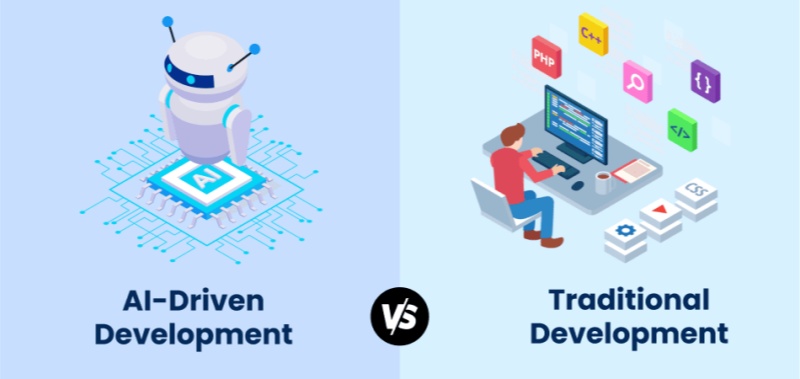
Many developers and business leaders are now asking: How is ai different from traditional computer programs? and how is ai different from traditional computer systems? The answer lies in a fundamental shift from deterministicprocesses to probabilistic intelligence.
As we move away from static code toward dynamic learning, the infrastructure supporting these systems must also evolve. This is where WhaleFlux enters the narrative. As a Unified AI Platform, WhaleFlux provides the Elastic AI Compute and AI Agent Platforms necessary to manage this new breed of “thinking” systems. In this article, we will break down the DNA of this technological evolution and explain why the future of computing belongs to those who master AI orchestration.
1. Logic vs. Learning: How is AI Different from Traditional Computer Programs?
To understand the core difference, we must look at the “Source of Truth” for the system.
The Traditional Program: The Rule-Follower
In a traditional computer program, the human is the “brain.” The programmer writes explicit logic (e.g., if (balance < 0) { send_alert(); }). The program is a series of “If-Then” statements. It is Deterministic, meaning for any given input, the output is 100% predictable based on the written code.
The AI System: The Pattern-Recognizer
AI, specifically machine learning, flips this model. Instead of receiving rules, the system receives Data. It uses algorithms to identify patterns and create a statistical model. When it sees a new input, it doesn’t follow a pre-written path; it calculates a Probability.
- Strengths: Handles “fuzzy” data, improves over time, solves complex problems.
- Weaknesses: Computationally expensive, requires specialized hardware (GPUs).
WhaleFlux bridges this gap. Since AI is resource-heavy, WhaleFlux provides AI Observability to monitor these probabilistic systems, ensuring that even as the “logic” becomes complex, the underlying hardware remains stable and cost-effective.
2. Architectural Evolution: How is AI Different from Traditional Computer Systems?
When we ask how is ai different from traditional computer systems, we are talking about the “Physical and Operational Infrastructure.”
CPU-Centric vs. GPU-Centric
Traditional systems are built around the CPU (Central Processing Unit). CPUs are designed for sequential tasks—doing one complex thing at a time. AI systems, however, are built around GPUs (Graphics Processing Units). Because AI involves millions of simultaneous mathematical operations, it requires the parallel processing power that only high-end GPUs like the NVIDIA H100 or A100 can provide.
WhaleFlux and the New Infrastructure Standard
WhaleFlux has reimagined the computer system for the AI age. A traditional system is just a server; a WhaleFlux system is a Unified AI Platform.
Elastic AI Compute:
Unlike traditional fixed servers, WhaleFlux allows you to scale GPU resources up or down based on the intensity of your AI workload.
Infrastructure Reliability:
AI hardware is prone to failure due to high heat and power demands. WhaleFlux’s observability tools reduce hardware failures by 98%, a level of stability traditional systems rarely need to account for.
3. The “0 to 1” Myth: Why Fine-tuning is the Practical Difference
In traditional software, you build your app from 0 to 1. In AI, building from 0 (Pre-training a foundation model) is a task reserved for tech giants with billions of dollars. For the rest of the world, the difference lies in Fine-tuning.
WhaleFlux empowers the “99%” by providing the perfect environment for Fine-tuning.
- The Process: You take a “Foundation Model” (like Llama or Mistral) and use WhaleFlux’s compute power to train it on your specific business data.
- The Result: You get a system that has the broad intelligence of a global AI but the specific expertise of your own company.
This shift from “Coding from Scratch” to “Fine-tuning a Foundation” is the defining characteristic of modern AI computer science.
4. Maintenance and Evolution: Debugging vs. Optimization
How you “fix” a system highlights another major difference:
- Traditional: You find the “bug” (the broken line of code) and rewrite it.
- AI: You don’t “fix” a line of code; you optimize the model. This might involve cleaning the training data, adjusting the fine-tuning parameters, or providing more compute power.
WhaleFlux simplifies this by integrating AI Models & Data management. When an AI system starts drifting or producing inaccurate results, WhaleFlux provides the tools to re-evaluate the data and re-run fine-tuning jobs efficiently, slashing costs by up to 70% compared to unoptimized cloud providers.
5. From Passive Tools to Autonomous Agents
Perhaps the most exciting answer to how is AI different from traditional computer systems is the emergence of Agents.
Traditional systems are Passive. They wait for a user to click a button or trigger an API. AI systems, when deployed on the WhaleFlux AI Agent Platform, become Active.
- Observation: They monitor their environment.
- Reasoning: They decide on a course of action based on their fine-tuned knowledge.
- Action: They execute tasks (like writing code, answering tickets, or managing servers) autonomously.
This transforms the computer from a “tool” into a “collaborator.”
Conclusion: Choosing the Right Path
Understanding how is ai different from traditional computer programs and how is ai different from traditional computer systems is the first step toward digital transformation. Traditional systems provide the stability and structure we need for basic operations, but AI provides the “reasoning engine” that will drive future innovation.
The complexity of AI infrastructure can be daunting. However, platforms like WhaleFlux make this transition accessible. By focusing on Elastic AI Compute, Fine-tuning, and AI Agent Platforms, WhaleFlux removes the technical hurdles of GPU management and model deployment.
The future isn’t about choosing between traditional code and AI—it’s about integrating them into a unified, intelligent stack. Whether you are optimizing a workflow through fine-tuning or deploying an autonomous agent, WhaleFlux provides the foundation for the next generation of computing.
FAQ (Frequently Asked Questions)
1. How is AI different from traditional computer programs in terms of results?
Traditional programs provide exact, binary results based on rules. AI provides “probabilistic” results, meaning it gives the most likely correct answer based on patterns it learned during fine-tuning.
2. How is AI different from traditional computer systems regarding hardware?
Traditional systems rely on CPUs for sequential processing. AI systems require dense clusters of GPUs (like those provided by WhaleFlux) to handle the massive parallel mathematical calculations needed for neural networks.
3. Does WhaleFlux allow me to train a model like GPT-4 from scratch?
WhaleFlux focuses on Fine-tuning and inference rather than 0-to-1 pre-training. This allows businesses to take existing powerful models and customize them for specific tasks, which is significantly more cost-effective and faster for most enterprises.
4. Why is AI Observability mentioned as a key feature of WhaleFlux?
Because AI systems run on high-performance GPUs that are under constant stress, they are more likely to fail than traditional servers. WhaleFlux AI Observability monitors hardware health to prevent 98% of potential failures, ensuring your AI stays online.
5. Can an AI system replace a traditional database?
No. AI systems and traditional systems are complementary. You still need traditional databases for structured data storage, while AI (often fine-tuned on WhaleFlux) is used to analyze that data and make intelligent predictions or take autonomous actions.
The Future of Computer Science in the Age of AI: Evolution or Replacement?
Introduction: The Dawn of the “AI-Native” Computer Science Era
For over half a century, Computer Science (CS) has been defined by the art of writing explicit instructions for machines. We built compilers, optimized databases, and designed intricate algorithms to solve human problems. However, the meteoric rise of Generative AI has sent a shockwave through the industry. Suddenly, the “black box” of neural networks is performing tasks—coding, debugging, and architecting—that were once the exclusive domain of human engineers.
This shift has ignited a polarizing debate: Is AI and computer science a partnership, or is AI a “replacement engine” for the very field that created it? If you browse any tech forum today, you will encounter the same anxious questions: Will computer science be replaced by ai? Is a CS degree still worth it?
The truth is more nuanced than a simple “yes” or “no.” We are witnessing an evolution. We are moving away from the era of “Hand-Coded Logic” and into the era of “AI Orchestration.” In this new landscape, the traditional boundaries of software engineering are blurring, giving way to a more integrated stack where hardware, models, and autonomous agents work in unison. Companies like WhaleFlux are at the forefront of this transition, providing the infrastructure—from Elastic AI Compute to AI Agent Platforms—that allows computer scientists to stop wrestling with raw code and start building intelligent systems.
In this article, we will explore why AI computer science is the most significant career pivot in history, why the focus has shifted from “0-to-1 pre-training” to “strategic fine-tuning,” and how platforms like WhaleFlux are ensuring that the human computer scientist remains the most critical component of the tech stack.
1. The Symbiosis: Understanding AI in Computer Science
To understand the future, we must first define the relationship between ai and computer science. AI is not a separate entity; it is a specialized branch of CS that has grown so powerful it is now “recursive”—it is being used to improve the very discipline from which it emerged.
Traditionally, computer science was about deterministic systems (Input A always yields Output B). AI computer scienceintroduced probabilistic systems (Input A yields the most likely Output B). This transition hasn’t made CS obsolete; it has simply added a new layer of complexity.
The Shift from Coding to Orchestration
In the past, a software engineer spent 80% of their time writing boilerplate code and 20% on system design. Today, AI handles the boilerplate. This allows the modern computer scientist to focus on:
- System Architecture: How do different AI models interact?
- Data Lineage: Is the data used for training clean and ethical?
- Compute Efficiency: How do we run these models without burning through a million-dollar budget?
This is where the concept of a Unified AI Platform becomes essential. WhaleFlux recognizes that the modern CS professional needs more than just a code editor. They need a dashboard that manages the entire lifecycle of an AI application—from the raw NVIDIA GPU compute to the final Autonomous Agent deployment.
2. The Strategic Shift: Why Fine-Tuning is the Real Winner
A common misconception when discussing AI in computer science is that every innovation requires building a model from scratch (0-to-1 pre-training). While companies like OpenAI or Google focus on pre-training foundational models, the rest of the world is realizing that the real value lies in Fine-tuning.
Why Not 0-to-1 Pre-training?
Pre-training a foundation model requires tens of thousands of GPUs, months of time, and billions of dollars. It is a feat of “Brute Force CS.” For 99% of businesses and developers, this is neither practical nor necessary.
The Power of Fine-Tuning on WhaleFlux
Fine-tuning is the process of taking a pre-trained model (like Llama 3 or Mistral) and training it on a smaller, domain-specific dataset to make it an expert in a particular field. This is the “Best AI for computer science” strategy today.
WhaleFlux specifically focuses on this middle-to-end stage of the AI lifecycle. Instead of asking you to build a brain from scratch, WhaleFlux provides:
Elastic AI Compute:
High-performance GPUs (H100, A100, etc.) optimized for the intense but shorter bursts of activity required for fine-tuning.
AI Models & Data Management:
A streamlined environment to upload your proprietary data and refine existing models.
Cost Efficiency:
By focusing on fine-tuning rather than pre-training, companies can achieve “SOTA” (State of the Art) results at 1/100th of the cost.
3. Will AI Take Over Computer Science Jobs?
The fear that AI will take over computer science jobs is understandable but largely misplaced. History shows that when a tool makes a task easier, the demand for that task doesn’t vanish—it explodes.
The Jevons Paradox in Software
When it becomes easier and cheaper to build software (thanks to AI), companies don’t stop building software; they decide to build ten times more of it. We are entering an era where every small business will want its own custom AI agent, every internal tool will need a natural language interface, and every hardware device will need embedded intelligence.
AI won’t replace the computer scientist; it will replace the manual coder. The jobs that are “at risk” are those that involve repetitive, low-level tasks. The jobs that are “exploding” are those that involve:
- AI Infrastructure Management: Managing GPU clusters and ensuring AI Observability.
- Prompt Engineering & Model Steering: Guiding AI to produce accurate, safe results.
- Agentic Workflow Design: Using platforms like the WhaleFlux AI Agent Platform to create autonomous systems that can actually do work, not just talk about it.
4. Redefining the Tech Stack: Compute, Models, and Agents
The traditional “Full Stack Developer” is being replaced by the “AI Stack Orchestrator.” To stay relevant, CS professionals must master a new four-layer stack, which is exactly how WhaleFlux is structured:
Layer 1: AI Compute & Observability
Hardware is the new bottleneck. You cannot do AI computer science without a deep understanding of GPU utilization. WhaleFlux’s AI Observability tools are game-changers here. They provide full-stack visibility, allowing engineers to:
- Reduce hardware failure rates by 98%.
- Slash compute costs by up to 70% through better resource allocation.
- Monitor GPU health in real-time to ensure fine-tuning jobs don’t crash halfway through.
Layer 2: AI Models & Data
This layer involves the selection and “polishing” of models. As mentioned, WhaleFlux facilitates efficient fine-tuning, allowing CS professionals to turn generic AI into specialized tools.
Layer 3: Knowledge & Reasoning
This is where RAG (Retrieval-Augmented Generation) and vector databases come in. It’s about giving the AI a “memory” and a “library” of your specific business data.
Layer 4: AI Agent Platform
This is the pinnacle of the new CS. A “Model” is just a brain in a jar; an “Agent” is a brain with hands and eyes. WhaleFlux’s AI Agent Platform allows developers to build autonomous entities that can observe a system, reason about a problem, and take action.
5. What is the Best AI for Computer Science Success?
If you are a student or a professional asking what the best AI for computer science is, the answer isn’t a specific chatbot. It is a Platform Mindset.
To succeed in 2026 and beyond, you need a platform that unifies these disparate elements. If you spend all your time configuring Linux drivers for GPUs, you aren’t being a computer scientist; you’re being a mechanic. WhaleFlux acts as the “Operating System for AI,” handling the “mechanic” work (infrastructure, observability, compute scaling) so you can focus on the “architect” work (fine-tuning and agent design).
Conclusion: Embracing the AI-Powered Future
So, will computer science be replaced by AI?
The answer is a resounding no. Computer science is not dying; it is graduating. We are moving from the “Digital Age” to the “Intelligence Age.” In this new era, the most successful computer scientists will be those who view AI as their most powerful collaborator.
The future of the field belongs to those who can bridge the gap between raw power and intelligent action. Whether it is through the Elastic AI Compute that powers a fine-tuning job, the AI Observability that keeps a global cluster running, or the AI Agent Platform that automates a complex business process, the tools are now here to amplify human creativity.
WhaleFlux is more than just a service provider; it is the infrastructure for this evolution. By focusing on the critical stages of fine-tuning and agent orchestration, WhaleFlux ensures that enterprises and developers can harness the power of AI without the prohibitive costs or complexity of the past.
The “Computer Scientist” of tomorrow won’t just write code; they will lead a digital workforce of AI agents. The question isn’t whether you will be replaced—it’s what you will build now that the limits have been removed.
Frequently Asked Questions (FAQ)
1. Does WhaleFlux support 0-to-1 model pre-training?
No. WhaleFlux is specialized for the Fine-tuning and inference stages of the AI lifecycle. We provide the elastic compute and model management tools necessary to adapt existing foundation models to specific data and use cases, which is the most cost-effective path for 99% of businesses.
2. Will AI take over computer science jobs in the next few years?
AI will automate many routine programming tasks, but it will not take over the role of a computer scientist. The field is shifting toward AI Orchestration. Professionals who master tools like WhaleFlux to manage GPU resources and deploy AI agents will find themselves in higher demand than ever.
3. What is “AI Observability,” and why is it important for CS?
In ai computer science, hardware is the most expensive asset. AI Observability (like that offered by WhaleFlux) provides deep monitoring of GPU clusters. It can reduce hardware failures by 98% and optimize costs by 70%, making it a critical skill for modern infrastructure engineers.
4. Why should I choose fine-tuning over building a model from scratch?
Building a model from scratch (pre-training) is extremely expensive and time-consuming. Fine-tuning allows you to leverage the “intelligence” of models like Llama 3 while customizing them with your own data. WhaleFlux makes this process seamless and affordable.
5. How does the WhaleFlux AI Agent Platform differ from a standard chatbot?
A chatbot simply answers questions. An AI Agent on the WhaleFlux platform can “Observe, Reason, and Act.” It can be integrated into your business workflows to autonomously perform tasks, making it a functional tool rather than just a conversational interface.