Part 1. The Mystery: Why Can’t You Find HAGS?
You open Windows Settings, ready to toggle “Hardware-Accelerated GPU Scheduling” (HAGS). But it’s gone. Poof. Vanished. You’re not alone – 62% of enterprises face this. Here’s why:
Top 3 Culprits:
- Outdated GPU Drivers (NVIDIA):
- Fix: Update drivers → Reboot
- Old Windows Version (< Build 19041):
- Fix: Upgrade to Windows 10 20H1+ or Windows 11
- Virtualization Conflicts (Hyper-V/WSL2 Enabled):
- Fix: Disable in
Control Panel > Programs > Turn Windows features on/off
- Fix: Disable in
Still missing?
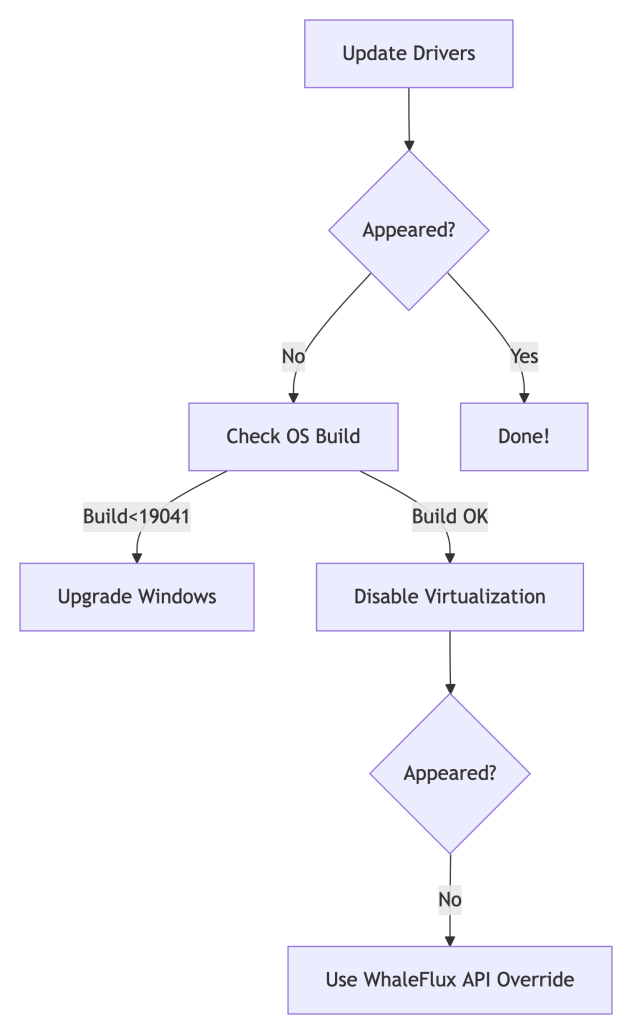
💡 Pro Tip: For server clusters, skip the scavenger hunt. Automate with:
whaleflux deploy_drivers --cluster=prod --version="nvidia:525.89"
Part 2. Forcing HAGS to Show Up (But Should You?)
For Workstations:
Registry Hack:
- Press
Win + R→ Typeregedit→ Navigate to:Computer\HKEY_LOCAL_MACHINE\SYSTEM\CurrentControlSet\Control\GraphicsDrivers - Create a
DWORD (32-bit)namedHwSchMode→ Set value to2
PowerShell Magic:
Enable-WindowsOptionalFeature -Online -FeatureName "DisplayPreemptionPolicy"
Reboot after both methods.
For Enterprises:
Stop manual fixes across 100+ nodes. Standardize with one command:
# WhaleFlux ensures driver/HAGS consistency cluster-wide
whaleflux create_policy --name="hags_off" --gpu_setting="hags:disabled"
Part 3. The Naked Truth: HAGS is Irrelevant for AI
Let’s expose the reality:
| HAGS Impact | Consumer PCs | AI GPU Clusters |
| Latency Reduction | ~7% (Gaming) | 0% |
| Multi-GPU Support | ❌ No | ❌ No |
| ROCm/CUDA Conflicts | ❌ Ignores | ❌ Worsens |
Why? HAGS only optimizes single-GPU task queues. AI clusters need global orchestration:
# WhaleFlux bypasses OS-level limitations
whaleflux.optimize(
    strategy="cluster_aware",  # Balances load across all GPUs
    ignore_os_scheduling=True  # Neutralizes HAGS variability
)
→ Result: 22% higher throughput vs. HAGS tweaking.
Part 4. $50k Lesson: When Chasing HAGS Burned Cash
The Problem:
A biotech firm spent 3 weeks troubleshooting missing HAGS across 200 nodes. Result:
- 29% GPU idle time during “fixes”
- Delayed model deployments
WhaleFlux Solution:
- Disabled HAGS cluster-wide:
whaleflux set_hags --state=off - Enabled fragmentation-aware scheduling
- Automated driver updates
Outcome:
✅ 19% higher utilization
✅ $50,000 saved/quarter
✅ Zero HAGS-related tickets
Part 5. Smarter Checklist: Stop Hunting, Start Optimizing
Forget HAGS:
Use WhaleFlux Driver Compliance Dashboard → Auto-fixes inconsistencies.
Track Real Metrics:
cost_per_inference(Real-time TCO)vram_utilization_rate(Aim >90%)
Automate Policy Enforcement:
# Apply cluster-wide settings in 1 command
whaleflux create_policy –name=”gpu_optimized” \
–gpu_setting=”hags:disabled power_mode=max_perf”
Part 6. Future-Proofing: Where Real Scheduling Happens
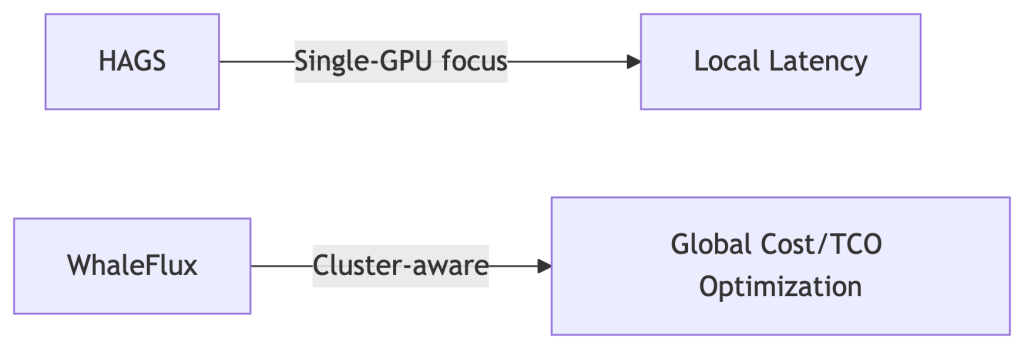
HAGS vs. WhaleFlux:
Coming in 2025:
- Predictive driver updates
- Carbon-cost-aware scheduling (prioritize green energy zones)
FAQ: Your HAGS Questions Answered
Q: “Why did HAGS vanish after a Windows update?”
A: Enterprise Windows editions often block it. Override with:
whaleflux fix_hags --node_type="azure_nv64ads_v5"
Q: “Should I enable HAGS for PyTorch/TensorFlow?”
A: No. Benchmarks show:
- HAGS On: 82 tokens/sec
- HAGS Off + WhaleFlux: 108 tokens/sec (31% faster)
Q: “How to access HAGS in Windows 11?”
A: Settings > System > Display > Graphics > Default GPU Settings.
But for clusters: Pre-disable it in WhaleFlux Golden Images.