Introduction: The GPU Memory Bottleneck in AI
You’ve launched the training job for your latest large language model. The code is running, the GPUs are showing activity, but something feels off. The process is crawling, and your estimated completion time is measured in days, not hours. You check your system monitor and see a frustratingly familiar warning: accelerate not fully using gpu memory.
This message is more than just a minor alert; it’s a symptom of a critical inefficiency at the heart of your AI infrastructure. At the core of this problem is the fundamental management of the memory of GPU resources. For AI enterprises, inefficient GPU memory usage isn’t just a technical hiccup—it’s a direct drain on budget, productivity, and competitive edge.
The key to unlocking superior performance and significant cost savings lies in understanding a crucial distinction: dedicated vs. shared GPU memory. In this guide, we’ll demystify these concepts, explore their direct impact on your AI workloads, and introduce how intelligent management with WhaleFlux can transform this potential bottleneck into a seamless advantage.
1. Demystifying GPU Memory: The Two Key Types
To understand the solution, we must first understand the components. Think of your GPU’s memory system as a two-tiered workspace for data processing.
What is Dedicated GPU Memory (VRAM)?
Dedicated GPU Memory, commonly known as VRAM (Video Random Access Memory), is the GPU’s own high-speed, on-board memory. It’s physically located right next to the GPU’s processing cores, creating a super-fast pathway for data transfer.
An Analogy: Imagine Dedicated VRAM as a chef’s personal, perfectly organized prep station in a busy kitchen. All the essential ingredients, knives, and tools are within immediate arm’s reach. The chef can grab what they need instantly, without moving a step, allowing them to work at maximum speed and efficiency. This is the ideal workspace.
This is the primary gpu memory you see listed on a spec sheet—24GB on an NVIDIA RTX 4090, 80GB on an NVIDIA H100. It’s the performance powerhouse, and the goal of any AI workload is to operate entirely within this space.
What is Shared GPU Memory?
Shared GPU Memory is different. It is not a separate, physical memory chip on the GPU. Instead, it is a portion of your system’s regular RAM (the main memory connected to the CPU) that is set aside to be used by the GPU if needed.
An Analogy: Now, imagine our chef’s personal prep station (Dedicated VRAM) is full. To get more space, they have to run across the kitchen to a shared, communal storage room (the system RAM). This room is much larger, but it’s far away, crowded, and the path is slower. Every trip to get a new ingredient takes significantly more time, dramatically slowing down the cooking process.
This is the role of shared gpu memory. It’s a safety net, a backup plan that prevents your system from crashing when the dedicated VRAM is exhausted. However, relying on it comes at a heavy performance cost. You might see it referred to in various ways like gpu shared memory or share gpu memory, but they all point to this same concept of a slower, secondary memory pool.
2. Dedicated vs. Shared: A Performance Deep Dive
Now that we know what they are, let’s compare them head-to-head. The difference isn’t just theoretical; it’s a chasm in performance that directly impacts your model’s runtime.
Speed and Bandwidth:
Dedicated VRAM is connected to the GPU by an extremely wide, high-speed data bus (e.g., on NVIDIA’s H100, this is over 3 TB/s). Shared memory, in contrast, must travel through the much slower system bus connecting the CPU and RAM (often in the range of 50-100 GB/s). This is like comparing a fiber-optic cable to a dial-up modem.
Latency:
Accessing data from dedicated VRAM has minimal delay. Accessing data from shared system RAM involves a much longer journey, creating significant latency. For AI models processing millions of calculations per second, this latency adds up, creating a major bottleneck.
The Critical Workflow Breakdown:
Here’s what happens during a typical AI workload:
Optimal State:
Your model loads its parameters and data into the fast dedicated GPU memory. Everything runs smoothly and quickly.
The Bottleneck:
As the model processes data, it might require more memory than is available in the dedicated VRAM. Once that space is full, the system has no choice but to start using the slower shared GPU memory.
The “Swap” of Despair:
The system now has to constantly “swap” data back and forth between the fast dedicated memory and the slow shared memory. The GPU’s powerful processors are left idle, waiting for data to arrive. This is the primary reason you see messages like accelerate not fully using gpu memory. The framework is telling you, “I’m being held back by the slow memory swap; the GPU’s power is being wasted.”
This inefficient swapping is the silent killer of AI performance. It turns your state-of-the-art NVIDIA GPU into a frustrated powerhouse, stuck in traffic.
3. The High Stakes for AI and Large Language Models (LLMs)
For general computing, this memory swap might cause a minor slowdown. For AI enterprises, it’s a catastrophic inefficiency with direct financial consequences.
LLMs are Memory-Hungry Beasts:
Modern Large Language Models are defined by their parameter count (e.g., 7 billion, 70 billion, etc.). Each parameter needs to be stored in memory during training and inference. A model with 70 billion parameters can easily require over 140 GB of GPU memory just to load. This demand for vast, fast VRAM is non-negotiable for stability and speed.
The Tangible Cost of Inefficiency:
- Longer Training Times: What should take 10 hours now takes 50. This delays product launches, research cycles, and time-to-market.
- Unstable Deployments: In production, memory bottlenecks can cause inference servers to crash or time out, leading to poor user experiences and service outages.
- Wasted Cloud Costs: In the cloud, you pay for GPU time by the second. If your $10/hour GPU is only operating at 40% efficiency because it’s waiting on shared memory, you are effectively throwing away $6 every hour. At scale, this wasted expenditure is enormous.
The stakes couldn’t be higher. Inefficient memory management doesn’t just slow you down; it makes your entire AI operation prohibitively expensive and unreliable.
4. The Solution: Optimizing GPU Memory Allocation with WhaleFlux
So, how can AI teams ensure their valuable workloads are consistently using fast dedicated memory, especially across a complex multi-GPU cluster? Manually managing this is a nightmare.
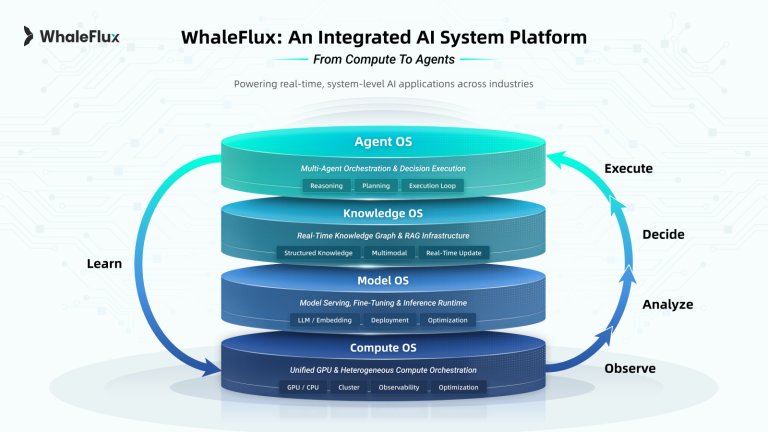
This is precisely the challenge WhaleFlux is built to solve. WhaleFlux is an intelligent GPU resource management tool designed specifically for AI enterprises. It moves beyond simple GPU allocation to smart, memory-aware orchestration.
How WhaleFlux Solves the Memory Problem:
Intelligent Orchestration:
WhaleFlux doesn’t just see a cluster of GPUs; it understands the specific GPU memory requirements of each job. When you submit a training task, WhaleFlux’s scheduler intelligently places it on the specific node and GPU within your cluster that has the optimal amount of free dedicated VRAM. It ensures the job “fits” comfortably, preventing it from spilling over into slow shared memory from the start.
Maximizing Dedicated VRAM Usage:
Think of your cluster’s total dedicated VRAM as a single, pooled resource. WhaleFlux acts as a master allocator, packing multiple compatible jobs onto the same GPUs to maximize the utilization of this high-speed memory. By doing so, it actively minimizes the system’s need to rely on the slower shared GPU memory. This efficient “packing” is the key to high utilization rates.
The Result:
The outcome is exactly what every AI team leader wants: faster model deployment, superior stability for LLMs, and significantly lower cloud costs. You eliminate the wasteful idle time caused by memory swapping, ensuring you get the full performance you’re paying for from your hardware.
5. Powered by Top-Tier Hardware: The WhaleFlux GPU Fleet
Superior software delivers its best results on superior hardware. An intelligent manager is only as good as the resources it manages.
At WhaleFlux, we provide direct access to a powerful and diverse fleet of the latest NVIDIA GPUs, ensuring we can meet the demanding needs of any AI workload.
For Cutting-Edge LLMs and Massive Models:
Our NVIDIA H100 and H200 Tensor Core GPUs are beasts designed for the largest-scale AI. With their massive 80GB+ of ultra-fast HBM3 memory, they are the ideal foundation for training the next generation of foundational models.
For High-Performance Training and Inference:
The NVIDIA A100 (80GB/40GB) remains a workhorse for enterprise AI. It offers a proven, powerful platform for a wide range of demanding training and inference tasks.
For Powerful and Cost-Effective Compute:
For researchers, developers, and for smaller-scale models, we offer the NVIDIA RTX 4090 and other high-performance NVIDIA GPUs. This provides an excellent balance of power and value.
We believe in providing flexibility to match your project’s scope and budget. That’s why customers can either purchase these resources outright or rent them through flexible terms. To ensure stability and cost predictability for both our users and our infrastructure, our rentals are structured with a minimum commitment of one month, moving beyond the unpredictable volatility of hourly billing.
Conclusion: Build Faster, Smarter, and More Cost-Effectively
In the race to leverage AI, efficiency is the ultimate competitive advantage. The management of the balance between dedicated and shared GPU memory is not a low-level technical detail; it is a strategic imperative that dictates the speed, cost, and reliability of your entire AI operation.
Trying to manage this complex balance manually across a multi-GPU cluster is a losing battle. WhaleFlux is the strategic tool that automates this optimization. It ensures your workloads run in the fastest possible memory, slashing project timelines and cloud bills.
Stop letting memory bottlenecks slow you down and drive up your costs. Visit our website to learn how WhaleFlux can optimize your GPU cluster, reduce your expenses, and accelerate your path to AI innovation.
FAQs
1. What is the fundamental difference between dedicated and shared GPU memory for AI workloads?
The core difference lies in the hardware architecture and performance characteristics, which directly impact AI tasks:
- Dedicated GPU Memory (VRAM): This is high-speed physical memory (like GDDR6X, HBM2e) soldered onto a dedicated GPU card, such as NVIDIA’s A100 or H100. It offers exclusive, low-latency access to the GPU with very high bandwidth (often 1 TB/s or more), making it ideal for data-intensive, latency-sensitive calculations like training large models.
- Shared GPU Memory: This is a portion of the system’s main RAM (DDR4/DDR5) dynamically allocated for GPU use. While more flexible in capacity, it has significantly lower bandwidth(typically ~100 GB/s) and higher latency, as data must travel through the CPU’s memory controller. This can become a major bottleneck for training.
2. How should my AI team choose between dedicated and shared GPU memory resources?
The choice involves a classic trade-off between performance and cost, aligned with your project’s stage and requirements:
Choose Dedicated GPU Memory (e.g., NVIDIA A100/H100) for:
- Training medium to large-scale models (e.g., transformer-based models with hundreds of millions of parameters).
- Low-latency inference in real-time production systems (e.g., autonomous driving, financial trading).
Consider Shared GPU Memory for:
- Development, prototyping, and debugging in environments like Jupyter Notebooks.
- Running lightweight AI inference on cost-sensitive or resource-constrained edge devices.
- Tasks that are not bandwidth-sensitive or are primarily CPU-bound.
3. What are the key performance bottlenecks when using shared GPU memory for training?
The primary bottleneck is bandwidth and access latency. For example, training a 100-million-parameter model might take ~50ms per iteration on dedicated HBM2e memory but could exceed 200ms using shared DDR5 memory due to the order-of-magnitude lower bandwidth. This drastically slows down training cycles. Additionally, shared memory can face resource contention from other system processes (CPU, disk I/O), leading to unpredictable performance swings.
4. Can we optimize our existing shared GPU memory resources for better AI performance?
Yes, several software-level optimizations can help mitigate the limitations of shared memory:
- Memory Pre-allocation: Lock and pre-allocate memory at the start to avoid runtime allocation overhead.
- Data Chunking: Process large tensors in smaller blocks to reduce the memory footprint per operation.
- Asynchronous Data Transfers: Overlap data transfers between CPU and GPU with computation using CUDA streams to hide latency.
- Using Efficient Frameworks: Leverage frameworks like PyTorch or TensorFlow that have built-in memory management for such scenarios.
5. How does a tool like WhaleFlux help manage the cost and complexity of dedicated GPU clusters for AI teams?
WhaleFlux is an intelligent GPU resource management tool designed to help AI enterprises navigate the high-performance but costly nature of dedicated NVIDIA GPU clusters (like H100, A100). It directly addresses key challenges:
- Maximizing Utilization & Lowering Cost: By optimizing workload scheduling across multi-GPU clusters, WhaleFlux increases the utilization efficiency of expensive hardware. This prevents expensive GPUs from sitting idle, helping to lower the overall cloud computing cost.
- Simplifying Deployment and Improving Stability: It abstracts away the complexity of manual resource orchestration, accelerating model deployment. Its management capabilities ensure more stable performance for running large language models and other AI workloads by efficiently mapping tasks to available resources.
- Providing Flexible Access: WhaleFlux offers access to the full range of NVIDIA GPUs(including H100, H200, A100, RTX 4090) via purchase or rental plans (not hourly), allowing teams to scale their dedicated GPU resources according to project needs without massive upfront investment.