How LLM Applications Are Making Daily Tasks Way Easier?
Let’s be honest—we’ve all had those moments: staring blankly at an overflowing to-do list, drawing a blank in the supermarket on what to buy, or spending 20 minutes crafting a mere two-sentence email. But daily tasks don’t have to feel like a marathon. That’s where LLM applications come in—tools powered by large language models that can chat, write, and solve problems like a helpful friend. No need to understand complex technology; they turn “Ugh, I have to do this” into “Done, that was easy.”
What Exactly Are LLM Applications?
LLM stands for “large language model.” Think of it as a “super-smart program” that has read millions of books, articles, and conversations. It learns how humans communicate, the logic behind answering questions, and ways to organize information. LLM applications, on the other hand, are the practical tools we use in daily life: apps that help draft emails, summarize news, or even plan recipes—all driven by this “super-smart” technology.
They’re different from the regular AI we’re used to, too. Tools like the calculator on your phone or spell check in your keyboard are “single-task” AI—they only do one specific thing. But LLM applications are “flexible”: ask it to make a grocery list, and it’ll adjust based on your dietary preferences; need meeting notes, and it’ll highlight key points relevant to you. They’re not one-size-fits-all—they’re tailored to your “chaotic daily life.”
First Stop: LLM Applications for Taming Morning Chaos
Mornings are already hectic enough—no need to add more stress. LLM applications turn those rushed hours into a smooth routine.
Take to-do lists, for example. A generic list like “Buy milk, finish report” is basically useless. But with an LLM application, just say, “I have a work deadline at 3 PM, a doctor’s appointment, and need to call my mom,” and it’ll prioritize tasks for you: “1. Finish the report by 2 PM (deadline first!), 2. Call mom on your commute, 3. Buy milk after the doctor’s visit.” No more overthinking what to do first.
Then there’s morning news. You want to stay informed, but scrolling through 10 articles takes too long. LLM apps like ChatGPT or Google Gemini can summarize your go-to news sources in 2 minutes. Just say, “Summarize today’s top tech news in simple terms,” and you’ll get the key points—no fluff included.
And let’s not forget rescheduling emails. We’ve all typed and deleted messages like, “Hi [Name], I need to reschedule… would tomorrow work? Or maybe the day after?” LLM applications eliminate this hassle. Tell it, “Reschedule my 10 AM meeting with Sarah to tomorrow, keep the tone polite, and mention I’ll send the meeting notes in advance,” and it’ll generate a clear, friendly message in 10 seconds.
LLM Applications for Those “I Forgot” Moments
Who hasn’t stood frozen in the supermarket thinking, “Did I need eggs or bread?” LLM applications turn these little slip-ups into non-issues.
Staring at an empty fridge and unsure what to cook? Just tell an LLM app, “I have eggs, spinach, and pasta—what can I make for dinner?” It’ll suggest recipes (like spinach and egg pasta) and even list the steps. No more wasting ingredients or panicking about mealtime.
Follow-ups are another pain point. We’ve all thought, “I need to email that client back…” then completely forgotten. LLM applications can not only help you remember but also draft the follow-up email for you: “Hi, just following up on our conversation about the project—let me know if you need more details!” All you have to do is copy, paste, and hit “send.”
They even help with small memories. Forgot your friend’s favorite chocolate snack for their birthday? Ask an LLM app, “My friend mentioned loving a chocolate snack last month—what could it be?” It’ll offer suggestions like dark chocolate truffles or chocolate-covered pretzels to jog your memory.
Work-from-Home Lifesavers: LLM Applications for Cutting Down Busywork
Work-from-home life comes with plenty of “busywork”—taking meeting notes, drafting reports, scheduling meetings. LLM applications turn these tedious tasks into quick wins.
Meeting notes are a major headache. Trying to scribble notes while someone talks often leads to missing key points. Use an LLM app by pasting in a text transcript of the meeting, and it’ll even highlight action items: “Action Item: John to send the project draft by Friday.” No more spending an hour organizing notes later, and no more missed information.
Drafting emails or reports is also a breeze. Writing a first draft of a report can take hours, but an LLM app does it in minutes. Just say, “Write a first draft of the Q3 sales report—we hit 120% of our target and added 5 new clients,” and it’ll create a clear, professional draft. You just need to polish it—no more staring at a blank document.
Scheduling meetings is the worst—endless back-and-forth: “Does 2 PM work?” “No, how about 3?” LLM apps like Calendly’s AI assistant or Google Calendar’s smart scheduling fix this. Tell the app, “Find a time for Sarah, Mike, and me to meet this week—we’re all free after 10 AM,” and it’ll pick a time that works for everyone. Done—no more endless coordination.
LLM Applications for Nurturing Personal Connections
When life gets busy, staying in touch with friends and family becomes harder. LLM applications help you be thoughtful without the stress.
Take birthday messages, for example. We’ve all stared at a text box thinking, “What should I say?” An LLM app can help. Tell it, “Write a fun birthday message for my friend who loves hiking—mention our trip last summer,” and it’ll generate something like: “Happy birthday! Hope your day is as great as our hike (minus the rain and getting lost). Can’t wait for our next adventure!” It’s personal, not generic.
Group chats are another hassle—step away for an hour, and you’ll return to 50 messages. LLM apps can summarize them: “What did I miss in the group chat about the weekend gathering?” It’ll tell you, “Everyone is free on Saturday, meeting at 10 AM at the park, and Lisa is bringing snacks.” No more scrolling through endless messages.
Planning get-togethers is easier too. If you’re bad at logistics, just say, “Plan a casual dinner with 4 friends—affordable, near downtown, and kid-friendly.” The LLM app will suggest restaurants, ask about dietary restrictions, and even send a group message to confirm. All you have to do is show up.
LLM Applications for Stress-Free Cooking & Meal Prep
Cooking should be enjoyable, not like taking an exam. LLM applications turn the “what to eat” dilemma into a simple “let’s cook!”
Have you ever bought vegetables only to let them go bad because you didn’t know how to cook them? An LLM app solves this. Say, “I have broccoli, chicken, and rice—what’s a quick dinner I can make?” It’ll give you a recipe: “Sauté chicken with garlic, add broccoli, then mix with rice—20 minutes total.” No more food waste, no more constant takeout.
Meal planning for special diets is also easy. If you’re vegetarian, just say, “Create a weekly vegetarian meal plan where each dish takes less than 30 minutes to cook.” It’ll list options like breakfast (oatmeal with berries), lunch (chickpea salad), and dinner (vegan stir-fry)—all tailored to your needs. No more spending hours searching for “vegetarian recipes.”
If you’re new to cooking, LLM apps even explain culinary terms. See “sauté” in a recipe and wonder if it’s just “frying”? Ask the app, and it’ll reply: “Sauté means cooking small pieces of food in a little oil over medium heat—stir often to prevent burning.” Simple, clear, no confusion.
LLM Applications for Learning & Personal Growth
Want to learn a new skill or understand a tricky topic? LLM applications are like patient tutors—no homework, no pressure.
Take taxes, for example. They’re complicated, but you don’t need to read a 100-page guide. Ask an LLM app, “What is a tax deduction, and how can I use it for my side hustle?” It’ll say: “A tax deduction is an expense you can subtract from your income (like supplies for your side hustle) to lower the amount of tax you owe. Keep receipts and include them when you file!” Instant clarity.
If you’re learning a new skill—say, Spanish—LLM apps can help make flashcards. Tell it, “Make flashcards for common Spanish grocery words,” and it’ll create: “Apple = Manzana, Milk = Leche, Bread = Pan.” Practice anytime, no need to buy physical flashcards.
They even recommend learning materials. If you love space and want to learn more about Mars, say, “Recommend easy-to-read books about Mars for beginners.” The app will suggest titles like Mars: Our Future on the Red Planet (published by National Geographic)—no more scrolling through endless Amazon reviews.
Question: Are LLM Hard to Use? Answer: No!
You might think, “This sounds great, but I’m not tech-savvy.” Don’t worry—LLM applications are designed for regular people, not experts. Getting started is super simple. Most apps (like ChatGPT, Google Gemini, or even the AI feature in Microsoft Word) have a text box—just type what you need, like you’re talking to a friend. Want a Saturday to-do list? Type, “Make a Saturday to-do list: do laundry, grocery shop, visit grandma.” That’s it—no complicated buttons to press or settings to adjust.
As for free vs. paid? You don’t need to spend money to get value. Free versions of ChatGPT and Gemini handle most daily tasks: drafting emails, summarizing news, making grocery lists. Paid versions (usually 10–20 a month) add extras like faster responses, but they’re totally unnecessary when you’re just starting out.
To make it fit your habits better? Just be specific. Hate long emails? Say, “Draft a short email—max 3 sentences.” Are you an early bird? Ask the app to “Send me a morning to-do list at 7 AM every day.” The more you share your habits, the more useful it becomes.
Things to Watch Out For: Tips for Using LLM Applications
LLM applications are helpful, but they’re not perfect. Here are a few tips to avoid headaches:
First, double-check important information. LLMs sometimes make mistakes (called “hallucinations”)—like giving the wrong recipe step or incorrect tax rules. If you’re using it for something important (like a work report or a recipe with allergens), spend 30 seconds verifying. For example, if it says, “Bake cookies at 400°F (about 204°C),” check a reliable recipe to confirm.
Second, protect your personal privacy. Never type sensitive information—like credit card numbers, passwords, or medical records—into an LLM app. Most apps are secure, but it’s better to be safe than sorry.
Third, don’t over-rely on them. They’re helpers, not replacements. It’s fine to use an app to draft an email, but add a friendly joke to make it more personal; use it to make a to-do list, but still check off items yourself. Think of it as a teammate, not someone who does all the work for you.
Ready to Let LLM Simplify Your Days?
Daily tasks don’t have to be a burden. LLM applications can ease morning chaos, fix “I forgot” moments, cut down on work busywork, and even make cooking and learning fun. No tech skills required—just type what you need, and enjoy the convenience.
Start small: Next time you draft an email, use an LLM app to outline it; or let it make a grocery list based on what’s in your fridge. You’ll be surprised how much time you save. Remember, they’re not perfect, but they do make life simpler.
So why not give it a try? Your overflowing to-do list, chaotic mornings, and those “I forgot” moments will thank you.
Fine-Tuning Llama 3 Secrets: Proven Practices Uncovered
In the ever-evolving landscape of artificial intelligence, large language models (LLMs) have emerged as game-changers. Among these, Llama 3, developed by Meta, has garnered significant attention for its advanced capabilities. While the base Llama 3 model is already powerful, fine – tuning it can unlock even greater potential, tailoring it to specific tasks and domains.
Introduction to Llama 3
Llama 3 is a series of advanced large language models (LLMs) developed by Meta. As the successor to Llama 2, it comes with significant improvements in performance, capabilities, and versatility, making it a prominent player in the field of artificial intelligence.
One of the key features of Llama 3 is its enhanced natural language understanding. It can grasp complex contexts, nuances, and even subtle emotions in text, enabling more accurate and meaningful interactions. Whether it’s answering questions, engaging in conversations, or analyzing text, Llama 3 shows a high level of comprehension.
What is Fine-tuning?
Fine-tuning is a crucial technique in the field of machine learning, particularly in the training of large language models (LLMs) like Llama 3. It refers to the process of taking a pre-trained model that has already learned a vast amount of general knowledge from a large dataset and further training it on a smaller, task-specific or domain-specific dataset.
The core idea behind fine-tuning is to adapt the pre-trained model’s existing knowledge to better suit specific applications. Instead of training a model from scratch, which is computationally expensive and time-consuming, fine-tuning leverages the model’s prior learning. This allows the model to retain its broad understanding while acquiring specialized skills relevant to the target task.
The Significance of Fine – Tuning Llama 3
Improved Task Performance
Fine – tuning Llama 3 allows it to specialize in specific tasks, such as question – answering, text summarization, or code generation. By training the model on task – specific datasets, it can learn the patterns and nuances relevant to those tasks, leading to better performance and higher accuracy. For example, in a medical question – answering system, fine – tuning Llama 3 on medical literature and patient – related questions can enable it to provide more accurate and relevant answers compared to the base model.
Domain Adaptation
When Llama 3 is fine – tuned on domain – specific datasets, such as legal documents, financial reports, or scientific research papers, it can adapt to the specific language and concepts used in those domains. This domain adaptation is crucial for applications where the model needs to understand and generate content that is specific to a particular field. For instance, a legal firm can fine – tune Llama 3 on legal statutes and case law to create a tool for legal research and document analysis.
Customization
Fine – tuning provides the flexibility to customize Llama 3 according to specific needs. This could include incorporating stylistic preferences, such as a particular writing style or tone, into the model’s output. It can also involve adding specialized knowledge, like industry – specific jargon or domain – specific rules, to the model. For example, a marketing agency can fine – tune Llama 3 to generate content with a brand – specific tone and style.
Resource Efficiency
Compared to training a model from scratch, fine – tuning Llama 3 is much more resource – efficient. Training a large – language model from the ground up requires massive amounts of computational resources, large datasets, and significant time. Fine – tuning, on the other hand, starts with a pre – trained model that has already learned a vast amount of general knowledge. By only training on a smaller, task – specific dataset, developers can achieve good results with fewer computational resources and in a shorter time frame.
Fine – Tuning Methods for Llama 3
Supervised Fine – Tuning
In supervised fine – tuning, Llama 3 is trained on a dataset where each input example is paired with a correct output. This could be a set of questions and their corresponding answers, or text passages and their summaries. The model learns to map the inputs to the correct outputs by minimizing the difference between its predictions and the actual outputs in the dataset. This method is straightforward and effective for tasks where there is a clear – cut correct answer.
Reinforcement Learning with Human Feedback (RLHF)
RLHF is a more advanced fine – tuning method. In this approach, Llama 3 is first fine – tuned using supervised learning. Then, it is further optimized using reinforcement learning, where the model receives rewards based on the quality of its outputs as judged by human feedback. For example, human evaluators can rate the generated responses as good or bad, and the model adjusts its parameters to maximize the expected reward. RLHF helps the model generate more human – preferred and high – quality outputs.
LoRA (Low-Rank Adaptation):
LoRA is perfect for resource-constrained environments. It’s a game-changer for fine-tuning large models like Llama 3—without high costs. Instead of retraining all billions of the model’s parameters, LoRA freezes pre-trained weights. It injects trainable low-rank matrices into the model’s attention layers. These matrices act as “adaptors.” They capture task-specific patterns.
At the same time, they preserve the model’s original knowledge. This approach cuts trainable parameters by up to 95% vs. full fine-tuning. For the 70B Llama 3 model, that means training millions, not billions, of parameters. The results are clear: Memory usage drops drastically. This makes it possible to run on consumer GPUs like NVIDIA’s RTX 4090. Training is also faster—often done in hours, not days. Despite its efficiency, LoRA keeps performance strong.
Studies show LoRA-fine-tuned Llama 3 often matches or beats fully fine-tuned versions on task benchmarks. This is especially true with optimal rank sizes (usually 8 to 32, depending on task complexity). LoRA works great for small to medium enterprises, researchers, or developers. It’s ideal for niche tasks like domain-specific chatbots or specialized text classification.
The Step – by – Step Fine – Tuning Process
Step 1: Data Preparation
The first step in fine – tuning Llama 3 is to prepare the task – specific dataset. This involves collecting relevant data, cleaning it to remove any noise or incorrect information, and formatting it in a way that is suitable for the fine – tuning framework. For example, if fine – tuning for a question – answering task, the dataset should consist of questions and their corresponding answers. The data may need to be tokenized, which means converting the text into a format that the model can process. Tools like the Hugging Face Datasets library can be used for data loading, splitting, and preprocessing.
Step 2: Selecting the Fine – Tuning Framework
There are several frameworks available for fine – tuning Llama 3, such as TorchTune and Hugging Face’s SFT Trainer. The choice of framework depends on factors like the complexity of the task, the available computational resources, and the developer’s familiarity with the tools. Each framework has its own set of features and advantages. For example, TorchTune simplifies the fine – tuning process with its recipe – based system, while Hugging Face’s SFT Trainer provides a high – level interface for fine – tuning models using state – of – the – art techniques.
Step 3: Configuring the Fine – Tuning Parameters
Once the framework is selected, the next step is to configure the fine – tuning parameters. This includes setting the number of training epochs (the number of times the model will see the entire dataset), the learning rate (which controls how quickly the model updates its parameters), and other hyperparameters. Additionally, if using techniques like LoRA or quantization, the relevant parameters for those techniques need to be configured. For example, when using LoRA, the rank of the low – rank matrices needs to be specified.
Step 4: Initiating the Fine – Tuning Process
After the data is prepared and the parameters are configured, the fine – tuning process can be initiated. This involves running the training job using the selected framework and the configured parameters. The model learns from task-specific data. It adjusts parameters to minimize loss function. Loss function measures how well the model performs on training data. Monitor training progress during this process. Check loss value and validation accuracy. This ensures effective learning. It also prevents the model from overfitting.
Step 5: Evaluating the Fine – Tuned Model
Once the fine – tuning is complete, the next step is to evaluate the performance of the fine – tuned Llama 3 model. This is done using a separate test dataset that the model has not seen during training. Metrics such as accuracy, precision, recall, and F1 – score can be used to measure the model’s performance on the task. If the performance is not satisfactory, the fine – tuning process may need to be repeated with different parameters or a different dataset.
Step 6: Deployment
After the model has been evaluated and its performance is deemed acceptable, it can be deployed for real – world applications. This could involve integrating the model into a web application, a mobile app, or a backend system. Deployment may require additional steps, such as optimizing the model for inference (making it faster and more memory – efficient for real – time use) and ensuring its security.
Applications of Fine – Tuned Llama 3
Customer Support
Fine – tuned Llama 3 can be used in customer – support applications. Train the model on past customer interactions. It will learn to understand queries then. It can give accurate, helpful responses. This boosts customer support efficiency a lot. The model handles many common queries automatically. Human agents focus on complex issues instead.
Content Generation
Llama 3, when fine-tuned, excels at content generation. It can be customized for specific styles or audiences.
For example, it can learn to write blog posts. It can also craft articles or social media captions. All follow a brand’s unique tone.
This saves content creators lots of time. It also cuts down their effort. The model makes high-quality content from instructions.
Medical and Healthcare
In the medical and healthcare domain, fine – tuned Llama 3 can be used for various applications. It can be trained on medical literature, patient records, and clinical guidelines to assist in medical diagnosis, answer patient questions, and provide medical advice. For example, it can help doctors quickly find relevant information in a large volume of medical research papers or provide patients with general information about their conditions.
Legal Applications
For legal applications, fine – tuned Llama 3 can be trained on legal statutes, case law, and legal documents. It can be used to perform tasks such as legal research, document analysis, and contract review. The model can help lawyers quickly find relevant legal information, analyze the implications of a particular case, and ensure that contracts are compliant with the law.
Conclusion
Fine-tuning Llama 3 offers a powerful way to customize this advanced large language model for specific tasks and domains. By understanding the techniques, significance, methods, and steps involved in fine-tuning, developers can unlock the full potential of Llama 3. Llama 3 can adapt to various applications—like customer support, content generation, medical, and legal fields—making it a valuable tool in the AI landscape. Tools like WhaleFlux enhance this process further.
WhaleFlux is a smart GPU resource management tool designed for AI enterprises. It optimizes multi-GPU cluster utilization, which helps reduce cloud computing costs. At the same time, it boosts the deployment speed and stability of fine-tuned Llama 3 models. Whether you are a data scientist, an AI engineer, or a developer interested in leveraging the power of Llama 3, there’s a practical approach: combine fine-tuning with efficient resource management. This approach lets you create tailored AI solutions effectively.
Difference Between Fine-Tuning and Transfer Learning
Fine-Tuning and Transfer Learning are powerful techniques that can significantly improve the performance and efficiency of machine learning models. While transfer learning involves minimal adjustments to a pre-trained model, fine-tuning goes further by retraining the model to better suit a specific task.
What is Transfer Learning?
Transfer Learning is a machine learning technique that leverages knowledge gained from training a model on one task (source task) to improve performance on a related but distinct task (target task). Instead of training a model from scratch, it reuses pre-trained models’ learned features, reducing dependency on large target datasets and computational resources.
Core Mechanism:
Freezes most layers of the pre-trained model, training only the final layers to adapt to the new task. This preserves general features (e.g., edges in images, syntax in text) while customizing the output for specific goals.
Key Applications:
Computer Vision: Using ImageNet-pre-trained ResNet to detect rare diseases in medical images.
Natural Language Processing (NLP): Adapting GPT models, pre-trained on general text, for customer service chatbots.
Healthcare: Repurposing general image recognition models to analyze X-rays for fracture detection.
What is Fine-Tuning?
Fine-Tuning is a subset of transfer learning that involves adjusting part or all layers of a pre-trained model to better align with the target task. It retains the model’s foundational knowledge while refining specific layers to capture task-specific patterns.
Core Mechanism:
Typically freezes early layers (which learn universal features like textures or basic grammar) and retrains later layers (specialized in task-specific features). A smaller learning rate is used to avoid overwriting critical pre-trained knowledge.
Key Applications:
NLP: Fine-tuning BERT, originally trained on diverse text, for sentiment analysis of product reviews.
Computer Vision: Adapting ResNet (pre-trained on ImageNet) to classify specific plant species by retraining top layers.
Speech Recognition: Tuning a general voice model to recognize regional dialects.
Transfer Learning vs. Fine-Tuning
| Aspect | Transfer Learning | Fine-Tuning |
|---|---|---|
| Training Scope | Only final layers are trained; most layers frozen. | Entire model or selected layers are retrained. |
| Data Requirements | Performs well with small datasets. | Needs larger datasets to avoid overfitting. |
| Computational Cost | Lower (fewer layers trained). | Higher (more layers updated). |
| Adaptability | Limited; focuses on final output adjustment. | Higher; adapts both feature extraction and classification layers. |
| Overfitting Risk | Lower (minimal parameter updates). | Higher (more parameters adjusted, especially with small data). |
Key Differences and Similarities
Differences
- Transfer Learning is a broad concept encompassing various knowledge-reuse methods, while Fine-Tuning is a specific technique within it.
- Transfer Learning prioritizes efficiency with minimal adjustments, while Fine-Tuning emphasizes task-specific adaptation through deeper parameter tuning.
Similarities
- Both leverage pre-trained models to avoid redundant training.
- Both improve performance on target tasks, especially when data is limited.
- Both are widely used in computer vision, NLP, and other AI domains.
Advantages of Each Approach
Advantages of Transfer Learning
- Efficiency: Reduces training time and computational resources by reusing pre-trained features.
- Robustness: Minimizes overfitting in small datasets due to limited parameter updates.
- Versatility: Applicable to loosely related tasks (e.g., from image classification to object detection).
Advantages of Fine-Tuning
- Precision: Adapts models to domain-specific nuances (e.g., legal terminology in NLP).
- Performance: Achieves higher accuracy on tasks with sufficient data by refining deep-layer features.
- Flexibility: Balances general knowledge and task-specific needs (e.g., medical image analysis).
Domain Adaptation: When to Use Which
Choose Transfer Learning when
- The target dataset is small (e.g., 100–500 samples).
- The target task is closely related to the source task (e.g., classifying dog breeds after training on animal images).
- Computational resources are limited.
Choose Fine-Tuning when
- The target dataset is large enough to support deeper training (e.g., 10,000+ samples).
- The target task differs significantly from the source task (e.g., converting a general text model to medical record analysis).
- High precision is critical (e.g., fraud detection in finance).
Future Trends in Transfer Learning and Fine-Tuning
- Few-Shot Fine-Tuning: Combining transfer learning’s efficiency with fine-tuning’s precision to handle ultra-small datasets (e.g., GPT-4’s few-shot capabilities).
- Dynamic Adaptation: Models that adjust layers in real time based on incoming data (e.g., personalized recommendation systems).
- Cross-Domain Transfer: Enhancing ability to transfer knowledge across unrelated domains (e.g., from text to image tasks).
- Ethical and Efficient Training: Reducing carbon footprints by optimizing pre-trained model reuse and minimizing redundant computations.
Fine-tuning needs larger datasets and more intensive computational adjustments. It gains a clear advantage from WhaleFlux’s high-performance GPU clusters—equipped with NVIDIA H100, H200, and A100—ensuring efficient deep parameter tuning. Transfer learning focuses on minimal computational overhead. WhaleFlux complements this by precisely allocating resources, cutting costs without slowing things down. Whether an enterprise is adapting a general model to a niche task via fine-tuning or repurposing pre-trained knowledge across loosely related domains with transfer learning, WhaleFlux’s scalable, cost-effective GPU solutions provide the foundational infrastructure to maximize the potential of both approaches.
Where Do LLMs Get Their Data
TL;DR: The Architecture of LLM Data
The Evolution of Data Mix: Modern LLMs (Llama 3, GPT-5 era) rely on a strategic blend of High-Quality Web Crawls, Structured Code Repositories, and an increasing ratio of Synthetic Data to overcome the “Public Data Exhaustion” limit.
The Quality Filter: Data volume is no longer the primary KPI. The focus has shifted to De-duplication, Pii-stripping, and Heuristic Filtering to maximize the “Token-per-Watt” efficiency during training.
Corporate Integration: For enterprise-grade RAG and Fine-tuning, the focus is on Proprietary Data Vaults—private, high-security datasets that provide the “Domain Expertise” off-the-shelf models lack.
WhaleFlux Advantage: Our platform provides High-speed NVMe Storage Fabrics and Optimized Data Loaders, ensuring your massive training sets are fed into GPUs at wire-speed, eliminating the “I/O Wait” in large-scale refinement.
1. The Three Pillars of Modern LLM Datasets
The “Training Set” is no longer just a raw dump of the internet. It is a highly curated Token Stream categorized into three distinct layers:
A. High-Fidelity Public Data
This includes the Common Crawl, PubMed, and ArXiv. However, the 2026 standard requires aggressive filtering.
Key Insight: Models are now trained on trillions of tokens where “low-quality” content (SEO spam, toxic text) is removed via secondary AI classifiers.
B. Synthetic Data (The New Frontier)
As high-quality human-generated text becomes scarce, developers use “Teacher Models” to generate complex reasoning chains and synthetic textbooks.
The ROI: Synthetic data allows for a denser “Knowledge-to-Token” ratio, which WhaleFlux-optimized clusters can process with higher accuracy during specialized fine-tuning.
C. Code & Logic Repositories
Datasets like The Stack (StackOverflow/GitHub) are critical. Training on code doesn’t just help the model write Python; it teaches the model Logical Reasoning and Chain-of-Thought (CoT) structures.
2. From Raw Files to VRAM: The Data Ingestion Bottleneck
When scaling AI without “breaking the bank,” the speed at which data reaches the GPU is paramount.
The Problem:
Slow data ingestion leads to Idle Silicon, where $30,000 GPUs sit waiting for the next batch of data from slow hard drives.
The Solution:
WhaleFlux utilizes GPUDirect Storage (GDS) and PCIe 5.0 interconnects to stream pre-processed datasets directly from high-speed NVMe storage to VRAM.
3. Legal Provenance & Data Ethics
In the enterprise world, “where the data comes from” is a legal question as much as a technical one.
Data Provenance:
Modern models now include “Data Passports” that track the lineage of training sets to ensure compliance with global copyright laws.
Private Vaulting:
Through WhaleFlux Integrated AI Observability, enterprises can fine-tune models on their private data within isolated enclaves, ensuring that proprietary knowledge never leaks into the public domain.
Expert FAQ
Q: Do LLMs “remember” everything they read during training?
A: No. LLMs do not store data like a database. They learn statistical patterns and relationships between tokens. However, “memorization” can occur with highly repetitive data, which is why De-duplication in the WhaleFlux data pipeline is critical.
Q: Is Wikipedia still the most important data source for AI?
A: While high in quality, Wikipedia accounts for less than 3% of the total tokens in 2026-scale models. Its value lies in providing a ground-truth baseline for factual accuracy during the initial stages of training.
Q: How does WhaleFlux handle massive dataset transfers?
A: We provide dedicated 100Gbps+ networking fabrics and optimized S3-compatible object storage. This allows for the rapid movement of multi-terabyte datasets between your “Data Vault” and your compute nodes, reducing the setup time for new training jobs.
RAG vs Fine Tuning: Which Approach Delivers Better AI Results?
Artificial intelligence large models iterate rapidly. For enterprises implementing AI technologies, a core issue is how to make pre-trained models better adapt to actual business needs. RAG vs Fine-Tuning is a key consideration here. Retrieval Augmented Generation (RAG) and Fine-Tuning are two mainstream technical solutions. They differ significantly in principles, applicable scenarios, and implementation costs. Choosing the right solution often requires a comprehensive judgment based on business goals, data characteristics, and resource allocation.
What is Retrieval Augmented Generation (RAG)
Retrieval Augmented Generation (RAG) is a hybrid technology that combines “retrieval” and “generation”. Its core logic is to enable large models to retrieve relevant information from an external knowledge base before generating responses, and then reason and generate based on the retrieved content.
Specifically, the workflow of RAG can be divided into three steps: First, process enterprise private domain data (such as documents, databases, web pages, etc.) into structured vector data and store it in a vector database. Second, when a user inputs a query, the system will quickly retrieve information fragments highly relevant to the query from the vector database. Finally, the large model uses these retrieved information as “reference materials” and combines its own pre-trained knowledge to generate accurate and evidence-based responses.
The greatest advantage of this technology is that it allows the model to “master” the latest or domain-specific knowledge without modifying model parameters. For example, in the financial industry, when policy documents and market dynamics are frequently updated, RAG can retrieve new documents in real-time to ensure that the information output by the model is consistent with the latest policies, avoiding reliance on outdated pre-trained data.
What is Fine-Tuning
Fine-Tuning refers to a technical method that further trains a pre-trained large model using datasets specific to a certain domain or task, and adjusts some or all parameters of the model to make it more suitable for the target task.
A pre-trained model is like a “general knowledge base”, covering extensive common sense and basic logic. However, when facing vertical fields (such as medical care, law) or specific tasks (such as sentiment analysis, code generation), it may have insufficient accuracy. Fine-Tuning enables the model to learn domain knowledge and task rules from specific data through “secondary training”. For example, a model fine-tuned with a large amount of medical record data can more accurately identify medical terms and interpret diagnostic reports.
The effect of fine-tuning is closely related to the quality and quantity of training data: high-quality annotated data can guide the model to learn key rules faster, while a sufficient amount of data can reduce the risk of model overfitting and improve generalization ability. However, this process requires continuous computing resource support to complete multiple rounds of parameter iterative optimization.
Key Differences: RAG vs Fine Tuning
Although both RAG and Fine-Tuning aim to “improve model practicality”, they have essential differences in technical logic and implementation performance, mainly reflected in the following three dimensions:
Performance Metrics
- The performance of RAG is highly dependent on the accuracy of the retrieval system. If the vector database has comprehensive information coverage and efficient retrieval algorithms, the model can quickly obtain accurate references, and the output results have strong factual consistency and timeliness; however, if irrelevant information is retrieved or key content is missing, the generated results may be biased.
- The performance of Fine-Tuning is reflected in the model’s “in-depth understanding” of specific tasks. A fully fine-tuned model can internalize domain knowledge into parameters, showing stronger task adaptability and output fluency when dealing with complex logical reasoning (such as legal clause interpretation, industrial fault diagnosis), and its response speed is more stable without relying on external retrieval.
Implementation Complexity
- The complexity of RAG is concentrated on “knowledge base construction and maintenance”. Enterprises need to build a vector database, design data cleaning and embedding processes, and continuously update the content of the knowledge base (such as adding new documents, deleting outdated information). The technical threshold is mainly reflected in the optimization of the retrieval system, with little modification to the model itself.
- The complexity of Fine-Tuning is reflected in the “full-process chain”. From annotating high-quality training data, designing training strategies (such as learning rate, number of iterations), to monitoring model convergence and avoiding overfitting, each step requires the participation of a professional algorithm team. In addition, multiple rounds of testing are required after fine-tuning to ensure the stability of the model in the target task, making the overall process more cumbersome.
Cost Considerations
- The cost of RAG mainly comes from the storage cost of the vector database, the computing power consumption of the retrieval service, and the continuous maintenance cost of the knowledge base. Since there is no need to modify model parameters, its initial investment is low, but with the growth of data volume, the marginal cost of storage and retrieval may gradually increase.
- The cost of Fine-Tuning is concentrated on computing resources. In the process of model training, high-performance GPUs (such as NVIDIA H100, H200) are needed for large-scale parallel computing. Especially for large models with more than 10 billion parameters, a single fine-tuning may cost thousands or even tens of thousands of yuan in computing power. In addition, the acquisition of high-quality annotated data (such as manual annotation) will also increase the cost.
In terms of cost optimization, WhaleFlux, an intelligent GPU resource management tool designed for AI enterprises, can provide efficient support for the implementation of both technologies. Its high-performance GPUs such as NVIDIA H100, NVIDIA H200, NVIDIA A100, and NVIDIA RTX 4090 can be purchased or rented (with a minimum rental period of one month, and no hourly rental service is provided) to meet the stable computing power needs of RAG retrieval services and the large-scale training needs of Fine-Tuning, helping enterprises control costs while improving the deployment speed and stability of large models.
When to Use RAG?
Dynamic and Expanding Datasets
When enterprises need to process high-frequency updated data, RAG is a better choice. For example, the product information (price, inventory, specifications) of e-commerce platforms changes every day, and news applications need to incorporate hot events in real-time. In these scenarios, if fine-tuning is adopted, each data update requires retraining the model, which is not only time-consuming but also leads to a surge in costs. With RAG, as long as new data is synchronized to the vector database, the model can “immediately master” new information, significantly improving efficiency.
High Accuracy Requirements
In fields with high requirements for traceability and accuracy of output results (such as law, medical care), RAG has more obvious advantages. For example, lawyers need to generate legal opinions based on the latest legal provisions, and doctors need to refer to patients’ latest inspection reports to give diagnostic suggestions. RAG can directly retrieve specific legal clauses or inspection data and use them as the “basis” for generating content, ensuring the accuracy of the results and facilitating subsequent verification.
In such scenarios, efficient retrieval and generation rely on stable computing power support. By optimizing the utilization efficiency of multi-GPU clusters, WhaleFlux can provide sufficient computing power for vector retrieval and model reasoning of RAG systems, ensuring efficient response even when the data volume surges and reducing the cloud computing costs of enterprises.
When to Use Fine Tuning?
Fine-Tuning is more suitable for the following business scenarios:
Specific Tasks and Domains
When enterprises need models to focus on single and fixed tasks, fine-tuning can bring more in-depth optimization. For example, the “credit risk assessment model” of financial institutions needs to accurately identify risk indicators in financial statements, and the “equipment fault diagnosis model” in intelligent manufacturing scenarios needs to understand the operating parameter rules of specific equipment. These tasks have high requirements for the “internalization” of domain knowledge, and fine-tuning can enable the model to integrate task logic into parameters, showing more stable performance when dealing with complex cases.
Resource Constraints
The “resource constraints” here do not refer to resource scarcity, but to the need for long-term and stable computing resource investment to support continuous optimization. Fine-tuning is not a one-time task. Enterprises need to continuously iterate training data and optimize model parameters according to business feedback. At this time, it is crucial to choose high-performance and cost-controllable GPU resources. The NVIDIA H100, NVIDIA H200, and other GPUs provided by WhaleFlux support a minimum rental period of one month without hourly payment, which can meet the long-term training needs of fine-tuning. At the same time, through resource management optimization, it helps enterprises control costs in long-term investment.
Deciding Between RAG and Fine-Tuning
Choosing between RAG and Fine-Tuning requires comprehensive judgment based on business goals, data characteristics, and resource allocation. The core considerations include:
- Data dynamics: Is the data updated frequently and widely? Prioritize RAG; Is the data relatively stable and concentrated in specific fields? Consider Fine-Tuning.
- Task complexity: Is the task mainly “information matching and integration” (such as customer service Q&A)? RAG is more efficient; Does the task involve “in-depth logical reasoning” (such as professional field decision-making)? Fine-Tuning is more suitable.
- Cost and resources: For short-term trial and error or limited budget? RAG has lower initial costs; For long-term engagement in specific tasks and ability to bear continuous computing power investment? Fine-Tuning has more obvious long-term benefits.
In actual business, the two are not completely opposed. Many enterprises use a “RAG + Fine-Tuning” hybrid approach: first, fine-tuning helps the model master basic domain logic; then RAG supplements real-time information. For example, an intelligent customer service system uses fine-tuning to learn industry terms and service processes, then uses RAG to get users’ latest order information or product updates—balancing efficiency and accuracy.
Batch Inference: Revolutionizing AI Model Deployment
What is Batch Inference?
Batch Inference means processing multiple input requests at the same time using a pre-trained AI model. It does not handle each request one by one. Online inference focuses on low latency to get real-time responses. But batch inference is different. It works best in situations where latency isn’t a big concern. Instead, it prioritizes throughput and making the most of resources.
In traditional single-request inference, each input is processed alone. This leads to hardware accelerators like GPUs being underused. These accelerators are made for parallel processing. They work best with many tasks at once. Batch inference uses this parallelism. It groups hundreds or even thousands of inputs into a “batch.” This lets the model process all samples in one go through the network. The benefits are clear: it cuts down total computation time. It also reduces the extra work caused by repeatedly initializing the model and loading data.
Key Advantages of Batch Inference
Improved Computational Efficiency
By maximizing GPU/TPU utilization, batch inference reduces the per-sample processing cost. For example, a model processing 1000 samples in a single batch may take only 10% more time than processing one sample alone, leading to a 10x efficiency gain.
Reduced Infrastructure Costs
Higher throughput per hardware unit means fewer servers are needed to handle the same workload, lowering capital and operational expenses.
Simplified Resource Management
Batch jobs can be scheduled during off-peak hours when computing resources are underutilized, balancing load across data centers.
Consistent Performance
Processing batches in controlled environments (e.g., during non-peak times) reduces variability in latency caused by resource contention.
How Batch Inference Works
- Data Collection: Input requests are aggregated over a period (e.g., minutes or hours) or until a predefined batch size is reached.
- Batch Processing: The accumulated data is formatted into a tensor (a multi-dimensional array) compatible with the model’s input layer. The model processes the entire batch in parallel, leveraging vectorized operations supported by modern hardware.
- Result Distribution: Once inference is complete, outputs are mapped back to their original requests and delivered to end-users or stored for further analysis.
VLLM and Advanced Batch Inference Techniques
While traditional batch inference improves efficiency, it struggles with dynamic workloads where request sizes and arrival times vary. This is where frameworks like VLLM (Very Large Language Model) Engine come into play, introducing innovations such as continuous batching.
VLLM Continuous Batching
Traditional static batching uses fixed-size batches. This leads to idle resources when requests finish processing at different times—like a short sentence vs. a long paragraph in NLP, for example.VLLM continuous batching (also called dynamic batching) fixes this. It adds new requests to the batch right away as soon as slots open up.
Take an example: if a batch has 8 requests and 3 finish early, continuous batching immediately fills those slots with new incoming requests. This keeps the GPU fully used. For large language models like LLaMA or GPT-2, it can boost throughput by up to 10 times compared to static batching.
VLLM Batch Size
The VLLM batch size refers to the maximum number of requests that can be processed in parallel at any given time. Unlike static batch size, which is fixed, VLLM’s dynamic batch size adapts to factors such as:
- Request Length: Longer inputs (e.g., 1000 tokens) require more memory, reducing the optimal batch size.
- Hardware Constraints: GPUs with larger VRAM (e.g., A100 80GB) support larger batch sizes than those with smaller memory (e.g., T4 16GB).
- Latency Requirements: Increasing batch size improves throughput but may slightly increase latency for individual requests.
VLLM automatically tunes the batch size to balance these factors, ensuring optimal performance without manual intervention. Users can set upper limits (e.g., –max-batch-size 256) to align with their latency budgets.
Optimizing Batch Inference Performance
To maximize the benefits of batch inference, consider the following best practices:
- Tune Batch Size: Larger batches improve GPU utilization but increase memory usage. For VLLM, start with a max-batch-size of 64–128 and adjust based on hardware metrics (e.g., VRAM usage, throughput).
- Leverage Continuous Batching: For LLMs, enable VLLM’s continuous batching (–enable-continuous-batching) to handle dynamic workloads efficiently.
- Batch Similar Requests: Grouping requests with similar input sizes (e.g., all 256-token sentences) reduces padding overhead, as padding (adding dummy data to match lengths) wastes computation.
- Monitor and Adapt: Use tools like NVIDIA’s NVML or VLLM’s built-in metrics to track throughput (requests/second) and latency, adjusting parameters as workloads evolve.
Real-World Applications
Batch inference, especially with VLLM’s enhancements, powers critical AI applications across industries:
- Content Moderation: Social media platforms use batch inference to scan millions of posts overnight for harmful content.
- E-commerce Recommendations: Retailers process user behavior data in batches to update product suggestions daily.
- Healthcare Analytics: Hospitals batch-process medical images (e.g., X-rays) to identify anomalies during off-peak hours.
- LLM Serving: Companies deploying chatbots use VLLM’s continuous batching to handle fluctuating user queries efficiently.
Batch Inference is key for efficient AI deployment, letting organizations scale models affordably.
Advancements like VLLM’s continuous batching handle modern workloads, especially large language models. Batch inference balances throughput, latency and resources, cutting infrastructure costs. Tools like WhaleFlux support this—optimizing multi-GPU clusters to reduce cloud costs. WhaleFlux boosts LLM deployment efficiency for AI enterprises. As AI models grow, mastering batch inference stays critical for competitiveness.
From Concepts to Implementations of Client-Server Model
What Is the Client-Server Model?
In the digital age, most tech interactions rely on the client-server model. This framework is key to modern computing. It has enabled efficient device communication for decades. It works across networks, connecting various systems. But what is the client-server model, and how does it shape our daily digital experiences?
At its core, the client-server model definition revolves around a distributed computing structure where tasks and resources are divided between two primary components: clients and servers.
A client is a user-facing device or application that requests resources, services, or data from another system. Examples include personal computers, smartphones, web browsers (like Chrome or Safari), and email clients (like Outlook). Clients are typically lightweight, designed to interact with users and send requests rather than store large amounts of data or perform heavy processing.
A server is a powerful, centralized system (or network of systems) engineered to respond to client requests by providing resources, processing data, or managing access to shared services. Servers are built for reliability, scalability, and performance, often operating 24/7 to handle multiple client requests simultaneously. Common types include web servers (hosting websites), database servers (storing and managing data), and file servers (sharing documents or media).
In essence, the client-server model thrives on a request-response cycle: clients initiate communication by asking for something, and servers fulfill those requests. This division of labor is what makes the model so efficient and widely adopted in everything from simple web searches to complex enterprise systems.
The Client-Server Model Architecture
The client-server model architecture is structured to facilitate seamless communication between clients and servers over a network, which could be a local area network (LAN), wide area network (WAN), or the internet.
- Clients: As mentioned, these are end-user devices or applications. They rely on servers to access resources they cannot provide themselves (e.g., a web browser needs a web server to load a webpage).
- Servers: Centralized systems specialized in specific tasks. A single server can serve multiple clients, and multiple servers can work together to handle high volumes of requests (a setup known as server clustering).
- Network Infrastructure: The medium that connects clients and servers, such as cables, routers, or wireless signals. This infrastructure ensures data packets are transmitted between the two components.
- Communication Protocols: Standardized rules that govern how data is formatted and transmitted. For example:
- HTTP/HTTPS: Used for web browsing (clients request web pages, servers deliver them).
- FTP (File Transfer Protocol): Enables clients to upload or download files from servers.
- SMTP/POP3/IMAP: Manage email communication (clients send/receive emails via email servers).
- TCP/IP: The foundational protocol suite for internet communication.
This architecture follows a centralized approach, where servers control access to resources, ensuring consistency, security, and easier management. Unlike peer-to-peer (P2P) models—where devices act as both clients and servers—the client-server model clearly separates roles, making it more predictable and scalable for large-scale applications.
How the Client-Server Computing Model Works?
The client-server computing model operates through a straightforward yet efficient sequence of interactions. Here’s a step-by-step overview of a typical workflow, and this cycle repeats for each new request, with servers handling thousands or even millions of concurrent requests daily—thanks to advanced hardware, load balancing, and optimized software.
- Request Initiation: The client generates a request for a specific resource or service. For example, when you type a URL into your browser, the browser (client) requests the corresponding webpage from a web server.
- Request Transmission: The client sends the request over the network using a predefined protocol (e.g., HTTP). The request includes details like the type of resource needed, authentication credentials (if required), and formatting instructions.
- Server Processing: The server receives the request, validates it (e.g., checking if the client has permission to access the resource), and processes it. This may involve retrieving data from a database, performing calculations, or fetching files.
- Response Delivery: The server sends a response back to the client, containing the requested data (e.g., the webpage HTML) or an error message (if the request cannot be fulfilled, such as a 404 “Not Found” error).
- Client Interpretation: The client receives the response and presents it to the user in a readable format. For instance, a web browser renders HTML, CSS, and JavaScript into a visual webpage.
Advantages of the Client-Server Model
- Resource Centralization: Servers act as central repositories for data, software, and services, making it easier to update, secure, and manage resources. For example, a company’s database server can be updated once, and all clients will access the latest information.
- Scalability: Organizations can scale their server infrastructure to handle growing numbers of clients. Adding more servers (horizontal scaling) or upgrading existing ones (vertical scaling) ensures the system can meet increased demand.
- Enhanced Security: Centralized servers are easier to secure than distributed devices. Administrators can implement firewalls, encryption, and access controls at the server level to protect sensitive data, reducing the risk of breaches from individual clients.
- Cost-Efficiency: Clients do not need powerful hardware since most processing occurs on servers. This lowers the cost of end-user devices, making the model accessible for businesses and consumers alike.
- Reliability: Servers are designed with redundancy (e.g., backup power supplies, mirrored storage) to minimize downtime. This ensures consistent access to services, even if individual components fail.
Limitations and Challenges of the Client-Server Model
- Single Point of Failure: If a central server fails, all clients relying on it lose access to services. While clustering and redundancy mitigate this risk, they add complexity and cost.
- Network Dependency: Communication between clients and servers depends on a stable network connection. Poor connectivity or outages can disrupt service, frustrating users.
- Server Overhead: As the number of clients grows, servers must handle heavier loads. This can lead to slower response times if the infrastructure is not properly scaled, requiring ongoing investment in server resources.
- Complex Maintenance: Managing and updating servers requires specialized expertise. Organizations may need dedicated IT teams to ensure servers run smoothly, increasing operational costs.
- Latency: Data must travel between clients and servers, which can introduce delays—especially for users in remote locations far from the server’s physical location.
Real-World Applications of the Client-Server Model
The client-server model powers countless technologies we use daily. Here are some common examples:
| Web Browsing | When you visit a website, your browser (client) sends a request to a web server, which responds with HTML, images, and other files needed to display the page. |
| Email Services | Email clients (e.g., Gmail’s web interface, Microsoft Outlook) request messages from email servers, which store and manage your inbox, sent items, and contacts. |
| Online Gaming | Multiplayer games use servers to sync gameplay between clients, ensuring all players see the same actions (e.g., a character moving or a goal being scored) in real time. |
| Cloud Computing | Services like Google Drive, AWS, and Microsoft Azure rely on client-server architecture. Users (clients) access storage, software, or processing power hosted on remote servers via the internet. |
| Banking and E-Commerce | Online banking portals and shopping sites use servers to process transactions, store user data, and verify payments, while clients (web browsers or mobile apps) provide the user interface. |
| Database Management | Businesses use database servers (e.g., MySQL, Oracle) to store customer records, inventory data, and sales reports. Client applications (e.g., spreadsheets, CRM software) query these servers to retrieve or update information. |
Comparing Client-Server Model to Other Computing Models
To better understand the client-server model, it’s helpful to compare it to alternative paradigms:
- Peer-to-Peer (P2P) Model: In P2P networks, devices (peers) act as both clients and servers, sharing resources directly without a central server. Examples include file-sharing networks like BitTorrent. While P2P avoids single points of failure, it lacks centralized control, making it less secure and harder to manage for large-scale applications.
- Cloud Computing Model: While cloud computing relies heavily on client-server architecture, it extends it by using virtualization and distributed servers. Cloud services abstract server infrastructure, allowing clients to access resources on-demand without worrying about the underlying hardware.
- Mainframe Computing: A precursor to the client-server model, mainframes are large, powerful computers that handle all processing, with “dumb terminals” (early clients) serving only as input/output devices. Unlike client-server systems, mainframes are highly centralized and less flexible.
The client-server model’s division between requestors and providers hinges on robust server-side performance to meet client demands—especially critical in AI, where high-performance GPU clusters underpin seamless service delivery. WhaleFlux strengthens this dynamic: by optimizing multi-GPU clusters (including NVIDIA H100, H200, A100, RTX 4090), it boosts server efficiency, ensuring faster response to client requests and stable AI model deployment, thus reinforcing the model’s core balance.
AI Inference: From Training to Practical Use
When talking about the implementation of artificial intelligence (AI), attention tends to center on advanced training algorithms or huge datasets. However, the crucial link that moves AI from laboratories to making a real-world difference is AI inference. It converts the knowledge acquired during the training phase into practical problem-solving skills, acting as the ultimate channel through which AI systems deliver value.
What Is AI Inference?
AI inference refers to the process by which a trained model utilizes acquired parameters and patterns to process new input data and produce outputs. If model training is comparable to “a student acquiring knowledge,” Inference AI is like “the student using that knowledge to solve problems.” For instance, a model trained to recognize cats (through features such as pointed ears and whiskers) will employ AI inference to classify a new photo of a cat as “a cat.”
AI Inference vs. AI Training
- AI Training: The “learning phase,” where models adjust parameters using large labeled datasets to grasp data patterns. It demands massive computing resources and time (e.g., teaching a student to solve problems).
- AI Inference: The “application phase,” where trained models process new data to deliver conclusions (e.g., medical diagnoses, fraud detection). It prioritizes “speed and efficiency,” relying on lightweight computing (e.g., a student solving problems with learned skills).
Training focuses on “optimizing the model,” while inference emphasizes “efficient application.” Training uses labeled data, while inference handles real-time, unlabeled inputs—together forming a complete AI system loop.
Why AI Inference Matters
AI inference is a critical mechanism. It turns trained models into tools that create value. Its significance lies in three core areas.
First, it connects training to real-world outcomes. Training gives models “knowledge.” Inference is what puts that knowledge to use. For example, a cancer-detection model only saves lives when inference lets it analyze new patient scans. This applies to many areas, from smartphone face recognition to industrial defect inspections.
Second, it influences user experience. The speed, accuracy, and reliability of inference directly affect user trust. A voice assistant with 5-second delays feels cumbersome. Delayed obstacle detection in a self-driving car could even be life-threatening. Optimized inference ensures responsiveness. This drives user adoption.
Third, it balances efficiency and scalability. Training uses a lot of resources but happens occasionally. Inference, however, operates continuously on a large scale. For example, recommendation engines handle billions of daily requests. Efficient inference reduces costs. This makes widespread AI deployment feasible without excessive expenses.
How AI Inference Works
- Input Data Preparation: Raw data (images, text, sensor readings) is cleaned, standardized, and normalized to match the model’s training data format.
- Model Loading: Trained models (stored as .pth or .onnx files) are loaded into a runtime environment, with hardware (GPUs like NVIDIA H100/H200) and software (e.g., TensorRT) optimized for speed.
- Feature Extraction & Computation: The model extracts key features (e.g., edges in images, context in text) and uses learned parameters to generate raw outputs (e.g., “90% probability of ‘cat’”).
- Result Processing: Raw outputs are refined into usable results (e.g., top-probability class, text generation) and delivered to users or downstream systems.
- Monitoring & Optimization: Metrics like latency and accuracy are tracked. Optimizations include model compression, hardware upgrades, or parameter tuning—where tools like WhaleFlux play a vital role.
AI Inference Applications
- Healthcare: Analyzes medical images and patient data to assist in tumor diagnosis, predict disease risks, and recommend personalized treatments.
- Finance: Evaluates credit default risks, detects real-time fraud, and powers personalized financial recommendations.
- Smart Transportation: Enables autonomous vehicles to recognize road conditions and make real-time decisions (e.g., braking). Optimizes traffic flow via congestion prediction.
- Smart Manufacturing: Uses sensor data for predictive equipment maintenance and optimizes production line scheduling.
Challenges in AI Inference
Despite its significant value, large-scale AI inference deployment faces computing bottlenecks: GPU utilization rates below 30% during multi-model parallel inference, resource waste due to fluctuating peak computing demands, and frequent compatibility issues in large model deployment. These pain points directly drive up enterprises’ cloud computing costs, hindering AI adoption.
To address these challenges, WhaleFlux, an intelligent GPU resource management tool designed for AI enterprises, optimizes multi-GPU cluster collaboration to solve inference computing dilemmas. Its core advantages include:
- Efficient Computing Scheduling: Supporting high-performance GPUs like NVIDIA H100, H200, A100, and RTX 4090, it boosts cluster utilization to over 90% via dynamic resource allocation, significantly reducing cloud computing costs.
- Accelerated Model Deployment: Built-in optimization modules for large language models (LLMs) reduce model loading time by 30%, ensuring stable and rapid AI application launches.
- Flexible Rental Options: Offering GPU purchase and rental services with a minimum 1-month lease (no hourly billing), it caters to enterprises’ diverse needs from short-term testing to long-term deployment.
The Future of AI Inference
AI inference will evolve toward greater efficiency, edge deployment, interpretability, and customization:
- Efficiency: Model compression and specialized chips (e.g., TPUs, NPUs) will balance performance and cost, enabling cloud-edge-device collaboration.
- Edge Deployment: Local data processing on end devices will reduce latency and enhance privacy, with cloud integration for complex tasks.
- Interpretability: Visualization and causal reasoning will demystify “black boxes,” boosting trust in critical sectors.
- Scenario-Specific Solutions: Industry-tailored systems (e.g., healthcare or manufacturing) will integrate domain knowledge for higher accuracy.
How to Reduce AI Inference Latency: Optimizing Speed for Real-World AI Applications
Introduction
AI inference latency—the delay between input submission and model response—can make or break real-world AI applications. Whether deploying chatbots, recommendation engines, or computer vision systems, slow inference speeds lead to poor user experiences, higher costs, and scalability bottlenecks.
This guide explores actionable techniques to reduce AI inference latency, from model optimization to infrastructure tuning. We’ll also highlight how WhaleFlux, an end-to-end AI deployment platform, automates latency optimization with features like smart resource matching and 60% faster inference.
1. Model Optimization: Lighten the Load
Adopt Efficient Architectures
Replace bulky models (e.g., GPT-4) with distilled versions (e.g., DistilBERT) or mobile-friendly designs (e.g., MobileNetV3).
Use quantization (e.g., FP32 → INT8) to shrink model size without significant accuracy loss.
Prune Redundant Layers
Tools like TensorFlow Model Optimization Toolkit trim unnecessary neurons, reducing compute overhead by 20–30%.
2. Hardware Acceleration: Maximize GPU/TPU Efficiency
Choose the Right Hardware
- NVIDIA A100/H100 GPUs: Optimized for parallel processing.
- Google TPUs: Ideal for matrix-heavy tasks (e.g., LLM inference).
- Edge Devices (Jetson, Coral AI): Cut cloud dependency for real-time apps.
Leverage Optimization Libraries
CUDA (NVIDIA), OpenVINO (Intel CPUs), and Core ML (Apple) accelerate inference by 2
–5×.
3. Deployment Pipeline: Streamline Serving
Use High-Performance Frameworks
- FastAPI (Python) or gRPC minimize HTTP overhead.
- NVIDIA Triton enables batch processing and dynamic scaling.
Containerize with Docker/Kubernetes
WhaleFlux’s preset Docker templates automate GPU-accelerated deployment, reducing setup time by 90%.
4. Autoscaling & Caching: Handle Traffic Spikes
Dynamic Resource Allocation
WhaleFlux’s 0.001s autoscaling response adjusts GPU/CPU resources in real time.
Output Caching
Store frequent predictions (e.g., chatbot responses) to skip redundant computations.
5. Monitoring & Continuous Optimization
Track Key Metrics
Latency (ms), GPU utilization, and error rates (use Prometheus + Grafana).
A/B Test Optimizations
- Compare quantized vs. full models to balance speed/accuracy.
- WhaleFlux’s full-stack observability pinpoints bottlenecks from GPU to application layer.
Conclusion
Reducing AI inference latency requires a holistic approach—model pruning, hardware tuning, and intelligent deployment. For teams prioritizing speed and cost-efficiency, platforms like WhaleFlux automate optimization with:
- 60% lower latency via smart resource allocation.
- 99.9% GPU uptime and self-healing infrastructure.
- Seamless scaling for high-traffic workloads.
Ready to optimize your AI models? Explore WhaleFlux’s solutions for frictionless low-latency inference.
How to Test LLMs: Evaluation Methods, Metrics, and Best Practices
Introduction
Large Language Models (LLMs) are reshaping how we interact with technology, from drafting emails to answering life-changing medical queries. But do we always trust the answer given by LLMs? Small oversights in emails may be fixed timely, however, inaccurate descriptions in a medical query response may lead to serious repercussions.
The catch is straightforward: power comes with responsibility. While LLMs are capable of impressive feats, they are also prone to errors, biases, and unanticipated behaviors. Testing is therefore crucial to ensure that LLMs produce accurate, fair, and useful outputs in real-world applications.
This blog explores why LLM evaluation is essential, provides a deep dive into metrics and methods for testing LLMs. By the end, you will have a clearer understanding of why testing isn’t just a hindsight—it’s the backbone of building better, more reliable AI.
Why is LLM Testing Required?
We start with elaborating the potential benefits of thorough LLM testing, together with a related concrete application scenario.
Ensure Model Accuracy
Despite being trained on massive amounts of data, LLMs can still make inaccurate responses, ranging from generating nonsensical outputs to producing factually incorrect information. Testing plays a crucial role in identifying these inaccuracies and ensuring that the model produces reliable, factually correct outputs.
Example: In critical applications like healthcare consulting, responses must be delicate. A model error could lead to incorrect medical advice or even harm to patients.
Detecting and Mitigating Bias
LLMs inherit biases present in their training data, such as gender, racial, or cultural biases. This can lead to discrimination or reinforce harmful stereotypes. Rigorous testing helps identify these biases, enabling developers to mitigate them and ensure fairness in the model’s behavior.
Example: In recruitment tools, LLMs are used to help evaluate resumes and job applications. If a model exhibits gender or racial bias, it could inadvertently favor or reject candidates based on characteristics unrelated to their qualifications.
Improving Robustness and Generalization
LLMs are often evaluated on their performance in ideal conditions, but real-world inputs can be much more varied and unpredictable. Robustness testing ensures that a model performs well even under edge cases or adversarial conditions.
Example: Consider a customer support chatbot designed for multi-lingual purpose. If the model is only trained with datasets mainly in English and lacks generalization ability for other languages or dialects, it may fail to respond appropriately in non-English conversations.
Optimizing User Experience
Testing LLMs from a user experience (UX) perspective is vital for understanding how the model interacts with users. A well-tested model will generate outputs that are coherent, relevant, and engaging, enhancing user satisfaction and promoting retention.
Example: All applications based on in-context responses.
Regulatory and Ethical Compliance
For industrial AI applications, ensuring that they comply with ethical guidelines and regulations is crucial. Testing on this issue helps ensure that LLMs do not violate privacy regulations and adhere to ethical standards.
Example: Personalized content recommendation systems may use user data to provide tailored experiences. Many regions, such as the European Union, have implemented data protection regulations like GDPR, which govern how personal data is used.
LLM Evaluation Metrics and Methods
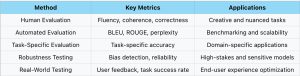
Now we explore common evaluation methods, the key metrics for each, and the scenarios in which they are most effective. Below is the roadmap of this section.
Human Evaluation
Human evaluation involves assessing LLM outputs by users or experts. This approach is particularly useful for creative tasks where subjective judgment matters; and tasks requiring professional backgrounds and only domain experts have the authority to give a reliable evaluation. Human evaluators can rate the fluency, coherence, and correctness of the generated text, helping to assess if the model meets human standards for quality.
Applications: Creative content generation, design, scientific domain, etc.
Automated Evaluation
Automated evaluation uses computational metrics to assess the quality of LLM outputs. These metrics are often used for benchmarking models on standardized tasks, therefore mostly appear in research papers. Automated metrics follow certain mathematical definitions and can quickly process large volumes of data, making them ideal for testing models at scale. Many metrics have been adopted for NLP tasks such as BLEU score in machine translation. We introduce several metrics that have been widely used for evaluation on NLP tasks.
- BLEU (Bilingual Evaluation Understudy)
BLEU compares the n-grams of the generated translation with a reference translation, assigning a score between 0 and 1. Higher BLEU scores indicate that the generated text is closer to the reference.
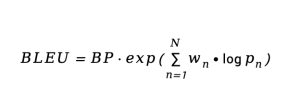
where BP is the brevity penalty, and is the precision of n-grams.
- ROUGE (Recall-Oriented Understudy for Gisting Evaluation)
ROUGE is a set of metrics used for evaluating text summarization and other tasks where generating a relevant summary is the goal. It focuses on recall, measuring how many n-grams in the generated text overlap with the reference. A higher Rouge score shows better performance.
- Perplexity
Perplexity measures how well a probabilistic model predicts a sample. It is commonly used for evaluating language models, indicating how effectively the model predicts the next word/token in a sequence. A lower perplexity value indicates that the model is better at predicting the next token. It’s often used as a proxy for fluency and coherence.

where H (p) is the cross-entropy of the model’s predicted distribution.
Application: machine translation, summarization, question-answering systems, etc.
Task-Specific Evaluation
LLMs have shown potentials on more and more challenging tasks, for which particular metrics should be proposed to evaluate the performance thoroughly. These metrics are directly tied to the model’s ability to solve complicated real-world problems. For example, to evaluate scientific question-answering performance of LLMs, recent research proposed a metric called RACAR, leveraging the power of GPT-4. This metric consists of five dimensions: Relevance, Agnosticism, Completeness, Accuracy and Reasonableness. Indeed, using GPT-4 to design evaluation metrics is happening!
Applications: education, scientific domains, medical diagnosis, legal document analysis.
Robustness Testing
Robustness testing ensures that LLMs can handle edge cases, adversarial inputs, and unexpected conditions. For sensitive applications, this type of testing is critical to avoid disastrous consequences. It also includes bias detection to ensure the model doesn’t make discriminatory decisions based on problematic inputs. Concrete assessment may include: adversarial attack test, fairness test, out-of-distribution test, perturbation test, etc.
Applications: autonomous vehicle, healthcare, high-risk applications
Real-World Testing
Real-world testing involves collecting feedback from terminals (e.g. users) and observing how they interact with the model in practical scenarios. Metrics like user satisfaction, task success, and engagement help developers understand how well the model meets user needs. If the LLMs target human users, then this method is closely entangled with human evaluation. On the other hand, after the LLM system is deployed, the testing should also include system stability, inference latency, resource consumption, etc.
Best Practices and Case Studies
Several companies have successfully improved their LLM performance through extensive testing. We give an example of Claude, an LLM developed by Anthropic, which has improved the performance in the new generation by robustness testing.
In the early stages, Claude 1 showed significant weaknesses in handling adversarial inputs, such as biased queries and subtle misleading prompts. It also struggled with complex, multi-step reasoning tasks. Anthropic conducted extensive robustness testing focusing on bias detection, safety, and accuracy under ambiguity. They tested Claude’s performance using adversarial inputs, ethical dilemma questions, and complex logical problems.
Anthropic fine-tuned Claude 2 using more robust, curated datasets focused on reducing bias and improving long-term reasoning. Consequently, Claude 2 shows a substantial improvement in safety (less likely to produce biased or harmful responses) and logical coherence when handling multi-step or complex reasoning tasks. It also demonstrated better resilience to adversarial inputs, providing more accurate, contextually appropriate answers even when the input was ambiguous or adversarial.
Popular Tools for Testing LLMs
Several tools have emerged to support LLM testing. One notable tool is WhaleFlux.
Other popular LLM testing tools include:
- Hugging Face’s transformers library: Provides easy access to a range of pre-trained models and benchmarking datasets.
- OpenAI’s GPT Evaluation Framework: Allows developers to assess GPT models on various metrics like task completion, creativity, and coherence.
Conclusion
Testing LLMs is an essential step in ensuring that models are accurate, fair, robust, and optimized for user experience. From human evaluations to real-world user feedback, a comprehensive testing strategy is key to addressing the challenges posed by LLMs in practical applications.
We encourage developers to adopt these strategies in their LLM development and testing pipelines, and to continuously iterate on their models based on feedback and testing results. Share your experiences and feedback to contribute to the ongoing improvement of LLMs!