Building a “Knowledge Base” It Can Actually Use
In the race to deploy powerful AI, many organizations focus overwhelmingly on model selection—scouring the latest benchmarks for the largest, most sophisticated large language model (LLM). Yet, even the most advanced model, when deployed in isolation, often disappoints. It hallucinates facts, struggles with domain-specific queries, and fails to leverage the organization’s most valuable asset: its proprietary data. The true differentiator isn’t just the model itself; it’s the specialized knowledge base you build for it.
Think of your AI as an immensely talented but generalist new hire. Without access to the company drive, past project reports, customer feedback logs, and technical manuals, its usefulness is severely limited. A knowledge base equips your AI with this context, transforming it from a generic chatterbox into a precise, informed, and reliable expert tailored to your business.
But building a knowledge base your AI can actually use—one that consistently delivers accurate, relevant, and actionable insights—is a significant engineering challenge. It’s more than just dumping documents into a folder. It requires a strategic architecture designed for machine understanding, seamless integration, and scalable performance.
The “Why”: Beyond the Hype of Raw Model Power
Why is a knowledge base non-negotiable?
Curbing Hallucinations:
LLMs are probabilistic pattern generators. Without grounded, verifiable sources, they confidently invent answers. A knowledge base provides the “source of truth” that the model can retrieve from, citing real documents and data, thereby dramatically improving accuracy and trustworthiness.
Enabling Domain Expertise:
Your competitive edge lies in what you know that others don’t. A knowledge base infused with your proprietary research, product specs, and internal processes allows your AI to operate at expert levels in your niche.
Dynamic Information Access:
Unlike static, fine-tuned models that become outdated, a well-architected knowledge base can be updated in near real-time. New pricing sheets, updated regulations, or the latest support tickets can be made instantly available to the AI.
Cost and Efficiency:
Constantly retraining or fine-tuning massive models on new data is prohibitively expensive and slow. A retrieval-augmented generation (RAG) approach, which pairs a model with a dynamic knowledge base, is a far more agile and cost-effective way to keep your AI current.
The “How”: Blueprint for an Actionable Knowledge Base
Building an effective system involves several key pillars:
1. Ingestion & Processing: From Chaos to Structure
This is the foundational step. You must gather data from all relevant sources: PDFs, Word docs, Confluence pages, Salesforce records, database exports, and even structured data from APIs. The magic happens in processing: chunking text into semantically meaningful pieces, extracting metadata (source, author, date), and converting everything into a unified format. The goal is to break down information silos and create a normalized pool of “knowledge chunks.”
2. Vectorization & Embedding: The Language of AI
For an AI to “understand” and retrieve text, it needs a numerical representation. This is where embedding models come in. Each text chunk is converted into a high-dimensional vector (a list of numbers) that captures its semantic meaning. Sentences about “quarterly sales targets” and “Q3 revenue goals” will have vectors that are mathematically close to each other in this “vector space,” even if the wording differs.
3. The Vector Database: The AI’s Memory Core
These vectors are stored in a specialized database optimized for similarity search—the vector database. When a user asks a question, that query is also vectorized. The database performs a lightning-fast search to find the stored vectors (knowledge chunks) that are most semantically similar to the query. This is the core retrieval mechanism.
4. Retrieval Augmented Generation (RAG): The Intelligent Synthesis
In a RAG pipeline, the retrieved relevant chunks are not the final answer. They are passed as context, along with the original user query, to the LLM (e.g., an OpenAI model or an open-source Llama 2/3 variant running in-house). The system instructs the model: “Using only the following context, answer the question…” The LLM then synthesizes a coherent, natural-language answer grounded in the provided sources. This combines the precision of retrieval with the linguistic fluency of generation.
5. Infrastructure: The Often-Overlooked Engine
This entire pipeline—running embedding models, querying vector databases, and hosting the inference engine for the LLM—demands serious, scalable computational power, particularly from GPUs. The embedding and inference stages are intensely parallelizable tasks that run orders of magnitude faster on GPUs. However, managing a multi-GPU cluster efficiently is a major operational hurdle. Under-provision, and your knowledge base responds sluggishly, crippling user experience. Over-provision, and you hemorrhage money on idle cloud GPUs. The stability of your GPU resources directly impacts the reliability and speed of your AI’s access to its knowledge.
Here is where a specialized tool can become a secret weapon in its own right. ConsiderWhaleFlux, a smart GPU resource management platform designed for AI enterprises. WhaleFlux optimizes the utilization of multi-GPU clusters, ensuring that the computational heavy-lifting behind your knowledge base—from embedding generation to LLM inference—runs efficiently and stably. By dynamically managing workloads across a fleet of NVIDIA GPUs (including the H100, H200, A100, and RTX 4090), it helps drastically reduce cloud costs while accelerating deployment cycles. WhaleFlux is more than just GPU management; it’s an integrated platform that also provides AI Model services, Agent frameworks, and Observability tools, offering a cohesive environment to build, deploy, and monitor sophisticated AI applications like a RAG-powered knowledge base. For companies needing tailored solutions, WhaleFlux further offers customized AI services, providing the flexible, powerful infrastructure foundation that makes advanced AI projects practically and economically viable.
6. Continuous Iteration: The Feedback Loop
Launching is just the beginning. You need observability tools to monitor: What queries are failing? Which retrieved documents are rated as helpful? Where is the model still hallucinating? This feedback loop is essential for curating your knowledge base, refining chunking strategies, and improving overall system performance.
Best Practices for Success
- Start with a High-Value, Contained Domain: Don’t boil the ocean. Begin with a specific department’s knowledge (e.g., HR policies or product support) to prove value and iterate.
- Prioritize Data Quality: Garbage in, garbage out. Clean, well-structured source documents yield vastly better results than messy scans or inconsistent formats.
- Implement Robust Access Controls: Your knowledge base will contain sensitive information. The retrieval system must respect user permissions, ensuring individuals only access chunks they are authorized to see.
- Cite Your Sources: Always design your AI’s responses to explicitly reference the documents it used. This builds user trust and allows for easy verification.
Conclusion
Your AI’s ultimate capability is not determined solely by the model you license, but by the quality, architecture, and accessibility of the knowledge you connect it to. Building a dynamic, well-engineered knowledge base moves AI from a fascinating experiment to a core operational asset. It turns generic intelligence into proprietary expertise. By combining a strategic RAG architecture with a powerful and efficiently managed infrastructure—the kind that platforms like WhaleFlux enable—you provide your AI with the secret weapon it needs to truly deliver on its transformative promise. The future belongs not to the organizations with the biggest AI models, but to those who can most effectively teach their AI what they know.
FAQs: Building an AI-Powered Knowledge Base
Q1: What’s the main difference between fine-tuning an LLM and using a RAG (Retrieval-Augmented Generation) system with a knowledge base?
A: Fine-tuning adjusts the model’s internal weights on a specific dataset, making it better at a style or domain but “locking in” knowledge at the time of training. It’s expensive to update. RAG keeps the general model unchanged but dynamically retrieves relevant information from an external knowledge base for each query. This allows for real-time updates, provides source citations, and is generally more cost-effective for leveraging proprietary data.
Q2: We have terabytes of documents. Is building a knowledge base too expensive and complex?
A: The complexity and cost are front-loaded in the design and infrastructure phase. Start with a focused, high-ROI subset of data to validate the pipeline. The long-term operational cost, especially using an efficient RAG approach, is typically much lower than constantly fine-tuning large models. Strategic use of GPU resources, managed through platforms like WhaleFlux, is key to controlling inference costs and ensuring scalable performance as your knowledge base grows.
Q3: Can the knowledge base handle highly structured data (like databases) alongside unstructured documents?
A: Absolutely. A robust knowledge base architecture can ingest both. Structured data from SQL databases or APIs can be converted into descriptive text chunks (e.g., “Customer [ID] purchased [Product] on [Date]”). When vectorized, this allows the AI to answer precise, data-driven questions by retrieving these structured facts, seamlessly blending them with insights from PDFs or wikis.
Q4: What kind of GPUs are necessary for running a private knowledge base system, and is buying or renting better?
A: The requirement depends on the scale of your knowledge base, user concurrency, and the size of the LLM used for inference. For production systems, NVIDIA GPUs like the A100 or H100 are common for their memory bandwidth and parallel processing power. The buy-vs-rent decision hinges on long-term usage patterns and capital expenditure strategy. Some integrated platforms offer flexible models. For instance, WhaleFlux provides access to a full suite of NVIDIA GPUs (including H100, H200, A100, and RTX 4090), allowing enterprises to procure or lease resources according to their specific needs, providing a middle path that prioritizes efficiency and control.
Q5: How does a tool like WhaleFlux specifically help a knowledge base project?
A: WhaleFlux addresses the critical infrastructure layer. It ensures that the GPU-intensive components of the knowledge base pipeline—embedding models and the LLM inference engine—run on optimally utilized, cost-effective NVIDIA GPU clusters. This directly translates to faster query response times, higher system stability under load, and lower cloud compute bills. Furthermore, as an integrated platform offering AI observability, it provides crucial monitoring tools to track the performance and accuracy of your knowledge base retrievals, creating a complete environment for development and deployment.
WhaleFlux Signals a Shift Toward Architecting Enterprise AI Systems as Enterprise AI Enters a New Phase in 2026
SAN FRANCISCO, Jan. 21, 2026 /PRNewswire/ — As enterprise AI adoption moves beyond experimentation and into production, the industry is entering a new phase where system reliability, governance, and long-term operability matter more than model performance alone. WhaleFlux today announced its positioning as an AI system builder, reflecting a broader shift in how organizations deploy AI at scale.
Over the past decade, rapid advances in foundation models have driven widespread AI experimentation. However, many enterprises now face a different bottleneck: building AI systems that can operate continuously within real-world constraints such as compliance, cost control, and operational stability. As a result, the focus is shifting from developing better models to engineering better systems.
From Model-Centric AI to System-Centric AI
WhaleFlux began as a GPU infrastructure management company and initiated a strategic expansion in early 2025 to address this emerging gap. Rather than focusing on standalone tools or individual models, the company has developed a system-level platform designed for long-running, workflow-oriented enterprise AI.
“At scale, AI systems fail not because models are weak, but because systems are fragile,” said Jolie Li, COO of WhaleFlux. “The challenge is no longer model development — it’s system engineering.”
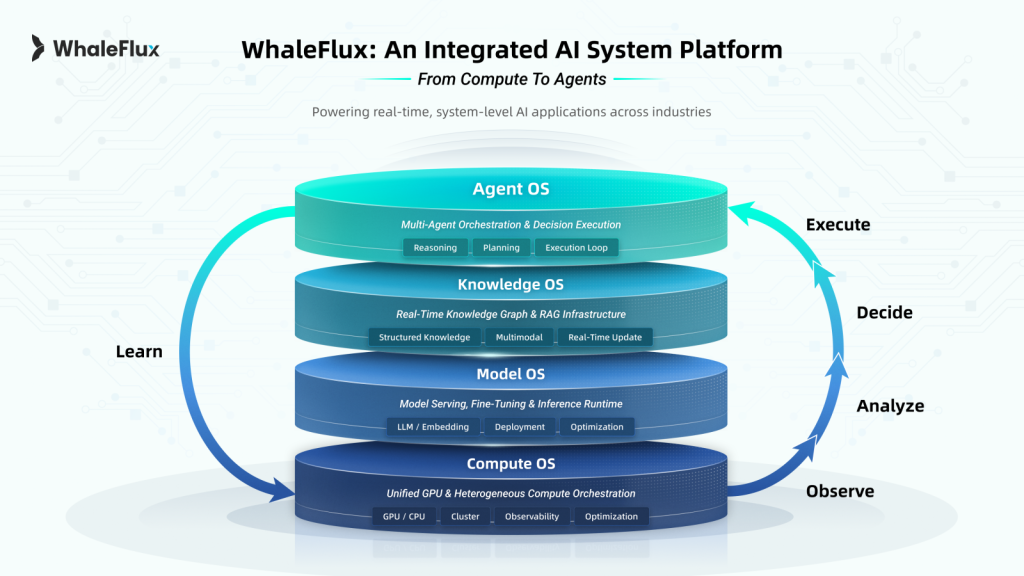
To support this transition, WhaleFlux consolidated its platform into a unified Compute–Model–Knowledge–Agent architecture, designed to provide enterprises with a stable foundation for production AI.
- Compute Layer — An autonomous scheduling and management engine for private GPU environments, enabling predictable performance, cost efficiency, and operational visibility across heterogeneous hardware.
- Model Layer — An optimized runtime environment for model serving, fine-tuning, and inference, ensuring the scalable deployment and optimization of LLMs and embeddings.
- Knowledge Layer — A secure enterprise knowledge foundation combining Retrieval-Augmented Generation (RAG) with structured access control, allowing AI agents to reason over private data while maintaining strict governance.
- Agent Layer — A workflow orchestration engine that enables multi-step, policy-aware execution, ensuring AI agents operate within predefined operational and compliance boundaries.
Together, these layers support AI workflows that are traceable, controllable, and designed to run reliably over time.
Validated in High-Stakes Industry Environments
Throughout 2025, WhaleFlux deployed its system architecture across regulated and mission-critical settings. In finance, institutional teams used on-premise AI agents for strategy evaluation and risk analysis while keeping sensitive data within private infrastructure. In healthcare, research institutions adopted federated learning workflows to enable collaborative pathology research without transferring patient data. In manufacturing, industrial producers applied AI-assisted modeling to complex chemical and reaction environments, improving visibility where traditional sensing methods are limited.
These deployments reflect growing demand for AI systems designed to operate under real-world constraints rather than controlled laboratory conditions. WhaleFlux also shared system-level insights at global industry events including NVIDIA GTC and GITEX Global.
Looking Ahead
As enterprises enter 2026, WhaleFlux expects AI adoption to increasingly shift toward agent-driven, workflow-oriented systems composed of multiple coordinated components. The company positions itself as an AI system builder, providing the architectural foundation enterprises use to design, deploy, and govern AI systems over time.
About WhaleFlux
Headquartered in San Francisco, WhaleFlux builds system platforms for enterprise AI environments. By integrating GPU compute scheduling, private knowledge management, and intelligent agent orchestration, WhaleFlux helps organizations transform AI capabilities into stable, production-ready systems.
For more information, visit www.whaleflux.com or follow us on LinkedIn
Media Contact
Niki Yan
Head of Marketing, WhaleFlux
Email: niki@whaleflux.com
Website: www.whaleflux.com
Beyond Generic Answers: Connect ChatGPT to Your Own Knowledge Base
Have you ever pushed ChatGPT to its limits, asking for insights on your latest proprietary research, details from an internal company handbook, or analysis of a confidential project report, only to be met with a polite deflection or a confident-sounding fabrication? This universal frustration highlights the core boundary of public large language models: their knowledge is vast but generic, static, and utterly separate from the private, dynamic, and specialized information that powers your business.
The promise of AI is not just in conversing about publicly available facts but in amplifying our unique expertise. The critical question for businesses today is no longer if they should use AI, but how to make it meaningfully interact with their most valuable asset: their internal knowledge. The solution lies in moving beyond the generic chat interface and connecting a powerful language model like ChatGPT directly to your own knowledge base.
This process transforms AI from a brilliant generalist into a specialized, in-house expert. Imagine a customer support agent that instantly references the latest product spec sheets and resolved tickets, a legal assistant that cross-references thousands of past contracts in seconds, or a research analyst that synthesizes findings from decades of internal reports. This is not science fiction; it’s an achievable architecture powered by a paradigm called Retrieval-Augmented Generation (RAG).
Why “Just ChatGPT” Isn’t Enough for Business
ChatGPT, in its standard form, operates as a closed system. Its knowledge is frozen in time at its last training data cut-off. This presents several insurmountable hurdles for professional use:
The Knowledge Cut-Off:
It is unaware of events, data, or documents created after its training period. Your 2023 annual report or Q1 2024 strategy document simply do not exist to it.
The Hallucination Problem:
When asked about unfamiliar topics, LLMs may “confabulate” plausible yet incorrect information. In a business context, an invented financial figure or product feature is not just unhelpful—it’s dangerous.
Lack of Source Verification:
You cannot ask it to “show its work.” There are no citations, footnotes, or links back to original source material, which is essential for auditability, compliance, and trust.
Data Privacy & Security:
Sending sensitive internal data directly into a public API poses significant confidentiality risks. Your proprietary information should not become part of a model’s latent training data.
Simply put, asking a generic AI about your specific business is like asking a world-renowned chef to prepare a gourmet meal… but locking them out of your kitchen and pantry. You need to let them in.
The Bridge: How to Connect ChatGPT to Your Data
The technical architecture to build this bridge is elegant and has become the industry standard for building knowledgeable AI assistants. It revolves around RAG. Here’s a breakdown of how it works, translating the technical process into a clear, step-by-step workflow.
Step 1: Building Your Digital Library (Indexing)
Before any question can be answered, your unstructured knowledge—PDFs, Word docs, Confluence pages, database entries, Slack histories—must be organized into a query-ready format.
Chunking:
Documents are broken down into semantically meaningful pieces (e.g., paragraphs or sections). This is crucial; you can’t search a 100-page manual as a single block.
Embedding:
Each text chunk is passed through an embedding model (like OpenAI’s own text-embedding-ada-002), which converts it into a high-dimensional vector. This vector is a numerical representation of the chunk’s semantic meaning. Think of it as creating a unique DNA fingerprint for the idea contained in the text.
Storage:
These vectors, alongside the original text, are stored in a specialized vector database(e.g., Pinecone, Weaviate, or pgvector). This database is engineered for one task: lightning-fast similarity search.
Step 2: The Intelligent Look-Up (Retrieval)
When a user asks your custom AI a question (e.g., “What was the Q3 outcome for Project Phoenix?”), the following happens in milliseconds:
- The user’s query is instantly converted into a vector using the same embedding model.
- This query vector is sent to the vector database with an instruction: “Find the K (e.g., 5) most semantically similar vectors to this one.”
- The database performs a nearest neighbor search and returns the text chunks whose vector “fingerprints” are closest to the question’s fingerprint—the most relevant passages from your entire corpus.
Step 3: The Informed Answer (Augmented Generation)
Here is where ChatGPT (or a similar LLM) finally enters the picture, but now it’s fully briefed. The retrieved relevant text chunks are packaged into a enhanced prompt:
Answer the user’s question based solely on the following context.
If the answer cannot be found in the context, state clearly that you do not have that information.
Context:
{Retrieved Text Chunk 1}
{Retrieved Text Chunk 2}
…
Question: {User’s Original Question}
This prompt is sent to the LLM. The model, now “augmented” with the retrieved context, generates a coherent, accurate answer that is directly grounded in your provided sources. The output can be designed to include citations (e.g., [Source 2]), creating full traceability.
The Infrastructure Imperative: It’s More Than Just Code
Building a robust, production-ready RAG system is a software challenge intertwined with a significant computational infrastructure challenge. The performance of the embedding model and the final LLM (like GPT-4) is critical to user experience. Slow retrieval or sluggish generation kills adoption.
This is where strategic GPU resource management becomes a core business differentiator, not an IT afterthought. Running high-throughput embedding models and large language models concurrently demands predictable, high-performance parallel computing. This typically requires dedicated access to powerful NVIDIA GPUs like the H100, A100, or RTX 4090 to ensure low-latency responses, especially under concurrent user loads.
However, simply provisioning GPUs is where costs can spiral and complexity blooms. Managing a cluster, optimizing utilization across the different stages of the RAG pipeline (embedding vs. LLM inference), ensuring stability, and controlling cloud spend are massive operational overheads for an AI engineering team.
This operational complexity is the exact problem WhaleFlux is designed to solve. WhaleFlux is an intelligent, all-in-one AI infrastructure platform that allows enterprises to move from experimental RAG prototypes to stable, scalable, and cost-efficient production deployments. By providing optimized management of multi-GPU clusters (featuring the full spectrum of NVIDIA GPUs, from the flagship H100 and H200 to the cost-effective A100 and RTX 4090), WhaleFlux ensures that the computational heart of your custom knowledge AI beats reliably. Its integrated suite—encompassing GPU Management, AI Model deployment, AI Agent orchestration, and AI Observability—means the entire pipeline can be monitored and tuned from a single pane of glass. For businesses looking to build a proprietary advantage, WhaleFlux also offers custom AI servicesto tailor the entire stack to specific needs, providing not just the tools but the expert partnership to deploy a knowledge-connected ChatGPT that truly reflects the unique intellectual capital of the organization.
Real-World Blueprints: What This Enables
This architecture unlocks transformative applications across every department:
Onboarding & HR:
A 24/7 assistant that answers questions about vacation policy, benefits, and IT setup, directly from the latest internal guides.
Enterprise Search:
A natural-language search engine across all internal wikis, documentation, and meeting notes. “Find all discussions about the Singapore market entry from last year.”
Customer Support:
Agents that have instant, cited access to the latest troubleshooting guides, product manuals, and engineering change logs.
Consulting & Legal:
Analysts who can instantly synthesize insights from a curated database of past client reports, case law, or regulatory filings.
Conclusion: From Generic Tool to Proprietary Partner
Connecting ChatGPT to your knowledge base is the definitive step from using AI as a novelty to embedding it as a core competency. It closes the gap between the model’s generalized intelligence and your organization’s specific wisdom. The technology stack—centered on RAG—is mature and accessible. The true differentiator for execution is no longer just the algorithm, but the ability to deploy and maintain the high-performance, scalable infrastructure it requires. By building this bridge, you stop asking generic questions and start building a proprietary intelligence that works for you.
FAQ: Connecting ChatGPT to Your Knowledge Base
Q1: What’s the difference between connecting ChatGPT via RAG and fine-tuning it on our data?
They serve different purposes. Fine-tuning adjusts the model’s internal weights to excel at a specific style or task format (e.g., writing emails in your company’s tone). RAG (Retrieval-Augmented Generation) provides the model with external, factual knowledge at the moment of query to answer specific content-based questions. For knowledge base access, RAG is preferred as it’s more dynamic (easy to update knowledge), traceable (provides sources), and avoids the risk of the model internalizing and potentially leaking sensitive data.
Q2: Is our data safe if we build this system?
With a properly architected private RAG system, your data remains under your control. Your documents are indexed in your own vector database (hosted on your cloud or private servers). The LLM (ChatGPT API or a self-hosted model) only receives relevant text chunks at query time and does not permanently store or use them for training. Choosing an infrastructure partner like WhaleFlux, which emphasizes secure, dedicated NVIDIA GPU clusters and private deployment models, further ensures your data never leaves your governed environment.
Q3: How complex and resource-intensive is it to build and run this in production?
The initial prototype can be built relatively quickly with modern frameworks. However, moving to a low-latency, high-availability production system is complex. It involves managing multiple services (embedding models, vector databases, LLMs), optimizing for speed and accuracy (“chunking” strategy, query routing), and scaling infrastructure. This requires significant NVIDIA GPU resources for inference. Platforms like WhaleFlux dramatically reduce this operational burden by providing a unified platform for GPU management, model deployment, and observability, turning infrastructure complexity into a managed service.
Q4: Can we use a model other than ChatGPT for the generation step?
Absolutely. While the article uses “ChatGPT” as a familiar example, the RAG architecture is model-agnostic. You can use the OpenAI GPT API, Anthropic’s Claude, or powerful open-source models like Meta’s Llama 3 or Mistral AI‘s models. The choice depends on factors like cost, latency, data privacy requirements, and desired performance. A platform like WhaleFlux is particularly valuable here, as its AI Model service simplifies the deployment and scaling of whichever LLM you choose on optimal NVIDIA GPU hardware.
Q5: We want to start with a pilot. What’s the first step, and how can WhaleFlux help?
Start by identifying a contained, high-value knowledge domain (e.g., your product FAQ or a specific department’s manual). The first steps are to gather those documents and prototype the RAG pipeline. WhaleFlux can accelerate this by providing immediate, hassle-free access to the right NVIDIA GPU resources (through rental or purchase plans) needed for development and testing. Their team can then help you design a scalable architecture and, using their custom AI services, assist in moving from a successful pilot to a full-scale, enterprise-wide deployment, managing the entire infrastructure lifecycle.
RAG Explained Simply: How AI “Looks Up” Answers in Your Documents
Have you ever asked a large language model (LLM) a question about a specific topic—like your company’s latest internal project report or a dense, 200-page technical manual—only to receive a confident-sounding but completely made-up answer? This common frustration, often called an “AI hallucination,” happens because models like ChatGPT are designed to generate fluent text based on their vast, static training data. They aren’t built to know your private, new, or specialized information.
But what if you could give an AI the ability to “look up” information in real-time, just like a skilled researcher would scan through a library of trusted documents before answering your question?
Enter Retrieval-Augmented Generation, or RAG. It’s a powerful architectural framework that is revolutionizing how businesses deploy accurate, trustworthy, and cost-effective AI. In simple terms, RAG gives an AI model a “search engine” and a “working memory” filled with your specific data, allowing it to ground its answers in factual sources.
The Librarian Analogy: From Black Box to Research Assistant
Imagine a traditional LLM as a brilliant, eloquent scholar who has memorized an enormous but fixed set of encyclopedias up to a certain date. Ask them about general knowledge, and they excel. Ask them about yesterday’s news, your company’s Q4 financials, or the details of an obscure academic paper, and they must guess or fabricate based on outdated or incomplete memory.
Now, imagine you pair this scholar with a lightning-fast, meticulous librarian. Your role is simple: you ask a question. The librarian (the retrieval system) immediately sprints into a vast, private archive of your choosing—your documents, databases, manuals, emails—and fetches the most relevant pages or passages. They hand these pages to the scholar (the generation model), who now synthesizes the provided information into a clear, coherent, and—crucially—source-based answer.
That is RAG in a nutshell. It decouples the model’s knowledge from its reasoning, breaking the problem into two efficient steps: first, find the right information; second, use it to formulate the perfect response.
Why RAG? The Limitations of “Vanilla” LLMs
To appreciate RAG’s value, we must understand the core challenges of standalone LLMs:
Static Knowledge:
Their world ends at their last training cut-off. They are unaware of recent events, new products, or your private data.
Hallucinations:
When operating outside their trained domain, they tend to “confabulate” plausible but incorrect information, a critical risk for businesses.
Lack of Traceability:
You cannot easily verify why an LLM gave a particular answer, posing audit and compliance challenges.
High Cost of Specialization:
Continuously re-training or fine-tuning a giant model on new data is computationally prohibitive, slow, and expensive for most organizations.
RAG elegantly solves these issues by making the model’s source material dynamic, verifiable, and separate from its core parameters.
How RAG Works: A Three-Act Play
Deploying a RAG system involves three continuous stages: Indexing, Retrieval, and Generation.
Act 1: Indexing – Building the Knowledge Library
This is the crucial preparatory phase. Your raw documents (PDFs, Word docs, web pages, database entries) are processed into a searchable format.
- Chunking: Documents are split into manageable “chunks” (e.g., paragraphs or sections). Getting the chunk size right is an art—too small loses context, too large dilutes relevance.
- Embedding: Each text chunk is converted into a numerical representation called a vector embedding. This is done using an embedding model, which encodes semantic meaning into a long list of numbers (a vector). Think of it as creating a unique “fingerprint” for the idea expressed in that text. Semantically similar chunks will have similar vector fingerprints.
- Storage: These vectors, along with their original text, are stored in a specialized database called a vector database. This database is optimized for one thing: finding the closest vector matches to a given query at incredible speed.
Act 2: Retrieval – The Librarian’s Sprint
When a user asks a question:
- The user’s query is instantly converted into its own vector embedding using the same model from the indexing phase.
- This query vector is sent to the vector database with a command: “Find the ‘K’ most similar vectors to this one.” This is typically done via a mathematical operation called nearest neighbor search.
- The database returns the text chunks whose vectors are closest to the query vector—the most semantically relevant passages from your entire library.
Act 3: Generation – The Scholar’s Synthesis
The retrieved relevant chunks are now packaged together with the original user query and fed into the LLM (like GPT-4 or an open-source model like Llama 3) as a prompt. The prompt essentially instructs the model: “Based only on the following context information, answer the question. If the answer isn’t in the context, say so.”
The LLM then generates a fluent, natural-language answer that is directly grounded in the provided sources. The final output can often include citations, allowing users to click back to the original document.
The Tangible Benefits: Why Businesses Are Racing to Adopt RAG
Accuracy & Reduced Hallucinations:
Answers are tied to source documents, dramatically lowering the rate of fabrication.
Dynamic Knowledge:
Update your AI’s knowledge by simply adding new documents to the vector database—no model retraining required.
Transparency & Trust:
Source citations build user trust and enable fact-checking, which is vital for legal, medical, or financial applications.
Cost-Effectiveness:
It’s far more efficient to update a vector database than to retrain a multi-billion parameter LLM. It also allows you to use smaller, faster models effectively, as you provide them with the necessary specialized knowledge.
Security & Control:
Knowledge remains in your controlled database. You can govern access, redact sensitive chunks, and audit exactly what information was used in a response.
Where RAG Shines: Real-World Applications
RAG is not a theoretical concept; it’s powering real products and services today:
- Enterprise Chatbots: Internal assistants that answer questions about HR policies, software documentation, or project histories.
- Customer Support: Agents that pull answers from product manuals, knowledge bases, and past support tickets to resolve issues instantly.
- Legal & Compliance: Tools that help lawyers search through case law, contracts, and regulations in natural language.
- Research & Development: Accelerating literature reviews by querying across thousands of academic papers and technical reports.
Powering the RAG Engine: The Critical Role of GPU Infrastructure
A RAG system’s performance—its speed, scalability, and reliability—hinges on robust computational infrastructure. The two most demanding stages are embedding generation and LLM inference.
Creating high-quality vector embeddings for millions of document chunks and running low-latency inference with a powerful LLM are both computationally intensive tasks that require potent, parallel processing power. This is where access to dedicated, high-performance NVIDIA GPUs becomes a strategic advantage, not just a technical detail. The parallel architecture of GPUs like the NVIDIA H100, A100, or even the powerful RTX 4090 is perfectly suited for the matrix operations at the heart of AI inference and embedding generation.
However, for an enterprise running mission-critical RAG applications, simply having GPUs isn’t enough. They need to be managed, optimized, and scaled efficiently. This is precisely the challenge that WhaleFlux is designed to solve.
WhaleFlux is an intelligent GPU resource management platform built for AI-driven enterprises. It goes beyond basic provisioning to optimize the utilization of multi-GPU clusters, ensuring that the computational engines powering your RAG system—from embedding models to large language models—run at peak efficiency. By dynamically allocating and managing NVIDIA GPU resources (including the latest H100, H200, and A100 series), WhaleFlux helps businesses significantly reduce cloud costs while dramatically improving the deployment speed and stability of their AI applications. For a complex, multi-component system like a RAG pipeline—which might involve separate models for retrieval and generation running concurrently—WhaleFlux’s ability to orchestrate and monitor these workloads across a unified platform is invaluable. It provides the essential infrastructure layer that turns powerful GPU hardware into a reliable, scalable, and cost-effective AI factory.
Related FAQs
1. Do I always need a vector database to build a RAG system?
While a vector database is the standard and most efficient tool for the retrieval stage due to its optimized similarity search capabilities, it is technically possible to use other methods (like keyword search with BM25) for simpler applications. However, for any system requiring semantic understanding—where a query like “strategies for reducing customer turnover” should match documents discussing “client retention tactics”—a vector database is the industry-standard and recommended choice.
2. How is RAG different from fine-tuning an LLM on my documents?
They are complementary but distinct approaches. Fine-tuning retrains the model’s internal weights to change its behavior and style, making it better at a specific task (like writing in your brand’s tone). RAG provides the model with external, factual knowledge at the time of query. The best practice is often to use RAG for accurate, source-grounded knowledge and combine it with a fine-tuned model for perfect formatting and tone.
3. What are the main challenges in implementing a production RAG system?
Key challenges include: Chunking Strategy (finding the optimal document split for preserving context), Retrieval Quality (ensuring the system retrieves the most relevant and complete information, handling multi-hop queries), and Latency (managing the combined speed of retrieval and generation to keep user wait times low). This last challenge is where GPU performance and management platforms like WhaleFlux become critical, as they directly impact the inference speed and overall responsiveness of the system.
4. How can WhaleFlux specifically help with deploying and running a RAG application?
WhaleFlux provides the integrated infrastructure backbone for the demanding components of a RAG pipeline. Its AI Model service can streamline the deployment and scaling of both the embedding model and the final LLM. Its GPU management core ensures these models have dedicated, optimized access to NVIDIA GPU resources (like H100 or A100 clusters) for fast inference. Furthermore, AI Observability tools allow teams to monitor the performance, cost, and health of each stage (retrieval and generation) in real-time, identifying bottlenecks and ensuring reliability. For complex deployments, WhaleFlux’s support for custom AI services means the entire RAG pipeline can be packaged and managed as a unified, scalable application.
5. We’re considering building a proof-of-concept RAG system. What’s the first step with WhaleFlux?
The first step is to define your performance requirements and scale. Contact the WhaleFlux team to discuss your projected needs: the volume of documents to index, the expected query traffic, and your choice of LLM. WhaleFlux will then help you select and provision the right mix of NVIDIA GPU resources (from the H100 for massive-scale deployment to cost-effective RTX 4090s for development) on a rental plan that matches your project timeline. Their platform simplifies the infrastructure setup, allowing your data science and engineering teams to focus on perfecting the RAG logic—chunking, prompt engineering, and evaluation—rather than managing servers and clusters.
From Data to Dialogue: Turning Static Files into an Interactive Knowledge Base with RAG
Imagine this: a new employee, tasked with preparing a compliance report, spends hours digging through shared drives, sifting through hundreds of PDFs named policy_v2_final_new.pdf, and nervously cross-referencing outdated wiki pages. Across the office, a seasoned customer support agent scrambles to find the latest technical specification to answer a client’s urgent query, bouncing between four different databases.
This chaotic scramble for information is the daily reality in countless organizations. Companies today are data-rich but insight-poor. Their most valuable knowledge—product manuals, internal processes, research reports, meeting notes—lies trapped in static files, inert and inaccessible. Traditional keyword-based search fails because it doesn’t understand context or meaning; it only finds documents that contain the exact words you typed.
The solution is not more documents or better filing systems. It’s a fundamental transformation: turning that passive archive into an interactive, conversational knowledge base. This shift is powered by a revolutionary AI architecture called Retrieval-Augmented Generation (RAG). In essence, RAG provides a bridge between your proprietary data and the powerful reasoning capabilities of large language models (LLMs). It doesn’t just store information; it understands it, reasons with it, and delivers it through natural dialogue.
This article will guide you through the journey from static data to dynamic dialogue. We’ll demystify how RAG works, explore its transformative benefits, and examine how integrated platforms are making this powerful technology accessible for every enterprise.
The Problem with the “Static” in Static Files
Traditional knowledge management systems are built on a paradigm of storage and recall. Data is organized in folders, tagged with metadata, and retrieved via keyword matching. This approach has critical flaws in the modern workplace:
Lack of Semantic Understanding:
Searching for “mitigating financial risk” won’t find a document that discusses “hedging strategies” unless those exact keywords are present.
No Synthesis or Summarization:
The system returns a list of documents, not an answer. The cognitive burden of reading, comparing, and synthesizing information remains entirely on the human user.
The “Hallucination” Problem with Raw LLMs:
One might think to simply feed all documents to a public LLM like ChatGPT. However, these models have no inherent knowledge of your private data and are prone to inventing plausible-sounding but incorrect information when asked about it—a phenomenon known as “hallucination”.
How RAG Brings Your Data to Life: A Three-Act Process
RAG solves these issues by creating a smart, two-step conversation between your data and an AI model. Think of it as giving the LLM a super-powered, instantaneous research assistant that only consults your approved sources.
Act 1: The Intelligent Librarian (Retrieval)
When you ask a question—”What’s the process for approving a vendor contract over $50k?”—the RAG system doesn’t guess. First, it transforms your question into a mathematical representation (a vector embedding) that captures its semantic meaning. It then instantly searches a pre-processed vector database of your company documents to find text chunks with the most similar meanings. This isn’t keyword search; it’s semantic search. It can find relevant passages even if they use different terminology.
Act 2: The Contextual Briefing (Augmentation)
The most relevant retrieved text chunks are then packaged together. This curated, factual context is what “augments” the next step. It ensures the AI’s response is grounded in your actual documentation.
Act 3: The Expert Communicator (Generation)
Finally, this context is fed to an LLM alongside your original question, with a critical instruction: “Answer the question based solely on the provided context.” The LLM then synthesizes a clear, concise, and natural language answer, citing the source documents. This process dramatically reduces hallucinations and ensures the output is accurate, relevant, and trustworthy.
Table: The RAG Pipeline vs. Traditional Search
| Aspect | Traditional Keyword Search | RAG-Powered Knowledge Base |
| Core Function | Finds documents containing specific words. | Understands questions and generates answers based on meaning. |
| Output | A list of links or files for the user to review. | A synthesized, conversational answer with source citations. |
| Knowledge Scope | Limited to pre-indexed keywords and tags. | Dynamically leverages the entire semantic content of all uploaded documents. |
| User Effort | High (must manually review results). | Low (receives a direct answer). |
| Accuracy for Complex Queries | Low (misses conceptual connections). | High (understands context and intent). |
Beyond Basic Q&A: The Evolving Power of RAG
The core RAG pattern is just the beginning. Advanced implementations are solving even more complex challenges:
Handling Multi-Modal Data:
Next-generation systems can process and reason across not just text, but also tables, charts, and images within documents, creating a truly comprehensive knowledge base.
Multi-Hop Reasoning:
For complex questions, advanced RAG frameworks can perform “multi-hop” retrieval. They break down a question into sub-questions, retrieve information for each step, and logically combine them to arrive at a final answer.
From Knowledge Graph to “GraphRAG”:
Some of the most effective systems now combine vector search with knowledge graphs. These graphs explicitly model the relationships between entities (e.g., “Product A uses Component B manufactured by Supplier C”). This allows for breathtakingly precise reasoning about connections within the data, moving beyond text similarity to true logical inference.
The Engine for Dialogue: Infrastructure Matters
Creating a responsive, reliable, and scalable interactive knowledge base is not just a software challenge—it’s an infrastructure challenge. The RAG pipeline, especially when using powerful LLMs, is computationally intensive. This is where a specialized AI infrastructure platform becomes critical.
Consider WhaleFlux, a platform designed specifically for enterprises embarking on this AI journey. WhaleFlux addresses the core infrastructure hurdles that can slow down or derail a RAG project:
Unified AI Service Platform:
WhaleFlux integrates the essential pillars for deployment: intelligent GPU resource management, model serving, AI agent orchestration, and observability tools. This eliminates the need to stitch together disparate tools from different vendors.
Optimized Performance & Cost:
At its core, WhaleFlux is a smart GPU resource management tool. It optimizes utilization across clusters of NVIDIA GPUs (including the H100, H200, A100, and RTX 4090 series), ensuring your RAG system has the compute power it needs for fast inference without over-provisioning and wasting resources. This directly lowers cloud costs while improving the speed and stability of model deployments.
Simplified Lifecycle Management:
From deploying and fine-tuning your chosen AI model (whether open-source or proprietary) to building sophisticated AI agents that leverage your new knowledge base, WhaleFlux provides a cohesive environment. Its observability suite is crucial for monitoring accuracy, tracking which documents are being retrieved, and ensuring the system performs reliably at scale.
From Concept to Conversation: Getting Started
Transforming your static files into a dynamic knowledge asset may seem daunting, but a practical, phased approach makes it manageable:
1. Start with a High-Value, Contained Use Case:
Don’t boil the ocean. Choose a specific team (e.g., HR, IT support) or a critical document set (e.g., product compliance manuals) for your pilot.
2. Curate and Prepare Your Knowledge:
The principle of “garbage in, garbage out” holds true. Begin with well-structured, high-quality documents. Clean PDFs, structured wikis, and organized process guides yield the best results.
3. Choose Your Path: Platform vs. Build:
You can assemble an open-source stack (using tools like Milvus for vector search and frameworks like LangChain), or leverage a low-code/no-code application platform like WhaleFlux that abstracts away much of the complexity. The platform approach significantly accelerates time-to-value and reduces maintenance overhead.
4. Iterate Based on Feedback:
Launch your pilot, monitor interactions, and gather user feedback. Use this to refine retrieval settings, add missing knowledge, and improve prompt instructions to the LLM.
The transition from static data to dynamic dialogue is more than a technological upgrade; it’s a cultural shift towards democratized expertise. An interactive knowledge base powered by RAG ensures that every employee can access the organization’s collective intelligence instantly and accurately. It turns information from a cost center—something that takes time to find—into a strategic asset that drives efficiency, consistency, and innovation. The technology, led by frameworks like RAG and powered by robust platforms, is ready. The question is no longer if you should build this capability, but how quickly you can start the conversation.
FAQs
1. What kind of documents work best for creating an interactive knowledge base with RAG?
Well-structured text-based documents like PDFs, Word files, Markdown wikis, and clean HTML web pages yield the best results. The system excels with manuals, standard operating procedures (SOPs), research reports, and curated FAQ sheets. While it can process scanned documents, they require an OCR (Optical Character Recognition) step first.
2. How does RAG ensure the AI doesn’t share inaccurate or confidential information from our documents?
RAG controls the AI’s output by grounding it only in the documents you provide. It cannot generate answers from its general training data unless that information is also in your retrieved context. Furthermore, a proper enterprise platform includes access controls and permissions, ensuring that sensitive documents are only retrieved and used to answer queries from authorized personnel.
3. Is it very expensive and technical to build and run a RAG system?
The cost and complexity spectrum is wide. While a custom-built, large-scale system requires significant technical expertise, the emergence of low-code application platforms and managed AI infrastructure services has dramatically lowered the barrier. These platforms handle much of the underlying complexity (vector database management, model deployment, scaling) and offer more predictable operational pricing, allowing teams to start with a focused pilot without a massive upfront investment.
4. We update our documents frequently. How does the knowledge base stay current?
A well-architected RAG system supports incremental updating. When a new document is added or an existing one is edited, the system can process just that file, generate new vector embeddings, and update the search index without needing a full, time-consuming rebuild of the entire knowledge base. This allows the interactive assistant to provide answers based on the latest information.
5. Can we use our own proprietary AI model with a RAG system, or are we locked into a specific one?
A key advantage of flexible platforms is model agnosticism. You are typically not locked in. You can choose to use a powerful open-source model (like Llama or DeepSeek), a commercial API (like OpenAI or Anthropic), or even a model you have fine-tuned internally. The platform’s role is to provide the GPU infrastructure and serving environment to run your model of choice efficiently and reliably.
How RAG Supercharges Your AI with a Live Knowledge Base
In the race to build truly useful enterprise AI, a silent but significant shift is underway. The initial wave of AI applications, powered by large language models (LLMs) alone, has hit a reliability ceiling. The Achilles’ heel—their static nature and tendency to “hallucinate”—has made them risky for high-stakes business decisions. The solution emerging as the new industry standard isn’t a single technology, but a powerful partnership: Retrieval-Augmented Generation (RAG) paired with a Live Knowledge Base.
Part 1: The Limitations of the Solo Act
To appreciate the duo, we must understand the shortcomings of the solo performer: the standalone LLM.
A model like GPT-4 is a masterpiece of pattern recognition, trained on a vast but frozen snapshot of the internet. Its knowledge is monolithic and static. Asking it about your company’s Q4 sales targets, the latest bug fixes in your software, or yesterday’s customer feedback is futile—it simply wasn’t trained on that data. Even when it has relevant knowledge, it operates as a “black box,” generating answers by predicting the most statistically likely next word, not by referencing verifiable facts. This leads to two critical problems:
- The Hallucination Problem: The AI confidently invents information, mixing real facts with plausible fiction, especially dangerous when dealing with proprietary or precise data.
- The Knowledge Expiry Problem: The world moves faster than any training cycle. A model trained on data up to 2023 is oblivious to everything since—market shifts, new regulations, internal policy updates.
This is where RAG enters as the essential first partner.
Part 2: RAG: The Bridge to External Truth
Retrieval-Augmented Generation (RAG) provides the crucial mechanism to ground an LLM in factual reality. The process is elegant:
- Retrieve: When a user asks a question, the system queries a separate, external database of information (your documents, wikis, reports) to find the most relevant chunks of text.
- Augment: These retrieved text snippets are formatted as “context” or “source material.”
- Generate: The LLM is then instructed: “Answer the user’s question based solely on this provided context.” This simple directive forces the model to anchor its response in the retrieved facts, dramatically reducing hallucinations.
RAG solves the grounding problem. But for this system to be powerful, the database it queries must be more than a static repository—it must be alive.
Part 3: The Live Knowledge Base: The Beating Heart
This is the second, equally vital member of the duo. A Live Knowledge Base is not just a digital filing cabinet. It is a dynamic, continuously updated ecosystem of an organization’s intelligence. It ingests information from a multitude of living sources:
- Real-time Data Streams: CRM updates (Salesforce), support tickets (Zendesk), live analytics dashboards.
- Collaborative Hubs: The latest project briefs from Notion, updated pages from Confluence, code documentation from GitHub.
- Structured Databases: Product inventories, customer records, ERP data.
- Automated Feeds: Regulatory news alerts, market data APIs, competitor intelligence.
When this live base is paired with RAG, the AI’s capabilities undergo a quantum leap. The RAG process is no longer querying a dusty archive; it’s tapping into the organization’s central nervous system. The “dynamic duo” creates a virtuous cycle: the Live Knowledge Base provides real-time, verified facts, and RAG provides the natural language intelligence to interpret and communicate them.
Part 4: The Superpowers Unleashed by the Duo
The synergy between RAG and a Live Knowledge Base grants AI applications transformative abilities:
Real-Time Expertise:
An AI assistant can now answer, “What is the current server status for Client A?” by retrieving live log data and synthesizing a plain-English summary. It knows right now.
Proactive Intelligence:
The system can monitor the knowledge base for new information and trigger actions. E.g., “A new high-priority bug was just logged in the knowledge base. Summarize it and draft an alert to the engineering lead.”
Continuous Learning Without Retraining:
To update the AI’s “mind,” you don’t need a costly and slow model retraining cycle. You simply update the document in the knowledge base. The change is instantly reflected in the next query.
Unified, Context-Aware Interaction:
A user can have a complex conversation that spans historical data and real-time info. “Compare last quarter’s sales (from historical reports) to our current pipeline (from the live CRM) and highlight the biggest growth opportunity.”
This duo moves AI from being a reactive Q&A tool to being an active, participatory agent in the business workflow.
Part 5: Orchestrating the Duo: The WhaleFlux Platform
Building and maintaining this dynamic system in production is complex. It requires seamless orchestration between data pipelines, vector databases, embedding models, LLMs, and application logic. This is where an integrated AI platform becomes not just convenient, but essential.
WhaleFlux is designed as a unified platform to operationalize this very duo, providing the infrastructure, tools, and oversight needed to go from prototype to production.
AI Computing & Model Management:
The “duo” requires the right models for both retrieval (embedding models) and generation (LLMs). WhaleFlux’s AI computing layer provides the scalable, secure infrastructure to run these models efficiently. Its model hub allows teams to effortlessly experiment with and deploy the optimal model combination—switching from a general-purpose LLM to a more cost-efficient one for specific tasks—without managing disparate cloud instances.
AI Agent Orchestration:
WhaleFlux enables you to build sophisticated AI Agents that leverage the RAG + Live Knowledge Base duo for action, not just answer. Imagine an agent that: 1) Retrieves the latest engineering spec from the knowledge base, 2) Pulls current component pricing from a supplier API, 3) Uses an LLM to analyze compliance, and 4) Automatically generates a procurement request. WhaleFlux provides the framework to chain these steps into a reliable, automated workflow.
AI Observability:
This is the critical “mission control” for the dynamic duo. With a live system, you must know why an answer was given. WhaleFlux’s observability tools offer full traceability: for every user query, you can see which documents were retrieved from the knowledge base (and their relevance scores), what context was sent to the LLM, and the final reasoning path. This is non-negotiable for debugging, ensuring compliance, maintaining security, and validating that your AI is truly grounded in the live truth of your business.
Conclusion: The Future is Dynamic
The era of the static, all-knowing AI model is giving way to a more agile and truthful paradigm. The future belongs to dynamic systems where powerful reasoning engines (LLMs) are seamlessly connected to ever-flowing streams of organizational truth (Live Knowledge Bases) via a robust retrieval mechanism (RAG).
This “dynamic duo” is the cornerstone of trustworthy, actionable, and valuable enterprise AI. Platforms like WhaleFlux are the essential enablers, providing the integrated environment to build, deploy, and—crucially—observe and govern these intelligent systems. By embracing this architecture, businesses can finally unlock AI that doesn’t just understand language but truly understands their business—as it exists today, not as it was captured in a training snapshot from the past.
FAQs
1. How “live” does a knowledge base need to be? Can I start with semi-static data?
Absolutely. You can start with a core set of static documents (manuals, policies) to build your initial RAG system and prove value. The “live” aspect is then layered in. Begin by connecting one dynamic source, like a frequently updated FAQ or a project management tool. The key is to architect the system for dynamism from the start, even if you phase in the live data sources.
2. Doesn’t a live knowledge base increase the risk of the AI retrieving incorrect or unvetted information?
Yes, it introduces that challenge, which makes governance and observability paramount. A platform like WhaleFlux helps mitigate this by allowing you to set data source priorities, implement approval workflows for certain document types, and, most importantly, use observability tools to audit what information was used in any given answer. The system should be designed with human oversight for critical updates.
3. What are the biggest technical challenges in maintaining a live RAG system?
Key challenges include: Data Freshness: Ensuring the vector index is updated quickly and efficiently as source data changes. Pipeline Complexity: Orchestrating the flow from multiple, disparate data sources into a unified index. Performance: Maintaining low-latency query responses as the knowledge base grows and updates. Consistency: Avoiding situations where different parts of the knowledge base contradict each other. An integrated platform addresses these by providing managed data connectors, automated pipeline tools, and performance monitoring.
4. How does this differ from simply connecting an AI to a database with an API?
A direct API call is great for fetching a specific record (e.g., “get customer ID 12345”). RAG with a live knowledge base is for semantic search and synthesis across unstructured and structured data. It can answer, “Summarize the recent feedback from enterprise customers in the EMEA region who mentioned scalability,” by retrieving relevant snippets from support tickets, meeting notes, and survey results, then generating a coherent summary. It understands the meaning of the question.
5. Is this architecture more expensive than using a standard LLM API?
The cost structure shifts. While you may reduce costs from using a smaller or more efficient LLM (since RAG provides context, the model needs less inherent knowledge), you add costs for data processing, embedding, and vector database management. However, the value and risk-reduction increase exponentially. The ROI comes from accurate, actionable insights that drive decisions, automate complex workflows, and eliminate errors caused by hallucinations—costs that often far outweigh the operational expense. Platforms help optimize these costs through efficient resource management.
What is RAG? And Why It’s the Key to a Truthful AI Assistant
If you’ve ever asked a standard AI chatbot a specific question about recent events, your company’s private data, or a niche topic, you’ve likely experienced its greatest weakness: the confident fabrication of an answer. This phenomenon, known as a “hallucination,” occurs because these models are essentially frozen, statistical predictors of language, limited to the knowledge they were trained on months or years ago.
The quest for a solution has led to one of the most important breakthroughs in applied artificial intelligence: Retrieval-Augmented Generation, or RAG. More than just a technical architecture, RAG is the foundational principle behind creating AI assistants that are not just intelligent, but truthful, trustworthy, and genuinely useful for real-world tasks.
This article will demystify RAG. We’ll explore what it is, how it works under the hood, and why it is the indispensable key to building AI systems that can be relied upon in business, healthcare, education, and beyond.
The Core Problem: The “Static Brain” and Its Hallucinations
To understand why RAG is revolutionary, we must first understand the problem it solves. Large Language Models (LLMs) like GPT-4 are marvels of engineering. Trained on vast swathes of the internet, they develop a profound understanding of language patterns, grammar, facts, and reasoning.
However, they have two critical limitations:
- Static Knowledge: Their knowledge is cut off at their last training date. They know nothing about events, documents, or data created after that point.
- Lack of Grounding: When generating an answer, they draw from a latent space of probabilities based on their training. There is no mechanism to “check their work” against an authoritative source. This leads to plausible-sounding but incorrect or “hallucinated” information, especially on obscure or proprietary topics.
Asking a base LLM, “What were my company’s Q3 sales figures?” is impossible—it has never seen your internal reports. This is where RAG bridges the gap.
Demystifying RAG: The Library Research Assistant Analogy
Think of a standard LLM as a brilliant, eloquent scholar with a photographic memory of every book they read up until 2023. If you ask them a general historical question, they’ll perform well. But ask them about this morning’s headlines or the contents of a confidential business report, and they are powerless.
RAG transforms this scholar into a world-class research assistant in a modern, dynamic library.
Here’s how the RAG process works, step-by-step, aligning with this analogy:
Step 1: Building Your Private Library (Knowledge Base Ingestion)
First, you populate your “library” with trusted, up-to-date information. This can include PDFs, Word documents, database records, internal wikis, and even real-time data feeds. This collection is your external knowledge base, separate from the AI’s static training memory.
Step 2: Creating a Super-Powered Index (Vector Embeddings)
A librarian doesn’t just throw books on shelves; they create a detailed catalog. RAG does this by converting every paragraph, slide, or data point in your documents into a vector embedding. An embedding is a numerical representation (a list of numbers) that captures the semantic meaning of the text. Documents about “revenue projections” and “financial forecasts” will have similar vectors, even if they don’t share the same keywords. These vectors are stored in a special database called a vector database for lightning-fast retrieval.
Step 3: The Retrieval Phase (The Assistant Searches the Stacks)
When you ask a question—”What are the key risks in our current project timeline?”—the system doesn’t guess. Instead, it converts your query into a vector and instantly searches the vector database for the text chunks with the most semantically similar vectors. It’s not keyword search; it’s meaning search. It retrieves the most relevant excerpts from your project plans and risk registers.
Step 4: The Augmentation Phase (Providing the Source Materials)
The retrieved, relevant text chunks are then passed to the LLM as context. This is the “augmentation.” It’s like handing your research assistant the exact, pertinent pages from the library books.
Step 5: The Generation Phase (The Assistant Writes the Report)
Finally, the LLM is given a powerful, grounding instruction: “Answer the user’s question based strictly and solely on the provided context below. Do not use your prior knowledge.” The model then synthesizes a coherent, natural language answer, citing the provided documents as its only source.
This elegant process ensures the answer is grounded in truth, current, and specific to your needs. The AI’s role shifts from being an oracle to being a supremely skilled interpreter of your own information.
Why RAG is Non-Negotiable for a Truthful Assistant
The value of RAG extends far beyond simply adding new information. It fundamentally changes the relationship between AI and truth.
Eliminates Hallucinations on Known Topics:
By constraining the AI to your provided context, RAG virtually eliminates fabrication on topics covered in your knowledge base. If the answer isn’t in the documents, the system can be instructed to say “I don’t know,” which is itself a form of truthfulness far more valuable than a confident lie.
Provides Provenance and Builds Trust:
A core feature of RAG systems is source citation. A truthful assistant can show you the exact document and passage it used to generate its answer. This audit trail allows humans to verify the information, building crucial trust and enabling use in regulated fields like law, finance, and medicine.
Controls and Updates Knowledge Instantly:
Company policy changed today? Simply update the document in the knowledge base. The RAG system immediately reflects the new truth. There’s no need to expensively retrain an entire LLM.
Enables Specialization at Scale:
A single RAG-powered assistant can be an expert on your HR policies, your product line, your technical documentation, and your support tickets—simply by connecting it to different sets of documents. It democratizes expertise.
Implementing RAG: From Concept to Reality with WhaleFlux
Understanding RAG’s theory is one thing; building a robust, production-ready RAG system is another. It involves orchestrating multiple complex components: data pipelines, embedding models, vector databases, LLMs, and application logic. For businesses, the challenge isn’t just building it, but securing, monitoring, and scaling it.
This is where integrated AI platforms become essential. WhaleFlux is designed precisely to operationalize technologies like RAG, turning them from a research project into a reliable business utility.
Here’s how WhaleFlux aligns with and empowers the RAG paradigm across its unified platform:
1. AI Computing & Model Management:
At the heart of RAG are the models—one for creating embeddings and the LLM for generation. WhaleFlux provides the seamless infrastructure to run and manage these models. Its model hub allows teams to easily select, test, and deploy the optimal combination (e.g., a BGE embedding model with a Llama 3 LLM) without managing disparate servers or APIs, ensuring performance and cost-efficiency.
2. AI Agent Orchestration:
A basic RAG system is a Q&A bot. WhaleFlux enables you to evolve it into a proactive AI Agent. Imagine an agent that doesn’t just answer a customer’s question from a manual but can also retrieve their order history from a connected database, analyze a log file for errors, and then execute a multi-step troubleshooting guide—all within a single workflow. WhaleFlux provides the tools to chain RAG with reasoning and action.
3. AI Observability:
This is the ultimate guardian of truthfulness. WhaleFlux’s observability suite allows developers and business users to peer inside the “black box” of every RAG interaction. You can trace a user’s query to see:
- Which documents were retrieved (and their similarity scores).
- What context was passed to the LLM.
- The final prompt and the AI’s reasoning path.
This transparency is critical for debugging errors, improving document quality, ensuring compliance, and continuously validating that your AI assistant remains truthful and reliable.
By consolidating these capabilities, WhaleFlux removes the technical roadblocks, allowing organizations to focus on what matters: curating their knowledge and deploying truthful AI assistants that deliver real value.
Conclusion: The Path to Trustworthy AI
RAG is more than a technical fix; it represents a philosophical shift in how we build AI. It acknowledges that an omniscient, all-knowing model is neither possible nor desirable. Instead, the future lies in hybrid systems that combine the incredible language fluency and reasoning of LLMs with the precision, currency, and verifiability of curated external knowledge.
For any enterprise, researcher, or developer serious about deploying AI that is truthful, accountable, and powerful, RAG is not just an option—it is the essential framework. It turns the dream of a reliable, expert AI assistant into a practical, implementable reality. Platforms like WhaleFlux are paving the way, providing the integrated toolset needed to bring these truthful assistants out of the lab and into the daily workflows where they can truly make a difference.
FAQs
1. What’s the difference between RAG and fine-tuning an LLM?
They are complementary but different. Fine-tuning retrains the core model on new data, changing its weights and behavior—like giving our scholar new long-term memories. It’s great for teaching a style or a new skill. RAG gives the model access to an external reference library without changing its core memory. It’s ideal for providing specific, updatable facts and documents. For truthfulness on dynamic data, RAG is more efficient, flexible, and provides source citations.
2. How much data do I need to start with RAG?
You can start remarkably small. A high-quality set of 50 FAQs, a single product manual, or a set of well-written process documents is enough to build a valuable and truthful prototype for a specific department. The key is quality and relevance, not sheer volume. Starting small allows you to perfect the pipeline before scaling.
3. Is RAG expensive to implement?
Costs have dropped dramatically. With the rise of open-source models and vector databases, the core technology is accessible. The major costs shift from pure computation to curation and engineering—preparing clean, organized knowledge and building a robust user interface. Cloud-based platforms like WhaleFlux offer predictable operational pricing, moving from large capital expenditure to a manageable operational cost.
4. Can RAG work with real-time, streaming data?
Absolutely. While the classic use case involves static documents, a RAG system’s “knowledge base” can be connected to live data streams—a database of current stock levels, a live ticker of news headlines, or real-time analytics dashboards. By embedding and indexing this streaming data, your AI assistant can provide truthful answers about the current state of the world.
5. How do I know if the retrieved context is actually correct?
This is where human-in-the-loop and observability are crucial. Initially, outputs should be reviewed. WhaleFlux’s observability tools are vital here, as they let you see the retrieved sources. Over time, you can implement automated checks, like having a second, smaller model score the relevance of the retrieved chunks to the query, creating a feedback loop for continuous improvement of your retrieval system.
The Business Case for RAG: Why Every Company Needs a Smart Knowledge Base
Introduction: The Cost of “Not Knowing”
Imagine a top sales executive spending 30 minutes digging through shared drives and old emails to answer a client’s technical question. Picture a seasoned engineer retiring, taking 20 years of troubleshooting wisdom with them. Consider the compliance risk of an employee accidentally using an outdated version of a policy document. These aren’t hypotheticals; they are daily, quantifiable drains on productivity, innovation, and risk management in the modern enterprise.
In today’s knowledge-driven economy, a company’s most valuable asset is not its physical inventory, but the collective intelligence locked within its documents, data, and employees’ minds. Yet, this asset is often the most underutilized. Traditional knowledge management—static intranets, folder hierarchies, and basic keyword search—has failed. It’s like having a library without a librarian or a catalog; the information exists, but finding the right answer at the right time is a matter of luck and labor.
This is where a paradigm shift is occurring. The convergence of Large Language Models (LLMs) with a powerful framework called Retrieval-Augmented Generation (RAG) is creating a new class of tool: the Smart, AI-Powered Knowledge Base. This isn’t just an IT project; it’s a strategic investment with a clear, compelling business case. This article will dissect that business case, demonstrating why implementing a RAG system is not a luxury for tech companies, but a necessity for every organization aiming to compete on efficiency, accuracy, and agility.
Part 1: Demystifying RAG—Beyond the Hype
First, let’s move beyond the acronym. RAG (Retrieval-Augmented Generation) is a simple yet revolutionary architecture that makes AI both powerful and trustworthy for business use.
- Retrieval: When a user asks a question, the system doesn’t just guess. It actively searches a secure, private database of your company’s information (PDFs, docs, wikis, CRM data) to find the most relevant excerpts.
- Augmentation: These retrieved facts and documents are packaged as “ground truth” context.
- Generation: This context is then given to an LLM (like GPT-4 or an open-source model) with the instruction: “Answer the question based solely on this information.”
The result? An AI that provides precise, sourced, and up-to-date answers specific to your business, dramatically reducing the “hallucinations” or fabrications that plague generic chatbots. It turns a general-purpose LLM into a dedicated, expert-level assistant for your company.
Part 2: The Tangible Business Value—Where RAG Impacts the Bottom Line
The ROI of a smart knowledge base built on RAG manifests across several key business pillars:
1. Supercharged Productivity & Operational Efficiency
Eliminate Search Friction:
Employees spend an average of 1.8 hours per day searching for information. A RAG system provides instant, conversational access to information, potentially reclaiming thousands of productive hours annually.
Accelerate Onboarding:
New hires can query the knowledge base like a veteran colleague, reducing time-to-competency from months to weeks. They can ask, “What’s our process for escalating a tier-2 support ticket?” and get an immediate, procedural answer.
Streamline Customer Support:
Support agents have answers from product manuals, past ticket resolutions, and engineering notes at their fingertips. This reduces average handle time (AHT) and increases first-contact resolution (FCR).
2. Risk Mitigation & Informed Decision-Making
Compliance & Consistency:
Ensure every employee, from HR to legal to operations, is using the latest, approved versions of policies, procedures, and regulatory guidelines. The AI cites its sources, creating an audit trail.
Reduce “Tribal Knowledge” Risk:
Capture and operationalize the expertise of retiring specialists or high-performing teams. The knowledge base becomes a living repository of institutional wisdom.
Data-Driven Insights:
By analyzing the questions asked, companies can identify knowledge gaps (what are people constantly searching for that doesn’t exist?), process bottlenecks, and training needs.
3. Enhancing Revenue & Customer Experience
Empower Customer-Facing Teams:
Equip sales and account management with instant access to product specifications, custom pricing models, and competitive intelligence, enabling them to respond to client queries with confidence and speed during critical conversations.
Create New Products:
The curated knowledge base can become the brain for customer-facing intelligent assistants, offering 24/7 personalized support or interactive product guides, directly enhancing the customer experience.
4. Foundation for Strategic AI Adoption
A RAG-powered knowledge base is not a dead-end project. It is the foundational data layer for a future-ready AI enterprise. It provides the clean, structured, and accessible knowledge necessary to power more advanced:
AI Agents:
Autonomous workflows that can execute tasks based on knowledge (e.g., an agent that not only answers a question about expense policy but also helps file an expense report).
Complex Analysis:
Cross-referencing market reports, internal strategy documents, and financial data to generate business intelligence summaries.
Part 3: The Implementation Blueprint—Overcoming Challenges with Integrated Platforms
The business case is clear, but the path to implementation can seem daunting. Key challenges include:
Technical Complexity:
Orchestrating data pipelines, vector databases, embedding models, and LLMs.
Security & Governance:
Ensuring sensitive data never leaks and access is properly controlled.
Observability & Trust:
Needing to understand why the AI gave a certain answer to debug errors and build user confidence.
This is where choosing the right platform becomes a strategic business decision. A piecemeal, DIY approach with multiple vendors can lead to integration hell, hidden costs, and security gaps.
An integrated, all-in-one AI platform like WhaleFlux is designed to directly address these challenges and accelerate time-to-value.
WhaleFlux: The Business Platform for Operational AI
WhaleFlux isn’t just another tool; it’s a cohesive environment that encapsulates the entire lifecycle of an AI-powered knowledge base:
AI Computing & Model Management:
WhaleFlux provides the enterprise-grade infrastructure to run the entire RAG pipeline securely. Its model hub allows businesses to easily select, compare, and deploy the best LLM for their specific need and budget—switching between powerful open-source models and premium APIs without infrastructural headaches. This eliminates the cost and complexity of managing separate compute clusters.
AI Agent Orchestration:
Beyond building a Q&A system, WhaleFlux enables companies to evolve their knowledge base into proactive AI Agents. Imagine an agent in your CRM that, when asked about a client, instantly retrieves the latest contract terms, project milestones, and support interactions from your knowledge base and generates a comprehensive account summary. This moves from passive retrieval to active assistance.
AI Observability:
This is the cornerstone of trust and continuous improvement. WhaleFlux’s observability tools let administrators trace every interaction. You can see the exact documents retrieved for a query and how they influenced the final answer. This is critical for auditing, refining data sources, proving compliance, and ensuring the system’s outputs are reliable. For a business, this means mitigated risk and a clear understanding of your AI’s performance.
By consolidating these capabilities, WhaleFlux transforms RAG from a complex technical project into a manageable business initiative with a clear owner, controlled costs, and measurable outcomes.
Conclusion: The Strategic Imperative
The question is no longer if companies should leverage AI to manage their knowledge, but how quickly they can do it effectively. The business case for RAG is a multiplier: it simultaneously drives down costs (through efficiency), protects revenue (through risk mitigation), and unlocks new value (through enhanced services and innovation).
Investing in a smart knowledge base powered by RAG is an investment in your organization’s nervous system. It makes the entire company more intelligent, responsive, and resilient. Platforms like WhaleFlux provide the necessary turnkey solution to embark on this journey without getting lost in the technological weeds. The competitive advantage will belong to those who can harness their collective knowledge fastest. The time to build that foundation is now.
FAQs: The Business of RAG
1. We already have a search function on our intranet. How is this different?
Traditional search is like a card catalog; it gives you a list of documents where your keywords might appear. A RAG system is like a personal research assistant: it reads and understands all your documents, then synthesizes a direct, conversational answer to your specific question, citing the sources it used. It answers the intent, not just matches keywords.
2. What is the typical cost and ROI timeline for implementing a RAG system?
Costs vary widely based on scale and approach. No-code platforms (like WhaleFlux) offer subscription models with faster setup and lower initial cost, potentially showing ROI in months via productivity gains. A custom, large-scale build requires higher upfront investment but can deliver transformative enterprise-wide value. The key is to start with a high-impact, contained pilot (e.g., a specific department’s documentation) to prove value before scaling.
3. How do we ensure the AI doesn’t expose our confidential data?
Security is paramount. Enterprise platforms should offer private deployment options (on your cloud or on-premises) so data never leaves your control. Look for features like robust encryption (at rest and in transit), strict role-based access controls (RBAC), and comprehensive audit logs. The “Retrieval” step in RAG is inherently more secure than training a model on your data, as source access can be strictly gated.
4. What kind of data and documents work best to start with?
Start with structured, high-quality, and critical knowledge. Ideal candidates are: internal process manuals, product documentation, compliance policies, standardized operating procedures (SOPs), and curated FAQ sheets. Avoid starting with chaotic data like unfiltered email archives or unmoderated chat logs.
5. Can a RAG system integrate with our existing software (CRM, ERP, etc.)?
Yes, a well-architected RAG system is built for integration. Through APIs, it can connect to live data sources like Salesforce, ServiceNow, Confluence, or SharePoint. This allows the knowledge base to provide answers that incorporate dynamic data (e.g., “What is the current status of client X’s project?”), making it a true central brain for the organization.
Step-by-Step: Build Your First AI-Powered Knowledge Base
Have you ever wished your company’s wealth of documents—manuals, reports, emails—could instantly answer any question? An AI-powered knowledge base makes this possible. It transforms static files into an interactive, intelligent resource that understands natural language queries and delivers precise, sourced answers.
This guide will walk you through creating your first AI knowledge base, a project that can drastically improve efficiency and decision-making. We will also explore how integrated platforms like WhaleFlux can streamline this entire process, offering a cohesive suite for AI computing, model management, agent creation, and observability.
Why Build an AI Knowledge Base?
Traditional knowledge management often means sifting through folders or using keyword searches that miss the context. An AI-powered knowledge base, often built with Retrieval-Augmented Generation (RAG) technology, solves this. It doesn’t just store information; it comprehends it. When an employee asks, “What’s the process for handling a client escalation?” the system finds the relevant sections from your policy documents and service manuals and generates a clear, consolidated answer. This capability is key to enhancing efficiency and supporting better decision-making.
Planning Your Knowledge Base: Key Considerations
Before diving in, a little planning ensures success.
Define the Scope and Goal:
Start small. Will this first version serve a specific team (e.g., IT support)? A particular project? A clear scope makes the project manageable.
Audit and Prepare Your Content:
Identify the core documents. These could be PDF manuals, Word docs, wiki pages, or even curated Q&A sheets. Clean, well-structured source material yields the best results.
Choose Your Approach:
You have two main paths
No-Code/Low-Code Platforms:
Tools like Dify or WhaleFlux allow you to build a knowledge base through a visual interface, often with drag-and-drop simplicity and no programming required. This is the fastest way to get started.
Hands-On Technical Build:
For maximum customization, you can assemble open-source tools like Ollama (to run models locally), a vector database, and a framework like LangChain. This offers great control but requires more technical expertise.
A Step-by-Step Implementation Guide
Here is a practical, step-by-step framework you can follow, adaptable to either a platform-based or a custom-built approach.
Step 1: Ingest and Process Your Documents
The first step is to get your content into the system. A good platform will support various formats like PDF, Word, Excel, and PowerPoint.
Action:
Upload your initial set of documents. For larger projects, organize files into logical folders or categories from the start.
Behind the Scenes:
The system will “chunk” the text—breaking down long documents into smaller, semantically meaningful pieces (e.g., by paragraph or section). This is crucial for accurate information retrieval later.
Step 2: Create Vector Embeddings and an Index
This is where the “AI magic” begins. The system converts each text chunk into a vector embedding—a numerical representation of its meaning.
Key Concept:
Think of embeddings as placing text on a map. Sentences with similar meanings are located close together. This allows the system to find content based on conceptual similarity, not just matching keywords.
Action:
The platform or your chosen embedding model (like BGE-M3) automatically handles this. The resulting vectors are stored in a specialized vector index for lightning-fast searches.
Step 3: Configure the RAG (Retrieval-Augmented Generation) Pipeline
Now, configure how queries are handled. This is the core of your AI knowledge base.
1.Retrieval:
When a user asks a question, the system converts it into a vector and searches the index for the most semantically relevant text chunks.
2.Augmentation:
These relevant chunks are pulled together as context.
3.Generation:
The system sends both the user’s question and this grounded context to a large language model (like GPT-4 or an open-source model). The instruction is: “Answer the question based only on the following context.” This forces the AI to base its answer on your provided knowledge, minimizing “hallucinations”.
Action:
In a platform like WhaleFlux, this pipeline is configured through intuitive settings, such as adjusting how many text chunks to retrieve or setting similarity score thresholds.
Step 4: Build a User Interface and Test
Your knowledge base needs a way for users to interact with it.
Action:
Most platforms offer a pre-built chat widget or a web application you can embed or share via a link. For a custom build, you would create a simple web interface.
Rigorous Testing:
Test with diverse queries. Start with simple factual questions, then move to complex, multi-part ones. Crucially, verify every answer against the source documents. Testing helps you fine-tune retrieval settings and prompt instructions.
Step 5: Deploy, Monitor, and Iterate
After testing, deploy the knowledge base to your pilot team.
Monitor Usage:
Pay attention to what users are asking and which answers are rated as helpful or unhelpful. As highlighted by industry leaders, the future of AI relies on learning from real-time interaction and feedback.
Iterate and Expand:
Use insights from monitoring to refine answers, add missing documentation, and gradually expand the scope of your knowledge base.
How WhaleFlux Simplifies the Entire Journey
Building an AI knowledge base involves coordinating multiple components: data processing, model selection, pipeline logic, and monitoring. WhaleFlux, as an all-in-one AI platform, is designed to integrate these capabilities seamlessly.
AI Computing & Model Management:
It provides the underlying compute power and a model hub, allowing you to select and switch between different state-of-the-art language models without managing complex infrastructure. This aligns with the “model factory” concept seen in advanced platforms, which helps in training, inference, and governance of models.
AI Agent Orchestration:
Beyond a simple Q&A bot, WhaleFlux likely enables the creation of sophisticated AI agents. Imagine an agent that doesn’t just answer a policy question but can also execute a related workflow, like generating a report based on that policy. This moves from simple retrieval to actionable intelligence.
AI Observability:
This is a critical differentiator. WhaleFlux probably offers tools to trace every user query—showing which documents were retrieved and how the final answer was generated. This transparency is essential for debugging, ensuring compliance, and continuously improving accuracy.
Conclusion
Building your first AI-powered knowledge base is an achievable and transformative project. By following a structured plan—starting with a clear goal, processing your documents, and implementing a RAG pipeline—you can unlock the latent value in your organization’s information. Platforms like WhaleFlux significantly lower the barrier to entry by consolidating the necessary tools into a unified, manageable environment. Start small, learn from use, and iterate. You’ll soon have a dynamic, intelligent system that enhances productivity and empowers everyone in your organization with instant access to collective knowledge.
FAQs: AI-Powered Knowledge Bases
1. What’s the difference between a traditional search and an AI knowledge base with RAG?
Traditional search relies on keyword matching. An AI knowledge base with RAG understands the semantic meaning of a question. It finds relevant information based on concepts and context, then uses a language model to synthesize a clear, natural language answer directly from your trusted sources.
2. Do I need technical expertise to build one?
Not necessarily. The rise of no-code/low-code AI platforms means business analysts or project managers can build powerful knowledge bases using visual interfaces. Technical expertise is required for highly customized, open-source implementations.
3. How do I ensure the AI gives accurate answers and doesn’t “hallucinate”?
The RAG architecture is the primary guardrail. By forcing the AI to base its answer only on retrieved documents from your knowledge base, you minimize fabrication. Additionally, features like answer sourcing (showing which document provided the information) and observability tools (to trace the AI’s decision path) are crucial for verification and trust.
4. Can I use my own company’s data securely?
Yes, data security is a top priority. Many enterprise-grade platforms offer private cloud or on-premises deployment options, ensuring your data never leaves your control. When evaluating platforms, inquire about their data encryption, access controls, and compliance certifications.
5. What are common use cases for an AI knowledge base in a business?
- 24/7 Intelligent Customer Support: Provide instant, accurate answers from product manuals and support guides.
- Onboarding & Employee Training: New hires can ask questions about company policies, software, and procedures.
- Expertise Preservation & Sharing: Capture the knowledge of subject matter experts and make it accessible to all teams.
- R&D and Competitive Intelligence: Quickly analyze large volumes of research papers, patents, and market reports.
3 AI Model Implementation Cases for SMEs: Empower Business Efficiently with Limited Budget
For small and medium-sized enterprises (SMEs), the world of artificial intelligence can often seem like an exclusive club reserved for tech giants with billion-dollar budgets. Headlines are dominated by massive, multi-million parameter models trained on sprawling data centers, creating the impression that AI is inherently complex, expensive, and out of reach.
This is a profound misconception. The true power of AI for business lies not in its scale, but in its precision and applicability. For SMEs, AI is not about building the next ChatGPT; it’s about solving a specific, high-impact business problem with a focused, efficient model. It’s about working smarter, automating tedious processes, and gaining insights from your existing data—all without needing a dedicated team of PhDs.
This guide presents three practical, budget-conscious AI implementation cases that SMEs can adopt. Each case follows a clear blueprint: identifying a common pain point, implementing a focused AI solution, and achieving tangible ROI. We’ll demystify the technical path and show how modern tools make this journey accessible.
Core Principles for SME AI Success
Before diving into the cases, two principles are fundamental:
Start with the Problem, Not the Technology:
Never ask “How can we use AI?” Instead, ask “What is our most costly, repetitive, or data-rich problem?” AI is the tool, not the goal.
Embrace the “Good Enough” Model:
SMEs win with efficiency. A simpler model that solves 80% of the problem today is infinitely more valuable than a perfect, complex model stuck in a year-long development cycle. Leverage pre-trained models and fine-tune them for your needs.
Case Study 1: The Intelligent Customer Service Automator
The Business Pain Point: A growing e-commerce SME is overwhelmed by customer service emails. Common queries about order status, return policies, and business hours consume hours of staff time daily, leading to slower response times, agent burnout, and potential customer dissatisfaction.
The AI Solution: A Hybrid Customer Service Triage & Drafting System
This isn’t about replacing humans with a brittle chatbot. It’s about augmenting your team with AI to handle the routine, so they can focus on the complex and empathetic conversations.
Step 1 – Automated Triage & Categorization:
An AI model (a fine-tuned lightweight text classifier like DistilBERT) automatically reads incoming emails and categorizes them: Order Status, Return Request, Product Question, Urgent Complaint. It can also extract key entities (order number, product name) and tag sentiment.
Step 2 – Smart Response Drafting:
For straightforward categories (Business Hours, Return Policy), the system can automatically generate a first-draft response by retrieving the correct information from a knowledge base and formatting it into a polite email. For Order Status, it can call a secure API to fetch the real-time tracking info and populate a response template.
Step 3 – Human-in-the-Loop:
Every AI-generated draft is presented to a human agent for a quick review, edit, and final approval before sending. This ensures quality, safety, and allows the agent to handle 3-4x more queries in the same time.
Why It Works for SMEs:
- Technology: Uses efficient, open-source models. No need to build complex chatbots from scratch.
- Data: Trained on your own historical email data, which you already have.
- ROI: Clear and fast. Measures: Reduction in average email handling time, increase in agent throughput, improvement in customer satisfaction (CSAT) scores due to faster replies.
Case Study 2: The Data-Driven Sales Lead Prioritizer
The Business Pain Point: A B2B service provider has a small sales team. Their CRM is full of hundreds of leads from websites, events, and campaigns, but they lack the bandwidth to contact everyone effectively. They waste time chasing cold leads while hot opportunities languish, resulting in inefficient sales cycles and missed revenue.
The AI Solution: A Lead Scoring & Prioritization Model
This system acts as a force multiplier for your sales team, directing their energy to the prospects most likely to convert.
Step 1 – Unify Data:
Consolidate lead data from your website forms, CRM (like HubSpot or Salesforce), marketing platform, and even LinkedIn Sales Navigator.
Step 2 – Build a Prediction Model:
Using historical data on which past leads became customers, train a simple machine learning classification model (e.g., XGBoost or Random Forest). The model learns patterns from features like:
- Firmographic: Company size, industry.
- Behavioral: Pages visited on your website, content downloaded, email engagement.
- Interaction: Number of touchpoints, recency of contact.
Step 3 – Generate Actionable Scores:
The model assigns each new lead a score from 1-100 predicting their likelihood to convert. It can also provide reasons (“scored highly due to repeated visits to pricing page and being in our target industry”).
Step 4 – Integrate & Act:
These scores and insights are pushed directly into your CRM. Your sales team now has a prioritized “hot list.” They can tailor their outreach—sending highly personalized, timely messages to high-score leads while automating nurturing sequences for lower-score ones.
Why It Works for SMEs:
- Technology: Uses robust, well-understood classical ML models that are less data-hungry than LLMs and highly interpretable.
- Data: Leverages the digital footprint you’re already collecting.
- ROI: Directly ties to revenue. Measures: Increase in lead-to-customer conversion rate, decrease in sales cycle length, higher win rates.
Case Study 3: The Automated Visual Quality Inspector
The Business Pain Point: A small manufacturer or artisan food producer relies on manual visual inspection for quality control. This process is slow, subjective, prone to fatigue, and inconsistent between shifts. Defects slip through, leading to product returns, waste, and brand damage.
The AI Solution: A Computer Vision (CV) Defect Detection System
This brings consistent, 24/7 “eyes” to your production line using a simple camera and a compact AI model.
Step 1 – Data Collection with a Twist:
You don’t need millions of images. Use a smartphone or a simple USB camera to capture a few hundred images of both “good” products and products with common defects (scratches, dents, discolorations, mislabeling). This small, curated dataset is your gold.
Step 2 – Train a Focused Model:
Use a user-friendly, cloud-based AutoML Vision tool (like Google’s or Roboflow). These platforms allow you to upload your images, label the defects with simple boxes, and automatically train a compact, efficient object detection model (like a small YOLO or MobileNet variant) within hours—no coding required.
Step 3 – Deploy at the Edge:
The trained model is tiny enough to run on an inexpensive edge device (like a NVIDIA Jetson Nano or even a Raspberry Pi with an accelerator) connected to the camera on your production line. It analyzes each product in real-time.
Step 4 – Automate Action:
The system is connected to a simple reject mechanism (a pneumatic arm, a diverter gate) or triggers an alert for a human operator when a defect is detected with high confidence.
Why It Works for SMEs:
- Technology: Leverages no-code/low-code AutoML platforms, eliminating the need for deep ML expertise.
- Data: Requires only a small, specific dataset you can create yourself.
- ROI: Highly tangible. Measures: Reduction in defect escape rate, decrease in product waste and returns, lower cost of quality inspection labor.
The Orchestration Challenge: From Idea to Integrated Solution
While each case uses accessible technology, the journey from a prototype script on a laptop to a reliable, integrated business system presents the real hurdle for an SME. This is the “last-mile” problem of AI: managing the data pipelines, versioning models, ensuring they run reliably, and connecting them to business applications.
This is precisely the gap that a unified AI platform like WhaleFlux is designed to fill for resource-constrained teams. WhaleFlux acts as the central nervous system for these AI implementations:
For the Customer Service Automator:
WhaleFlux can orchestrate the entire pipeline—ingesting emails, running the classification model, calling the knowledge base, and logging the draft and final response for continuous learning and monitoring, all within a governed workflow.
For the Lead Prioritizer:
It provides the tools to build, version, and deploy the scoring model as a live API that seamlessly integrates with the SME’s CRM, while monitoring its prediction drift as market conditions change.
For the Quality Inspector:
WhaleFlux can manage the lifecycle of the computer vision model, from receiving images from the edge device for periodic retraining to deploying updated models back to the production line, ensuring the system adapts to new defect types.
For an SME, WhaleFlux isn’t just a technical tool; it’s a force multiplier that reduces operational risk and complexity. It provides the infrastructure, monitoring, and integration glue that allows a small team to manage multiple AI solutions with the confidence of a much larger tech department, ensuring their AI investments are robust, scalable, and maintainable.
Conclusion: Your AI Journey Starts Now
The barrier to entry for practical, valuable AI has never been lower. SMEs have unique advantages: agility, focused data, and clear, impactful problems. By starting small with a well-defined use case—whether it’s automating service, prioritizing sales, or ensuring quality—you can build expertise, demonstrate ROI, and create a foundation for increasingly sophisticated AI adoption.
The question is no longer “Can we afford AI?” but “Can we afford to keep doing this manually?”Identify your pain point, follow the blueprint, leverage modern platforms to manage the complexity, and start empowering your business efficiently.
FAQs: AI Implementation for SMEs
Q1: We have very little data. Can we still implement AI?
Yes, absolutely. The key is to start with a focused problem. For many tasks, you need far less data than you think, especially if you use pre-trained models and fine-tune them. A few hundred well-labeled examples are often sufficient for a significant performance boost. Case Study 3 (Quality Inspection) is a perfect example of a small-data start.
Q2: What does the initial investment look like? Do we need to hire AI experts?
The initial investment is primarily time, not capital. You need dedicated personnel (often a technically-minded manager or an existing IT staffer) to own the project. You do not need to hire a dedicated AI scientist. Instead, leverage:
- Cloud-based AutoML services (for vision, tabular data).
- Fine-tuning of open-source models using guided platforms.
- Consultants or agencies for the initial setup, with a plan for internal knowledge transfer. The software and compute costs for a pilot are typically in the hundreds, not tens of thousands, of dollars.
Q3: How do we measure the ROI of an AI project?
Tie ROI directly to the business metric you are trying to improve, and measure it before and afterimplementation. Examples:
- Customer Service: Cost per resolved ticket, average handle time, customer satisfaction score.
- Sales: Lead-to-opportunity conversion rate, sales cycle length, average deal size from scored leads.
- Quality Control: Defect escape rate, cost of waste/returns, inspection throughput.
Start with a pilot on a subset of your operations to gather this comparison data.
Q4: Aren’t these AI systems “black boxes”? How do we trust them?
This is a valid concern. The solutions recommended prioritize interpretability.
- Lead Scoring: Models like XGBoost can show which factors contributed to a score.
- Classifiers: Can show which keywords influenced a decision.
- Human-in-the-Loop: Always keep a human reviewing critical AI outputs (like email drafts). Trust is built through transparency and control, not magic. Start with low-risk applications to build confidence.
Q5: What’s the biggest risk, and how do we mitigate it?
The biggest risk is project stagnation—an endless pilot that never integrates into daily operations. Mitigate this by:
- Setting a strict 3-month timeline for a pilot with clear success/failure criteria.
- Involving the end-users (agents, sales reps, line workers) from day one.
- Choosing a first project that solves a pain point they feel intensely. Adoption by the team is the ultimate measure of success, not just technical accuracy.