The Future of Intelligence: Navigating the Best AI Computing Platforms
Introduction
The AI revolution has moved beyond the “wow” factor of generative chat into the era of Industrial-Scale Autonomy. In 2026, the bottleneck for global innovation is no longer the complexity of the algorithms, but the efficiency, scalability, and sustainability of the underlying AI computing platform.
For enterprises looking to deploy mission-critical intelligence, the choice of infrastructure is a strategic pivot. Whether you are seeking the best serverless computing platforms for AI to minimize operational overhead, or investigating low-power AI compute platforms for green data centers to meet ESG targets, the architecture you build upon dictates your eventual ROI. This article explores the shifting landscape of AI compute and introduces why WhaleFlux has emerged as the premier “Architect of Intelligence” for modern business.

The Shift Toward Serverless AI Architecture
The days of manual cluster provisioning are fading. Developers today demand the ability to scale from zero to thousands of GPUs without managing the “plumbing” of the cloud. The best serverless computing platforms for AI in 2026 are defined by their “Cold Start” latency—or rather, the lack thereof.
Serverless AI allows engineers to focus on Model Refinement rather than Kubernetes maintenance. By abstracting the hardware layer, these platforms allow for granular billing, where you pay only for the milliseconds of inference or the specific epochs of fine-tuning. However, as workloads scale, many find that “generic” serverless providers lack the hardware-level optimization needed for specialized models. This is where specialized infrastructure providers bridge the gap between ease-of-use and raw performance.
WhaleFlux: Architecting the Industrial AI Spine
In this crowded ecosystem, WhaleFlux stands out by refusing to be a “standard” cloud vendor. WhaleFlux is built on the philosophy that AI compute should be as reliable and transparent as a utility, yet as precise as a specialized laboratory.
WhaleFlux provides a high-performance Compute Infra that transcends simple rental services. By offering elite GPU clusters with integrated Model Refinement pipelines, WhaleFlux enables businesses to transform raw data into proprietary AI assets. Unlike legacy providers, WhaleFlux’s platform is engineered for Agent Orchestration, ensuring that your autonomous agent workforces have the low-latency backbone they need to execute complex business logic in real-time.
By integrating compute, fine-tuning, and observability into a single Hardened Control Plane, WhaleFlux eliminates the “data friction” that typically plagues multi-vendor AI stacks.
Green Intelligence: Low-Power AI for Sustainable Growth
As AI consumption skyrockets, the carbon footprint of data centers has become a boardroom priority. The search for the best low-power AI compute platforms for green data centers is no longer just about ethics; it’s about regulatory compliance and long-term cost efficiency.
Modern green data centers in 2026 utilize advanced cooling techniques and specialized AI accelerators (NPUs and customized GPUs) that deliver higher TOPS (Tera Operations Per Second) per watt. Platforms that prioritize “Silicon-Up” efficiency allow enterprises to scale their Autonomous Agents without a linear increase in energy consumption. WhaleFlux, for instance, focuses on intelligent GPU scheduling, ensuring that no cycle is wasted and that hardware remains at peak efficiency, thereby reducing the Total Cost of Ownership (TCO) by 40-70%.
Choosing a Leading AI Computing Platform for Business
When evaluating a leading AI computing platform for business, decision-makers must look beyond raw FLOPs. The criteria for 2026 include:
1. Vertical Integration
A fragmented stack is a slow stack. A platform must offer a seamless transition from the Compute Infra layer to Model Refinement (Fine-tuning) and finally to Agent Orchestration.
2. Data Sovereignty and Security
In a world of proprietary weights, “Security-By-Design” is non-negotiable. Leading platforms now offer hardware-level isolation to ensure that your fine-tuned models remain strictly under your control.
3. AI Observability
You cannot manage what you cannot measure. The best platforms provide full-stack telemetry, allowing for precision debugging of non-deterministic AI agent workforces.
The ROI of Specialized Infrastructure
The transition from traditional cloud providers to specialized AI platforms like WhaleFlux is driven by the need to decouple growth from cost. Generic cloud providers often impose a “GPU Tax”—unnecessary overhead that inflates bills without adding performance. By moving to a platform optimized specifically for the AI lifecycle, businesses can reclaim their margins and reinvest them into more ambitious intelligence projects.
Conclusion
The AI computing landscape of 2026 is defined by the balance between power and precision. While the best serverless computing platforms for AI offer unparalleled speed to market, and green data centers provide the ethical foundation for growth, the ultimate winner is the enterprise that integrates these into a cohesive strategy.
With WhaleFlux, the journey from silicon to autonomous intelligence is streamlined. By providing the Compute Infra, Model Refinement, and Agent Orchestration needed for industrial-scale execution, WhaleFlux isn’t just a service provider—it is the architectural foundation for the future of business.
Frequently Asked Questions (FAQ)
1. What makes a platform the “leading AI computing platform for business” in 2026?
The leader is defined by its ability to offer a unified stack. It’s not just about GPU availability; it’s about providing integrated tools for model fine-tuning, agent deployment, and full-stack observability with an emphasis on high ROI and data security.
2. Why should I consider WhaleFlux over traditional cloud providers?
Traditional cloud providers offer generic compute. WhaleFlux offers a “Refinery” approach—infrastructure specifically hardened for AI workloads. This results in a 40-70% reduction in TCO and significantly lower latency for autonomous agents.
3. How do serverless AI platforms handle “Cold Start” issues?
Top-tier platforms in 2026 use “Pre-Warmed” GPU pools and localized model caching. WhaleFlux optimizes this through intelligent orchestration, ensuring that your Autonomous Agents are ready to execute tasks the moment they are triggered.
4. Why is “Green Compute” suddenly so important for AI?
Beyond environmental impact, energy is the primary cost driver of AI. Low-power AI compute platforms allow businesses to stay compliant with new global carbon tax laws while keeping operational costs sustainable as they scale their intelligence workforces.
5. Can I manage my own model weights on WhaleFlux?
Yes. WhaleFlux emphasizes Data Sovereignty. Unlike “Black Box” API providers, WhaleFlux gives you the infrastructure to refine and manage your own proprietary model weights, ensuring your intellectual property remains yours.
The Intelligent Backbone: How AI is Redefining the Future of Cloud Computing
Introduction: The Convergence of Two Giants
For the past decade, cloud computing has been the quiet engine behind the digital world, providing the storage and processing power that fueled the mobile and SaaS revolutions. However, we have reached a critical tipping point. The rise of generative AI and large-scale machine learning has transformed the cloud from a passive storage locker into an active, intelligent “brain.”
Today, the dialogue has shifted from simple “hosting” to a deep technical synergy: AI and cloud computing. This isn’t just a partnership; it is a fundamental re-architecting of how information is processed. As enterprises rush to deploy smarter models, they are discovering that the traditional cloud is no longer enough. They need cloud computing aiinfrastructure that is purpose-built for the massive parallel processing demands of modern neural networks.
But what is AI in cloud computing in a practical sense? Is it just running a model on a remote server, or is it something deeper? In this article, we will explore the symbiotic relationship between these two technologies, the shift toward AI-native infrastructure, and how platforms like WhaleFlux are leading the charge by bringing “Big Cloud” reliability to the decentralized AI frontier.
1. What is AI in Cloud Computing?
To define it simply, ai in cloud computing is the integration of artificial intelligence capabilities—such as machine learning (ML), natural language processing (NLP), and computer vision—directly into cloud infrastructure.
However, the relationship is bidirectional:
- Cloud for AI: The cloud provides the “muscles” (GPUs, TPUs, and vast datasets) that AI needs to learn and perform inference.
- AI for Cloud: AI acts as the “nervous system” for the cloud, optimizing resource allocation, predicting hardware failures, and automating security.
This convergence creates a self-optimizing environment. Instead of a human administrator manually scaling servers, ai cloud computing systems use predictive algorithms to anticipate traffic spikes and provision resources in real-time. This is precisely the logic behind the WhaleFlux Intelligent GPU Scheduling system, which manages decentralized GPU nodes with the same precision and stability once reserved only for the world’s largest data centers.
2. The Core Pillars of AI and Cloud Computing
When we discuss cloud computing and ai, we are looking at three critical areas of innovation:
A. Massive Compute On-Demand (GPU-as-a-Service)
Traditional cloud was built for CPUs (Central Processing Units). AI requires GPUs (Graphics Processing Units). The shift to ai cloud computing means that the cloud is now a massive pool of parallel processing power.
B. Data Democratization
AI is nothing without data, and the cloud is the world’s largest data repository. By housing datasets in the cloud, companies can train models without having to build their own multi-million dollar data centers.
C. Automated Infrastructure (AIOps)
This is where cloud computing ai becomes truly “intelligent.” AIOps uses machine learning to monitor the health of the cloud itself. At WhaleFlux, this manifests as AI Observability. By monitoring chip-level telemetry, WhaleFlux can predict 98% of hardware failures before they interrupt a training job. This brings “Big Cloud” reliability to a more flexible, cost-effective infrastructure.
3. Why Enterprises are Moving to AI-Native Cloud Solutions
The transition to ai and cloud computing isn’t just about speed; it’s about economics and accessibility.
Cost Efficiency:
Building an on-premise AI cluster is a massive CAPEX risk. Ai in cloud computing turns this into OPEX, allowing companies to pay only for the compute they use. WhaleFlux takes this a step further, offering up to 70% lower compute costs compared to traditional legacy providers by intelligently scheduling tasks across a global network of GPUs.
Speed to Market:
Using pre-configured cloud environments, developers can deploy a Fine-tuning job in minutes rather than weeks spent configuring physical hardware.
Scalability:
Whether you need one H100 for a small test or a cluster of a hundred for a massive inference task, the synergy of cloud computing and ai makes this possible instantly.
4. WhaleFlux: Redefining the AI Cloud Stack
While the “Big Three” cloud providers offer general-purpose services, WhaleFlux is built from the ground up as a Unified AI Platform. We recognize that the needs of an AI researcher are fundamentally different from those of a web developer.
The WhaleFlux Solution for AI Cloud Computing:
Elastic AI Compute:
We provide the high-performance NVIDIA GPU power (H100, A100, L40) required for the most demanding computer vision and NLP tasks.
Intelligent Scheduling:
As seen in our work with Exabits, WhaleFlux uses AI to manage decentralized GPU resources. This ensures that even if a single node goes offline, your task is automatically rerouted with zero downtime.
AI Agent Platform:
We move beyond “compute-only.” Our platform allows you to build AI Agents that observe the cloud environment and take autonomous actions, such as auto-scaling or self-healing.
5. The Future of AI and Cloud Computing
The future of ai cloud computing is not just about bigger models; it is about distributed intelligence. We are moving toward a world where the cloud isn’t a central warehouse, but a decentralized web of intelligent nodes.
In this future:
- Edge AI will process data locally for retail and manufacturing.
- Decentralized DePIN (Decentralized Physical Infrastructure Networks) will provide the majority of the world’s raw compute power.
- Intelligent Orchestration (like WhaleFlux) will be the “glue” that makes these decentralized systems as reliable as the legacy cloud.
Conclusion: Navigating the New Cloud Era
The integration of ai and cloud computing is the most significant technological shift since the invention of the internet itself. By answering the question—what is ai in cloud computing—we reveal a future where software isn’t just written; it is grown and optimized by the very infrastructure it runs on.
For organizations looking to lead in this new era, the choice of infrastructure is paramount. You need more than just raw power; you need the intelligence to manage that power efficiently. WhaleFlux provides that intelligence, offering a bridge between the affordability of decentralized compute and the reliability of the enterprise cloud. Whether you are fine-tuning a model for retail or building the next great AI agent, the future is built on the intelligent cloud.
Frequently Asked Questions
1. What is AI in cloud computing in simple terms?
It is the marriage of AI’s “intelligence” with the cloud’s “power.” The cloud provides the massive GPU resources needed to run AI, while AI is used to make the cloud run more efficiently, securely, and automatically.
2. How does WhaleFlux improve on traditional ai cloud computing?
Traditional cloud is expensive and often centralized. WhaleFlux uses Intelligent GPU Scheduling to manage decentralized resources, providing “Big Cloud” stability with 70% lower costs and 98% better hardware failure prevention.
3. Is cloud computing necessary for AI?
For small tasks, no. But for modern AI (like Large Language Models or high-end Computer Vision), the compute requirements are so high that cloud computing ai is the only way to access the necessary GPUs (like the H100) affordably and at scale.
4. What is the role of WhaleFlux in the Exabits case study?
In the Exabits x WhaleFlux use case, WhaleFlux acted as the management layer for a decentralized AI infrastructure. We provided the “intelligent brain” that allowed Exabits to offer reliable, enterprise-grade GPU power to their clients without the risk of system downtime.
5. Will AI eventually manage all cloud computing infrastructure?
Yes, we are moving toward “Autonomous Clouds.” Systems like the WhaleFlux AI Agent Platform are the first step, where AI agents observe the system and take actions (like rerouting tasks or optimizing power) without human intervention.
How is AI Different from Traditional Computer Programs and Systems? A Deep Dive into the Future of Computing
Introduction: The Paradigm Shift in Computing
For decades, the world of technology was governed by a single, unwavering principle: Instruction-based logic. If you wanted a computer to perform a task, you had to provide a manual for every possible scenario. This was the era of traditional computer programs. However, we have entered a transformative period where the question is no longer “How do we code this?” but rather “How does the system learn this?”
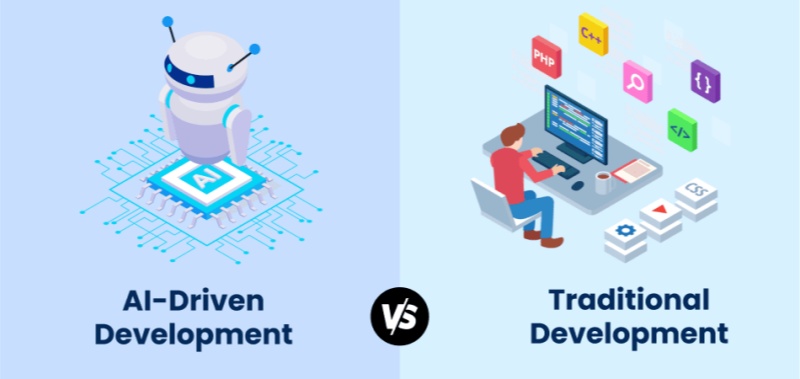
Many developers and business leaders are now asking: How is ai different from traditional computer programs? and how is ai different from traditional computer systems? The answer lies in a fundamental shift from deterministicprocesses to probabilistic intelligence.
As we move away from static code toward dynamic learning, the infrastructure supporting these systems must also evolve. This is where WhaleFlux enters the narrative. As a Unified AI Platform, WhaleFlux provides the Elastic AI Compute and AI Agent Platforms necessary to manage this new breed of “thinking” systems. In this article, we will break down the DNA of this technological evolution and explain why the future of computing belongs to those who master AI orchestration.
1. Logic vs. Learning: How is AI Different from Traditional Computer Programs?
To understand the core difference, we must look at the “Source of Truth” for the system.
The Traditional Program: The Rule-Follower
In a traditional computer program, the human is the “brain.” The programmer writes explicit logic (e.g., if (balance < 0) { send_alert(); }). The program is a series of “If-Then” statements. It is Deterministic, meaning for any given input, the output is 100% predictable based on the written code.
The AI System: The Pattern-Recognizer
AI, specifically machine learning, flips this model. Instead of receiving rules, the system receives Data. It uses algorithms to identify patterns and create a statistical model. When it sees a new input, it doesn’t follow a pre-written path; it calculates a Probability.
- Strengths: Handles “fuzzy” data, improves over time, solves complex problems.
- Weaknesses: Computationally expensive, requires specialized hardware (GPUs).
WhaleFlux bridges this gap. Since AI is resource-heavy, WhaleFlux provides AI Observability to monitor these probabilistic systems, ensuring that even as the “logic” becomes complex, the underlying hardware remains stable and cost-effective.
2. Architectural Evolution: How is AI Different from Traditional Computer Systems?
When we ask how is ai different from traditional computer systems, we are talking about the “Physical and Operational Infrastructure.”
CPU-Centric vs. GPU-Centric
Traditional systems are built around the CPU (Central Processing Unit). CPUs are designed for sequential tasks—doing one complex thing at a time. AI systems, however, are built around GPUs (Graphics Processing Units). Because AI involves millions of simultaneous mathematical operations, it requires the parallel processing power that only high-end GPUs like the NVIDIA H100 or A100 can provide.
WhaleFlux and the New Infrastructure Standard
WhaleFlux has reimagined the computer system for the AI age. A traditional system is just a server; a WhaleFlux system is a Unified AI Platform.
Elastic AI Compute:
Unlike traditional fixed servers, WhaleFlux allows you to scale GPU resources up or down based on the intensity of your AI workload.
Infrastructure Reliability:
AI hardware is prone to failure due to high heat and power demands. WhaleFlux’s observability tools reduce hardware failures by 98%, a level of stability traditional systems rarely need to account for.
3. The “0 to 1” Myth: Why Fine-tuning is the Practical Difference
In traditional software, you build your app from 0 to 1. In AI, building from 0 (Pre-training a foundation model) is a task reserved for tech giants with billions of dollars. For the rest of the world, the difference lies in Fine-tuning.
WhaleFlux empowers the “99%” by providing the perfect environment for Fine-tuning.
- The Process: You take a “Foundation Model” (like Llama or Mistral) and use WhaleFlux’s compute power to train it on your specific business data.
- The Result: You get a system that has the broad intelligence of a global AI but the specific expertise of your own company.
This shift from “Coding from Scratch” to “Fine-tuning a Foundation” is the defining characteristic of modern AI computer science.
4. Maintenance and Evolution: Debugging vs. Optimization
How you “fix” a system highlights another major difference:
- Traditional: You find the “bug” (the broken line of code) and rewrite it.
- AI: You don’t “fix” a line of code; you optimize the model. This might involve cleaning the training data, adjusting the fine-tuning parameters, or providing more compute power.
WhaleFlux simplifies this by integrating AI Models & Data management. When an AI system starts drifting or producing inaccurate results, WhaleFlux provides the tools to re-evaluate the data and re-run fine-tuning jobs efficiently, slashing costs by up to 70% compared to unoptimized cloud providers.
5. From Passive Tools to Autonomous Agents
Perhaps the most exciting answer to how is AI different from traditional computer systems is the emergence of Agents.
Traditional systems are Passive. They wait for a user to click a button or trigger an API. AI systems, when deployed on the WhaleFlux AI Agent Platform, become Active.
- Observation: They monitor their environment.
- Reasoning: They decide on a course of action based on their fine-tuned knowledge.
- Action: They execute tasks (like writing code, answering tickets, or managing servers) autonomously.
This transforms the computer from a “tool” into a “collaborator.”
Conclusion: Choosing the Right Path
Understanding how is ai different from traditional computer programs and how is ai different from traditional computer systems is the first step toward digital transformation. Traditional systems provide the stability and structure we need for basic operations, but AI provides the “reasoning engine” that will drive future innovation.
The complexity of AI infrastructure can be daunting. However, platforms like WhaleFlux make this transition accessible. By focusing on Elastic AI Compute, Fine-tuning, and AI Agent Platforms, WhaleFlux removes the technical hurdles of GPU management and model deployment.
The future isn’t about choosing between traditional code and AI—it’s about integrating them into a unified, intelligent stack. Whether you are optimizing a workflow through fine-tuning or deploying an autonomous agent, WhaleFlux provides the foundation for the next generation of computing.
FAQ (Frequently Asked Questions)
1. How is AI different from traditional computer programs in terms of results?
Traditional programs provide exact, binary results based on rules. AI provides “probabilistic” results, meaning it gives the most likely correct answer based on patterns it learned during fine-tuning.
2. How is AI different from traditional computer systems regarding hardware?
Traditional systems rely on CPUs for sequential processing. AI systems require dense clusters of GPUs (like those provided by WhaleFlux) to handle the massive parallel mathematical calculations needed for neural networks.
3. Does WhaleFlux allow me to train a model like GPT-4 from scratch?
WhaleFlux focuses on Fine-tuning and inference rather than 0-to-1 pre-training. This allows businesses to take existing powerful models and customize them for specific tasks, which is significantly more cost-effective and faster for most enterprises.
4. Why is AI Observability mentioned as a key feature of WhaleFlux?
Because AI systems run on high-performance GPUs that are under constant stress, they are more likely to fail than traditional servers. WhaleFlux AI Observability monitors hardware health to prevent 98% of potential failures, ensuring your AI stays online.
5. Can an AI system replace a traditional database?
No. AI systems and traditional systems are complementary. You still need traditional databases for structured data storage, while AI (often fine-tuned on WhaleFlux) is used to analyze that data and make intelligent predictions or take autonomous actions.
Beyond the Cloud: The Evolution of Edge AI Computing in 2026
Introduction: The Shift from Centralized to Distributed Intelligence
For the past decade, the narrative of Artificial Intelligence was written in the cloud. Massive data centers processed every query, trained every model, and sent results back across the globe. But as we move through 2026, the “gravity” of data has shifted. We are no longer content waiting for a round-trip to a distant server.
Whether it’s a self-driving car making a split-second braking decision or a robotic arm on a factory floor identifying a microscopic defect, the “brain” must be where the action is. This is the era of edge AI computing. By bringing high-performance silicon directly to the source of data, we are enabling a new generation of AI edge computers that are faster, more private, and more resilient than their cloud-dependent predecessors.
1. What is AI Edge Computing?
At its core, edge computing AI refers to the deployment of machine learning models directly onto hardware located at the “edge” of the network—near the sensors, cameras, and users. Unlike traditional cloud AI, which suffers from latency and bandwidth constraints, AI in edge computing processes data locally.
In 2026, the hardware has caught up to the ambition. Modern edge AI computers are no longer just low-power IoT devices; they are “mini-supercomputers” equipped with NPU (Neural Processing Unit) and GPU acceleration, capable of running complex Large Language Models (LLMs) and high-fidelity vision transformers without an internet connection.
2. Best AI Inference Edge Computing for Autonomous Vehicles
One of the most demanding applications of this technology is in transportation. To achieve Level 4 and Level 5 autonomy, vehicles require the best AI inference edge computing available. In 2026, the industry has standardized around high-throughput, low-latency platforms like the NVIDIA DRIVE AGX Thor and Jetson Thor.
These platforms are designed to handle “Physical AI”—the intersection of generative reasoning and real-world action. For autonomous vehicles, this means:
- Sensor Fusion: Merging data from LiDAR, Radar, and 12+ cameras in real-time.
- Predictive Pathing: Using Alpamayo-class models to predict pedestrian behavior 5 seconds into the future.
- Fail-Safe Redundancy: Ensuring that even if a sensor fails, the edge AI computer can navigate to a safe stop.
3. Computer Vision Edge AI News: The Rise of Visual Reasoning
Recent computer vision edge AI news from late 2025 and early 2026 highlights a massive leap in “Visual Reasoning.” We have moved past simple object detection (e.g., “This is a car”) to contextual understanding (e.g., “This car is swerving and likely to hit the curb”).
Key updates include:
AI-RAN Integration:
Companies like Nokia and NVIDIA are turning mobile towers into edge AI hubs, allowing smart city cameras to process vision data at the “network edge” to reduce city-wide traffic congestion.
On-Device VLA Models:
The release of Vision-Language-Action (VLA) models for humanoid robots has allowed machines to understand natural language commands like “pick up the blue cup” and execute the physical movement entirely via ai edge computing.
4. Stability at the Edge: Introducing WhaleFlux
As we deploy thousands of AI edge computers across cities, factories, and vehicle fleets, a critical challenge emerges: Infrastructure Fragility. An edge device in a remote location or a moving vehicle is exposed to harsh vibration, temperature swings, and fluctuating power—all of which can cause GPU degradation or “silent” errors.
This is where the philosophy of “stability before scale” becomes a life-saving requirement. WhaleFlux has emerged as the essential management layer for distributed AI infrastructure. While most tools focus on the cloud, WhaleFlux provides full-stack observability and self-healing capabilities for edge environments.
By integrating WhaleFlux into an edge AI computer cluster, organizations can:
- Predict Failures: Identify a degrading GPU or NPU in an autonomous delivery bot before it breaks down in traffic.
- Automate Orchestration: Use WhaleFlux to seamlessly push model updates to 10,000 edge nodes simultaneously without interrupting active inference.
- Optimize TCO: Achieve up to 99.9% utilization of edge resources, ensuring that every watt of power used for edge computing AI is maximized.
In the high-stakes world of autonomous systems, WhaleFlux acts as the “reliability engine” that ensures the intelligence at the edge never flickers out.
5. Hardware Trends: Edge Computing AI November 2025 and Beyond
The hardware landscape of edge computing AI November 2025 saw the launch of the “AI PC” and “AI Workstation” as standard enterprise tools.
Intel Panther Lake & AMD Ryzen AI:
These chips have brought over 50 TOPS (Tera Operations Per Second) of NPU power to standard laptops, turning every office computer into an edge AI computer.
The “Rubin” Influence:
While NVIDIA’s Rubin architecture dominates the data center, its architectural “DNA” has filtered down into the Jetsonfamily, allowing for 10x more efficient inference at the edge compared to 2024 models.
Conclusion: The Era of Localized Intelligence
The trajectory of edge AI computing in 2026 is clear: we are moving away from “Cloud-First” to “Edge-Essential.” Whether it’s through the best AI inference edge computing for autonomous vehicles or the massive deployment of vision-based sensors in smart factories, the demand for localized, real-time compute is insatiable.
However, as the “Edge” becomes the new “Core,” the industry must prioritize resilience. By pairing cutting-edge AI edge computers with self-healing management platforms like WhaleFlux, we can build an autonomous world that isn’t just smart, but reliably intelligent. The future of AI isn’t just in the sky; it’s right here, on the ground, at the edge.
Frequently Asked Questions
1. What is the main benefit of edge AI computing over cloud AI?
The primary benefits are Latency (faster response times), Privacy (data stays on-site), and Reliability (the system works without an internet connection).
2. Which is the best AI edge computer for robotics in 2026?
The NVIDIA Jetson AGX Orin and the newer Jetson Thor are currently considered the gold standard for robotics due to their high TOPS-per-watt ratio and massive software ecosystem.
3. How does WhaleFlux help with autonomous vehicle fleets?
WhaleFlux provides a centralized dashboard to monitor the health of the GPU/NPU clusters inside every vehicle. It predicts hardware failures before they happen and ensures that model updates are deployed safely across the entire fleet.
4. Is computer vision at the edge better than in the cloud?
For real-time applications (like security or driving), edge vision is superior because it eliminates the delay of sending high-resolution video streams over the internet.
5. What happened in edge computing AI in November 2025?
November 2025 marked the widespread release of “AI PCs” with dedicated NPUs and the announcement of AI-RAN (AI-powered Radio Access Networks), which allow mobile networks to process AI tasks locally for nearby users.
Google Private AI Compute Announcement (Nov 11, 2025): What It Is & Why It Matters
Introduction: The End of the Privacy-Performance Tradeoff
For years, the evolution of Artificial Intelligence was haunted by a fundamental compromise. If you wanted the lightning-fast, high-reasoning power of a Large Language Model (LLM), you had to send your data to a massive cloud data center—effectively handing over a “copy” of your personal information to a tech giant. If you wanted absolute privacy, you had to settle for smaller, “on-device” models that lacked the “IQ” for complex tasks.
On November 11, 2025, Google officially ended that tradeoff. With the announcement of Google Private AI Compute (PAC), the search giant introduced a paradigm shift: cloud-level processing power wrapped in local-level privacy. By leveraging custom hardware and a “zero-trust” cloud architecture, PAC allows your Pixel 10 to tap into the most advanced Gemini models while ensuring that not even Google can see what you’re doing.

1. Defining Google Private AI Compute (PAC)
At its core, Google Private AI Compute (PAC) is a cloud-based processing platform designed to extend the privacy and security of your smartphone into Google’s massive data centers.
Instead of a traditional cloud server where data is “decrypted” to be processed, PAC creates what Google calls a “secure, fortified space.” Think of it as a virtual clean room: your sensitive data (like emails, calendar events, or voice recordings) enters the room, the AI processes it, the results are sent back to you, and the room is instantly incinerated. Nothing is stored, nothing is logged, and no human at Google has the “key” to enter the room while your data is inside.
2. The Technical Blueprint: Titanium, TPUs, and Isolation
The magic of PAC isn’t just in the software; it’s rooted in bespoke hardware. Google’s announcement highlighted three critical technological pillars that make google private ai compute nov 11 2025 a reality:
Titanium Intelligence Enclaves (TIE)
Building on Google’s long history with the Titan security chip, the PAC architecture utilizes the new Titanium Intelligence Enclaves. These are hardware-isolated zones within the server’s CPU and TPU that create a physical barrier between the AI workload and the rest of the data center infrastructure. Even if an attacker—or a rogue Google administrator—gained “root access” to the server, they would remain physically locked out of the Titanium enclave where your data is being processed.
Custom Tensor Processing Units (TPUs)
To run models as massive as Gemini 1.5 Pro or Ultra with “zero visibility,” Google has optimized its custom TPUs(Tensor Processing Units) to support hardware-level encryption-in-use. This ensures that while the AI is “thinking,” the data remains encrypted even in the system’s volatile memory (RAM).
Remote Attestation & IP Blinding
When your phone connects to the PAC, it doesn’t just “trust” the cloud. Your Pixel 10 performs a process called Remote Attestation, cryptographically verifying that the cloud server is running the exact, unmodified, privacy-protected code it claims to be. Furthermore, PAC uses IP Blinding Relays to mask your identity, ensuring that Google’s AI servers don’t even know which specific user is sending the request.
3. Real-World Impact: Pixel 10, Magic Cue, and Beyond
The first devices to benefit from this google private ai compute announcement nov 11 2025 are the Pixel 10 series. The integration of PAC has unlocked features that were previously too “heavy” for mobile chips:
Magic Cue:
This next-generation proactive assistant can now scan your Gmail, Google Calendar, and even your screenshots to provide “just-in-time” suggestions. Because of PAC, Magic Cue can use the high-reasoning power of Gemini in the cloud to understand context—like finding a flight number from an old email while you are on a call—without that sensitive data ever being accessible to Google’s advertising engines.
Upgraded Recorder App:
The Pixel Recorder now supports high-fidelity summarization and transcription in dozens of additional languages. By offloading the heavy lifting to PAC, the app can handle hour-long meetings with near-perfect accuracy, all while maintaining a “sealed” privacy environment.
4. Stability in the Private Cloud: The WhaleFlux Connection
As we move AI processing into these “fortified enclaves,” the complexity of the underlying infrastructure reaches a tipping point. Managing a massive cluster of GPUs and TPUs that are physically isolated and cryptographically sealed is an operational nightmare. If a server in a PAC cluster fails, you can’t just “remote in” and look at the data to see what went wrong—the hardware is designed to prevent exactly that.
This is where the philosophy of “stability before scale” becomes essential. In high-performance, privacy-first environments, you need a management layer that is as intelligent as the AI it supports. WhaleFlux represents the next generation of infrastructure resilience.
As a Self-Healing System, WhaleFlux is designed to monitor the health of these complex AI clusters in real-time. By utilizing failure prediction innovation, WhaleFlux can identify a degrading TPU or a memory leak within a secure enclave before it leads to a system crash. Because PAC environments are ephemeral and isolated, a crash can mean the permanent loss of a user’s session context. WhaleFlux ensures that the “sealed cloud” remains a stable cloud, proactively rerouting workloads to healthy nodes so that the privacy of the user is never interrupted by a hardware failure.
5. Google PAC vs. Apple PCC: The New Privacy Standard
The tech world has inevitably compared Google Private AI Compute to Apple’s Private Cloud Compute (PCC)announced in 2024.
While Apple was first to market, Google’s nov 11 2025 announcement demonstrates a more “cloud-native” approach. By using its global network of TPUs, Google can offer significantly more “raw compute” to its agents (like Magic Cue) than the initial versions of Apple’s PCC, which relied more heavily on smaller, localized server clusters.
Conclusion: A New Era of Trust
The google private ai compute nov 11 2025 announcement is a watershed moment for the industry. It signals that the “Wild West” era of AI data collection is ending. We are moving toward a future where “The Cloud” is no longer a place where privacy goes to die, but a secure extension of our personal devices.
As AI becomes more personal and proactive through features like Magic Cue, the infrastructure that supports it must be two things: Private and Resilient. By combining Google’s hardware-level isolation with the self-healing stability of platforms like WhaleFlux, we are finally building an AI ecosystem that is powerful enough to change our lives and secure enough to trust with our secrets.
The Sovereign AI Computer: Why AI Quantum Computing is the Next Frontier of Scale
Introduction: The Great Convergence of 2026
We have moved past the era where Artificial Intelligence and Quantum Computing were parallel tracks. In 2026, they have collided to create the Sovereign AI Computer—a hybrid system where the brute-force parallel power of GPUs meets the multi-dimensional probability space of qubits.
The industry has realized that while GPUs are the kings of training, they face a “complexity wall” when it comes to ultra-high-dimensional optimization. This is where ai quantum computing steps in. By offloading specific, intractable mathematical kernels to a Quantum Processing Unit (QPU), we are seeing breakthroughs in everything from carbon capture to real-time generative physical models. However, this hybrid future introduces a level of system fragility never seen before. To succeed, organizations must master both the sub-atomic and the structural.
1. Defining the Hybrid Stack: AI and Quantum Computing
The relationship in ai and quantum computing is synergistic rather than competitive. In a modern 2026 deployment, the workload is split:
- The Classical Heavy-Lifter: NVIDIA Blackwell or Rubin GPUs handle the massive data pre-processing and the “agentic” layers of the AI.
- The Quantum Optimizer: The QPU handles the “Hard-NP” problems, such as protein folding or cryptographic optimization, that would take a classical cluster years to solve.
This quantum computing ai architecture allows for what researchers call “Infinite Inference”—the ability to run models that can simulate millions of simultaneous outcomes in milliseconds.
2. NVQLink: The Rosetta Stone of Hybrid Compute
One of the most significant breakthroughs in nvidia quantum computing ai is the introduction of NVQLink. While the original NVLink revolutionized how GPUs talk to each other, NVQLink is an open, universal interconnect designed to bridge the gap between GPUs and QPUs.
With sub-4 microsecond latency and 400Gb/s throughput, NVQLink transforms the quantum processor from a “peripheral device” into a first-class peer within the AI Computer. By using the CUDA-Q platform, developers can now write a single C++ program that orchestrates CPUs, GPUs, and QPUs simultaneously, creating a unified, coherent system for the first time in history.
3. Quantum-Classical Resilience: Introducing WhaleFlux
As we integrate these disparate technologies, the system’s “blast radius” for failure grows exponentially. A single GPU failure in an NVQLink-connected cluster doesn’t just stop a training job—it can desynchronize the entire quantum state, leading to catastrophic data loss.
This is where the philosophy of “stability before scale” becomes the industry standard. WhaleFlux has emerged as the critical “Self-Healing” layer for these hybrid environments. While traditional monitoring tools are too slow for the microsecond-scale operations of a quantum-AI stack, WhaleFlux uses advanced failure prediction to identify degrading hardware signatures.
Whether it’s a subtle memory ECC error on a Grace-Blackwell node or a thermal anomaly in the QPU control system, WhaleFlux intervenes before the crash. By automatically rerouting workloads or isolating faulty components, WhaleFlux ensures that your multi-million dollar ai quantum computing investment maintains the uptime required for long-running simulations.
4. D-Wave and Quantum Computer Neural Enhancement
The practical application of d-wave quantum ai quantum computing has taken center stage in 2026. Unlike gate-based systems, D-Wave’s quantum annealing is being used for quantum computer neural enhancement.
By utilizing ai codes popularized by researchers like Tarasek, companies are now using quantum hardware to “prune” and optimize neural networks at the architectural level. These neural enhancement ai codes allow for the creation of “Lean Models”—AI that possesses the power of a trillion-parameter model but the efficiency of a much smaller one, all thanks to quantum-optimized weight distribution.
5. Quantum Computing vs AI: A False Dichotomy
The old debate of ai vs quantum computing has been replaced by a focus on Quantum-Classical Hybridization.
- Quantum computing vs ai used to be about which would solve the world’s problems first.
- Today, quantum computers and ai are viewed as two parts of the same brain.
The GPU is the “fast-thinking” intuitive engine, while the Quantum unit is the “slow-thinking” deep-logic engine. The companies leading the market in 2026 are those who have stopped choosing between them and started building integrated clusters secured by resilient infrastructure management.
Conclusion: Engineering the Future of Intelligence
The shift toward ai quantum computing represents the most significant architectural change in the history of information technology. By combining nvidia quantum computing ai hardware with D-Wave‘s optimization power and securing the entire stack with WhaleFlux‘s self-healing stability, we are finally building computers that can keep pace with the speed of human thought.
As we move forward, the metric for success is no longer just “number of qubits” or “number of GPUs.” The new gold standard is Resilient Compute—the ability to run the world’s most complex hybrid models with the absolute certainty that the system will not fail.
Frequently Asked Questions
1. What is the main difference between NVLink and NVQLink?
NVLink is used for high-speed communication between GPUs within a cluster. NVQLink is a specialized, open-architecture interconnect designed specifically to link GPUs with Quantum Processing Units (QPUs) at microsecond latencies.
2. Is “quantum computer neural enhancement” available for commercial use?
Yes, in 2026, many enterprise AI labs use quantum annealing (like D-Wave) and specialized ai codes (such as those from the Tarasek framework) to optimize the structure and energy efficiency of their large-scale neural networks.
3. How does WhaleFlux prevent crashes in a quantum-AI hybrid system?
WhaleFlux acts as a “Self-Healing” system. It monitors hardware health at a granular level and uses failure prediction to move workloads away from degrading nodes before a crash occurs, protecting the delicate synchronization between the GPU and QPU.
4. Why is D-Wave often mentioned alongside AI?
D-Wave specializes in “quantum annealing,” which is particularly effective at solving combinatorial optimization problems. These are the same types of problems that AI “agents” struggle with in logistics, finance, and network design.
5. Does an AI Computer require a different type of data center?
Yes. AI quantum computing typically requires a hybrid data center that supports both high-density liquid-cooled GPU racks and specialized cooling (like dilution refrigerators) for quantum processors, all linked via a unified fabric.
The 2026 GPU Cluster Blueprint: Scaling AI Without Breaking the Bank
TL;DR: The 2026 GPU Cluster Scaling Standard
The Scaling Law: Linear performance gains require minimizing Communication Overhead. In clusters of 32+ GPUs, the Interconnect (InfiniBand/RoCE) becomes more critical than the individual GPU’s FLOPS.
The ROI Strategy: Shift from Over-provisioning to Intelligent Resource Pooling. By using WhaleFlux, enterprises eliminate “Idle Silicon” costs, reducing TCO by up to 70% compared to traditional on-prem deployments.
The Interconnect Blueprint: Utilize a Non-blocking Clos Topology with GPUDirect RDMA to ensure multi-node training doesn’t stall during gradient synchronization.
WhaleFlux Advantage: Our platform manages Thermal-aware Orchestration and Job Preemption, maximizing the lifespan and efficiency of H100/H200 clusters at scale.
1. The Architecture of Scaling: Beyond Individual Nodes
An AI “Cluster” is not a collection of independent servers; it is a Unified Compute Fabric.
Scaling from 8 to 128 GPUs introduces the “Communication Bottleneck.” Without high-speed interconnects like 400Gb/s NDR InfiniBand, your GPUs spend 40% of their time waiting for data from other nodes. At WhaleFlux, we architect our blueprints around Zero-Bottleneck Networking, ensuring that data ingestion never throttles your compute ROI.
2. Cost Optimization: Eliminating the “Compute Tax”
“Breaking the bank” usually happens due to Resource Fragmentation. Most enterprise clusters operate at only 20-30% actual Model Bandwidth Utilization (MBU).
WhaleFlux Intelligent Scaling:
Our platform dynamically partitions workloads, allowing for Fractional GPU usage for inference while reserving full-power clusters for training.
Thermal-Aware Scheduling:
We monitor rack-level thermals via Deep Observability. By proactively migrating tasks from “hot nodes,” we prevent thermal throttling that can silently degrade training performance by 15%.
3. The Blueprint for High-Availability AI
For production-grade Agentic Workflows, downtime is not an option. A robust cluster blueprint must include:
Redundant Storage Fabrics: Utilizing high-performance NVMe tiers for rapid checkpointing.
Automated Node Recovery: WhaleFlux monitors for ECC errors and hardware artifacting. If a node shows pre-failure signatures, it is automatically isolated and replaced.
Observability at Scale: Tracking Time-to-First-Token (TTFT) across the entire cluster to ensure consistent user experience.
4. Cluster Decision Matrix
| Metric | Basic Cloud Setup | WhaleFlux Engineered Cluster |
| Interconnect | Shared 10-25GbE (High Latency) | Dedicated 400Gb/s (Ultra-Low Latency) |
| Scaling Efficiency | Sub-linear (Heavy Overhead) | Near-Linear (RDMA Optimized) |
| Visibility | Surface-level Metrics | Full-stack AI Observability |
| TCO Management | Pay-as-you-go (Expensive) | Predictive Monthly (70% Savings) |
| Reliability | Best-effort | 99.9% Uptime Guarantee |
Expert FAQ
Q: When should an enterprise move from single nodes to a cluster?
A: When your Model Fine-tuning or Large-scale RAG ingestion takes longer than 24 hours on a single 8x GPU node. At this point, the bottleneck shifts to the “Time-to-Market” ROI, necessitating a clustered architecture.
Q: How does WhaleFlux handle multi-tenant isolation in a cluster?
A: Through Virtualized Hardware Enclaves. Each client’s workload is isolated at the networking and memory layer, providing the security of on-prem hardware with the flexibility of a unified platform.
Q: Does WhaleFlux support InfiniBand and RoCE v2?
A: Yes. We tailor the interconnect protocol based on your specific workload. For Monolithic Training, we recommend InfiniBand; for Distributed Inference, RoCE v2 often provides the best balance of cost and performance.
Beyond Binary: Scaling HPC with GPU Parallel Computing and NVQLink Quantum Integration
We are currently witnessing a “Compute Renaissance”—a period of unprecedented transformation where the boundaries of what we can simulate, predict, and build are being rewritten. For decades, Moore’s Law provided a predictable roadmap for performance. But as we push into the frontiers of generative AI and complex molecular modeling, the industry has shifted its focus from single-core speed to massively parallel architectures and quantum-classical hybrid systems.
This evolution isn’t just about adding more raw power; it’s about how that power talks to itself and how it stays alive under pressure. From the ubiquity of GPU Parallel Computing to the cutting-edge promise of NVQLink Quantum-GPU interconnects, the hardware landscape is becoming exponentially more complex. However, in this race for “the next big thing,” many organizations overlook a fundamental truth: Performance is an illusion if it isn’t backed by reliability.In the following sections, we will explore the trajectory of modern acceleration and the critical role of stability-first systems like WhaleFlux in securing our computational future.
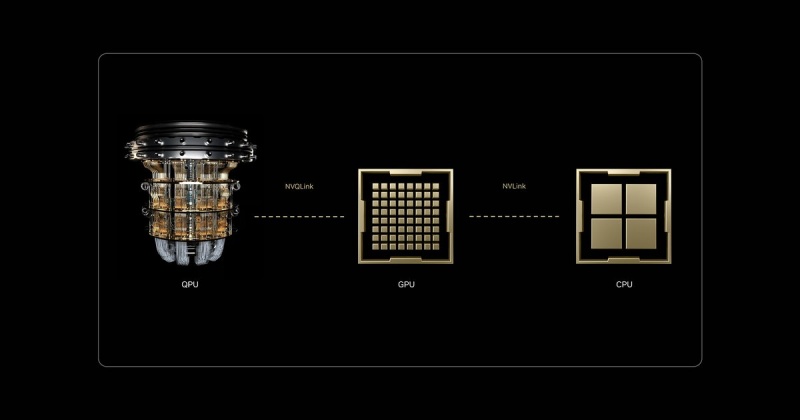
1. The Power of GPU Parallel Computing
The shift from serial to parallel computing defines the modern AI era. While a CPU acts as a high-speed “single-lane” processor for complex logic, a GPU functions as a “thousand-lane” highway. By breaking massive problems into smaller, simultaneous tasks, GPU parallel computing has reduced the training time of Large Language Models (LLMs) from years to days. This high-throughput architecture is the bedrock of every modern data center.
2. High-Performance Computing (HPC) and NVLink
As clusters grow, the bottleneck shifts from individual chip speed to interconnect bandwidth. NVIDIA’s NVLink solved this by providing a high-speed, direct GPU-to-GPU bridge that far exceeds standard PCIe limits. In the world of High-Performance Computing (HPC), NVLink allows thousands of GPUs to act as a single, unified computational engine, moving data at terabyte-per-second speeds to keep the “parallel highway” moving without congestion.
3. The Reliability Anchor: WhaleFlux
Even with the fastest interconnects, massive scale introduces massive risk. A single hardware “hiccup” in a DGX cluster can crash a million-dollar training job. This is where WhaleFlux becomes indispensable.
Designed with a “stability before scale” philosophy, WhaleFlux is a Self-Healing System that monitors GPU cluster health in real-time. By innovating in failure prediction, WhaleFlux identifies degraded components before they fail, automatically rerouting tasks to healthy nodes. For teams pushing the limits of HPC, WhaleFlux provides the operational “safety net” that turns raw hardware power into consistent, reliable results.
4. The Future: NVQLink and Quantum-GPU Convergence
The next frontier isn’t just more GPUs; it’s the integration of Quantum Processing Units (QPUs). While GPUs are masters of parallel math, Quantum units excel at specific, hyper-complex optimization problems.
The missing link has been communication, which is where NVQLink enters the frame. Unlike standard interconnects, NVQLink is a dedicated, low-latency link specifically designed for Quantum-GPU computing. It allows the GPU to handle classical data pre-processing while offloading “unsolvable” algorithms to the QPU in real-time. This hybrid architecture, powered by NVQLink, represents the most significant leap in computing history since the invention of the transistor.
Conclusion: Architecting the Future of Resilient Compute
The journey from standard GPU acceleration to the quantum-integrated clusters of tomorrow is not a straight line—it is a leap in complexity. As NVLink and NVQLink continue to dissolve the barriers between different processing units, the “computer” is no longer a box under a desk; it is a sprawling, interconnected living organism.
In this high-stakes environment, the philosophy of “stability before scale” is no longer optional. Innovation without resilience is merely a gamble. By integrating failure prediction and self-healing capabilities through WhaleFlux, we ensure that the next generation of breakthroughs—whether in climate science, medicine, or artificial intelligence—is built on a bedrock of ironclad uptime. The future belongs to those who can not only harness the speed of the quantum era but also master the art of keeping those systems running.
Frequently Asked Questions
1. What is the difference between NVLink and NVQLink?
NVLink is designed for high-speed communication between multiple GPUs. NVQLink is a specialized interconnect designed to bridge the gap between GPUs and Quantum Processing Units (QPUs), enabling hybrid quantum-classical computing.
2. Why is WhaleFlux necessary for these high-speed systems?
The faster and larger a system becomes, the more devastating a single failure is. WhaleFlux provides failure prediction and self-healing, ensuring that the complex web of GPUs and QPUs remains operational without manual intervention.
3. How does “Parallel Computing” benefit AI?
AI involves billions of repetitive math operations (matrix multiplications). Parallel computing allows a GPU to perform thousands of these operations at the exact same time, rather than one by one.
4. Can NVQLink work with existing GPU clusters?
Yes, the goal of NVQLink is to allow existing high-performance GPU environments to integrate Quantum accelerators, creating a hybrid system that can solve problems previously thought impossible.
5. Is High-Performance Computing (HPC) only for big tech companies?
While big tech leads the way, HPC is now essential in medicine (drug discovery), finance (risk modeling), and climate science. Tools like WhaleFlux make this power more accessible by reducing the complexity of maintaining such large systems.
How to Fix “nvcc fatal: unsupported gpu architecture ‘compute_89′” and Optimize Your NVIDIA GPU Computing Toolkit
1. Introduction: When the Hardware Outpaces the Software
You’ve just gained access to the latest NVIDIA Ada Lovelace hardware—perhaps an RTX 4090, an L4, or a powerhouse L40S. You fire up your terminal, ready to compile your latest CUDA kernel or install a new AI library, only to be met with a cryptic, red-text roadblock:
nvcc fatal : unsupported gpu architecture 'compute_89'.
This error is a classic “version mismatch” problem. It signifies that your hardware is speaking a language (Architecture 8.9) that your compiler (the NVIDIA GPU Computing Toolkit) doesn’t yet understand. In the fast-moving world of AI infrastructure, keeping your local environment in sync with the latest silicon is a constant battle.
In this comprehensive guide, we’ll dive into why this error occurs, how to fix it by updating your toolkit, and how to future-proof your development environment so you never have to manually troubleshoot architecture mismatches again.

2. Understanding the Root Cause: What is ‘compute_89’?
Every NVIDIA GPU generation is defined by its compute capability. This version number tells the compiler what hardware features (like Tensor Cores or Ray Tracing units) are available to be exploited.
- Compute 7.x: Volta/Turing (V100, T4)
- Compute 8.0: Ampere (A100)
- Compute 8.6: Ampere Consumer/Pro (RTX 30-series, A6000)
- Compute 8.9: Ada Lovelace (RTX 40-series, L4, L40, L40S)
- Compute 9.0: Hopper (H100)
When you see the compute_89 error, your NVIDIA GPU Computing Toolkit is likely version 11.7 or older. Since support for the Ada Lovelace architecture was only introduced in CUDA 11.8, your compiler simply doesn’t know that ’89’ exists.
3. The Step-by-Step Fix: Resolving the nvcc Fatal Error
Step 1: Verify Your Current CUDA Version
Before making changes, check what your system is currently running. Open your terminal and type:
nvcc –version
If it reports anything lower than 11.8, you have found your culprit.
Step 2: Update the NVIDIA GPU Computing Toolkit
To support compute_89, you must upgrade to at least CUDA 11.8, though we recommend CUDA 12.x for 2026 workflows to take advantage of the latest performance optimizations.
- Visit the NVIDIA CUDA Downloads page.
- Select your Operating System (Linux is standard for most high-performance AI tasks).
- Choose the “runfile (local)” or “deb (network)” installer.
- Follow the prompts to install the new NVIDIA GPU Computing Toolkit.
Step 3: Update Your Environment Variables
Installing the toolkit isn’t enough; you must point your system to it. Ensure your ~/.bashrc or ~/.zshrc reflects the new path:
export PATH=/usr/local/cuda-12.x/bin${PATH:+:${PATH}} export LD_LIBRARY_PATH=/usr/local/cuda-12.x/lib64${LD_LIBRARY_PATH:+:${LD_LIBRARY_PATH}}
WhaleFlux Integration: Ending the “Dependency Hell”
If reading the steps above makes you feel a sense of dread, you aren’t alone. Managing the NVIDIA GPU Computing Toolkit, matching driver versions, and resolving architecture errors like compute_89 is time-consuming “plumbing” work.
This is exactly why we built WhaleFlux. When you spin up a GPU Cluster via WhaleFlux, we handle the environment for you. Our images come pre-configured with the correct CUDA versions and drivers for your specific hardware. Whether you’re on a T4 or an L40S, WhaleFlux ensures the underlying architecture is automatically recognized, so you can focus on your code instead of your compiler.
4. Advanced Configuration: Using Virtual Environments and Docker
To prevent a system-wide update from breaking your other projects, professional AI engineers often use containerization.
Using NVIDIA Container Toolkit
Instead of installing the NVIDIA GPU Computing Toolkit directly on your host machine, you can use Docker. By pulling a specific image (e.g., nvidia/cuda:12.1.0-devel-ubuntu22.04), you encapsulate the entire environment. This ensures that even if your host machine has an old driver, the “container” provides the necessary libraries to support compute_89.
5. Why Proper Toolkit Management Matters for AI Inference
Fixing a compilation error is the first step, but the ultimate goal is Inference performance. A mismatched or poorly configured toolkit can lead to:
- Reduced Throughput: Failing to use the specific Tensor Core optimizations of the Ada Lovelace architecture.
- Memory Leaks: Older CUDA versions may have bugs when interacting with newer hardware memory management.
- Latency Spikes: Inefficient kernel execution.
By keeping your toolkit updated (or using a managed platform like WhaleFlux), you ensure that your Fine-tuning jobs and AI Agents run with the hardware-level speed you paid for.
6. Future-Proofing: Preparing for Compute 9.0 and Beyond
As the industry moves toward the H100 (Hopper) and the upcoming Blackwell architectures, the compute_xx errors will continue to pop up for those using legacy toolkits.
- Stay Updated: Check NVIDIA’s release notes quarterly.
- Automate: Use Infrastructure as Code (IaC) to manage your GPU nodes.
- Managed Services: Consider moving away from “DIY” hardware management.
Why WhaleFlux is the Final Solution
WhaleFlux isn’t just a cloud provider; it’s an AI Observability and management copilot. We proactively monitor the compatibility between your hardware and your software stack. If a new architecture drops, our platform is updated instantly, providing you with a seamless transition. With WhaleFlux, “nvcc fatal” becomes a thing of the past.
Conclusion: Focus on Intelligence, Not Infrastructure
The nvcc fatal : unsupported gpu architecture 'compute_89' error is a rite of passage for many AI developers. While it is solvable by updating your NVIDIA GPU Computing Toolkit, it serves as a reminder of how fragmented the AI stack can be.
By understanding your hardware’s compute capability and maintaining a clean, containerized environment, you can overcome these technical hurdles. And for those who prefer to skip the troubleshooting and get straight to building, WhaleFlux is here to provide the integrated, production-ready environment you need to scale.
5 Frequently Asked Questions (FAQ)
1. Can I fix the compute_89 error without upgrading CUDA?
Technically, no. Support for the 8.9 architecture was physically added in the CUDA 11.8 release. If you stay on 11.7 or lower, the compiler lacks the instructions to talk to your GPU.
2. Does the NVIDIA GPU Computing Toolkit work with non-NVIDIA GPUs?
No. The toolkit is specifically designed for NVIDIA’s proprietary CUDA architecture. For AMD or Intel GPUs, you would need to use different frameworks like ROCm or OneAPI.
3. What is the difference between CUDA Drivers and the CUDA Toolkit?
The Driver allows your OS to talk to the GPU. The Toolkit allows you to build and run applications on the GPU. You generally need a driver version that is equal to or newer than what the toolkit requires.
4. How do I know which ‘compute_xx’ version my GPU belongs to?
You can find this on the official NVIDIA Compute Capability table or by running a simple diagnostic tool like deviceQuery (included in the CUDA samples) on your machine.
5. How does WhaleFlux simplify these technical issues?
WhaleFlux provides pre-configured, optimized environments where the NVIDIA GPU Computing Toolkit, drivers, and libraries are already matched to the specific GPU you are using. This eliminates manual installation errors and ensures your AI Agents and Inference workflows are optimized out of the box.
The Complete Guide to GPU Cloud Computing: Performance, Accessibility, and Enterprise Scaling
The Ultimate Guide to GPU Cloud Computing: Balancing Performance, Cost, and Scalability
1. Introduction: The Silicon Backbone of the AI Era
In the fast-evolving landscape of 2026, the phrase “knowledge is power” has been updated to “compute is power.” For developers, researchers, and enterprise architects, the ability to access high-performance hardware via the internet has transformed from a niche luxury into a fundamental utility.
This transition is driven by gpu cloud computing. Whether you are rendering cinematic 3D environments, simulating molecular structures, or fine-tuning the latest large language model, the traditional local workstation is no longer enough. We have entered the era where the cloud computer with gpu is the primary engine of innovation. In this guide, we will navigate the complexities of the GPU market, from elite nvidia gpu cloud computing setups to the hunt for free gpu cloud computing resources, and show you how to turn raw silicon into business value.
2. What is GPU Cloud Computing?
Standard cloud computing relies on the Central Processing Unit (CPU), the “brain” of the computer designed for versatile, sequential tasks. However, AI and graphics workloads require a different kind of strength: massive parallelism.
GPU cloud computing provides remote access to Graphics Processing Units (GPUs) that can handle thousands of operations simultaneously. When you rent a cloud computer with gpu, you aren’t just getting a server; you’re getting a dedicated accelerator for mathematics and data.
The Role of the Cloud Computer with GPU
The primary advantage of a cloud computer with gpu is elasticity. Instead of spending $40,000 on a physical server that depreciates every year, you can “spin up” an H100 or A100 instance for the duration of your project and shut it down the moment you are finished. This agility is what allows small startups to compete with tech giants.
3. NVIDIA GPU Cloud Computing: The Industry Gold Standard
When we discuss the “how” of AI, we are inevitably discussing nvidia gpu cloud computing. NVIDIA has built more than just hardware; they have built an entire ecosystem known as CUDA (Compute Unified Device Architecture).
Why NVIDIA Dominates the Cloud
- Software Ecosystem: Through the NVIDIA GPU Cloud (NGC), users get access to pre-integrated, optimized containers for PyTorch, TensorFlow, and more.
- Precision Hardware: From the energy-efficient L4 to the powerhouse H200, nvidia gpu cloud computing offers a specific tool for every job.
WhaleFlux Integration: Beyond the Silicon
While nvidia gpu cloud computing provides the raw power, WhaleFlux acts as the essential orchestration layer. Simply having an NVIDIA GPU is like having a jet engine; WhaleFlux is the cockpit that allows you to steer that power. We integrate directly with NVIDIA environments to provide thread-level observability and automated scaling, ensuring your expensive GPU cycles are never wasted on idle processes.
4. The Search for Free GPU Cloud Computing
For students, hobbyists, and those in the early R&D phase, the price tag of elite GPUs can be a barrier. This leads to the frequent search for free gpu cloud computing.
Is “GPU Cloud Computing Free” a Reality?
Yes, but with limitations. You can typically find gpu cloud computing free tiers in the following places:
- Collaborative Notebooks: Platforms like Google Colab provide limited access to GPUs like the T4.
- Cloud Credits: Most major providers offer “start-up credits” that effectively grant you several hundred hours of cloud computing gpu time.
- Academic Grants: Researchers often have access to state-sponsored free gpu cloud computing clusters.
While these are excellent for small-scale testing or learning the basics of Python, they are rarely sufficient for production. When you move from “testing” to “deploying,” the limitations of free gpu cloud computing—such as session timeouts and low memory—make a managed solution like WhaleFlux a necessity to maintain continuity.
5. Optimizing Cloud Computing GPU Resources
Infrastructure is only cost-effective if it is managed correctly. Many companies overspend on cloud computing gpubecause they rent more power than they actually use.
The Three Pillars of GPU Management
- Orchestration: Moving workloads between GPUs to maximize utilization.
- Quantization: Reducing the model size so it fits on cheaper cloud computing gpu instances without losing accuracy.
- Observability: Knowing exactly where your bottlenecks are in real-time.
How WhaleFlux Maximizes Your Investment
This is where WhaleFlux shines. By providing a unified platform that bridges the gap between gpu cloud computing and the application layer, we help our users reduce hardware costs by up to 70%. We don’t just give you a cloud computer with gpu; we give you the tools to monitor every token and every watt, ensuring your AI journey is as lean as it is powerful.
6. Use Cases: From Rendering to AI Agents
The versatility of gpu cloud computing spans across industries:
- Generative AI: Fine-tuning specialized models for legal, medical, or financial sectors.
- Scientific Research: Simulating climate patterns or drug discovery.
- Autonomous Agents: The new frontier. In 2026, the focus has shifted from “chatbots” to “agents” that can take actions. These agents require the low-latency response times that only high-performance cloud computing gpu can provide.
7. Choosing the Right Cloud Provider
When selecting a provider for your cloud computer with gpu, don’t just look at the hourly rate. Look at:
- Network Latency: How fast does data move from your storage to the GPU?
- Security: Does the provider offer hardware-level isolation for your proprietary data?
- Ecosystem: Does it support the specific nvidia gpu cloud computing drivers your team uses?
Conclusion: Navigating the Future with WhaleFlux
As we look toward the remainder of 2026, the reliance on gpu cloud computing will only grow. Whether you are taking your first steps with gpu cloud computing free resources or managing a global fleet of nvidia gpu cloud computingclusters, the goal remains the same: efficiency, security, and results.
At WhaleFlux, we believe that compute should be a catalyst, not a headache. By integrating the world’s most powerful cloud computing gpu hardware with our sophisticated management platform, we empower you to stop worrying about the silicon and start focusing on the intelligence you’re building.
5 Frequently Asked Questions (FAQ)
1. What is the main benefit of using a cloud computer with GPU over a local one?
The main benefit is scalability and cost. A local cloud computer with gpu requires a massive upfront investment and maintenance. In the cloud, you can access the latest NVIDIA chips (like the H200) instantly and only pay for the minutes you use.
2. Can I run NVIDIA GPU cloud computing on any cloud provider?
Most major cloud providers offer nvidia gpu cloud computing instances. However, the level of software support and the availability of specialized chips like the H100 vary. It is important to check if your provider supports the CUDA versions your models require.
3. Is “free gpu cloud computing” safe for proprietary data?
Generally, free gpu cloud computing platforms are shared environments. While they are safe for learning and open-source projects, they often lack the strict “Zero-Trust” security and private enclaves found in enterprise-grade paid services. For sensitive data, a managed platform like WhaleFlux is recommended.
4. How does WhaleFlux improve the performance of my cloud computing gpu?
WhaleFlux provides an “Observability and Auto-Scaling” copilot. It monitors your gpu cloud computing workloads in real-time, automatically adjusting resources and managing model weights to ensure you get the highest possible throughput for the lowest possible cost.
5. What is the difference between “GPU cloud computing” and “GPU virtualization”?
GPU cloud computing is the broad service of providing GPUs over the internet. GPU virtualization is a specific technology used within that service to split one physical GPU into multiple “virtual” GPUs, allowing several users to share the same hardware efficiently.