A Complete Guide to AI Model Fine-Tuning: LoRA, QLoRA, and Full-Parameter Fine-Tuning
Imagine you’ve just hired a brilliant polymath who has read nearly every book ever written. They can discuss history, science, and art with astonishing depth. However, on their first day at your specialized law firm, you ask them to draft a precise legal clause. They might struggle. Their vast general knowledge needs to be focused and adapted to the specific language, patterns, and rules of your domain.
This is the exact challenge with powerful, pre-trained Large Language Models (LLMs) like Llama 2 or GPT-3. They are incredible generalists, but to become reliable, high-performing specialists for your unique tasks—be it legal analysis, medical note generation, or brand-specific customer service—they require fine-tuning.
Fine-tuning is the process of continuing the training of a pre-trained model on a smaller, domain-specific dataset. But how you fine-tune has evolved dramatically, leading to critical choices. This guide will demystify the three primary paradigms: Full-Parameter Fine-Tuning, LoRA, and QLoRA, helping you understand their trade-offs and select the right tool for your project.
The Core Goal of Fine-Tuning: From Generalist to Specialist
At its heart, fine-tuning aims to achieve one or more of the following:
- Domain Mastery: Teaching the model the jargon, style, and knowledge of a specific field (e.g., biomedicine, legal code, internal company documentation).
- ️Task Specialization: Optimizing the model for a particular format or function (e.g., following complex instructions, outputting strict JSON, engaging in a specific chat persona).
- Performance Alignment: Improving the model’s reliability, accuracy, and safety on a narrow set of critical tasks.
The evolution of fine-tuning methods is a story of the relentless pursuit of efficiency—achieving these goals while minimizing computational cost, time, and hardware barriers.
Method 1: Full-Parameter Fine-Tuning – The Traditional Powerhouse
This is the original and most straightforward approach. You take the pre-trained model, load it onto powerful GPUs, and run additional training passes on your custom dataset, updating every single parameter (weight) in the neural network.
How it Works:
It’s a continuation of the initial training process, but on a much smaller, targeted dataset. The optimizer adjusts all billions of parameters to minimize loss on your new data.
Use Cases:
- When you have a very large, high-quality domain-specific dataset (millions of examples).
- When the target task differs significantly from the model’s pre-training, requiring fundamental rewiring.
- For creating a definitive, standalone model variant meant for widespread distribution and heavy use (e.g., a code-specific version of a base model).
Trade-offs:
- Pros: Maximum potential performance and flexibility; the model can deeply internalize new patterns.
- Cons: Extremely expensive in terms of GPU memory and time; high risk of catastrophic forgetting (losing general knowledge); requires multiple high-end GPUs (often 4-8 A100s).
Analogy: Sending the polymath back to a full, multi-year university program focused solely on law. Effective but immensely resource-intensive.
Method 2: LoRA (Low-Rank Adaptation) – The Efficiency Revolution
Introduced by Microsoft in 2021, LoRA is a Parameter-Efficient Fine-Tuning (PEFT) method that has become the de facto standard for most practical applications. Its core insight is brilliant: the weight updates a model needs for a new task have a low “intrinsic rank” and can be represented by much smaller matrices.
How It Works
Instead of updating the massive pre-trained weight matrices (e.g., of size 4096×4096), LoRA injects trainable “adapter” layers alongside them. During training, only these tiny adapter matrices (e.g., of size 4096×8 and 8×4096) are updated. The original weights are frozen. For inference, the adapter weights are merged with the frozen base weights.
Use Cases:
- The vast majority of business applications where you need to adapt a model to a specific style, task, or knowledge base.
- Situations with limited data (hundreds to thousands of examples).
- When you need to create multiple specialized versions of a model (e.g., one for summarization, one for Q&A) efficiently, as adapters are small (~1-10% of original model size) and easily swapped.
Trade-offs:
- Pros: Dramatically lower GPU memory usage (enabling fine-tuning of large models on a single GPU), faster training, reduced overfitting risk, and no catastrophic forgetting. Adapters are portable and shareable.
- Cons: Can, in some edge cases, theoretically underperform full fine-tuning given unlimited data and compute. Requires selecting target modules (often attention layers) and rank parameters.
Analogy:
Giving the polymath a concise, targeted legal handbook and a set of specialized quick-reference guides. They keep all their general knowledge but learn to apply it within a new, structured framework.
Method 3: QLoRA (Quantized LoRA) – Democratizing Access
QLoRA, introduced in 2023, pushes the efficiency frontier further. It asks: “What if we could fine-tune a massive model on a single, consumer-grade GPU?” The answer combines LoRA with another key technique: 4-bit Quantization.
How it Works:
First, the pre-trained model is loaded into GPU memory in a 4-bit quantized state (compared to standard 16-bit). This drastically reduces its memory footprint. Then, LoRA adapters are applied and trained in 16-bit precision. A novel “Double Quantization” technique is used to minimize the memory overhead of the quantization constants themselves. Remarkably, the model’s performance is maintained through backpropagation via the 4-bit weights.
Use Cases:
- Research, prototyping, and personal projects with severe hardware constraints.
- Fine-tuning the largest available models (e.g., 70B parameter models) on a single 24GB or 48GB GPU.
- When cost and accessibility are the primary limiting factors.
Trade-offs:
- Pros: Makes previously impossible fine-tuning tasks possible on affordable hardware. Retains the core benefits of LoRA.
- Cons: The quantization process adds slight complexity. There can be a marginal, though often negligible, performance trade-off compared to 16-bit LoRA. Requires libraries that support 4-bit quantization (like
bitsandbytes).
Analogy:
The polymath’s entire library is now stored on a highly efficient, compressed e-reader. They still get the complete legal handbook and quick guides, allowing them to specialize using minimal physical desk space.
Navigating the Trade-offs: A Decision Framework
How do you choose? Follow this decision tree based on your primary constraints:
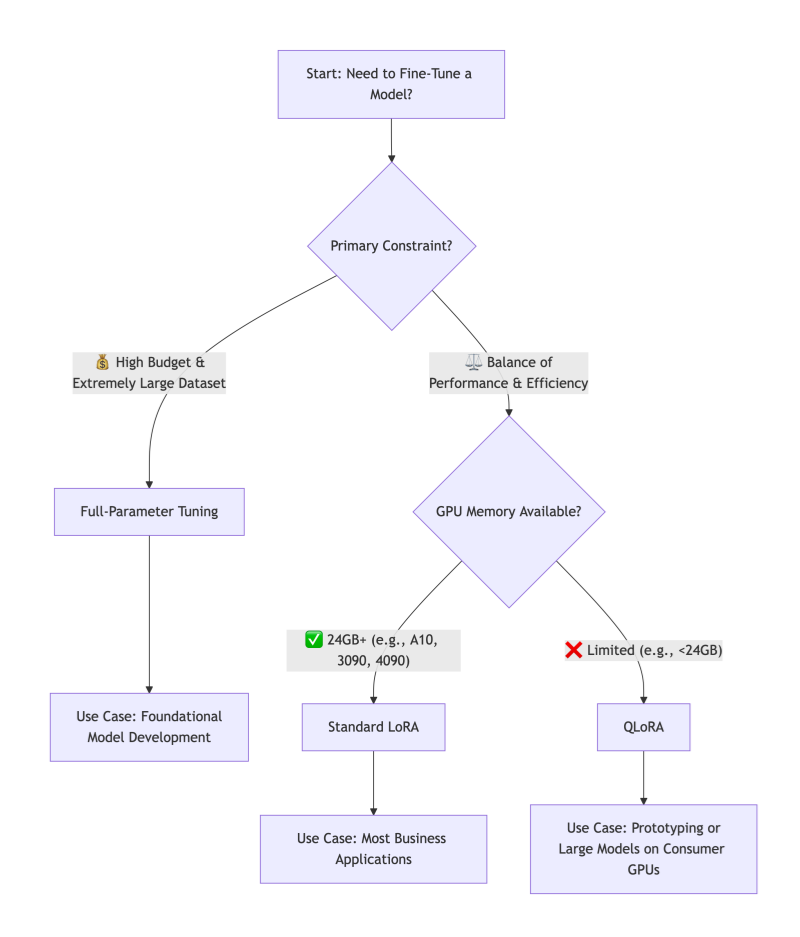
The Verdict:
For over 90% of business, research, and personal applications, LoRA is the recommended starting point. It offers the best balance of performance, efficiency, and practicality. QLoRA is the key when hardware is the absolute bottleneck. Reserve Full-Parameter Fine-Tuning for major initiatives where you are essentially creating a new foundational model and have the corresponding resources.
Taming Complexity: The Need for an Orchestration Platform
While LoRA and QLoRA lower hardware barriers, they introduce new operational complexities: managing different base models, dozens of adapter files, experiment tracking across various ranks and learning rates, and deploying these composite models.
This is where an integrated AI platform like WhaleFlux becomes a strategic force multiplier. WhaleFlux is designed to tame the fine-tuning lifecycle:
Streamlined Experimentation:
It provides a centralized environment to launch, track, and compare hundreds of fine-tuning jobs—whether full-parameter, LoRA, or QLoRA—logging all hyperparameters, metrics, and resulting artifacts.
Adopter & Model Registry:
Instead of a folder full of cryptic .bin files, WhaleFlux acts as a versioned registry for both your base models and your trained adapters. You can easily browse, compare, and promote the best-performing adapters.
Simplified Deployment:
Deploying a LoRA-tuned model is as simple as selecting a base model and an adapter from the registry. WhaleFlux handles the seamless merging and deployment of the optimized model to a scalable inference endpoint, abstracting away the underlying infrastructure complexity.
With WhaleFlux, teams can focus on the art of crafting the perfect dataset and experiment strategy, while the science of orchestration, reproducibility, and scaling is handled reliably.
Conclusion
The fine-tuning landscape has been transformed by LoRA and QLoRA, shifting the question from “Can we afford to fine-tune?” to “How should we fine-tune most effectively?” By understanding the trade-offs between full-parameter tuning, LoRA, and QLoRA, you can align your technical approach with your project’s goals, data, and constraints.
Start with a clear objective, embrace the efficiency of modern PEFT methods, and leverage platforms that operationalize these advanced techniques. This allows you to turn a powerful general-purpose AI into a dedicated, domain-specific expert that delivers tangible value.
FAQs: AI Model Fine-Tuning
1. When should I not use fine-tuning?
Fine-tuning is most valuable when you have a repetitive, well-defined task and a curated dataset. For tasks requiring real-time, external knowledge (e.g., answering questions about recent events), Retrieval-Augmented Generation (RAG) is often better. For simple task guidance, prompt engineering may suffice. The best solutions often combine RAG (for knowledge) with a lightly fine-tuned model (for style and task structure).
2. How much data do I need for LoRA/QLoRA to be effective?
You need significantly less data than for full-parameter tuning. For many style or instruction-following tasks, a few hundred high-quality examples can yield remarkable improvements. For complex domain adaptation, 1,000-10,000 examples are common. The key is data quality and diversity—they must be representative of the task you want the model to master.
3. What are the “rank” and “alpha” parameters in LoRA, and how do I set them?
- Rank (
r): This is the critical dimension of the low-rank adapter matrices. A higher rank means a larger, more expressive adapter (but more parameters to train). Start with a low rank (e.g., 8, 16, 32) and increase only if performance is lacking. - Alpha (
α): This is a scaling parameter for the adapter weights. Think of it as the learning rate for the adapter’s influence. A common and often effective rule of thumb is to setalpha = 2 * rank. Empirical testing on a validation set is the best way to tune these.
4. Can I combine multiple LoRA adapters on one base model?
Yes, this is a powerful advanced technique sometimes called “Adapter Fusion” or “Mixture of Adapters.” You can train separate adapters for different skills (e.g., one for coding syntax, one for medical terminology) and, with the right framework, dynamically combine or select them at inference time. This pushes the model towards being a modular, multi-skilled expert.
5. Does QLoRA sacrifice model quality compared to standard LoRA?
The research (Dettmers et al., 2023) showed that QLoRA, when properly configured, recovers the full 16-bit performance of standard fine-tuning. In practice, any performance difference is often negligible and far outweighed by the accessibility gains. For mission-critical deployments, you can train with QLoRA and then merge the high-quality adapters back into a 16-bit base model for inference if desired.
Guide to AI Model End-to-End Lifecycle Cost Optimization
For many businesses, the initial excitement of building a powerful AI model is quickly tempered by a daunting reality: the astronomical and often unpredictable costs that accrue across its entire lifecycle. It’s not just the headline-grabbing expense of training a large model; it’s the cumulative burden of data preparation, experimentation, deployment infrastructure, and ongoing inference that can cripple an AI initiative’s ROI.
The good news is that strategic cost optimization is not about indiscriminate cutting. It’s about making intelligent, informed decisions at every stage—from initial idea to production scaling. By adopting a holistic, end-to-end perspective, it is entirely feasible to reduce your total cost of ownership (TCO) by 50% or more, while maintaining or even improving model performance and reliability.
This guide provides a practical, stage-by-stage blueprint to achieve this goal, transforming your AI projects from budget black holes into efficient, value-generating assets.
Stage 1: The Foundation – Cost-Aware Design and Data Strategy (15-30% Savings)
Long before a single line of training code runs, you make decisions that lock in most of your future costs.
Optimization 1: Right-Scope the Problem.
The most expensive model is the one you didn’t need to build. Rigorously ask: Can a simpler rule-based system, a heuristic, or a fine-tuned small model solve 80% of the problem at 20% of the cost? Starting with the smallest viable model (e.g., a logistic regression or a lightweight BERT variant) establishes a cost-effective baseline.
Optimization 2: Invest in Data Quality, Not Just Quantity.
Garbage in, gospel out—and training on “garbage” is incredibly wasteful. Data cleaning, deduplication, and smart labeling directly reduce the number of training epochs needed for convergence. Implementing active learning, where the model selects the most informative data points for labeling, can cut data acquisition and preparation costs by up to 70%.
Optimization 3: Architect for Efficiency.
Choose model architectures known for efficiency from the start (e.g., EfficientNet for vision, DistilBERT for NLP). Design feature engineering pipelines that are lightweight and reusable. This upfront thinking prevents costly refactoring later.
Stage 2: The Experimental Phase – Efficient Model Development (20-40% Savings)
This is where compute costs can spiral due to unmanaged experimentation.
Optimization 4: Master the Art of Experiment Tracking.
Undisciplined experimentation is a primary cost driver. By systematically logging every training run—hyperparameters, code version, data version, and results—you avoid repeating failed experiments. This alone can cut wasted compute by 30%. Identifying underperforming runs early and stopping them (early stopping) is a direct cost saver.
Optimization 5: Leverage Transfer Learning and Efficient Fine-Tuning.
Never train a large model from scratch if you can avoid it. Start with a high-quality pre-trained model and use Parameter-Efficient Fine-Tuning (PEFT) methods like LoRA. These techniques fine-tune only a tiny fraction (often <1%) of the model’s parameters, slashing training time, GPU memory needs, and cost by over 90% compared to full fine-tuning.
Optimization 6: Optimize Hyperparameter Tuning.
Grid searches over large parameter spaces are prohibitively expensive. Use Bayesian Optimization or Hyperband to intelligently explore the hyperparameter space, finding optimal configurations in a fraction of the time and compute.
Stage 3: The Deployment Leap – Optimizing for Production Scale (25-50% Savings)
This is where ongoing operational costs are determined. Inefficiency here compounds daily.
Optimization 7: Apply Model Compression.
Before deployment, subject your model to a compression pipeline: Prune it to remove unnecessary weights, Quantize it from 32-bit to 8-bit precision (giving a 4x size reduction and 2-4x speedup), and consider Knowledge Distillation to create a compact “student” model. A compressed model directly translates to lower memory requirements, faster inference (lower latency), and significantly cheaper compute instances.
Optimization 8: Implement Intelligent Serving and Autoscaling.
Do not over-provision static resources. Use Kubernetes-based serving with horizontal pod autoscaling to match resources precisely to incoming traffic. For batch inference, use spot/preemptible instances at a fraction of the on-demand cost. Choose the right hardware: an efficient CPU for simple models, a GPU for heavy parallel workloads, or an AI accelerator (like AWS Inferentia) for optimal cost-per-inference.
Optimization 9: Design a Cost-Effective Inference Pipeline.
Cache frequent prediction results. Use model cascades, where a cheap, fast model handles easy cases, and only the difficult ones are passed to a larger, more expensive model. This dramatically reduces calls to your most costly resource.
Stage 4: The Long Run – Proactive Monitoring and Maintenance (10-25% Savings)
Post-deployment complacency erodes savings through silent waste.
Optimization 10: Proactively Monitor for Drift and Decay.
A model degrading in performance is a cost center—it delivers less value while consuming the same resources. Implement automated monitoring for data drift and concept drift. Detecting decay early allows for targeted retraining, preventing a full-blown performance crisis and the frantic, expensive firefight that follows.
Optimization 11: Establish a Retraining ROI Framework.
Not all drift warrants an immediate, full retrain. Establish metrics to calculate the Return on Investment (ROI) of retraining. Has performance decayed enough to impact business KPIs? Is there enough new, high-quality data? Automating this decision prevents unnecessary retraining cycles and their associated costs.
The Orchestration Imperative: How WhaleFlux Unlocks Holistic Optimization
Attempting to implement these 11 optimizations with a patchwork of disjointed tools creates its own management overhead and cost. True end-to-end optimization requires a unified platform that orchestrates the entire lifecycle with cost as a first-class metric.
WhaleFlux is engineered to be this orchestration layer, explicitly designed to turn the strategies above into executable, automated workflows:
Unified Cost Visibility:
It provides a single pane of glass for tracking compute spend across experimentation, training, and inference, attributing costs to specific projects and models—solving the “cost black box.”
Automated Efficiency:
WhaleFlux automates experiment tracking (Optimization 4), can orchestrate PEFT training jobs (5), and manages model serving with autoscaling on cost-optimal hardware (8).
Governed Lifecycle:
Its model registry and pipelines ensure that compressed, optimized models (7) are promoted to production, and its integrated monitoring (10) can trigger cost-aware retraining pipelines (11).
By centralizing control and providing the tools for efficiency at every stage, WhaleFlux doesn’t just run models—it systematically reduces the cost of owning them, turning the 50% savings goal from an aspiration into a measurable outcome.
Conclusion
Slashing AI costs by 50% is not a fantasy; it’s a predictable result of applying disciplined engineering and financial principles across the model lifecycle. It requires shifting from a narrow focus on training accuracy to a broad mandate of operational excellence. From the data you collect to the hardware you deploy on, every decision is a cost decision.
By adopting this end-to-end optimization mindset and leveraging platforms that embed these principles, you transform AI from a capital-intensive research project into a scalable, sustainable, and financially predictable engine of business growth. The savings you unlock aren’t just cut costs—they are capital freed to invest in the next great innovation.
FAQs: AI Model Lifecycle Cost Optimization
Q1: Where is the single biggest source of waste in the AI lifecycle?
Unmanaged and untracked experimentation. Teams often spend thousands of dollars on GPU compute running redundant or poorly documented training jobs. Implementing rigorous experiment tracking with early stopping capabilities typically offers the fastest and largest return on investment for cost reduction.
Q2: Is cloud or on-premise infrastructure cheaper for AI?
There’s no universal answer; it depends on scale and predictability. Cloud offers flexibility and lower upfront cost, ideal for variable workloads and experimentation. On-premise (or dedicated co-location) can become cheaper at very large, predictable scales where the capital expenditure is amortized over time. The hybrid approach—using cloud for bursty experimentation and on-premise for steady-state inference—is often optimal.
Q3: How do I calculate the ROI of model compression (pruning/quantization)?
The ROI is a combination of hard and soft savings: (Reduced_Instance_Cost * Time) + (Performance_Improvement_Value). Hard savings come from downsizing your serving instance (e.g., from a $4/hr GPU to a $1/hr CPU). Soft savings come from reduced latency (improving user experience) and lower energy consumption. The compression process itself has a one-time cost, but the savings recur for the lifetime of the deployed model.
Q4: We have a small team. Can we realistically implement all this?
Yes, by leveraging the right platform. The complexity of managing separate tools for experiments, training, deployment, and monitoring is what overwhelms small teams. An integrated platform like WhaleFlux consolidates these capabilities, allowing a small team to execute like a large one by automating best practices and providing a single workflow from idea to production.
Q5: How often should we review and optimize costs?
Cost review should be continuous and automated. Set up monthly budget alerts and dashboard reviews. More importantly, key optimization decisions (like selecting an instance type or triggering a retrain) should be informed by cost metrics in real-time. Make cost a first-class KPI alongside accuracy and latency in every phase of your ML operations.
10 Common Pitfalls Beginners Face with AI Models: A Guide to Avoiding Ineffective Training and Deployment Lag
Pitfall 1: Starting Without a Well-Defined Problem & Success Metric
The Trap:
Jumping straight into data collection or model selection because “AI is cool for this.” Vague goals like “improve customer experience” or “predict something useful” set the project up for failure, as there’s no clear finish line.
The Solution:
Begin by rigorously framing your problem. Is it a classification, regression, or clustering task? Crucially, define a quantifiable, business-aligned success metric before you start. Instead of “predict sales,” aim for “build a model that predicts next-month sales for each store within a mean absolute error (MAE) of $5,000.” This metric will guide every subsequent decision.
Pitfall 2: Underestimating the Paramount Importance of Data Quality
The Trap:
Assuming that more data automatically means a better model, and spending all effort on complex algorithms while feeding them noisy, inconsistent, or biased data. Garbage in, gospel out.
The Solution:
Allocate the majority of your initial time (often 60-80%) to data understanding, cleaning, and preprocessing. This involves:
- Handling missing values and outliers.
- Ensuring consistent formatting and labeling.
- Conducting exploratory data analysis (EDA) to uncover biases or spurious correlations.
- Documenting your data’s origins and limitations. A simple model trained on impeccable data will consistently outperform a brilliant model trained on a mess.
Pitfall 3: Data Leakage – The Silent Model Killer
The Trap:
Accidentally allowing information from the training process to “leak” into the training data. This creates a model that performs spectacularly well in testing but fails catastrophically in the real world. Common causes include: preprocessing (e.g., normalization) on the entire dataset before splitting, or using future data to predict past events.
The Solution:
Implement a strict, chronologically-aware data pipeline. Always split your data into training, validation, and test sets first (respecting time order if relevant). Then, fit any preprocessing steps (scalers, encoders) only on the training set, and apply the fitted transformer to the validation/test sets. This mimics the real-world flow of seeing new, unseen data.
Pitfall 4: Overfitting to the Training Set
The Trap:
Creating a model that memorizes the noise and specific examples in the training data rather than learning the generalizable pattern. It achieves near-perfect training accuracy but performs poorly on new data.
The Solution:
Employ a combination of techniques:
- Use a validation set: Hold out a portion of your training data to evaluate performance during development.
- Apply regularization: Techniques like L1/L2 regularization (which penalizes overly complex models) or Dropout (for neural networks) explicitly discourage overfitting.
- Practice simplicity: Start with a simpler model (linear regression before a deep neural network). You can only justify complexity if simplicity fails on your validation set.
- Get more data: This is often the most effective regularizer.
Pitfall 5: Misinterpreting Model Performance
The Trap:
Relying solely on overall accuracy, especially for imbalanced datasets. For example, a model that simply predicts “no fraud” for every transaction will have 99.9% accuracy in a dataset where fraud is 0.1% prevalent, yet it’s utterly useless.
The Solution:
Choose metrics that reflect your business reality. For imbalanced classification, use precision, recall, F1-score, or the area under the ROC curve (AUC-ROC). Always examine a confusion matrix to see where errors are actually occurring. The right metric is determined by the cost of false positives vs. false negatives in your specific application.
Pitfall 6: The “Set-and-Forget” Training Mindset
The Trap:
Running one training job, hitting a decent metric, and calling the model “done.” Machine learning is inherently experimental.
The Solution:
Adopt a methodical experimentation mindset. Systematically vary hyperparameters (learning rate, model architecture, feature sets) and track every experiment. Use tools—or a platform—to log the hyperparameters, code version, data version, and resulting metrics for every run. This turns model development from a black art into a reproducible, optimizable process.
Pitfall 7: Ignoring the Engineering Path to Production
The Trap:
Building a model in a Jupyter notebook and only then asking, “How do we put this online?” This leads to deployment lag, as the code, dependencies, and environment are not built for scalable, reliable serving.
The Solution:
Think about deployment from day one. Write modular, production-ready code even during exploration. Containerize your model and its environment using Docker. Plan for how the model will receive inputs and deliver outputs (a REST API is common). This “production-first” thinking smooths the transition from prototype to product.
Pitfall 8: Assuming the Model Will Stay Accurate Forever
The Trap:
Deploying a model and considering the project complete. In a dynamic world, model performance decays over time due to data drift (changes in input data distribution) and concept drift (changes in the relationship between inputs and outputs).
The Solution:
Implement a model monitoring plan before launch. Define key performance indicators (KPIs) and set up automated tracking of prediction accuracy, input data distributions, and business outcomes. Establish alerts to trigger when these metrics deviate from expected baselines, signaling the need for model retraining or investigation.
Pitfall 9: Neglecting Computational and Cost Realities
The Trap:
Designing a massive neural network without considering the GPU hours required to train it or the latency and cost of serving thousands of predictions per second.
The Solution:
Profile your model’s needs early. Start small and scale up only if necessary. Explore model optimization techniques like quantization and pruning to reduce size and speed up inference. Always calculate the rough total cost of ownership (TCO), factoring in training compute, inference compute, and engineering maintenance.
Pitfall 10: Working in Isolation Without Version Control
The Trap:
Keeping code, data, and model weights in ad-hoc folders with names like final_model_v3_best_try2.pkl. This guarantees irreproducibility and collaboration nightmares.
The Solution:
Use Git religiously for code. Extend that discipline to data and models. Use data versioning tools (like DVC) and a model registry to track exactly which version of the code trained which version of the model on which version of the data. This is non-negotiable for professional, collaborative ML work.
How an Integrated Platform Bridges the Gap
For beginners, managing these ten areas—experiment tracking, data pipelines, deployment engineering, and monitoring—can feel overwhelming. This is where an integrated MLOps platform like WhaleFlux transforms the learning curve.
WhaleFlux is designed to institutionalize best practices and help beginners avoid these exact pitfalls:
- It structures experimentation (solving Pitfall 6), automatically logging every run to eliminate confusion.
- Its model registry provides governance and version control (solving Pitfall 10), creating a single source of truth.
- It streamlines the packaging and deployment of models as APIs (solving Pitfall 7), turning weeks of DevOps work into a few clicks.
- Its built-in monitoring dashboards track model health and data drift in production (solving Pitfall 8), giving you peace of mind.
In essence, WhaleFlux provides the guardrails and automation that allow beginners to focus on the core science and application of ML, rather than the sprawling peripheral engineering challenges that so often cause projects to stall or fail.
Conclusion
Mastering AI is as much about avoiding fundamental mistakes as it is about implementing advanced techniques. By being aware of these ten common pitfalls—from problem definition to production monitoring—you position your project for success from the outset. Remember, effective AI is built on a foundation of meticulous data management, rigorous experimentation, and a steadfast focus on the end goal of creating a reliable, maintainable asset that delivers real-world value. Start with these principles, leverage modern platforms to automate the complexity, and you’ll not only build better models, but deploy them faster and with greater confidence.
FAQs: Common Beginner Pitfalls with AI Models
1. What is the single most important step for a beginner to get right?
Without a doubt, it’s Pitfall #2: Data Quality and Understanding. Investing disproportionate time in cleaning, exploring, and truly understanding your data pays greater dividends than any model choice or hyperparameter tune. A clean, well-understood dataset makes all subsequent steps smoother and more likely to succeed.
2. How can I practically check for data leakage (Pitfall #3)?
A strong, practical red flag is a massive discrepancy between performance on your validation set and performance on a truly held-out test set. If your model’s accuracy drops dramatically (e.g., from 95% to 70%) when evaluated on the final test data you locked away at the very start, you almost certainly have data leakage. Review your preprocessing pipeline step-by-step to ensure the test set was never used to calculate statistics like means, medians, or vocabulary lists.
3. I have a highly imbalanced dataset. What metric should I use instead of accuracy?
Stop using accuracy. Instead, focus on Recall (Sensitivity) if missing the positive class is very costly (e.g., failing to detect a serious disease). Focus on Precision if false alarms are very costly (e.g., incorrectly flagging a legitimate transaction as fraud). To balance both, use the F1-Score. Always examine the Confusion Matrix to see the exact breakdown of your errors.
4. As a beginner, how do I know when to stop trying to improve my model?
Establish a performance benchmark early. This could be a simple heuristic or a basic model (like logistic regression). Your goal is to outperform this benchmark meaningfully. Stop when: 1) You consistently meet your pre-defined business metric on the validation set, 2) Further hyperparameter tuning or feature engineering yields diminishing returns (very small improvements for large effort), or 3) You hit the constraints of your data quality or volume. Don’t optimize indefinitely.
5. Do I really need to worry about monitoring and retraining (Pitfall #8) for a simple model?
Yes, absolutely. Even simple models are subject to the changing world. The frequency may be lower, but the need is the same. At a minimum, schedule a quarterly review where you check the model’s predictions against recent outcomes. Setting up a simple automated alert for a significant drop in an online metric (like conversion rate) that your model influences is a highly recommended best practice for any model in production.
Beyond ChatGPT: 6 Niche but Practical Industry Use Cases of AI Models
The meteoric rise of ChatGPT brought Large Language Models (LLMs) into the public spotlight, showcasing their remarkable ability to converse, create, and reason with text. However, this public-facing “chatbot” persona is just the tip of the AI iceberg. Beneath the surface, a quiet revolution is underway: specialized AI models are being deployed to solve deep, complex, and highly valuable problems in specific industries.
These niche applications often don’t make headlines, but they are transforming operations, driving innovation, and creating significant competitive advantages. They move beyond general conversation to perform precision tasks—analyzing molecular structures, interpreting sensor vibrations, or forecasting microscopic crop diseases. This article explores six such practical use cases where AI models are doing the heavy lifting far beyond the chat window.
1. AI in Healthcare: Accelerating Drug Discovery and Development
The traditional drug discovery pipeline is notoriously slow and expensive, often taking over a decade and billions of dollars to bring a new therapy to market. AI models are compressing this timeline by orders of magnitude.
The Application:
Researchers use specialized AI for virtual screening of compound libraries. Models trained on vast datasets of molecular structures and biological interactions can predict how a new molecule will behave in the body, identifying the most promising candidates for treating a specific disease. Another critical application is in optimizing clinical trial design. AI can analyze historical trial data to identify suitable patient cohorts, predict potential side effects, and even suggest optimal dosing regimens.
Why It’s Niche & Powerful:
This isn’t about answering patient questions; it’s about leveraging graph neural networks (GNNs) and generative models to navigate a complex, multi-dimensional scientific space. It reduces the initial “needle-in-a-haystack” search from millions of compounds to a manageable shortlist, saving years of lab work and immense resources.
2. AI in Precision Manufacturing: Predictive Maintenance and Quality Control
In a high-stakes factory environment, an unplanned machine failure can cost millions. Similarly, a single defective component can ruin an entire production batch.
The Application:
Predictive maintenance models analyze real-time sensor data (vibration, temperature, acoustic signals) from industrial equipment. By learning the “normal” operating signature, these models can detect subtle anomalies that precede a failure, allowing maintenance to be scheduled proactively. For automated visual inspection, high-resolution computer vision models surpass human ability to spot microscopic cracks, coating defects, or assembly errors on fast-moving production lines, 24/7.
Why It’s Niche & Powerful:
These models operate on the edge, processing high-frequency time-series or image data. They require robustness to noisy industrial environments and must deliver predictions with extreme reliability. The value is direct: preventing catastrophic downtime, reducing waste, and ensuring flawless product quality.
3. AI in Agriculture: From Precision Farming to Yield Optimization
Modern agriculture faces the immense challenge of feeding a growing population with limited resources. AI is becoming a key tool for sustainable intensification.
The Application:
By analyzing multispectral satellite or drone imagery, AI models can assess crop health at the individual plant level. They detect early signs of disease, nutrient deficiency, or water stress long before the human eye can see them. This enables variable-rate application: AI-guided machinery delivers the precise amount of water, fertilizer, or pesticide only where it’s needed. Furthermore, models integrate weather data, soil conditions, and historical yield maps to predict crop yields with remarkable accuracy, aiding harvest planning and supply chain logistics.
Why It’s Niche & Powerful:
This application combines computer vision with geospatial and environmental data analysis. The models must be tailored to specific crops, regions, and climates. The impact is profound: increasing yields while minimizing environmental footprint and input costs.
4. AI in Supply Chain & Logistics: Dynamic Optimization and Demand Forecasting
Global supply chains are complex, dynamic networks vulnerable to disruption. AI provides the intelligence to navigate this complexity.
The Application:
AI models power dynamic routing and logistics optimization. They process real-time data on traffic, weather, fuel costs, and delivery windows to continuously re-optimize delivery routes for fleets of vehicles. In warehouses, computer vision and robotics AI enable fully automated picking and packing. For demand forecasting, advanced models synthesize historical sales data, market trends, promotional calendars, and even social media sentiment to predict future product demand with much higher accuracy than traditional methods.
Why It’s Niche & Powerful:
These are optimization problems at a massive scale, often requiring a combination of reinforcement learning and combinatorial optimization. The AI doesn’t just predict; it prescribes the most efficient action in a constantly changing environment, directly translating to lower costs and higher service levels.
5. AI in Legal Tech & Compliance: Contract Analysis and Legal Research
The legal profession is built on documents—contracts, case law, regulations. AI is becoming an indispensable assistant for navigating this textual universe.
The Application:
Natural Language Processing (NLP) models specialized in legal language can review and analyze contracts in seconds, flagging non-standard clauses, potential liabilities, or obligations. For e-discovery in litigation, AI sifts through millions of emails and documents to find relevant evidence. Furthermore, AI-powered research tools can quickly surface pertinent case law or regulatory precedents, saving lawyers countless hours of manual review.
Why It’s Niche & Powerful:
This requires models fine-tuned on massive corpora of legal text to understand intricate jargon and context. The value isn’t in creativity but in precision, recall, and speed, drastically reducing risk and human labor in document-intensive processes.
6. AI in Meteorology & Climate Science: High-Resolution Weather and Climate Modeling
Predicting the weather and modeling climate change are among the most computationally challenging scientific problems.
The Application:
AI is now being used to create “digital twins” of the atmosphere. Machine learning models, particularly physics-informed neural networks, can analyze data from satellites, radar, and ground stations to make highly accurate, localized, short-term weather forecasts faster than traditional numerical weather prediction (NWP) models. For climate science, AI helps analyze complex climate model outputs, identify patterns of change, and even improve the parameterization of smaller-scale processes in larger global models.
Why It’s Niche & Powerful:
This sits at the intersection of AI and fundamental physics. The models must respect physical laws (conservation of energy, mass) while learning from data. The potential is vast: from giving farmers hyper-local rain forecasts to improving our long-term understanding of planetary systems.
The Common Challenge: Operationalizing Specialized AI
While the applications are diverse, they share a common hurdle: moving from a promising pilot to a reliable, scalable production system. These niche models require:
- Integration with proprietary industry data sources (lab systems, factory SCADA, satellite feeds).
- Specialized deployment environments (on-premise servers, edge devices in factories, secure cloud vaults).
- Continuous monitoring for performance decay as real-world data evolves.
This is where an integrated AI platform like WhaleFlux proves critical. WhaleFlux provides the unified foundation to build, deploy, and manage these specialized industry models. It can handle the diverse data pipelines, provide the tools for domain-specific fine-tuning, and ensure robust monitoring for model health and data drift—whether the model is predicting a bearing failure on a factory floor or analyzing a clause in a ten-thousand-page merger agreement. By abstracting away the infrastructure complexity, WhaleFlux allows domain experts and data scientists to focus on solving the unique problems of their field.
Conclusion
The future of AI’s economic impact lies not only in general-purpose conversational agents but profoundly in these deep, vertical applications. By moving “Beyond ChatGPT,” businesses are leveraging AI as a core tool for scientific discovery, operational excellence, and strategic decision-making in fields where specialized knowledge is paramount. The next wave of AI value will be generated by those who can successfully harness these powerful niche models and integrate them seamlessly into the heart of their industry’s workflows.
FAQs: Niche Industry Use Cases of AI Models
Q1: What’s the main difference between a general model like ChatGPT and these niche industry models?
General-purpose LLMs are trained on broad internet text to be conversational jack-of-all-trades. Niche industry models are typically specialized from the ground up or heavily fine-tuned on proprietary, domain-specific data (molecular structures, sensor logs, legal documents). They excel at a precise, high-stakes task but lack broad conversational ability. It’s the difference between a polymath and a world-leading specialist.
Q2: What are the biggest challenges in implementing such niche AI solutions?
The top challenges are: 1) Data Access & Quality: Acquiring enough high-quality, labeled domain-specific data. 2) Talent: Finding or developing teams that combine AI expertise with deep domain knowledge (e.g., a biochemist who understands ML). 3) Integration: Embedding the AI into existing, often legacy, industry software and hardware systems. 4) Trust & Regulation: Meeting stringent industry standards for validation, explainability, and compliance (especially in healthcare, finance, and law).
Q3: How does a platform like WhaleFlux help with these niche applications?
WhaleFlux addresses operational friction. It provides a unified environment to manage proprietary data for training, orchestrate the training/fine-tuning of specialized models on appropriate hardware, and deploy and monitor these models in their required environments (cloud, on-premise, edge). This allows cross-functional teams (domain experts + data scientists) to collaborate effectively and move from experiment to productionized asset faster.
Q4: Can small and medium-sized enterprises (SMEs) in these industries afford to develop such AI?
Yes, the barrier is lowering. Instead of building massive models from scratch, SMEs can often start with pre-trained, domain-adapted foundation models (e.g., a model pre-trained on scientific literature) and fine-tune them on their own smaller datasets. Cloud-based AI platforms and “AI-as-a-Service” offerings for specific tasks (like document analysis or predictive maintenance) are also making this technology more accessible and cost-effective for smaller players.
Q5: What is a key trend in the future of these niche AI applications?
The move towards “AI Scientists” or “AI Co-pilots.” We will see less of AI as a standalone tool and more as an integrated assistant that works alongside the human expert. In drug discovery, this might be an AI suggesting novel molecular pathways. For a lawyer, it could be an AI proactively highlighting risks in a contract draft based on recent case law. The integration will become deeper, more interactive, and more focused on augmenting human expertise.
AI Model Training Tools Showdown: TensorFlow vs. PyTorch vs. JAX – How to Choose?
TL;DR: AI Framework ROI & Compute Economics in 2026
- The Verdict: PyTorch 2.x has emerged as the definitive enterprise standard for Model Fine-tuning and Agentic Workflows, driven by its superior ecosystem (Triton/FlashAttention) and 30% faster deployment velocity.
- Performance ROI: JAX retains a 10–15% throughput advantage for massive-scale distributed research (128+ GPU clusters), while TensorFlow serves as a stable legacy backbone for established enterprise pipelines.
- The WhaleFlux Advantage: By leveraging the WhaleFlux Unified AI Platform, enterprises can reduce Total Cost of Ownership (TCO) by up to 70% on H100/H200 clusters through Intelligent Scaling and Full-stack AI Observability.
- Operational Impact: Our integrated Model Lifecycle Management ensures 99.9% system uptime and reduces inference latency by 60%, allowing organizations to convert complex framework selections into deterministic business growth.
Beyond the Syntax: Frameworks as Infrastructure
In 2026, the “Framework War” has moved past API preferences. For AI enterprises, the choice between PyTorch, JAX, and TensorFlow is a strategic decision impacting Model Refinement speed and Compute TCO.
At WhaleFlux, we don’t just host models; we orchestrate intelligence. Through our Deep Observability suite, we’ve tracked thousands of fine-tuning cycles. The data is clear: the framework you choose dictates how much of your NVIDIA H100/H200’s raw power actually reaches your Autonomous Agents.
1. PyTorch: The Uncontested Leader in Fine-Tuning
PyTorch 2.x and the evolution of torch.compile have solidified its position as the industry standard for Model Adaptation.
The “Triton” Advantage
PyTorch’s deep integration with OpenAI’s Triton allows for the rapid development of custom GPU kernels. This means features like FlashAttention-3 are available on PyTorch weeks before other frameworks.
Ecosystem Velocity
95% of the models arriving at the WhaleFlux Model Refinery are PyTorch-native. Its dynamic graph nature makes debugging complex agent logic significantly faster than its competitors.
WhaleFlux Synergy
We use PyTorch for the majority of our Thermal-aware Orchestration tasks because of its superior handling of memory fragments (VRAM) during high-concurrency inference.
2. JAX: The Precision Engine for Frontiers
JAX has carved out a niche for teams pushing the boundaries of new architectures, such as State Space Models (SSMs)and massive-scale distributed refinement.
XLA Compilation
JAX’s ability to compile high-level Python code into optimized XLA kernels makes it incredibly fast on TPU and NVIDIA H-series clusters.
The Functional Paradigm
For researchers performing complex gradient transformations, JAX offers a level of mathematical elegance that PyTorch struggles to match.
The Trade-off
JAX remains “research-heavy.” Deployment into a production Agent Workforce is often more complex due to a less mature serving ecosystem compared to the PyTorch/Triton stack.
3. TensorFlow: The Legacy Infrastructure Backbone
TensorFlow has transitioned from the “default” to the “legacy” powerhouse.
Enterprise Stability
For businesses with established TFX (TensorFlow Extended) pipelines, the framework remains a stable choice for maintaining older assets.
Static Graph Benefits
While less flexible during the “refinement” phase, TensorFlow’s static graphs still offer marginal gains in specific, unchanging production environments where every microsecond of inference is pre-calculated.
The Verdict
Most modern WhaleFlux users are migrating away from TensorFlow to leverage the faster innovation cycles of the PyTorch ecosystem.
4. Framework Decision Matrix: 2026 ROI Edition
| Criteria | PyTorch (The Standard) | JAX (The Frontier) | TensorFlow (The Legacy) |
| Fine-Tuning Speed | Excellent (via FSDP) | Superior (Scale-out) | Average |
| Agent Deployment | Industry Leading | Emerging | Stable |
| Custom Kernel Dev | Native Triton Support | Via Pallas | Complex |
| WhaleFlux ROI | Highest for mid-scale | High for massive scale | Lower for new projects |
5. How WhaleFlux Optimizes Your Framework Choice
As an all-in-one AI integrated platform, WhaleFlux abstracts the friction of framework management through AI Platform Intelligence:
Hardware-to-Framework Mapping
Our platform automatically adjusts the Power Envelope of your H200 nodes based on whether you are running a JAX-heavy research task or a PyTorch-driven fine-tuning job.
Automated Dependency Management
Through WhaleFlux, you can switch from a PyTorch 2.4 environment to a JAX-specific XLA environment in seconds, with all drivers and CUDA kernels pre-optimized for our Compute Infra.
Cross-Framework Observability
Use our Deep Observability dashboard to compare the VRAM utilization of the same model across different frameworks, identifying exactly where your compute budget is being wasted.
Conclusion: Strategic Selection
In 2026, don’t choose a framework based on what’s “easy” to code. Choose based on deployment velocity and silicon utilization.
For the vast majority of Autonomous Agent and Model Refinement tasks, PyTorch is the definitive choice for ROI. However, for those pushing the absolute limits of distributed scale, JAX offers a glimpse into the future. Whatever your choice, the WhaleFlux Integrated AI Platform provides the infrastructure and intelligence to ensure your model reaches the “Green Zone” of efficiency.
Expert FAQ
1. Is PyTorch faster than JAX for fine-tuning a 70B model?
It depends on the scale. For a single-node or 8-GPU cluster, PyTorch (using FSDP) is often faster due to its ease of setup. For massive, multi-node clusters exceeding 128 GPUs, JAX’s XLA compilation can sometimes offer a 10-15% throughput advantage.
2. Why is TensorFlow’s popularity declining in AI enterprises?
The industry has moved toward “Agentic” workflows that require frequent, dynamic changes to model logic. TensorFlow’s static nature makes this iteration cycle significantly slower than PyTorch.
3. Does WhaleFlux support custom C++ kernels for these frameworks?
Yes. Through our Integrated AI Platform, engineers can deploy custom Triton or C++ kernels. We recommend PyTorch for this, as its integration with the modern NVIDIA stack is currently the most robust.
4. Can I use WhaleFlux to migrate from TensorFlow to PyTorch?
Absolutely. Many clients use our Model Refinery to port older weights into modern PyTorch architectures, enabling them to take advantage of Thermal-aware Orchestration and newer quantization formats like FP4.
5. How does framework choice affect “Agent Latency”?
Frameworks with better “Serving” stacks (like PyTorch with vLLM or Triton) result in lower Time-to-First-Token (TTFT). This makes your Agent Workforce feel more responsive and capable of handling real-time human interaction.
AI Model Trends: Lightweight, Multimodal, or Industry-Customized
The Great Fork in the Road
Imagine you’re a tech lead at a mid-sized company. Your CEO has greenlit a major AI initiative, convinced it’s the key to staying competitive. The directive is clear: “Build something intelligent and impactful.” But as you sit down to plan, you’re immediately faced with a foundational and perplexing choice. Should you:
- Adopt a state-of-the-art, massive multimodal model (MMM) that can chat, see, and reason, hoping its breathtaking generality sparks unexpected innovation?
- Develop a streamlined, lightweight model laser-focused on one specific task, promising speed, low cost, and easy deployment on your existing servers?
- Invest in creating or deeply fine-tuning a model exclusively for your industry’s jargon, regulations, and workflows, aiming to solve your most expensive problems that generic AI glosses over?
This isn’t just a technical selection; it’s a strategic bet on the future of your business. The AI landscape is no longer a one-way street toward bigger and bigger models. It has forked into three distinct, powerful pathways: the pursuit of Lightweight Efficiency, the ambition of Multimodal Mastery, and the depth of Industry-Customized Specialization. Each promises leadership, but in very different races. Which trend holds the key to real-world dominance?
Contender 1: The Agile Champion – Lightweight & Efficient Models
The “bigger is better” mantra in AI is facing a pragmatic challenger: the lightweight model. This trend isn’t about beating GPT-4 at a general knowledge test. It’s about winning where it matters most—in production.
The “Why” Behind the Shift: The drive for efficiency comes from the harsh economics of deployment. Running a 100-billion-parameter model in real-time requires immense computational power, typically from clusters of expensive GPUs like the NVIDIA H100, leading to high latency and unsustainable costs for high-volume applications. Lightweight models, often with parameters in the single-digit billions or even millions, flip this script.
The Engine of Efficiency: This is achieved through a sophisticated toolbox:
- Architectural Innovation: New model architectures like Microsoft’s Phi-2 or Google’s Gemmaare designed from the ground up to do more with less, using smarter attention mechanisms and denser parameter utilization.
- Model Compression: Techniques like quantization (reducing numerical precision from 32-bit to 8-bit or 4-bit), pruning (removing non-essential neurons), and knowledge distillation (training a small model to mimic a large one) can shrink model size by 4x or more with minimal accuracy loss.
- Hardware Synergy: These compact models are perfect partners for cost-effective inference on less powerful, widely available hardware, such as a single NVIDIA RTX 4090 for on-premises deployment or even on mobile and edge devices.
Leadership Claim: Lightweight models lead the race to ubiquity and practicality. They are the trend that brings AI from the cloud to the daily workflows—powering real-time translation on phones, instant product recommendations on websites, and fast, private data analysis on company servers without exorbitant cloud bills.
Contender 2: The Universal Genius – Multimodal Models
If lightweight models are specialists, multimodal models are the polymaths. They aim to break down the walls between data types, creating a single AI that can seamlessly understand and generate text, images, audio, and video.
Beyond Simple Combination:
Early “multimodal” systems were often pipelines—an image classifier feeding text to a language model. Modern MMMs like GPT-4V or Google’s Gemini are fundamentally unified. They are trained on massive, interleaved datasets of text, images, and code, allowing them to develop a deeply interconnected understanding. An image isn’t just labeled; its elements, style, and implied meaning are woven into the model’s reasoning fabric.
The Power of a Unified World View:
This creates astonishing, human-like capabilities. You can ask it to write a marketing slogan based on a product sketch, analyze a scientific chart and summarize the findings, or find an emotional moment in a video based on a voice description. The potential for creative assistants, revolutionary search interfaces, and complex problem-solving is immense.
The Cost of Genius:
However, this capability comes at a staggering cost. Training these unified models requires unprecedented computational scale—think tens of thousands of NVIDIA H100 or H200 GPUs running for months. Furthermore, their very generality can be a weakness for businesses. A model that knows a little about everything might not know enough about your specific industry’s nuances, leading to plausible but incorrect or generic outputs for specialized tasks.
Leadership Claim:
Multimodal models lead the race for raw capability and user experience innovation. They are contenders for the ultimate human-machine interface, potentially becoming the primary way we interact with all digital systems.
Contender 3: The Deep Expert – Industry-Customized Models
This trend asks a simple, powerful question: What good is a genius if it doesn’t understand your business? Industry-customized models are the domain experts, trained or meticulously fine-tuned on proprietary data—legal contracts, medical journals, engineering schematics, financial reports.
From General Knowledge to Operational Intelligence: These models move beyond answering general questions to performing high-stakes, domain-specific tasks. Think of a model that reads thousands of clinical trial reports to suggest potential drug interactions, or one that analyzes decades of supply chain and geopolitical data to predict procurement risks for a manufacturer.
The Path to Specialization: Customization happens in several ways:
- Continued Pre-training: Further training a base model (like Llama 2) on a vast corpus of domain-specific text.
- Supervised Fine-Tuning (SFT): Training the model on labeled examples of specific tasks (e.g., “label this radiograph”).
- Retrieval-Augmented Generation (RAG): Connecting a model to a live, vectorized database of company knowledge, ensuring its answers are grounded in internal docs and latest data.
The infrastructure for such specialization is critical. Developing and iterating on these custom models requires flexible, high-performance computing that doesn’t break the bank. This is where platforms architected for efficiency show their value. For instance, WhaleFlux provides an integrated AI service platform that supports this entire customization journey. Beyond offering optimized access to the full spectrum of NVIDIA GPUs (from H100 for heavy training to RTX 4090s for cost-effective development), its unified environment for GPU management, model serving, and AI observability allows enterprise teams to focus on fine-tuning their proprietary data and workflows. By maximizing cluster utilization and providing stable deployment, it turns the high-compute task of building a domain expert into a manageable and predictable operational process.
Leadership Claim: Industry-customized models lead the race for tangible ROI and competitive advantage. They don’t just automate tasks; they encapsulate and scale a company’s unique intellectual property, directly impacting the bottom line by solving problems no off-the-shelf model can.
The Verdict: A Trifecta, Not a Winner-Takes-All
So, who will lead? The answer is not one, but all three—in different arenas.
The future belongs to strategic layering. The winning enterprise architecture will likely integrate elements from each trend:
- A lightweight, efficient model deployed at the edge to handle high-frequency, low-latency tasks (e.g., customer service chat filtering).
- A powerful multimodal model in the cloud as a creative and research co-pilot for employees, analyzing presentations and brainstorming.
- A deeply customized, domain-specific model serving as the core operational brain, powering critical applications like risk assessment, diagnostic support, or legal discovery.
Lightweight models will lead in pervasiveness and accessibility. Multimodal models will lead in consumer-facing and creative applications. Industry-customized models will lead in transforming core business operations and building unassailable moats.
The true leaders won’t be the models themselves, but the organizations that most skillfully navigate this trifecta. They will be the ones who ask not “Which trend should we follow?” but “How can we orchestrate these powerful forces to solve our most meaningful problems?” The race is on, and the most intelligent strategy may be to build a team that can run in all three directions at once.
FAQs: AI Model Trends
1. Is the trend toward lightweight models just because companies can’t afford larger ones?
Not at all. While cost is a major driver (making AI viable for more use cases), the shift is fundamentally about right-sizing. Lightweight models offer superior speed, lower latency, the ability to run on-device for privacy, and dramatically reduced energy consumption. It’s about applying the appropriate amount of intelligence for the task, not settling for less.
2. Can a multimodal model replace the need for specialized, industry-customized models?
Unlikely in the near term. While multimodal models are incredibly versatile, they are generalists. An industry-customized model trained on proprietary data develops a depth of understanding and reliability on niche tasks that a generalist cannot match. Think of it as the difference between a brilliant medical student (multimodal) and a seasoned specialist with 20 years of experience (customized). For high-stakes business applications, depth and precision are non-negotiable.
3. What’s the biggest infrastructure challenge in pursuing industry-customized AI?
The challenge is two-fold: computational cost and operational complexity. Fine-tuning and continuously improving custom models require significant, repeated GPU compute cycles (on hardware like NVIDIA A100 or H100 clusters). Managing this infrastructure, ensuring high utilization to control costs, and maintaining stable deployment pipelines is a massive undertaking. This is precisely why integrated platforms that handle this complexity are becoming essential for enterprise AI teams.
4. How does a platform like WhaleFlux support a company exploring multiple AI trends?
WhaleFlux acts as a flexible, unified foundation for AI development and deployment. For lightweight models, its efficient GPU management allows for cost-effective inference scaling. For developing customized models, it provides the high-performance NVIDIA GPU resources (like H100s for training) and the observability tools needed for iterative fine-tuning. Its integrated environment for models and agents helps teams manage this entire portfolio from experimentation to production, optimizing resource use across different types of AI workloads and preventing infrastructure from becoming a bottleneck to innovation.
5. As a business leader, how should I prioritize investment among these three trends?
Start with the problem, not the technology. Map your key business challenges to the trend’s strength:
- Invest in Lightweight AI for customer-facing apps needing speed/scale (e.g., recommendation engines).
- Invest in Multimodal AI for enhancing creativity, internal research, or building next-gen user interfaces.
- Invest in Industry-Customized AI for automating core, proprietary processes (e.g., contract analysis, predictive maintenance, diagnostic support). Most companies will find the highest initial ROI in a focused, customized model project that tackles a known, expensive problem.
AI Model Deployment Demystified: A Practical Guide from Cloud to Edge
Deploying an AI model from a promising prototype to a robust, real-world application is a critical yet complex journey. The landscape of deployment options has expanded dramatically, leaving many teams facing a crucial question: where and how should our models live in production? The choice isn’t just technical; it directly impacts your application’s performance, cost, reliability, and ability to scale.
This guide cuts through the complexity by comparing the three mainstream deployment paradigms: Public Cloud Services, On-Premises/Private Cloud, and Edge Computing. We’ll explore the core logic, ideal use cases, and practical trade-offs of each to help you build a deployment strategy that aligns with your business goals.
The Core Deployment Trinity: Understanding Your Options
The modern AI deployment ecosystem is broadly divided into three domains, each governed by a different philosophy about where computation and data should reside.
1. Public Cloud AI Services: The Power of Elasticity
Cloud AI platforms, such as AWS SageMaker, Azure Machine Learning, and Google Cloud Vertex AI, offer a managed, service-centric approach. Their primary advantage is elastic scalability, allowing you to deploy a model on a single GPU instance and scale out to a multi-node cluster within minutes to handle increased load. This model eliminates massive upfront capital expenditure (CapEx) on hardware, converting it into a predictable operational expense (OpEx).
Cloud platforms are ideal for scenarios requiring rapid iteration, variable workloads, or global reach. They provide integrated MLOps toolchains that can significantly reduce operational overhead. However, organizations must be mindful of potential pitfalls like egress costs for large data transfers, “cold start” latency for infrequently used services, and the long-term cost implications of sustained, high-volume inference.
2. On-Premises & Private Cloud: The Command of Control
For many enterprises, especially in regulated industries like finance, healthcare, or government, maintaining direct control over data and infrastructure is non-negotiable. On-premises deployment involves hosting models on company-owned hardware, typically within a private data center or cloud (like an NVIDIA DGX pod). This approach offers the highest degree of data sovereignty, security, and network control.
The primary challenge shifts from operational agility to infrastructure management. Teams must procure, maintain, and optimize expensive GPU resources (such as clusters of NVIDIA H100 or A100 GPUs) and handle the full software stack. The initial investment is high, and maximizing the utilization of this fixed, finite resource pool becomes a critical engineering task to ensure a positive return on investment. This is precisely where intelligent orchestration platforms add immense value.
For enterprises navigating the complexity of private GPU clusters, a platform like WhaleFlux provides a critical advantage. WhaleFlux is an intelligent GPU resource management and AI service platform designed to tackle the core challenges of on-premises and private cloud AI. It goes beyond simple provisioning to optimize the utilization efficiency of multi-GPU clusters, directly helping businesses lower cloud computing costs while enhancing the deployment speed and stability of large models. By integrating GPU management, AI model serving, Agent frameworks, and full-stack observability into one platform, WhaleFlux allows teams to focus on innovation rather than infrastructure mechanics. It provides access to a full spectrum of NVIDIA GPUs, from the powerful H100 and H200 for massive training to the versatile A100 and RTX 4090 for inference and development, available through purchase or monthly rental to ensure cost predictability.
3. Edge AI: Intelligence at the Source
Edge AI represents a paradigm shift by running models directly on devices at the “edge” of the network—such as smartphones, IoT sensors, industrial PCs, or dedicated appliances like the NVIDIA Jetson. This architecture processes data locally, where it is generated, rather than sending it to a central cloud.
The benefits are transformative for specific applications: ultra-low latency for real-time decision-making (e.g., autonomous vehicle navigation), enhanced data privacy as sensitive information never leaves the device, operational resilience in connectivity-challenged environments, and bandwidth cost reduction. The trade-off is working within the strict computational, power, and thermal constraints of the edge device, often requiring specialized model optimization techniques like quantization and pruning.
Choosing Your Path: A Strategic Decision Framework
Selecting the right deployment target is not about finding the “best” option in a vacuum, but the most fit-for-purpose solution for your specific scenario. Consider these key dimensions:
- Latency & Responsiveness: Does your application require real-time feedback (e.g., fraud detection, interactive voice)? Edge or cloud-edge hybrid models are strong candidates. Batch processing or asynchronous tasks are well-suited for cloud or on-premises.
- Data Gravity & Compliance: Is your data highly sensitive, bound by strict regulations (GDPR, HIPAA), or simply too massive to move economically? This strongly favors on-premises or edge solutions.
- Cost Structure & Scale: Do you have predictable, steady-state workloads or spiky, unpredictable traffic? The former can justify on-premises investment for better long-term value, while the latter benefits from cloud elasticity.
- Operational Expertise: Do you have a team to manage servers, GPUs, and orchestration software? If not, the managed experience of cloud services or an integrated platform like WhaleFlux is crucial.
The Future: Hybrid Architectures and Optimized Inference
The most sophisticated production systems rarely rely on a single paradigm. The future lies in hybrid architectures that intelligently distribute workloads. A common pattern uses the public cloud for large-scale model training and retraining, a private cluster for hosting core, latency-sensitive inference services, and edge devices for ultra-responsive, localized tasks.
Furthermore, the industry’s focus is intensifying on inference optimization—the art of serving models faster, cheaper, and more efficiently. Advanced techniques like Prefill-Decode (PD) separation—which splits the compute-intensive and memory-intensive phases of LLM inference across optimized hardware—are delivering dramatic throughput improvements. Innovations in continuous batching, attention mechanism optimization (like MLA), and efficient scheduling are pushing the boundaries of what’s possible, making powerful AI applications more viable and sustainable.
Conclusion
There is no universal answer to AI model deployment. Cloud services offer speed and scalability, on-premises provides control and security, and edge computing enables real-time, private intelligence. The winning strategy involves a clear-eyed assessment of your technical requirements, business constraints, and strategic goals.
By understanding the core principles and trade-offs of these three mainstream solutions, you can design a deployment architecture that not only serves your models but also empowers your business to innovate reliably and efficiently. Start by mapping your key application requirements against the strengths of each paradigm, and don’t be afraid to embrace a hybrid future that leverages the best of all worlds.
FAQs: AI Model Deployment
1. What are the most critical factors to consider when deciding between cloud and on-premises deployment for an LLM?
Focus on four pillars: Data & Compliance (sensitivity and regulatory constraints), Performance Needs (latency SLA and throughput), Total Cost of Ownership (comparing cloud OpEx with on-premises CapEx and operational overhead), and Operational Model (in-house DevOps expertise). For example, a high-traffic, public-facing chatbot might suit the cloud, while a proprietary financial model trained on confidential data would mandate a private, on-premises cluster.
2. Our edge AI application needs to work offline. What are the key technical challenges?
Offline edge AI must overcome: Limited Resources (fitting the model into constrained device memory and compute power, often requiring heavy quantization), Energy Efficiency (maximizing operations per watt for battery-powered devices), and Independent Operation (handling all pre/post-processing and decision logic locally without cloud fallback). Success depends on meticulous model compression and choosing hardware with dedicated AI accelerators.
3. What is “inference optimization,” and why has it become so important for business viability?
Inference optimization is the suite of techniques (like model quantization, speculative decoding, and advanced serving architectures) aimed at making running trained models faster, cheaper, and more efficient. It’s critical because for most businesses, the ongoing cost and performance of serving a model (inference) far outweigh the one-time cost of training it. Effective optimization can reduce server costs by multiples and improve user experience through lower latency, directly impacting ROI and application feasibility.
4. How does a platform like WhaleFlux specifically help with the challenges of on-premises AI deployment?
WhaleFlux addresses the core pain points of private AI infrastructure: Cost Control by maximizing the utilization of expensive NVIDIA GPU clusters (like H100/A100), turning idle time into productive work; Operational Complexity by providing an integrated platform for GPU management, model serving, and observability, reducing the need for disparate tools; and Performance Stabilitythrough intelligent scheduling and monitoring that ensures reliable model performance. Its monthly rental option also provides a predictable cost alternative to large upfront hardware purchases.
5. We have variable traffic. Is a hybrid cloud/on-premises deployment possible?
Absolutely, and it’s often the most robust strategy. A common hybrid pattern is to use your on-premises or private cloud cluster (managed by a platform like WhaleFlux for efficiency) to handle baseline, predictable traffic, ensuring data sovereignty and low latency. Then, configure an auto-scaling cloud deployment to act as a “overflow” capacity during unexpected traffic spikes. This approach balances control, cost, and elasticity, though it requires careful design for load balancing and data synchronization between environments.
Double Your AI Model Inference Speed! 5 Low-Cost Optimization Hacks
You’ve deployed your AI model. It’s accurate, it’s live, but it’s… slow. User complaints trickle in about latency. Your cloud bill is creeping up because your instances are struggling to keep up with demand. You’re caught in the classic trap: the model that was a champion in training is a laggard in production.
The good news? You likely don’t need a bigger GPU or a complete rewrite. Significant performance gains—often 2x or more—are hiding in plain sight, achievable through software optimizations and smarter configurations. These are the “low-hanging fruit” of inference optimization. Let’s dive into five practical, cost-effective hacks to dramatically speed up your model.
Why Speed Matters (Beyond Impatience)
Before we start optimizing, let’s frame the why. Inference speed directly impacts:
- User Experience: A 100ms delay can feel instant; a 2-second delay feels broken.
- Cost: Faster inference = more requests processed per server = fewer servers needed.
- Scalability: Your system can handle traffic spikes without collapsing.
- Feasibility: Real-time applications (voice assistants, live video analysis) are impossible without low-latency inference.
Optimization is the art of removing computational waste. Here’s where to find it.
Hack #1: Model Quantization (The Biggest Bang for Your Buck)
The Concept: Do you need 32 decimal points of precision for every single calculation? Probably not. Quantization reduces the numerical precision of your model’s weights and activations. The most common jump is from 32-bit floating point (FP32) to 16-bit (FP16) or even 8-bit integers (INT8).
The Speed-Up: This is a triple win:
- Smaller Model Size: An INT8 model is ~75% smaller than its FP32 version. This speeds up model loading and reduces memory bandwidth pressure.
- Faster Computation: Modern CPUs and GPUs have specialized instructions (like NVIDIA Tensor Cores for INT8/FP16) that can perform many more low-precision operations per second.
- Reduced Memory Footprint: You can fit larger batch sizes or run on cheaper, memory-constrained hardware (like edge devices).
How to Implement:
- FP16: Often a safe, first-step “free lunch.” In PyTorch, it’s as simple as
model.half(). TensorFlow has similar automatic mixed-precision tools. Expect a 1.5x to 3x speedup on compatible GPUs with negligible accuracy loss. - INT8: Requires “calibration”—running a small representative dataset through the model to determine the optimal scaling factors for conversion. Use frameworks like TensorRT (NVIDIA) or ONNX Runtime which handle this process. This can yield a 2x to 4x speedup but requires careful validation to ensure accuracy stays within acceptable bounds.
Pitfall: Don’t quantize blindly. Always validate accuracy on your test set after quantization.
Hack #2: Graph Optimization & Kernel Fusion
The Concept: High-level frameworks like PyTorch and TensorFlow are great for flexibility, but they execute operations (“kernels”) one by one. Each kernel call has overhead. Graph optimizersanalyze the entire model’s computational graph and perform surgery: they fuse small, sequential operations into single, larger kernels, and eliminate redundant calculations.
The Speed-Up: By minimizing kernel launch overhead and maximizing hardware utilization, these optimizations can yield a 20-50% improvement with zero change to your model’s accuracy or architecture.
How to Implement:
Use an Optimized Runtime:
Don’t serve with pure PyTorch or TensorFlow. Convert your model and run it through:
- ONNX Runtime: Pass your model through its graph optimizations (
GraphOptimizationLevel.ORT_ENABLE_ALL). - TensorRT: NVIDIA’s powerhouse. It fuses layers, selects optimal kernels for your specific GPU, and is a key part of the quantization pipeline.
- OpenVINO: Excellent for Intel CPUs and integrated graphics.
The Process:
Train Model (PyTorch/TF) -> Export to Intermediate Format (e.g., ONNX) -> Optimize with Runtime -> Deploy Optimized Engine. This extra step in your pipeline is non-negotiable for performance.
Hack #3: Dynamic Batching (The Secret Weapon of Servers)
The Problem:
Processing requests one-by-one (online inference) is terribly inefficient for parallel hardware like GPUs. The GPU sits mostly idle, waiting for data transfers.
The Solution: Batching.
Group multiple incoming requests together and process them in a single forward pass. This amortizes the fixed overhead across many inputs, dramatically improving GPU utilization and throughput.
The Hack: Dynamic Batching.
Instead of waiting for a fixed batch size (which harms latency), a smart inference server implements dynamic batching. It collects incoming requests in a queue for a predefined, very short time window (e.g., 10ms). When the window ends or the queue hits a limit, it sends the entire batch to the model.
The Speed-Up:
For a moderately sized model, going from batch size 1 to 8 or 16 can improve throughput by 5-10x with only a minor latency penalty for the first request in the batch.
How to Implement:
Use a serving solution with built-in dynamic batching:
- NVIDIA Triton Inference Server: A industry-standard with excellent dynamic batching, auto-scaling, and multi-framework support.
- TensorFlow Serving / TorchServe: Have basic batching capabilities.
- Managed Platforms: Many cloud AI platforms implement this automatically under the hood.
Hack #4: Choose the Right Hardware (It’s Not Always a GPU)
The Misconception:
“GPUs are always faster for AI.” Not necessarily for inference.
The Hack:
Profile and match your workload.
- High-Throughput, Batched, Large Models (NLP/Vision): A GPU (especially with Tensor Cores) is king. Look for inference-optimized cards like the NVIDIA T4 or A10G.
- Low/Medium Throughput, Latency-Sensitive, Small Models: A modern CPU (with AVX-512 instructions) can be surprisingly competitive and much cheaper per instance. Often good for classic ML models (scikit-learn, XGBoost).
- Predictable, High-Volume, Fixed Models: Consider specialized AI accelerators like AWS Inferentia or Google TPU. They can offer the best price/performance for their specific use case.
- The Edge (Phones, Cameras): Use dedicated edge NPUs or frameworks like TensorFlow Lite that perform model quantization and optimization for mobile CPUs.
Action Step:
Run a benchmark! Deploy your optimized (quantized) model on 2-3 different instance types (CPU, mid-tier GPU, inferentia) and compare cost per 1000 inferences. The winner might surprise you.
Hack #5: Implement Prediction Caching
The Concept: Are you making the same prediction over and over? Many applications have repetitive requests. A user might reload a page, or a sensor might send near-identical data frequently.
The Hack: Cache the result. Implement a fast, in-memory cache (like Redis or Memcached) in front of your inference service. Before calling the model, compute a hash of the input features. If the hash exists in the cache, return the cached prediction instantly.
The Speed-Up: This can reduce latency to sub-millisecond levels for repeated requests and slash your model’s computational load, directly reducing cost.
When to Use: Ideal for:
- Recommendation systems with stable user profiles.
- APIs where input parameters change slowly.
- Any application with significant request redundancy.
Managing these optimizations—quantization scripts, Triton configurations, caching layers, and performance benchmarks—can quickly become a complex choreography of tools. This operational overhead is where an integrated platform shines. A platform like Whaleflux can automate much of this optimization pipeline. It can manage the conversion and quantization of models, deploy them with automatically configured dynamic batching on the right hardware, and provide built-in monitoring and caching patterns. This allows engineering teams to focus on applying these hacks rather than building and maintaining the plumbing that connects them.
Putting It All Together: Your Optimization Checklist
- Profile First: Use tools like PyTorch Profiler or NVIDIA Nsight Systems to find your bottleneck (is it data loading, CPU pre-processing, or the GPU model execution?).
- Quantize: Start with FP16, experiment with INT8 after validation.
- Optimize the Graph: Run your model through ONNX Runtime or TensorRT.
- Batch Dynamically: Deploy with a server that supports it (e.g., Triton).
- Right-Size Hardware: Benchmark on CPU vs. GPU vs. accelerator based on your cost-per-inference target.
- Cache When Possible: Add a Redis layer for repetitive queries.
Start with one hack, measure the improvement, then move to the next. A 1.5x gain from quantization, plus a 2x gain from batching, and a 1.3x gain from graph optimizations can easily combine to a 4x total speedup—doubling your speed twice over. No new algorithms, no loss in accuracy, just smarter engineering. Go make your model fly.
FAQs
1. Won’t quantization (especially INT8) ruin my model’s accuracy?
It can, which is why validation is critical. The accuracy drop is often minimal (<1%) for many vision and NLP models, as neural networks are inherently robust to noise. The key is “calibration” using a representative dataset. Always measure accuracy on your test set post-quantization. FP16 quantization rarely hurts accuracy.
2. Is dynamic batching suitable for real-time, interactive applications?
Yes, if configured correctly. The trick is in the dynamic timeout. Set a very short maximum wait time (e.g., 2-10ms). This means the first request in a batch might wait a few milliseconds for companions, but the dramatic increase in throughput keeps the overall system responsive even under load, preventing queue backlogs that cause much worse latency spikes.
3. How do I know if my model is “CPU-friendly” or needs a GPU?
As a rule of thumb: small models (under ~50MB parameter size, simple architectures), models with low operational intensity (like many classic ML models), and workloads with low batch size requirements are often CPU-competitive. Large transformers (BERT, GPT), big CNNs (ResNet50+), and high-throughput batch processing almost always require a GPU or accelerator. The definitive answer comes from benchmarking.
4. What’s the first optimization I should try?
Model Quantization to FP16 is almost always the safest and easiest first step. It’s often a single line of code change, requires no new infrastructure, and provides an immediate, significant speedup on modern GPUs with virtually no downside.
5. Do these optimizations work for any model framework?
The principles are universal, but the tools vary. Quantization and graph optimization are supported for all major frameworks (PyTorch, TensorFlow, JAX) via intermediary formats like ONNX or framework-specific runtimes (TensorRT, OpenVINO). Dynamic batching is a feature of the serving system (like Triton), not the model itself, so it works regardless of how the model was trained.
A Beginner’s Guide to the Complete AI Model Workflow
Welcome to the exciting world of building AI models! If you’ve ever trained a model in a Jupyter notebook and wondered, “What now?”, this guide is for you. Building a real-world AI application is a marathon, not a sprint, and the journey from a promising prototype to a reliable, live system is called the end-to-end (E2E) workflow.
This roadmap will walk you through each stage, highlight common pitfalls that trip up beginners (and professionals!), and equip you with the knowledge to navigate the process successfully. Let’s break it down into two major phases: Training and Deployment & Beyond.
Phase 1: The Training Ground – From Idea to Trained Model
This phase is about creating your best possible model in a controlled, experimental environment.
Step 1: Problem Definition & Data Collection
- The Goal: Before writing a single line of code, clearly define what you want your model to do. Is it classifying emails as spam/not spam? Predicting house prices? Frame it as a specific machine learning task (classification, regression, etc.).
- Pitfall Alert: “Solution Looking for a Problem.” Don’t start with a cool model (like a transformer) and try to force it onto a problem. Start with the business/user problem first.
- Data is King: Your model learns from data. You need a relevant, representative dataset. Sources can be public (Kaggle, UCI), internal company data, or data you collect.
- Pitfall Alert: “Garbage In, Garbage Out.” If your data is biased, incomplete, or doesn’t reflect real-world conditions, your model will fail, no matter how advanced your algorithms are.
Step 2: Data Preparation & Exploration
This is arguably the most important step, often taking 60-80% of the project time.
Clean:
Handle missing values, remove duplicates, correct errors.
Explore (EDA – Exploratory Data Analysis):
Use statistics and visualizations to understand your data’s distributions, relationships, and potential anomalies.
Preprocess:
Format data for the model. This includes:
- Numerical Data: Scaling (e.g., StandardScaler) or normalizing.
- Categorical Data: Encoding (e.g., One-Hot Encoding).
- Text/Image Data: Tokenization, resizing, normalization.
Split:
Always split your data into three sets before any model training:
- Training Set: For the model to learn from.
- Validation Set: For tuning model hyperparameters during development.
- Test Set: For the final, one-time evaluation of your fully-trained model. Lock it away and don’t peek!
Step 3: Model Selection & Training
- Start Simple: Begin with a straightforward, interpretable model (like Linear Regression for predictions or Logistic Regression for classification). It sets a performance baseline.
- Iterate: Experiment with more complex models (Random Forests, Gradient Boosting, Neural Networks) to see if performance improves.
- Train: Feed the training data to the model so it can learn the patterns. This is where you “fit” the model.
- Pitfall Alert: “Overfitting.” This is when your model memorizes the training data (including noise) but fails to generalize to new data. Signs: Perfect training accuracy but poor validation accuracy. Combat this with techniques like cross-validation, regularization, and getting more data.
Step 4: Evaluation & Validation
- Use the Right Metrics: Accuracy is not always king! For imbalanced datasets (e.g., 99% “not spam,” 1% “spam”), use Precision, Recall, F1-Score, or AUC-ROC.
- Validate on the Validation Set: Use this set to tune hyperparameters (like learning rate, tree depth) and choose between different models. The model that performs best on the validation set is your candidate.
- The Final Exam – Test Set: Only after you’ve completely finished model selection and tuning do you run your final candidate model on the held-out test set. This gives you an unbiased estimate of how it will perform in the real world.
Managing this experimental phase can become chaotic quickly—tracking different datasets, model versions, hyperparameters, and metrics. This is where platforms like Whaleflux add tremendous value for beginners and teams. Whaleflux helps you organize the entire training lifecycle, automatically logging every experiment, dataset version, and code state. It turns your ad-hoc notebook trials into a reproducible, traceable scientific process, making it clear which model version is truly your best and exactly how it was built.
Phase 2: Deployment & Beyond – Launching Your Model to the World
A model in a notebook is a science project. A model served via an API is a product.
Step 5: Model Packaging & Preparation
Export the Model:
Save your trained model in a standard, interoperable format. Common choices include:
- Pickle (
.pkl) / Joblib: Simple for scikit-learn models. - ONNX: A universal format for exchanging models between frameworks.
- Framework-Specific:
.h5for Keras,.ptfor PyTorch,.pbfor TensorFlow.
Package the Environment:
Your model relies on specific library versions (e.g., scikit-learn==1.2.2). Use a requirements.txt file or a Docker container to encapsulate everything needed to run your model, ensuring it works the same everywhere.
Step 6: Building the Inference Service
- The Goal: Create a reliable interface for your model, typically a web API (using frameworks like FastAPI or Flask in Python).
- What it Does: The API receives input data (e.g., a JSON request with house features), loads the model, runs prediction (inference), and returns the result (e.g., predicted price).
- Pitfall Alert: “It Works on My Machine!” The deployment environment (cloud server, Docker container) must perfectly mirror your training environment to avoid mysterious failures.
Step 7: Deployment & Serving
Choose a Deployment Target:
- Cloud Platforms (AWS SageMaker, GCP Vertex AI, Azure ML): Managed services that simplify deployment.
- Serverless (AWS Lambda): Good for sporadic, low-latency requests.
- Container Orchestration (Kubernetes): For scalable, robust deployment of multiple models.
- Edge Device: Deploying directly on a phone or IoT device for low-latency, offline use.
Serving:
This is where your model API is hosted and made accessible to users or other applications.
Step 8: Post-Deployment – The Real Work Begins
Monitoring: You must monitor:
- System Health: Is the API up? Latency, throughput.
- Model Performance: Data Drift (Has the input data distribution changed?) and Concept Drift(Has the real-world relationship between input and output changed?). A drop in live accuracy is a key signal.
Logging:
Log all predictions (with anonymized inputs) to track performance and debug issues.
Pitfall Alert:
“Deploy and Forget.” Models degrade over time as the world changes. Without monitoring, you won’t know until it’s too late.
The CI/CD Loop:
The best teams set up a Continuous Integration/Continuous Deployment (CI/CD) pipeline for models. This automates testing, packaging, and safe deployment of new model versions, allowing for seamless updates and rollbacks.
Putting It All Together
The end-to-end workflow is a cycle, not a straight line. Insights from monitoring (Step 8) feed back into new data collection and problem definition (Step 1), starting the loop again. As a beginner, your goal is to understand this entire landscape. Start by completing a full cycle on a small project using a managed cloud service to handle the complex deployment infra.
Remember, building AI is an iterative engineering discipline. Embrace the process, learn from the pitfalls, and celebrate getting your first model to reliably serve predictions in the real world—it’s a fantastic achievement.
FAQs
1. What programming language and math level do I need to start?
Start with Python. It has the dominant ecosystem (libraries like scikit-learn, TensorFlow, PyTorch). For math, a solid grasp of high-school algebra (functions, graphs) and basic statistics (mean, standard deviation) is enough to begin. You’ll learn more advanced concepts (like gradients) as you need them, through practical implementation.
2. How long does it take to go from training to deployment for a first project?
For a simple model (like a scikit-learn classifier on a clean dataset), a motivated beginner can go from notebook to a basic deployed API in a weekend or two. The bulk of the time will be learning deployment steps, not the model training itself. Start extremely small to complete the full cycle.
3. What’s the biggest mistake beginners make after training a good model?
Assuming the job is done. The “deployment gap” is real. Failing to plan for how the model will be integrated into an application, how it will be served efficiently, and how its performance will be monitored post-launch are the most common points of failure.
4. Do I need to be a DevOps expert to deploy a model?
Not necessarily. Cloud-managed ML services (like those from AWS, Google, Microsoft) abstract away much of the DevOps complexity. They provide guided paths to deploy a model with an API endpoint with just a few clicks. As you scale, DevOps knowledge becomes crucial, but you can start with these managed tools.
5. How do I know if my model is “good enough” to deploy?
It’s a trade-off. Evaluate based on: 1) Test Set Performance: Does it meet your minimum accuracy or performance threshold? 2) Business Impact: Will it provide tangible value, even if it’s imperfect? 3) Cost of Being Wrong: For a low-stakes application like a casual recommendation system, you can launch earlier with a lower bar. For a high-stakes application like a medical diagnostic tool, the bar must be exceptionally high. Often, a simple and robust model in production is far better than a complex, fragile one stuck in a notebook.
Efficient Model Serving: Architectures for High-Performance Inference
You’ve spent months perfecting your machine learning model. It achieves state-of-the-art accuracy on your validation set. The training graphs look beautiful. The team is excited. You push it to production, and then… reality hits. User requests time out. Latency spikes unpredictably. Your cloud bill for GPU instances becomes a source of panic. Your perfect model is now a production nightmare.
This story is all too common. The harsh truth is that training a model and serving it efficiently at scale are fundamentally different challenges. Training is a batch-oriented, compute-heavy process focused on learning. Serving, or inference, is a latency-sensitive, I/O-and-memory-bound process focused on applying that learning to individual or batches of new data, thousands to millions of times per second.
Efficient model serving is the critical bridge that turns a research artifact into a reliable, scalable, and cost-effective product. This blog explores the key architectural patterns and optimizations that make this possible.
Part 1: The Serving Imperative – Why Efficiency Matters
Before diving into how, let’s clarify why efficient serving is non-negotiable.
Latency & User Experience:
A recommendation that takes 2 seconds is useless. Real-time applications (voice assistants, fraud detection, interactive translation) often require responses in under 100 milliseconds. Every millisecond counts.
Throughput & Scalability:
Can your system handle 10, 10,000, or 100,000 requests per second (RPS)? Throughput defines your product’s capacity.
Cost:
GPUs and other accelerators are expensive. Poor utilization—where a powerful GPU sits idle between requests—is like renting a sports car to drive once an hour. Efficiency directly translates to lower infrastructure bills.
Resource Constraints:
Serving on edge devices (phones, cameras, IoT sensors) demands extreme efficiency due to limited memory, compute, and power.
The core equation is: Performance = Latency & Throughput, and the core goal is to maximize throughput while minimizing latency, all within a defined cost envelope.
Part 2: Foundational Optimization Patterns
These are the essential tools in your serving toolkit, applied at the model and server level.
1. Model Optimization & Compression:
You often don’t need the full precision of a training model for inference.
- Pruning: Removing unnecessary weights (e.g., small-weight connections) from a neural network, creating a sparser, faster model.
- Quantization: Reducing the numerical precision of weights and activations, typically from 32-bit floating point (FP32) to 16-bit (FP16) or 8-bit integers (INT8). This reduces memory footprint, increases memory bandwidth utilization, and can leverage specific hardware instructions for massive speedups (2-4x common).
- Knowledge Distillation: Training a smaller, faster “student” model to mimic the behavior of a larger, more accurate “teacher” model.
2. Batching: The Single Biggest Lever
Processing one input at a time (online inference) is incredibly inefficient on parallel hardware like GPUs. Batching groups multiple incoming requests together and processes them in a single forward pass.
- Benefit: Amortizes the fixed overhead of loading the model and transferring data to the GPU across many inputs, dramatically improving GPU utilization and throughput.
- The Challenge: Batching introduces trade-offs. You must wait to form a batch (
batch_size), which increases latency for the first request in the batch. The key is dynamic batching: a server-side pattern that queues requests for a short, configurable time window, then forms the largest possible batch from the queued items, intelligively balancing latency and throughput.
3. Hardware & Runtime Specialization
Choose the Right Target:
CPU, GPU, or a dedicated AI accelerator (like AWS Inferentia, Google TPU, or NVIDIA T4/A100). Each has a different performance profile and cost.
Leverage Optimized Runtimes:
Don’t use a generic framework like PyTorch directly. Convert your model to an optimized intermediate format and use a dedicated inference runtime:
- ONNX Runtime: Cross-platform, highly performant.
- TensorRT (NVIDIA): The gold standard for NVIDIA GPUs, applying layer fusion, precision calibration, and kernel auto-tuning for specific GPU architectures.
- TensorFlow Serving / TorchServe: Framework-specific serving systems with built-in batching and lifecycle management.
Part 3: Serving Architectures – From Simple to Sophisticated
How you structure your serving components defines system resilience and scalability.
1. The Monolithic Service:
A single service that encapsulates everything—pre-processing, model execution, post-processing. Simple to build but hard to scale (the entire stack must be scaled as one unit) and inefficient (a CPU-bound pre-process step can block the GPU model).
2. The Model-as-a-Service (MaaS) Pattern:
This is the most common modern pattern. The model is deployed as a separate, standalone service (e.g., using a REST or gRPC API). This allows the model server to be optimized, scaled, and versioned independently of the application logic. The application becomes a client to the model service.
3. The Inference Pipeline / Ensemble Pattern:
Many real-world applications require a sequence of models. Think: detect objects in an image, then classify each detected object. This is modeled as a pipeline or DAG (Directed Acyclic Graph) of inference steps.
- Synchronous Chaining: Simple but slow (total latency is the sum of all steps) and a failure in one step fails the entire request.
- Asynchronous & Decoupled: Using a message queue (like Kafka or RabbitMQ), each step publishes its results for the next step to consume. More resilient and scalable, but adds complexity.
4. The Intelligent Router & Canary Pattern:
For A/B testing, gradual rollouts, or failover, you need to route requests between different model versions. A dedicated router service can direct traffic based on criteria (user ID, percentage, model performance metrics), enabling safe deployment strategies.
5. The Multi-Model Serving (Model Repository) Pattern:
Instead of spinning up a separate service for each of your 50 models, use a serving system that can host multiple models on a shared pool of hardware (like NVIDIA Triton Inference Server or Seldon Core). It dynamically loads/unloads models based on demand, manages their versions, and applies optimizations like dynamic batching globally.
Part 4: Orchestrating Complexity – The Platform Layer
As you adopt these patterns—dynamic batching, multi-model serving, complex inference pipelines—the operational complexity explodes. Managing these systems across a Kubernetes cluster, monitoring performance, tracing requests, and ensuring GPU utilization is high becomes a full-time engineering effort.
This is where an integrated AI platform becomes critical for production teams. Whaleflux, for instance, provides a managed serving layer that abstracts this complexity. It can automatically handle the deployment of optimized inference servers, orchestrate dynamic batching and model scaling policies, and provide unified observability across all your served models. By integrating with runtimes like TensorRT and Triton, Whaleflux allows engineering teams to focus on application logic rather than the intricacies of GPU memory management and queueing theory, ensuring efficient, cost-effective inference at any scale.
Part 5: Key Metrics & Observability
You can’t optimize what you can’t measure. Essential serving metrics include:
- Latency: P50, P90, P99 (tail latency). Track model latency (just the forward pass) and end-to-end latency.
- Throughput: Requests/sec or Inputs/sec.
- Error Rate: Failed requests.
- Hardware Utilization: GPU Utilization %, GPU Memory Used, CPU Utilization. High GPU utilization (e.g., >70%) is often a sign of good batching.
- Queue/Batch Statistics: Average batch size, queue depth, wait time.
Efficient model serving is not an afterthought; it is a core discipline of ML engineering. By combining model-level optimizations, intelligent server patterns like dynamic batching, and scalable architectures, you can build systems that are not just accurate, but also fast, robust, and affordable. The journey moves from a singular focus on the model itself to a holistic view of the serving system—the true engine of AI-powered products.
FAQs
1. What’s the difference between latency and throughput, and why is there a trade-off?
Latency is the time taken to process a single request (e.g., 50ms). Throughput is the number of requests processed per second (e.g., 200 RPS). The trade-off often comes from batching. To achieve high throughput, you want large batches to maximize hardware efficiency. However, forming a large batch means waiting for enough requests to arrive, which increases the latency for the first requests in the batch. Good serving systems dynamically manage this trade-off.
2. Should I always quantize my model to INT8 for the fastest speed?
Not always. Quantization (especially to INT8) can sometimes lead to a small drop in accuracy. The decision involves a speed/accuracy trade-off. It’s essential to validate the quantized model’s accuracy on your dataset. Furthermore, INT8 requires hardware support (like NVIDIA Tensor Cores) and calibration steps. FP16 is often a safer first step, offering a significant speedup with minimal accuracy loss on modern GPUs.
3. When should I use a CPU versus a GPU for inference?
Use a CPU when: latency requirements are relaxed (e.g., >1 second), you have low/irregular traffic, your model is small or simple (e.g., classic ML like Random Forest), or you are extremely cost-sensitive for sustained loads. Use a GPU when: you need low latency (<100ms) and/or high throughput, your model is a large neural network (especially vision or NLP), and your traffic volume justifies the higher cost per hour.
4. What is “cold start” in model serving, and how can I mitigate it?
A cold start occurs when a model is loaded into memory (GPU or CPU) to serve its first request after being idle. This load time can add seconds of latency. Mitigation strategies include: using a multi-model server that keeps models in memory, implementing predictive scaling that loads models before traffic arrives, and for serverless inference platforms, optimizing model size to reduce load times.
5. How do I choose between a synchronous pipeline and an asynchronous (queue-based) pipeline for my multi-model application?
Choose a synchronous chain if: your use case requires a simple, linear sequence, you need a straightforward request/response pattern, and total latency is not a primary concern. Choose an asynchronous, decoupled architecture if: your pipeline has independent branches that can run in parallel, steps have highly variable execution times, you need high resilience (a failing step doesn’t block others), or you want to scale different parts of the pipeline independently based on load.