1. Introduction
The engine of the modern AI revolution isn’t just code or data—it’s raw, computational power. At the heart of this power lie Graphics Processing Units (GPUs), the workhorses that make training complex machine learning models and deploying massive large language models (LLMs) possible. As AI models grow exponentially in size and sophistication, the demand for high-performance computing has never been greater. In this competitive landscape, choosing the right GPU and, more importantly, managing it effectively, can be the difference between leading the pack and falling behind.
Enter the NVIDIA RTX A6000 GPU, a formidable contender in the professional visualization and compute arena. Built on the robust Ampere architecture, it offers a compelling blend of memory, performance, and reliability for serious AI workloads. However, simply owning a powerful GPU like the A6000 is only half the battle. AI enterprises frequently grapple with the challenges of underutilized resources, skyrocketing cloud costs, and the complex orchestration of multi-GPU clusters. This is where intelligent resource management becomes non-negotiable.
In this article, we will explore the capabilities of the NVIDIA RTX A6000, delve into the factors that influence its price, and examine its role in contemporary AI projects. Crucially, we will demonstrate how WhaleFlux, a smart GPU resource management platform designed specifically for AI companies, can unlock the full potential of the A6000 and other NVIDIA GPUs. We’ll show you how to not only boost your deployment speed and stability but also significantly reduce your total computing costs.
2. What Is the NVIDIA RTX A6000 GPU?
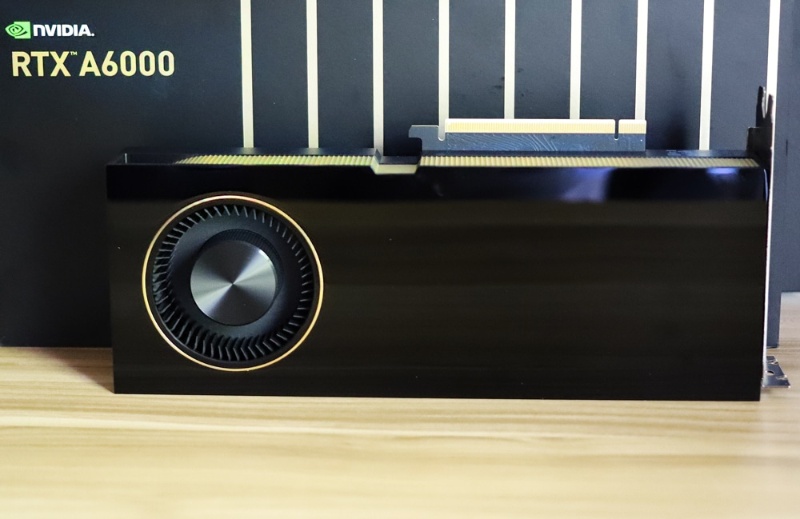
The NVIDIA RTX A6000 is a professional-grade GPU that sits at the intersection of high-performance computing and advanced visualization. It’s not a consumer-grade card; it’s engineered for the relentless demands of data scientists, researchers, and engineers.
An Overview of Power and Architecture
At its core, the A6000 is built on NVIDIA’s Ampere architecture, featuring 10,752 CUDA cores and 336 Tensor Cores. These cores are the fundamental processing units that accelerate mathematical operations, making them ideal for the matrix multiplications that underpin deep learning. What truly sets the A6000 apart for certain AI tasks is its massive 48 GB of GDDR6 memory. This vast memory pool, coupled with a 384-bit memory interface, allows it to handle enormous datasets and complex models that would cause other GPUs to run out of memory and fail. Furthermore, its support for NVIDIA NVLink allows two A6000s to be connected, effectively creating a single GPU with a staggering 96 GB of memory for the most memory-intensive applications.
Performance Highlights for AI
For AI enterprises, the A6000’s value proposition is clear: it can train and run large models that require significant memory. While it may not have the dedicated FP8 precision of the newer H100 Hopper architecture for ultimate LLM training speed, its FP32 and FP64 performance, combined with its massive VRAM, make it exceptionally well-suited for:
- Training medium-to-large neural networks.
- Running inference on very large models where the entire model must be loaded into GPU memory.
- Complex scientific simulations and data analytics.
However, the raw power of a single A6000 is just the beginning. To tackle the world’s most demanding AI challenges, you need clusters of these GPUs working in perfect harmony. This is where the challenge begins and where WhaleFlux provides a critical solution. Managing a cluster of A6000s, ensuring workloads are distributed evenly, and that no GPU sits idle is a complex task. WhaleFlux acts as the intelligent brain for your GPU cluster, automatically orchestrating workloads across multiple A6000s to ensure maximum scalability and stability, turning a collection of powerful cards into a cohesive, super-efficient compute unit.
3. Analyzing the A6000 GPU Price and Value
When considering the NVIDIA RTX A6000 GPU, the a6000 gpu price is a major point of discussion for any business. Understanding what drives its cost and how to extract maximum value is key to making a sound investment.
Factors Influencing the A6000 GPU Price
The price of the A6000 is influenced by several factors. Firstly, its professional-grade status and robust feature set—especially the 48 GB of VRAM—place it in a higher price bracket than consumer cards. Market demand and supply chain fluctuations also play a significant role. As AI continues to boom, demand for high-memory GPUs remains strong, which can impact availability and cost. When evaluating the price, it’s essential to look at the total cost of ownership (TCO). This includes not just the initial purchase price, but also electricity, cooling, and the IT overhead required to maintain and manage the hardware.
Ownership vs. Rental: A Strategic Choice
This brings us to a critical crossroads for AI companies: should you purchase the hardware outright or rent it? Purchasing offers long-term asset ownership but requires a large upfront capital expenditure (CapEx) and locks you into a specific technology. Renting, on the other hand, is an operational expense (OpEx) that offers much-needed flexibility.
This is where WhaleFlux provides a strategic advantage. We understand that every business has different needs. That’s why WhaleFlux offers both purchase and flexible rental options for the NVIDIA RTX A6000 and other high-end GPUs like the H100, H200, A100, and RTX 4090. Our rental model is designed for stability and project-based work, with a minimum commitment of one month. This approach prevents the unpredictable costs associated with hourly billing and gives your team the consistent, dedicated resources they need to see a project through without interruption.
Maximizing Value with WhaleFlux
Regardless of whether you choose to buy or rent, the a6000 gpu price is only one part of the financial equation. The real cost savings come from utilization. An idle GPU is a drain on resources, while an overburdened one can cause project delays. WhaleFlux’s intelligent scheduling and load-balancing algorithms ensure that your A6000 GPUs are used as efficiently as possible. By dynamically allocating workloads and preventing both idleness and bottlenecks, WhaleFlux directly reduces waste and lowers your effective cost per computation, ensuring you get the maximum possible return on your GPU investment.
4. How the NVIDIA RTX A6000 GPU Fits into Modern AI Workloads
The rtx a6000 gpu is not a one-trick pony; it carves out a specific and valuable niche in the modern AI ecosystem. Its strengths make it a go-to solution for several critical applications.
Prime Use Cases for the RTX A6000
The most prominent use case for the A6000 is in environments where large memory capacity is the primary constraint.
- Large Language Model Inference: While training the largest LLMs might require the sheer computational throughput of an H100, deploying and running inference on these models is a perfect task for the A6000. Its 48 GB of VRAM can accommodate many billion-parameter models entirely in memory, leading to faster and more stable inference without the latency of swapping data to system RAM.
- Research and Development: AI research often involves experimenting with novel, memory-hungry model architectures. The A6000 provides the necessary headroom for researchers to innovate without being constantly limited by GPU memory.
- High-Performance Data Science: Tasks like complex graph neural networks, molecular dynamics simulations, and high-fidelity 3D rendering for AI training environments benefit immensely from the A6000’s balanced profile of compute and memory.
The A6000 in a Diversified GPU Fleet with WhaleFlux
It’s important to see the NVIDIA RTX A6000 GPU not in isolation, but as part of a broader GPU strategy. This is where its integration within the WhaleFlux platform truly shines.
WhaleFlux provides access to a full spectrum of NVIDIA GPUs, each with its own superpower. The NVIDIA H100 and H200 are beasts designed for ultra-fast training of the largest LLMs. The A100 is a proven workhorse for general AI training and HPC. The RTX 4090 offers incredible raw performance for specific tasks at a different price point.
The A6000 complements this fleet perfectly as the high-memory specialist. WhaleFlux’sintelligent resource management system understands these differences. It can automatically route a memory-intensive inference job to an A6000 node, while simultaneously directing a parallelizable training task to a cluster of H100s. This ensures that every workload is matched with the most appropriate hardware, maximizing both performance and cost-efficiency. With WhaleFlux, you aren’t just using a single GPU; you’re leveraging an optimized, AI-driven data center where the A6000 plays a vital and seamlessly integrated role.
5. Optimizing GPU Resources with WhaleFlux
We’ve discussed the powerful hardware; now let’s talk about the intelligent software that makes it all work together. WhaleFlux is not just a GPU provider; it is a dedicated smart GPU resource management tool built from the ground up for AI enterprises. Our mission is to eliminate the friction and inefficiency that plagues GPU computing.
Intelligent Management for Multi-GPU Clusters
At its core, WhaleFlux uses advanced algorithms to automate the complex orchestration of multi-GPU clusters. Key features include:
- Dynamic Resource Allocation: WhaleFlux automatically assigns AI workloads to the most suitable available GPU in your cluster, whether it’s an A6000, H100, or A100. This happens in real-time, based on the specific compute and memory requirements of each job.
- Intelligent Load Balancing: It ensures that no single GPU is overwhelmed while others sit idle. By distributing tasks evenly, WhaleFlux prevents bottlenecks and ensures your entire cluster operates at peak efficiency.
- Advanced Scheduling: Our platform allows you to queue multiple training jobs, which WhaleFlux will execute in sequence, managing dependencies and resource claims automatically. This brings order and predictability to your AI development pipeline.
Tangible Benefits for Your AI Workflows
The result of this intelligent management is a direct and positive impact on your bottom line and productivity.
Faster Model Deployment:
By eliminating resource contention and automating provisioning, WhaleFlux drastically reduces the time from code commit to model deployment. Your data scientists can focus on science, not on infrastructure troubleshooting.
Lower Cloud Costs:
High utilization means you are getting what you pay for. WhaleFluxminimizes idle time and prevents over-provisioning, which are the two biggest sources of wasted cloud spending. Our platform provides clear visibility into usage, so you know exactly where your compute budget is going.
Enhanced Stability and Reliability:
Unmanaged clusters are prone to failures and job crashes. WhaleFlux monitors the health of your GPUs and can automatically reschedule jobs if an issue is detected, ensuring that your long-running training jobs complete successfully.
A Unified Platform for Your NVIDIA Fleet
Through WhaleFlux, you gain seamless access to a curated fleet of the most powerful NVIDIA GPUs on the market, including the NVIDIA H100, NVIDIA H200, NVIDIA A100, NVIDIA RTX 4090, and of course, the NVIDIA RTX A6000. This unified approach means you can build a hybrid cluster that perfectly matches your diverse needs, all managed through a single, intuitive interface. With WhaleFlux, you have a strategic partner dedicated to maximizing the return on your most critical asset: computational power.
6. Conclusion
The journey into advanced AI is powered by specialized hardware like the NVIDIA RTX A6000 GPU. Its immense memory capacity and robust compute performance make it an invaluable tool for tackling memory-intensive tasks like LLM inference and cutting-edge research. While the a6000 gpu price represents a significant investment, its true value is realized only when it is used to its fullest potential.
However, hardware alone is not enough. The key to unlocking superior performance, controlling costs, and accelerating innovation lies in intelligent resource management. WhaleFlux provides the essential layer of intelligence that transforms your GPU resources—from the high-memory A6000 to the raw power of the H100—into a cohesive, efficient, and reliable supercomputer.
We invite you to move beyond infrastructure challenges and focus on what you do best: building the future with AI. Explore how WhaleFlux can help you optimize your NVIDIA GPU resources, achieve dramatic cost savings, and deploy your models with unprecedented speed and stability.
Let’s build a more efficient ecosystem for AI innovation, together.
FAQs
1.What makes the NVIDIA RTX A6000 suitable for AI workloads?
The NVIDIA RTX A6000 is built on the Ampere architecture and features 48 GB of GDDR6 memory with ECC support. Its substantial memory capacity and bandwidth make it excellent for memory-intensive AI tasks, such as training medium-sized models, fine-tuning large language models (LLMs), and running complex inference pipelines, all within a single workstation or server node.
2. What types of AI projects are best suited for the RTX A6000?
The RTX A6000 is ideal for development, prototyping, and medium-scale production. It excels in computer vision, NLP model fine-tuning, and medium-batch inference. Its large memory is perfect for working with high-resolution datasets, 3D models, or serving multiple models concurrently, making it a powerful card for small to midsize AI teams and research groups.
3.How can I scale performance beyond a single RTX A6000?
For workloads that exceed the capacity of one A6000, you can configure multi-GPU servers. The key is efficient orchestration to manage data, model parallelism, and workload distribution across the cards to avoid bottlenecks and ensure high utilization of all GPUs in the cluster.
4.How does WhaleFlux help manage and optimize a cluster of RTX A6000 GPUs?
WhaleFlux is an intelligent GPU resource management tool designed for AI enterprises. When managing a cluster of RTX A6000 cards, WhaleFlux optimizes multi-GPU utilization by intelligently scheduling jobs, balancing loads, and streamlining data pipelines. This ensures your A6000-based infrastructure runs at peak efficiency, reducing idle time and helping to lower overall computing costs while accelerating project completion.
5.When should I consider complementing my RTX A6000s with more powerful GPUs like the NVIDIA H100 or A100?
Consider this move when facing limitations in large-scale distributed training, when needing to train massive foundation models, or when production workloads demand the highest throughput and specialized Tensor Cores. WhaleFlux provides a seamless path to scale by offering access to the full NVIDIA series, including H100, H200, and A100 GPUs for rent or purchase. Its platform can integrate and manage these heterogeneous resources, allowing you to run smaller tasks on your A6000s while directing the most demanding jobs to the data-center-grade GPUs, maximizing the return on your entire infrastructure investment.