The relentless pursuit of smaller, more powerful computing has met its match in the humble low-profile GPU. But when your AI ambitions outgrow the physical confines of a small chassis, a new solution emerges.
In our increasingly compact digital world, the demand for computational power in small-form-factor (SFF) systems continues to grow. From minimalist office workstations to discreet home servers, the challenge remains the same: how do we pack substantial GPU performance into severely limited physical space? This guide will explore the best low-profile GPU options for their intended use cases while examining when a more powerful, external solution becomes necessary for demanding workloads like artificial intelligence.
1. The Need for Small-Form-Factor Power
The trend toward compact computing is undeniable. Space-saving small-form-factor PCs offer cleaner desks, reduced energy consumption, and streamlined aesthetics. Yet, many of these systems come with integrated graphics that struggle with anything beyond basic display output. This creates a significant challenge for professionals who need respectable graphical performance but lack the physical space for full-sized components.
The solution lies in a specialized category of graphics cards known as low-profile GPUs. These compact powerhouses are engineered to deliver meaningful performance within strict dimensional constraints. While they can’t match their full-sized counterparts, they represent a critical bridge between integrated graphics and the space requirements of modern compact systems.
For tasks ranging from multiple display setups to light content creation and even some gaming, these cards offer a viable path forward. However, as we’ll explore, they also have inherent limitations that become apparent when faced with computationally intensive workloads like AI training and large language model deployment.
2. What Is a Low-Profile GPU? (And Why It Matters)
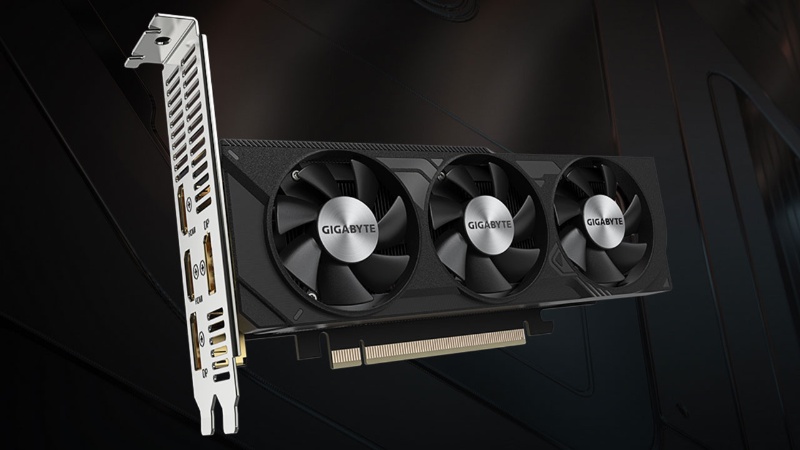
A low-profile GPU is a graphics card specifically designed to fit in slim computer cases where standard graphics cards would be physically impossible to install. These cards are characterized by their reduced height, typically around half the size of regular graphics cards.
The physical form factor is the most distinguishing feature. Where standard graphics cards use a full-height bracket (approximately 120mm), low-profile cards utilize a half-height bracket (approximately 80mm). Many models also come with both full-height and half-height brackets in the box, allowing users to adapt the card to their specific chassis.
It’s important to differentiate between a standard low profile GPU and a single slot low profile GPU:
- Standard Low-Profile GPU: May still occupy two expansion slots width-wise while having reduced height
- Single Slot Low-Profile GPU: Constrained to both half-height and single-slot width, representing the most space-efficient design
These GPUs serve several common use cases:
- Upgrading pre-built office computers: Many OEM systems from major manufacturers have limited space, making low-profile cards the only viable upgrade path for improved graphics performance.
- Home Theater PCs (HTPCs): For media playback and light gaming in entertainment centers where space is premium.
- Specific industrial or embedded systems: Digital signage, kiosks, and specialized equipment where rack space is limited.
3. The Contenders: A Look at the Best Low-Profile GPUs
When selecting a low-profile GPU, the choice typically comes down to models from the two major graphics manufacturers: NVIDIA and AMD. Each offers distinct advantages depending on your specific needs.
A. NVIDIA Low Profile GPU Options
NVIDIA’s approach to the low-profile market has typically focused on the entry-level and professional segments. Current NVIDIA low profile GPU models include select versions of the GTX 1650 and professional-grade cards like the RTX A2000.
The strength of NVIDIA’s offering lies in several key areas:
- Driver stability and support: Enterprise-focused drivers that prioritize reliability
- Feature set: Technologies like CUDA for parallel computing and NVENC for hardware-accelerated encoding
- Professional application certification: For software like CAD applications and content creation tools
For users whose workflows benefit from NVIDIA-specific technologies or who require certified drivers for professional applications, an NVIDIA low profile GPU often represents the best choice.
B. Finding the Best Low Profile GPU for Your Needs
Choosing the best low profile GPU requires balancing several factors:
- Power consumption: Many low-profile cards draw all necessary power directly from the PCIe slot (75W or less), eliminating the need for additional power connectors.
- Performance targets: Identify whether you need the card primarily for display output, light gaming, or professional applications.
- Budget: Prices can vary significantly between entry-level and professional models.
Based on current market options, here are recommendations for different categories:
- Best for multi-monitor productivity: NVIDIA Quadro P620 (8 mini-DisplayPort outputs)
- Best for light gaming: NVIDIA GTX 1650 Low Profile (GDDR6 version)
4. The Limitations: When a Low-Profile GPU Isn’t Enough
Despite their utility in specific contexts, low-profile GPUs face inherent limitations that become apparent when confronting demanding computational tasks. The physical constraints that define these cards necessarily limit their thermal dissipation capabilities and, consequently, their maximum potential performance.
This performance ceiling becomes critically important when dealing with:
- High-End Gaming and Ray Tracing: Modern AAA games with advanced graphical features quickly overwhelm the capabilities of even the best low profile GPU.
- Professional Visualization: Complex 3D modeling, rendering, and simulation tasks require more memory and processing power than these cards can provide.
- AI and Machine Learning: This represents the most significant performance gap for low-profile GPUs.
Training and deploying large language models (LLMs) requires immense computational resources—far beyond what any low profile single slot gpu or even most high-end consumer graphics cards can provide. The limited memory capacity (typically 4GB-8GB on low-profile cards) and processing power make them unsuitable for serious AI work.
When businesses encounter these limitations, they traditionally faced two unappealing options: investing in expensive on-premises GPU infrastructure or navigating the complex pricing models of cloud GPU services. Both approaches come with significant challenges in management, scalability, and cost efficiency.
5. Beyond the Chassis: Powering Enterprise AI with WhaleFlux
For businesses pushing the boundaries of AI, the primary constraint shifts from physical space in a PC case to computational efficiency and cost management. This is where specialized GPU resource management platforms deliver transformative value.
WhaleFlux is an intelligent GPU resource management tool specifically designed for AI enterprises. It addresses the core challenges faced by organizations working with large language models and other computationally intensive AI workloads by optimizing multi-GPU cluster utilization to reduce cloud computing costs while accelerating model deployment and enhancing stability.
The platform delivers value through several key mechanisms:
- Optimized Multi-GPU Cluster Efficiency: Maximizes utilization of expensive hardware resources, ensuring that GPUs aren’t sitting idle during critical development cycles.
- Reduced Cloud Computing Costs: By intelligently allocating resources and improving utilization rates, WhaleFlux significantly lowers the total cost of AI infrastructure.
- Accelerated LLM Deployment: Streamlines the process of deploying and scaling large models, reducing the time from development to production.
Unlike physical GPUs constrained by their form factors, WhaleFlux operates at the infrastructure level, providing a seamless management layer that abstracts away the complexity of multi-GPU coordination.
6. Why Choose WhaleFlux for Your AI Infrastructure?
The performance gap between low-profile GPUs and the hardware required for serious AI work is vast. While a gpu low profile might struggle with basic AI inference tasks, WhaleFlux provides access to industrial-grade computing power designed specifically for data-intensive workloads.
Powerhouse Performance
WhaleFlux offers access to top-tier data center GPUs including:
- NVIDIA H100: Designed for the most demanding AI and HPC workloads
- NVIDIA H200: Optimized for large-scale LLM training and inference
- NVIDIA A100: The versatile workhorse for diverse AI applications
- NVIDIA RTX 4090: Cost-effective option for inference and development tasks
Flexible Acquisition Models
Understanding that different projects have different requirements, WhaleFlux offers flexible acquisition models:
- Purchase: For organizations with long-term, predictable AI workloads
- Rental: For project-based work with defined timelines (minimum one-month commitment)
Note: Unlike some cloud services, WhaleFlux’s rental models are designed for sustained use rather than sporadic experimentation, and therefore do not support hourly billing.
Managed Service Advantage
Perhaps most importantly, WhaleFlux eliminates the operational overhead of managing complex GPU infrastructure. The platform handles the intricacies of cluster management, resource allocation, and optimization, allowing AI teams to focus on their core work: developing and refining models rather than managing hardware. This specialized approach is particularly valuable given the trend that AI investment return has become a core criterion for enterprise decision-making.
7. Conclusion: Choosing the Right Tool for the Job
The technology landscape requires matching solutions to specific problems. Low-profile GPUsrepresent an excellent solution for their intended purpose: delivering improved graphical performance in space-constrained environments for tasks like multi-monitor productivity, HTPC use, and light gaming.
However, these compact components have a clear performance ceiling that makes them unsuitable for enterprise AI workloads. Training and deploying large language models requires computational resources on a different scale entirely.
For organizations serious about leveraging AI, a specialized solution like WhaleFlux isn’t just an upgrade—it’s a necessity. By providing access to high-performance GPUs coupled with intelligent resource management, WhaleFlux enables businesses to pursue ambitious AI projects without the capital expenditure and operational overhead of maintaining their own infrastructure.
As AI continues to evolve from “model competition” to “value realization”, the efficiency gains offered by specialized platforms become increasingly critical to maintaining a competitive advantage.
Ready to move beyond hardware limitations? Explore how WhaleFlux can optimize your AI infrastructure and reduce costs.
FAQs
1. What is a Low Profile (LP) GPU, and what are its typical use cases in AI/ML?
A Low Profile (LP) GPU is a graphics card with a reduced physical size (typically a single slot and half the height of a standard card) designed to fit into compact, space-constrained computer systems like small form factor (SFF) workstations, edge computing boxes, or dense server racks. In AI/ML, their primary use cases are for edge inference, light-duty model development, and running smaller models where space, power, and cooling are significant constraints. While not as powerful as full-size data center GPUs like the NVIDIA A100, certain NVIDIA LP models provide a crucial balance of performance and footprint for specialized deployments.
2. What are the key performance and thermal trade-offs of using Low Profile GPUs for AI workloads compared to full-size cards?
The main trade-offs are:
- Performance: LP GPUs generally have fewer processing cores (CUDA Cores/Tensor Cores) and lower thermal design power (TDP) limits than their full-size counterparts. This results in lower peak compute performance (TFLOPS) and memory bandwidth.
- Thermals & Cooling: The compact size severely limits heatsink and fan capacity. This can lead to thermal throttling under sustained heavy loads, where the GPU reduces its clock speed to prevent overheating, thereby capping real-world performance. Effective system airflow is absolutely critical for LP GPUs.
- Memory: They often come with less Video RAM (VRAM), limiting the size of models that can be loaded.
3. Which NVIDIA GPU models are available in a Low Profile form factor suitable for AI tasks?
NVIDIA offers several LP models, primarily within its workstation and consumer lines, that are capable of AI inference and light training. Notable examples include variants of the NVIDIA RTX 4000 SFF Ada Generation and previous generation professional cards. While NVIDIA’s flagship data center GPUs like the H100, H200, and A100 are not available in LP form due to their immense power and cooling needs, the RTX 4090 (a consumer card) also has niche third-party LP coolers, though its high TDP makes it exceptionally challenging to cool in a true LP enclosure.
4. Can Low Profile GPUs be integrated into a larger, managed GPU cluster with WhaleFlux?
Yes, absolutely. In a modern, heterogeneous AI infrastructure, different types of GPUs serve different purposes. WhaleFlux, as an intelligent GPU resource management tool, is designed to manage diverse fleets. It can integrate and orchestrate workloads across a mixed cluster containing both high-performance data center NVIDIA GPUs (like H100 and A100 clusters) and specialized nodes equipped with Low Profile NVIDIA GPUs. WhaleFlux can automatically schedule lighter, latency-tolerant, or edge-simulative inference tasks to the LP GPU nodes, while directing intensive training and high-throughput inference to the full-size A100/H100 resources. This ensures optimal utilization of all hardware assets based on their capabilities.
5. When should a business consider deploying Low Profile GPUs versus using remote cloud/WhaleFlux-managed high-performance clusters?
This decision is driven by location, workload, and total cost.
- Deploy Low Profile GPUs When: The requirement is for local, on-premise processing in physically constrained environments (e.g., retail stores for real-time video analytics, factory floors for quality inspection, or remote offices with limited IT space) where low latency, data privacy, or network reliability are paramount, and the models are small enough to run efficiently on the hardware.
- Use WhaleFlux-Managed High-Performance Clusters When: The primary needs are for model training, running large/ complex models, or scaling inference massively. WhaleFlux provides access to and manages clusters of powerful NVIDIA GPUs (H100, A100, etc.) with superior performance, memory, and stability. Its monthly rental or purchase model offers a predictable cost structure for sustained, scalable AI work, eliminating the physical space and cooling challenges associated with building your own dense compute cluster, even with LP cards.