Choosing Your Inference Engine: A Look at TensorRT, Triton and vLLM
TL;DR: The 2026 Inference Engine Matrix
vLLM (The Versatility King): The gold standard for Agentic Workflows and fast-moving deployments. Its PagedAttention v2 and dynamic LoRA swapping make it unbeatable for multi-tenant, high-concurrency environments.
TensorRT-LLM (The Latency Specialist): Mandatory for mission-critical inference where sub-millisecond TTFT (Time-to-First-Token) is the priority. It extracts 2x-4x more throughput from NVIDIA silicon via hardware-level kernel optimization.
Triton Inference Server (The Production Hub): The enterprise backbone for Model Ensemble (running PyTorch, ONNX, and TensorRT simultaneously). Essential for cross-framework pipelines.
WhaleFlux Optimization: Our platform automates the deployment of these engines via Intelligent Scaling, reducing Token-to-Token (TBT) latency by 60% through automated kernel selection and VRAM orchestration.
1. vLLM: Architecting for Dynamic Throughput
In the 2026 compute landscape, vLLM has moved beyond a simple hobbyist tool. It is now the preferred engine for Autonomous Agents due to its superior handling of high-concurrency requests.
The breakthrough of PagedAttention prevents VRAM fragmentation, allowing WhaleFlux clients to squeeze 30% more concurrent users onto a single H100 node. For developers prioritizing Ecosystem Agility, vLLM’s support for rapid model updates and diverse quantization formats (FP8, INT4) is its strongest ROI driver.
2. TensorRT-LLM: Squeezing Silicon for Peak ROI
When your business model depends on Deterministic Latency, NVIDIA’s TensorRT-LLM is the mandatory choice. It is not just an engine; it is a compiler that optimizes the computational graph for specific hardware.
Transformer Engine Integration
TRT-LLM utilizes the full potential of H100/H200 Tensor Cores, specifically for FP8 inference.
The Trade-off
It requires a “Compilation” step for every hardware change, which can slow down deployment cycles.
WhaleFlux Strategy
We mitigate the compilation bottleneck by providing Pre-compiled Kernel Images for all WhaleFlux GPU tiers, bridging the gap between TRT-LLM’s speed and vLLM’s flexibility.
3. Triton Inference Server: The Multi-Model Orchestrator
For enterprises running complex pipelines—such as a video AI model followed by an LLM summarizer—Triton is the operational backbone.
Triton allows for Model Ensembling, where different frameworks run in isolated execution environments on the same GPU cluster. Through WhaleFlux Deep Observability, we monitor the request queue across these ensembles to prevent bottlenecks in multi-stage AI workflows.
4. Strategic Decision Matrix
| Feature | vLLM | TensorRT-LLM | Triton (Enterprise) |
| Best For | Agents & Multi-LoRA | High-Speed Production | Multi-Model Pipelines |
| Throughput | High (PagedAttention) | Ultra-High (Compiled) | High (Concurrent Models) |
| Setup Speed | Minutes (Python-native) | Hours (Compilation req.) | Moderate (Config heavy) |
| Frameworks | Python / PyTorch | NVIDIA-specific | Cross-framework |
| WhaleFlux ROI | 70% TCO Savings | 60% Latency Reduction | Cluster-wide Stability |
Expert FAQ
Q: Can I use vLLM and TensorRT-LLM together?
A: Yes. This is the Gold Standard of 2026. You use vLLM as the serving frontend for its ease of use and PagedAttention, while using TensorRT-LLM as the backend execution core to maximize token throughput.
Q: How does WhaleFlux reduce the “Cold Start” in these engines?
A: We use Intelligent Scaling to pre-cache model weights in high-speed NVMe storage. When an engine requests a model, WhaleFlux ensures the data transfer rate matches the GPU’s peak HBM3e bandwidth, minimizing the “Loading” state.
Q: Which engine is best for long-context RAG applications?
A: vLLM is generally superior for RAG due to its efficient KV Cache Management. However, if you are serving a fixed, high-traffic RAG endpoint, TensorRT-LLM’s FP8 quantization can significantly reduce the memory footprint of long context windows.
Factors to Consider for Selecting the Right AI Model
Choosing the right AI model is less about picking the “most powerful” one and more about selecting the most appropriate tool for your specific job. It’s similar to planning a hiking trip: you wouldn’t use the same gear for a gentle day hike as you would for a multi-day alpine expedition. The “best” model depends entirely on the terrain you need to cross, the weight you can carry, and the conditions you expect to face.
A mismatch can lead to wasted resources, poor performance, and failed projects. This guide walks you through the key factors to consider, helping you navigate the landscape of AI model selection with confidence.
1. Define the Problem You’re Actually Solving
Start here, before looking at any model. Be ruthlessly specific.
- Is it a vision task? (e.g., defect detection, facial recognition)
- A language task? (e.g., sentiment analysis, document summarization)
- A prediction task? (e.g., sales forecasting, churn prediction)
- A generation task? (e.g., creating marketing copy, generating code)
The problem dictates the model architecture family (e.g., CNN for images, Transformer for language). Clarity at this stage prevents you from trying to force a square peg into a round hole.
2. Model Performance: Beyond Just Accuracy
Accuracy/Precision/Recall/F1-Score:
Which metric matters most for your use case? (e.g., Recall is critical for medical diagnosis, Precision for spam detection).
Inference Latency:
How fast must the model return a prediction? Real-time applications (autonomous driving, live chat) have stringent latency requirements.
Throughput:
How many predictions per second do you need to handle? This is crucial for user-facing applications at scale.
3. Model Explainability & Regulatory Compliance
Can you explain why the model made a decision? For industries like finance, healthcare, or insurance, this isn’t optional—it’s a legal and ethical requirement.
“Black Box” vs. “White Box” Models:
Complex deep learning models often trade explainability for performance. Simpler models like decision trees or linear regression are inherently more interpretable.
Consider the Stakeholder:
Does your internal data science team need to understand it, or must you explain it to a regulator or end-user? Choose a model that matches the required level of transparency.
4. Model Complexity & Your Team’s Expertise
A state-of-the-art, billion-parameter model is a powerhouse, but can your team deploy, maintain, and debug it?
Resource Demand:
Larger models require more GPU memory, specialized knowledge for optimization, and sophisticated MLOps pipelines.
Support Ecosystem:
Is there ample documentation, community support, and pre-trained checkpoints available for the model? Leveraging well-supported models (e.g., from Hugging Face) can drastically reduce development risk and time.
Here is where infrastructure becomes a critical enabler or a hard blocker. Managing the compute resources for complex models, especially during deployment and scaling, is a major challenge. This is precisely where a platform like WhaleFlux provides immense value. WhaleFlux is an intelligent GPU resource management platform designed for AI enterprises. It optimizes the utilization of multi-GPU clusters, ensuring that computationally intensive models run efficiently and stably. By providing seamless access to and management of NVIDIA’s full suite of GPUs (including the H100, H200, A100, and RTX 4090), WhaleFlux helps teams reduce cloud costs while accelerating deployment cycles and ensuring reliability. It allows your team to focus on model development and application logic, rather than the intricacies of GPU orchestration and cluster management.
5. Data: Type, Size, and Quality
Your data is the fuel; the model is the engine.
Data Type:
Is your data structured (tabular), unstructured (text, images), sequential (time-series), or a combination (multi-modal)? The data format narrows your model choices.
Data Volume & Quality:
Do you have millions of labeled examples or only a few hundred? Large, high-quality datasets can unlock the potential of large models. For small data, you might need simpler models, heavy augmentation, or leverage transfer learning from pre-trained models.
Data Pipeline Speed:
Can your data infrastructure feed data to the model fast enough to keep the expensive GPUs (like those managed by WhaleFlux) saturated? A bottleneck here wastes compute resources and money.
6. Training Time, Cost, and Environmental Impact
Training large models from scratch is expensive and time-consuming.
Cost-Benefit Analysis:
Does the potential performance gain justify the training cost? Often, fine-tuning a pre-trained model is the most cost-effective path.
Total Cost of Ownership (TCO):
Include not just training costs, but also deployment, monitoring, and re-training costs. A cheaper-to-train model that is expensive to run in production may be a poor choice.
Sustainability:
The carbon footprint of training massive models is a growing concern. Selecting an efficient model or using efficient hardware can be part of a responsible AI strategy.
7. Ease of Integration & Feature Requirements
How will the model fit into your existing ecosystem?
Integration:
Does the model have ready-to-use APIs or can it be easily containerized (e.g., Docker) for your production environment? Compatibility with your existing tech stack is vital.
Feature Needs:
Does your application require specific functionalities like multi-lingual support, control over output style, or the ability to cite sources (like in RAG systems)? Ensure the model architecture supports these features natively or can be adapted to do so.
Conclusion: It’s a Strategic Balancing Act
There is no universal “best” AI model. The right choice emerges from a careful balance of your business objectives, technical constraints, and operational realities. It involves trade-offs between speed and accuracy, complexity and explainability, cutting-edge performance and practical cost.
Start with a clear problem, let your data guide you, be realistic about your team’s capabilities and infrastructure, and always keep the total cost of ownership in mind. By systematically evaluating these factors, you move from simply adopting AI to strategically implementing it, building solutions that are not just intelligent, but also robust, efficient, and sustainable.
FAQ: Selecting the Right AI Model
Q1: Should I always choose the model with the highest accuracy on a benchmark?
A: Not necessarily. Benchmark scores are measured under specific conditions and may not reflect your real-world data, latency requirements, or explainability needs. Always validate model performance on your own data and within your application’s constraints.
Q2: How important is explainability for my AI project?
A: It is critical if your model’s decisions have significant consequences (e.g., loan approvals, medical diagnoses) or require regulatory compliance. In other cases, like a recommendation engine, performance might outweigh explainability. Assess the risk and stakeholder needs.
Q3: What if I have a very small dataset?
A: Training a large model from scratch is likely to fail. Your best strategies are: 1) Use a simpler, traditional ML model, 2) Heavily employ data augmentation, or 3) Leverage transfer learning by fine-tuning a pre-trained model on your small dataset.
Q4: How does infrastructure affect model selection?
A: It is a primary constraint. Large models require powerful, scalable GPU resources for training and inference. A platform like WhaleFlux, which provides managed access to high-performance NVIDIA GPUs and optimizes their utilization, can make deploying and running complex models feasible and cost-effective, directly influencing which models you can realistically choose.
Q5: Is it better to build our own model or use a pre-trained one?
A: For most organizations, starting with a pre-trained model and fine-tuning it is the fastest, most cost-effective path. Building a state-of-the-art model from scratch requires massive data, deep expertise, and significant compute resources, which platforms like WhaleFlux are designed to provide efficiently for those who truly need it.
Fine-Tuning 101: How to Customize Pre-Trained Models for Your Business
In the era of large language models (LLMs), every business faces a crucial dilemma: should you settle for a brilliant, all-purpose AI that knows a little about everything but lacks deep expertise in your specific field, or can you build one that truly understands your unique challenges, jargon, and goals? The answer lies not in building from scratch—a monumental and costly endeavor—but in the powerful technique of fine-tuning.
Think of a pre-trained model like GPT-4 or Llama 3 as a recent graduate from a top university with vast general knowledge. Fine-tuning is like sending that graduate through an intensive, specialized corporate training program. It transforms a capable generalist into a domain-specific expert for your company. This guide will walk you through the what, why, and how of fine-tuning, providing a practical roadmap to harness this technology for tangible business advantage.
What is Fine-Tuning? Beyond Basic Prompting
First, let’s distinguish fine-tuning from the more common practice of prompting. Prompting is like giving the generalist model very detailed, one-off instructions for a single task. It’s flexible but inefficient for repeated, complex applications and often hits limits in reasoning depth and consistency.
Fine-tuning, in contrast, is a targeted training process that adjusts the model’s internal weights (its fundamental parameters) based on your proprietary dataset. You are not just instructing the model; you are re-wiring its knowledge base to excel at a specific style, task, or domain. The model internalizes your company’s voice, logic, and data patterns.
Key Outcome: A fine-tuned model performs your specialized task with higher accuracy, consistency, and reliability than a prompted generalist model, often at a lower operational cost due to improved efficiency.
Why Your Business Needs Fine-Tuning: The Strategic Imperative
The business case for fine-tuning is built on three pillars: specialization, efficiency, and control.
Achieve Domain-Specific Mastery:
Generic models fail on niche tasks. A fine-tuned model can learn your industry’s unique lexicon (e.g., legal clauses, medical codes, engineering schematics), internal logic, and desired output format, turning it into an invaluable specialist.
Enhance Operational Efficiency & Cost-Effectiveness:
A model specialized for a single task often requires smaller, less expensive prompts to achieve superior results. This reduces computational costs per query (inference cost) and can allow you to use smaller, faster models in production.
Ensure Consistency and Brand Voice:
Whether generating marketing copy, customer service responses, or internal reports, fine-tuning ensures the AI’s output is consistently aligned with your brand’s tone, style, and quality standards.
Solve Problems Generic AI Can’t:
Tackle unique challenges like parsing your specific CRM data format, generating code for your proprietary API, or analyzing decades of internal research reports according to your company’s specific analytical framework.
The Fine-Tuning Toolkit: Key Methods Explained
Not all fine-tuning is created equal. The method you choose depends on your data, goals, and resources.
1. Full Fine-Tuning: The Intensive Retraining
This is the traditional approach, where you update all parameters of the pre-trained model on your new dataset. It’s powerful and can yield the highest performance gains but comes with significant costs. It requires a large, high-quality dataset and substantial computational power—think clusters of high-end NVIDIA H100 or A100 GPUs—making it expensive and time-consuming. There’s also a higher risk of “catastrophic forgetting,” where the model loses some of its valuable general knowledge.
2. Parameter-Efficient Fine-Tuning (PEFT): The Smart Shortcut
PEFT methods have revolutionized fine-tuning by updating only a tiny fraction of the model’s parameters. The most celebrated technique is LoRA (Low-Rank Adaptation).
How LoRA Works:
Instead of changing the 10+ billion weights of a model, LoRA injects and trains small “adapter” matrices alongside them. During inference, these lightweight adapters are merged back in.
Why It’s a Game-Changer:
- Dramatically Lower Cost: Requires up to 100x less GPU memory, enabling fine-tuning of massive models on a single NVIDIA RTX 4090 or a small cluster.
- Speed & Portability: Training is faster, and the resulting adapters are small files (often megabytes) that are easy to store, share, and swap.
- Reduced Forgetting: The core model remains largely intact, preserving its general capabilities.
For most businesses starting today, PEFT methods like LoRA offer the perfect balance of customization power and practical feasibility.
The Step-by-Step Fine-Tuning Workflow
Turning theory into practice involves a clear, iterative process.
Phase 1: Preparation & Data Curation
This is the most critical step. Garbage in, garbage out.
- Define the Task: Be hyper-specific. “Answer customer FAQs” is vague. “Generate accurate, empathetic responses to Tier 1 technical support queries for Product X, citing relevant knowledge base article IDs” is actionable.
- Curate Your Dataset: You need high-quality examples of inputs and desired outputs. For 500-1000 examples can be sufficient for a PEFT approach. Format them consistently (e.g., JSONL with “instruction,” “input,” and “output” fields). Clean the data meticulously.
Phase 2: Technical Execution
Select a Base Model:
Choose a suitable open-source model (e.g., Mistral, Llama 3) as your foundation. Consider its base capability, size, and license.
Choose Your Toolstack:
Frameworks like Hugging Face Transformers, PEFT, and TRL(Transformer Reinforcement Learning) have made the coding remarkably accessible.
Configure & Train:
Set your training arguments (learning rate, epochs, batch size). This is where infrastructure becomes paramount. Training, even with LoRA, requires sustained, high-performance computing.
Here, the choice of infrastructure is not just technical but strategic. Managing GPU clusters for fine-tuning—ensuring optimal utilization, avoiding bottlenecks, and controlling costs—is a complex operational burden. This is where an integrated AI platform like WhaleFlux becomes a critical enabler. WhaleFlux provides a streamlined environment for the entire model lifecycle. For the fine-tuning phase, it offers on-demand access to the right NVIDIA GPU for the job—from RTX 4090sfor experimentation to H100s for large-scale full fine-tuning—while its intelligent resource management maximizes cluster efficiency to lower costs and accelerate training cycles. By handling the orchestration, WhaleFlux allows your data scientists to focus on the model, not the infrastructure.
Phase 3: Evaluation & Deployment
Rigorous Evaluation:
Don’t just trust the training loss. Use a held-out validation set. Perform human evaluation on key metrics: accuracy, relevance, and fluency. Compare outputs against your baseline prompted model.
Deploy the Specialized Model:
Integrate your fine-tuned model into your application. This could involve serving it via an API endpoint. Platforms like WhaleFlux extend their value here through integrated AI Observability and Model Serving capabilities, ensuring your newly minted expert performs reliably and at scale in production, with clear monitoring for performance and drift.
A Practical Blueprint: Case Study – The Customer Support Co-Pilot
Let’s make this concrete. Imagine “TechCorp” wants to automate its first-line technical support.
- Task: Classify support ticket intent and generate a draft response.
- Data: 1,500 anonymized historical tickets (customer query + agent’s final response).
- Base Model:
Mistral-7B-Instruct(a capable, efficient, open model). - Method: LoRA fine-tuning.
- Infrastructure: A cluster of NVIDIA A100 GPUs provisioned and managed via WhaleFlux for balanced performance and cost-efficiency.
- Outcome: The fine-tuned model achieves 95%+ accuracy in intent classification and generates draft responses that agents approve or lightly edit 80% of the time, reducing average handle time by 40%.
Conclusion: Your AI, Reimagined
Fine-tuning is the key to moving beyond generic AI and building intelligent systems that are true extensions of your team’s expertise. It demystifies the process of creating a custom AI, framing it as a manageable project of targeted specialization rather than an impossible moonshot.
By starting with a clear business problem, curating focused data, leveraging efficient methods like LoRA, and utilizing a robust platform like WhaleFlux to tame the infrastructure complexity, any business can begin its journey toward owning a truly differentiated AI capability. The graduate is ready for the boardroom. Your competitive edge is waiting to be tuned.
FAQ: Fine-Tuning for Business
Q1: How much data do I actually need to start fine-tuning?
A: Thanks to Parameter-Efficient Fine-Tuning (PEFT) methods like LoRA, you can achieve meaningful results with a few hundred to a few thousand high-quality examples. The focus should be on data quality, diversity, and precise alignment with your target task, rather than sheer volume.
Q2: What’s the difference between fine-tuning and RAG (Retrieval-Augmented Generation)?
A: They are complementary strategies. Fine-tuning changes the model’s internal knowledge to make it a domain expert. RAG keeps the model general but gives it access to an external knowledge base (like your documents) at query time. For deep, internalized expertise, fine-tune. For dynamic, fact-heavy queries over large document sets, use RAG. Many advanced systems use both.
Q3: Is fine-tuning only for large language models (LLMs)?
A: No, the concept is fundamental to machine learning. It’s widely used for customizing computer vision models (e.g., for specific defect detection), speech recognition models (for particular accents or jargon), and more. The principles of adapting a pre-trained model with your data are universal.
Q4: What are the main infrastructure challenges when doing fine-tuning in-house?
A: The primary challenges are cost control and operational complexity. Fine-tuning requires significant GPU compute power (e.g., NVIDIA H100/A100 clusters). Without intelligent orchestration, GPU resources are underutilized, leading to high costs. Managing software environments, job scheduling, and cluster health adds substantial DevOps overhead that distracts from core AI work.
Q5: How does a platform like WhaleFlux simplify and reduce the cost of fine-tuning?
A: WhaleFlux directly addresses the core infrastructure challenges. It provides an integrated platform with intelligent scheduling that maximizes the utilization of NVIDIA GPU clusters (from H100 to RTX 4090), ensuring you get the most value from your compute investment. By eliminating resource waste and simplifying deployment and monitoring, it turns fine-tuning from a complex infrastructure project into a streamlined, cost-predictive workflow, allowing teams to iterate faster and deploy specialized models with confidence.
3 AI Model Implementation Cases for SMEs: Empower Business Efficiently with Limited Budget
For small and medium-sized enterprises (SMEs), the world of artificial intelligence can often seem like an exclusive club reserved for tech giants with billion-dollar budgets. Headlines are dominated by massive, multi-million parameter models trained on sprawling data centers, creating the impression that AI is inherently complex, expensive, and out of reach.
This is a profound misconception. The true power of AI for business lies not in its scale, but in its precision and applicability. For SMEs, AI is not about building the next ChatGPT; it’s about solving a specific, high-impact business problem with a focused, efficient model. It’s about working smarter, automating tedious processes, and gaining insights from your existing data—all without needing a dedicated team of PhDs.
This guide presents three practical, budget-conscious AI implementation cases that SMEs can adopt. Each case follows a clear blueprint: identifying a common pain point, implementing a focused AI solution, and achieving tangible ROI. We’ll demystify the technical path and show how modern tools make this journey accessible.
Core Principles for SME AI Success
Before diving into the cases, two principles are fundamental:
Start with the Problem, Not the Technology:
Never ask “How can we use AI?” Instead, ask “What is our most costly, repetitive, or data-rich problem?” AI is the tool, not the goal.
Embrace the “Good Enough” Model:
SMEs win with efficiency. A simpler model that solves 80% of the problem today is infinitely more valuable than a perfect, complex model stuck in a year-long development cycle. Leverage pre-trained models and fine-tune them for your needs.
Case Study 1: The Intelligent Customer Service Automator
The Business Pain Point: A growing e-commerce SME is overwhelmed by customer service emails. Common queries about order status, return policies, and business hours consume hours of staff time daily, leading to slower response times, agent burnout, and potential customer dissatisfaction.
The AI Solution: A Hybrid Customer Service Triage & Drafting System
This isn’t about replacing humans with a brittle chatbot. It’s about augmenting your team with AI to handle the routine, so they can focus on the complex and empathetic conversations.
Step 1 – Automated Triage & Categorization:
An AI model (a fine-tuned lightweight text classifier like DistilBERT) automatically reads incoming emails and categorizes them: Order Status, Return Request, Product Question, Urgent Complaint. It can also extract key entities (order number, product name) and tag sentiment.
Step 2 – Smart Response Drafting:
For straightforward categories (Business Hours, Return Policy), the system can automatically generate a first-draft response by retrieving the correct information from a knowledge base and formatting it into a polite email. For Order Status, it can call a secure API to fetch the real-time tracking info and populate a response template.
Step 3 – Human-in-the-Loop:
Every AI-generated draft is presented to a human agent for a quick review, edit, and final approval before sending. This ensures quality, safety, and allows the agent to handle 3-4x more queries in the same time.
Why It Works for SMEs:
- Technology: Uses efficient, open-source models. No need to build complex chatbots from scratch.
- Data: Trained on your own historical email data, which you already have.
- ROI: Clear and fast. Measures: Reduction in average email handling time, increase in agent throughput, improvement in customer satisfaction (CSAT) scores due to faster replies.
Case Study 2: The Data-Driven Sales Lead Prioritizer
The Business Pain Point: A B2B service provider has a small sales team. Their CRM is full of hundreds of leads from websites, events, and campaigns, but they lack the bandwidth to contact everyone effectively. They waste time chasing cold leads while hot opportunities languish, resulting in inefficient sales cycles and missed revenue.
The AI Solution: A Lead Scoring & Prioritization Model
This system acts as a force multiplier for your sales team, directing their energy to the prospects most likely to convert.
Step 1 – Unify Data:
Consolidate lead data from your website forms, CRM (like HubSpot or Salesforce), marketing platform, and even LinkedIn Sales Navigator.
Step 2 – Build a Prediction Model:
Using historical data on which past leads became customers, train a simple machine learning classification model (e.g., XGBoost or Random Forest). The model learns patterns from features like:
- Firmographic: Company size, industry.
- Behavioral: Pages visited on your website, content downloaded, email engagement.
- Interaction: Number of touchpoints, recency of contact.
Step 3 – Generate Actionable Scores:
The model assigns each new lead a score from 1-100 predicting their likelihood to convert. It can also provide reasons (“scored highly due to repeated visits to pricing page and being in our target industry”).
Step 4 – Integrate & Act:
These scores and insights are pushed directly into your CRM. Your sales team now has a prioritized “hot list.” They can tailor their outreach—sending highly personalized, timely messages to high-score leads while automating nurturing sequences for lower-score ones.
Why It Works for SMEs:
- Technology: Uses robust, well-understood classical ML models that are less data-hungry than LLMs and highly interpretable.
- Data: Leverages the digital footprint you’re already collecting.
- ROI: Directly ties to revenue. Measures: Increase in lead-to-customer conversion rate, decrease in sales cycle length, higher win rates.
Case Study 3: The Automated Visual Quality Inspector
The Business Pain Point: A small manufacturer or artisan food producer relies on manual visual inspection for quality control. This process is slow, subjective, prone to fatigue, and inconsistent between shifts. Defects slip through, leading to product returns, waste, and brand damage.
The AI Solution: A Computer Vision (CV) Defect Detection System
This brings consistent, 24/7 “eyes” to your production line using a simple camera and a compact AI model.
Step 1 – Data Collection with a Twist:
You don’t need millions of images. Use a smartphone or a simple USB camera to capture a few hundred images of both “good” products and products with common defects (scratches, dents, discolorations, mislabeling). This small, curated dataset is your gold.
Step 2 – Train a Focused Model:
Use a user-friendly, cloud-based AutoML Vision tool (like Google’s or Roboflow). These platforms allow you to upload your images, label the defects with simple boxes, and automatically train a compact, efficient object detection model (like a small YOLO or MobileNet variant) within hours—no coding required.
Step 3 – Deploy at the Edge:
The trained model is tiny enough to run on an inexpensive edge device (like a NVIDIA Jetson Nano or even a Raspberry Pi with an accelerator) connected to the camera on your production line. It analyzes each product in real-time.
Step 4 – Automate Action:
The system is connected to a simple reject mechanism (a pneumatic arm, a diverter gate) or triggers an alert for a human operator when a defect is detected with high confidence.
Why It Works for SMEs:
- Technology: Leverages no-code/low-code AutoML platforms, eliminating the need for deep ML expertise.
- Data: Requires only a small, specific dataset you can create yourself.
- ROI: Highly tangible. Measures: Reduction in defect escape rate, decrease in product waste and returns, lower cost of quality inspection labor.
The Orchestration Challenge: From Idea to Integrated Solution
While each case uses accessible technology, the journey from a prototype script on a laptop to a reliable, integrated business system presents the real hurdle for an SME. This is the “last-mile” problem of AI: managing the data pipelines, versioning models, ensuring they run reliably, and connecting them to business applications.
This is precisely the gap that a unified AI platform like WhaleFlux is designed to fill for resource-constrained teams. WhaleFlux acts as the central nervous system for these AI implementations:
For the Customer Service Automator:
WhaleFlux can orchestrate the entire pipeline—ingesting emails, running the classification model, calling the knowledge base, and logging the draft and final response for continuous learning and monitoring, all within a governed workflow.
For the Lead Prioritizer:
It provides the tools to build, version, and deploy the scoring model as a live API that seamlessly integrates with the SME’s CRM, while monitoring its prediction drift as market conditions change.
For the Quality Inspector:
WhaleFlux can manage the lifecycle of the computer vision model, from receiving images from the edge device for periodic retraining to deploying updated models back to the production line, ensuring the system adapts to new defect types.
For an SME, WhaleFlux isn’t just a technical tool; it’s a force multiplier that reduces operational risk and complexity. It provides the infrastructure, monitoring, and integration glue that allows a small team to manage multiple AI solutions with the confidence of a much larger tech department, ensuring their AI investments are robust, scalable, and maintainable.
Conclusion: Your AI Journey Starts Now
The barrier to entry for practical, valuable AI has never been lower. SMEs have unique advantages: agility, focused data, and clear, impactful problems. By starting small with a well-defined use case—whether it’s automating service, prioritizing sales, or ensuring quality—you can build expertise, demonstrate ROI, and create a foundation for increasingly sophisticated AI adoption.
The question is no longer “Can we afford AI?” but “Can we afford to keep doing this manually?”Identify your pain point, follow the blueprint, leverage modern platforms to manage the complexity, and start empowering your business efficiently.
FAQs: AI Implementation for SMEs
Q1: We have very little data. Can we still implement AI?
Yes, absolutely. The key is to start with a focused problem. For many tasks, you need far less data than you think, especially if you use pre-trained models and fine-tune them. A few hundred well-labeled examples are often sufficient for a significant performance boost. Case Study 3 (Quality Inspection) is a perfect example of a small-data start.
Q2: What does the initial investment look like? Do we need to hire AI experts?
The initial investment is primarily time, not capital. You need dedicated personnel (often a technically-minded manager or an existing IT staffer) to own the project. You do not need to hire a dedicated AI scientist. Instead, leverage:
- Cloud-based AutoML services (for vision, tabular data).
- Fine-tuning of open-source models using guided platforms.
- Consultants or agencies for the initial setup, with a plan for internal knowledge transfer. The software and compute costs for a pilot are typically in the hundreds, not tens of thousands, of dollars.
Q3: How do we measure the ROI of an AI project?
Tie ROI directly to the business metric you are trying to improve, and measure it before and afterimplementation. Examples:
- Customer Service: Cost per resolved ticket, average handle time, customer satisfaction score.
- Sales: Lead-to-opportunity conversion rate, sales cycle length, average deal size from scored leads.
- Quality Control: Defect escape rate, cost of waste/returns, inspection throughput.
Start with a pilot on a subset of your operations to gather this comparison data.
Q4: Aren’t these AI systems “black boxes”? How do we trust them?
This is a valid concern. The solutions recommended prioritize interpretability.
- Lead Scoring: Models like XGBoost can show which factors contributed to a score.
- Classifiers: Can show which keywords influenced a decision.
- Human-in-the-Loop: Always keep a human reviewing critical AI outputs (like email drafts). Trust is built through transparency and control, not magic. Start with low-risk applications to build confidence.
Q5: What’s the biggest risk, and how do we mitigate it?
The biggest risk is project stagnation—an endless pilot that never integrates into daily operations. Mitigate this by:
- Setting a strict 3-month timeline for a pilot with clear success/failure criteria.
- Involving the end-users (agents, sales reps, line workers) from day one.
- Choosing a first project that solves a pain point they feel intensely. Adoption by the team is the ultimate measure of success, not just technical accuracy.
A Complete Guide to AI Model Fine-Tuning: LoRA, QLoRA, and Full-Parameter Fine-Tuning
Imagine you’ve just hired a brilliant polymath who has read nearly every book ever written. They can discuss history, science, and art with astonishing depth. However, on their first day at your specialized law firm, you ask them to draft a precise legal clause. They might struggle. Their vast general knowledge needs to be focused and adapted to the specific language, patterns, and rules of your domain.
This is the exact challenge with powerful, pre-trained Large Language Models (LLMs) like Llama 2 or GPT-3. They are incredible generalists, but to become reliable, high-performing specialists for your unique tasks—be it legal analysis, medical note generation, or brand-specific customer service—they require fine-tuning.
Fine-tuning is the process of continuing the training of a pre-trained model on a smaller, domain-specific dataset. But how you fine-tune has evolved dramatically, leading to critical choices. This guide will demystify the three primary paradigms: Full-Parameter Fine-Tuning, LoRA, and QLoRA, helping you understand their trade-offs and select the right tool for your project.
The Core Goal of Fine-Tuning: From Generalist to Specialist
At its heart, fine-tuning aims to achieve one or more of the following:
- Domain Mastery: Teaching the model the jargon, style, and knowledge of a specific field (e.g., biomedicine, legal code, internal company documentation).
- ️Task Specialization: Optimizing the model for a particular format or function (e.g., following complex instructions, outputting strict JSON, engaging in a specific chat persona).
- Performance Alignment: Improving the model’s reliability, accuracy, and safety on a narrow set of critical tasks.
The evolution of fine-tuning methods is a story of the relentless pursuit of efficiency—achieving these goals while minimizing computational cost, time, and hardware barriers.
Method 1: Full-Parameter Fine-Tuning – The Traditional Powerhouse
This is the original and most straightforward approach. You take the pre-trained model, load it onto powerful GPUs, and run additional training passes on your custom dataset, updating every single parameter (weight) in the neural network.
How it Works:
It’s a continuation of the initial training process, but on a much smaller, targeted dataset. The optimizer adjusts all billions of parameters to minimize loss on your new data.
Use Cases:
- When you have a very large, high-quality domain-specific dataset (millions of examples).
- When the target task differs significantly from the model’s pre-training, requiring fundamental rewiring.
- For creating a definitive, standalone model variant meant for widespread distribution and heavy use (e.g., a code-specific version of a base model).
Trade-offs:
- Pros: Maximum potential performance and flexibility; the model can deeply internalize new patterns.
- Cons: Extremely expensive in terms of GPU memory and time; high risk of catastrophic forgetting (losing general knowledge); requires multiple high-end GPUs (often 4-8 A100s).
Analogy: Sending the polymath back to a full, multi-year university program focused solely on law. Effective but immensely resource-intensive.
Method 2: LoRA (Low-Rank Adaptation) – The Efficiency Revolution
Introduced by Microsoft in 2021, LoRA is a Parameter-Efficient Fine-Tuning (PEFT) method that has become the de facto standard for most practical applications. Its core insight is brilliant: the weight updates a model needs for a new task have a low “intrinsic rank” and can be represented by much smaller matrices.
How It Works
Instead of updating the massive pre-trained weight matrices (e.g., of size 4096×4096), LoRA injects trainable “adapter” layers alongside them. During training, only these tiny adapter matrices (e.g., of size 4096×8 and 8×4096) are updated. The original weights are frozen. For inference, the adapter weights are merged with the frozen base weights.
Use Cases:
- The vast majority of business applications where you need to adapt a model to a specific style, task, or knowledge base.
- Situations with limited data (hundreds to thousands of examples).
- When you need to create multiple specialized versions of a model (e.g., one for summarization, one for Q&A) efficiently, as adapters are small (~1-10% of original model size) and easily swapped.
Trade-offs:
- Pros: Dramatically lower GPU memory usage (enabling fine-tuning of large models on a single GPU), faster training, reduced overfitting risk, and no catastrophic forgetting. Adapters are portable and shareable.
- Cons: Can, in some edge cases, theoretically underperform full fine-tuning given unlimited data and compute. Requires selecting target modules (often attention layers) and rank parameters.
Analogy:
Giving the polymath a concise, targeted legal handbook and a set of specialized quick-reference guides. They keep all their general knowledge but learn to apply it within a new, structured framework.
Method 3: QLoRA (Quantized LoRA) – Democratizing Access
QLoRA, introduced in 2023, pushes the efficiency frontier further. It asks: “What if we could fine-tune a massive model on a single, consumer-grade GPU?” The answer combines LoRA with another key technique: 4-bit Quantization.
How it Works:
First, the pre-trained model is loaded into GPU memory in a 4-bit quantized state (compared to standard 16-bit). This drastically reduces its memory footprint. Then, LoRA adapters are applied and trained in 16-bit precision. A novel “Double Quantization” technique is used to minimize the memory overhead of the quantization constants themselves. Remarkably, the model’s performance is maintained through backpropagation via the 4-bit weights.
Use Cases:
- Research, prototyping, and personal projects with severe hardware constraints.
- Fine-tuning the largest available models (e.g., 70B parameter models) on a single 24GB or 48GB GPU.
- When cost and accessibility are the primary limiting factors.
Trade-offs:
- Pros: Makes previously impossible fine-tuning tasks possible on affordable hardware. Retains the core benefits of LoRA.
- Cons: The quantization process adds slight complexity. There can be a marginal, though often negligible, performance trade-off compared to 16-bit LoRA. Requires libraries that support 4-bit quantization (like
bitsandbytes).
Analogy:
The polymath’s entire library is now stored on a highly efficient, compressed e-reader. They still get the complete legal handbook and quick guides, allowing them to specialize using minimal physical desk space.
Navigating the Trade-offs: A Decision Framework
How do you choose? Follow this decision tree based on your primary constraints:
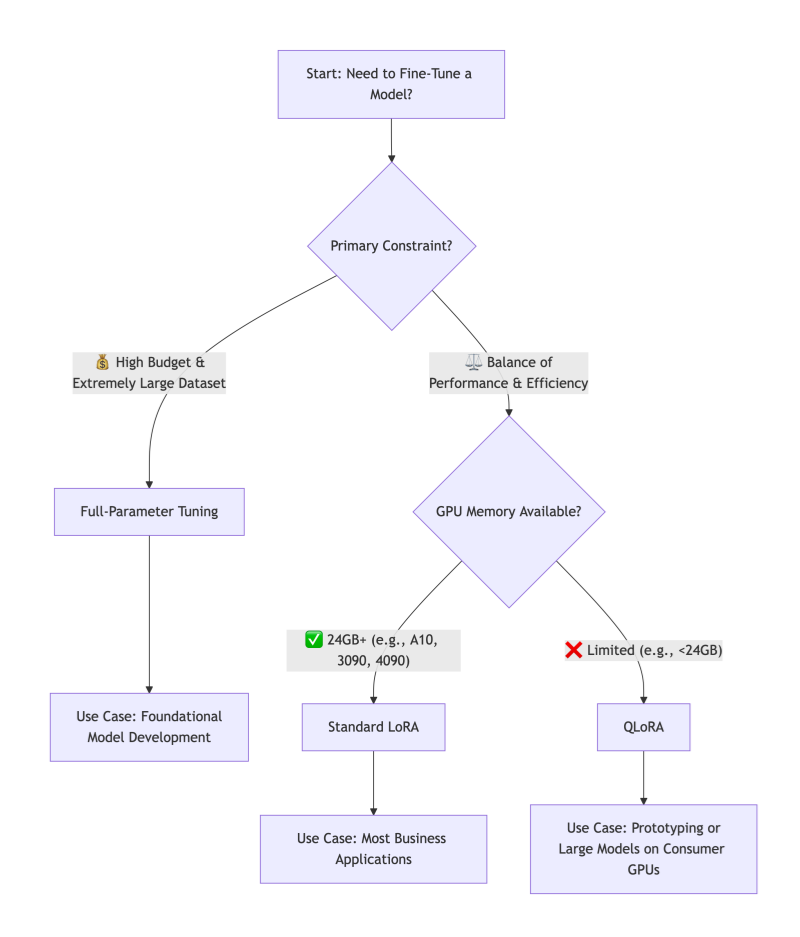
The Verdict:
For over 90% of business, research, and personal applications, LoRA is the recommended starting point. It offers the best balance of performance, efficiency, and practicality. QLoRA is the key when hardware is the absolute bottleneck. Reserve Full-Parameter Fine-Tuning for major initiatives where you are essentially creating a new foundational model and have the corresponding resources.
Taming Complexity: The Need for an Orchestration Platform
While LoRA and QLoRA lower hardware barriers, they introduce new operational complexities: managing different base models, dozens of adapter files, experiment tracking across various ranks and learning rates, and deploying these composite models.
This is where an integrated AI platform like WhaleFlux becomes a strategic force multiplier. WhaleFlux is designed to tame the fine-tuning lifecycle:
Streamlined Experimentation:
It provides a centralized environment to launch, track, and compare hundreds of fine-tuning jobs—whether full-parameter, LoRA, or QLoRA—logging all hyperparameters, metrics, and resulting artifacts.
Adopter & Model Registry:
Instead of a folder full of cryptic .bin files, WhaleFlux acts as a versioned registry for both your base models and your trained adapters. You can easily browse, compare, and promote the best-performing adapters.
Simplified Deployment:
Deploying a LoRA-tuned model is as simple as selecting a base model and an adapter from the registry. WhaleFlux handles the seamless merging and deployment of the optimized model to a scalable inference endpoint, abstracting away the underlying infrastructure complexity.
With WhaleFlux, teams can focus on the art of crafting the perfect dataset and experiment strategy, while the science of orchestration, reproducibility, and scaling is handled reliably.
Conclusion
The fine-tuning landscape has been transformed by LoRA and QLoRA, shifting the question from “Can we afford to fine-tune?” to “How should we fine-tune most effectively?” By understanding the trade-offs between full-parameter tuning, LoRA, and QLoRA, you can align your technical approach with your project’s goals, data, and constraints.
Start with a clear objective, embrace the efficiency of modern PEFT methods, and leverage platforms that operationalize these advanced techniques. This allows you to turn a powerful general-purpose AI into a dedicated, domain-specific expert that delivers tangible value.
FAQs: AI Model Fine-Tuning
1. When should I not use fine-tuning?
Fine-tuning is most valuable when you have a repetitive, well-defined task and a curated dataset. For tasks requiring real-time, external knowledge (e.g., answering questions about recent events), Retrieval-Augmented Generation (RAG) is often better. For simple task guidance, prompt engineering may suffice. The best solutions often combine RAG (for knowledge) with a lightly fine-tuned model (for style and task structure).
2. How much data do I need for LoRA/QLoRA to be effective?
You need significantly less data than for full-parameter tuning. For many style or instruction-following tasks, a few hundred high-quality examples can yield remarkable improvements. For complex domain adaptation, 1,000-10,000 examples are common. The key is data quality and diversity—they must be representative of the task you want the model to master.
3. What are the “rank” and “alpha” parameters in LoRA, and how do I set them?
- Rank (
r): This is the critical dimension of the low-rank adapter matrices. A higher rank means a larger, more expressive adapter (but more parameters to train). Start with a low rank (e.g., 8, 16, 32) and increase only if performance is lacking. - Alpha (
α): This is a scaling parameter for the adapter weights. Think of it as the learning rate for the adapter’s influence. A common and often effective rule of thumb is to setalpha = 2 * rank. Empirical testing on a validation set is the best way to tune these.
4. Can I combine multiple LoRA adapters on one base model?
Yes, this is a powerful advanced technique sometimes called “Adapter Fusion” or “Mixture of Adapters.” You can train separate adapters for different skills (e.g., one for coding syntax, one for medical terminology) and, with the right framework, dynamically combine or select them at inference time. This pushes the model towards being a modular, multi-skilled expert.
5. Does QLoRA sacrifice model quality compared to standard LoRA?
The research (Dettmers et al., 2023) showed that QLoRA, when properly configured, recovers the full 16-bit performance of standard fine-tuning. In practice, any performance difference is often negligible and far outweighed by the accessibility gains. For mission-critical deployments, you can train with QLoRA and then merge the high-quality adapters back into a 16-bit base model for inference if desired.
Guide to AI Model End-to-End Lifecycle Cost Optimization
For many businesses, the initial excitement of building a powerful AI model is quickly tempered by a daunting reality: the astronomical and often unpredictable costs that accrue across its entire lifecycle. It’s not just the headline-grabbing expense of training a large model; it’s the cumulative burden of data preparation, experimentation, deployment infrastructure, and ongoing inference that can cripple an AI initiative’s ROI.
The good news is that strategic cost optimization is not about indiscriminate cutting. It’s about making intelligent, informed decisions at every stage—from initial idea to production scaling. By adopting a holistic, end-to-end perspective, it is entirely feasible to reduce your total cost of ownership (TCO) by 50% or more, while maintaining or even improving model performance and reliability.
This guide provides a practical, stage-by-stage blueprint to achieve this goal, transforming your AI projects from budget black holes into efficient, value-generating assets.
Stage 1: The Foundation – Cost-Aware Design and Data Strategy (15-30% Savings)
Long before a single line of training code runs, you make decisions that lock in most of your future costs.
Optimization 1: Right-Scope the Problem.
The most expensive model is the one you didn’t need to build. Rigorously ask: Can a simpler rule-based system, a heuristic, or a fine-tuned small model solve 80% of the problem at 20% of the cost? Starting with the smallest viable model (e.g., a logistic regression or a lightweight BERT variant) establishes a cost-effective baseline.
Optimization 2: Invest in Data Quality, Not Just Quantity.
Garbage in, gospel out—and training on “garbage” is incredibly wasteful. Data cleaning, deduplication, and smart labeling directly reduce the number of training epochs needed for convergence. Implementing active learning, where the model selects the most informative data points for labeling, can cut data acquisition and preparation costs by up to 70%.
Optimization 3: Architect for Efficiency.
Choose model architectures known for efficiency from the start (e.g., EfficientNet for vision, DistilBERT for NLP). Design feature engineering pipelines that are lightweight and reusable. This upfront thinking prevents costly refactoring later.
Stage 2: The Experimental Phase – Efficient Model Development (20-40% Savings)
This is where compute costs can spiral due to unmanaged experimentation.
Optimization 4: Master the Art of Experiment Tracking.
Undisciplined experimentation is a primary cost driver. By systematically logging every training run—hyperparameters, code version, data version, and results—you avoid repeating failed experiments. This alone can cut wasted compute by 30%. Identifying underperforming runs early and stopping them (early stopping) is a direct cost saver.
Optimization 5: Leverage Transfer Learning and Efficient Fine-Tuning.
Never train a large model from scratch if you can avoid it. Start with a high-quality pre-trained model and use Parameter-Efficient Fine-Tuning (PEFT) methods like LoRA. These techniques fine-tune only a tiny fraction (often <1%) of the model’s parameters, slashing training time, GPU memory needs, and cost by over 90% compared to full fine-tuning.
Optimization 6: Optimize Hyperparameter Tuning.
Grid searches over large parameter spaces are prohibitively expensive. Use Bayesian Optimization or Hyperband to intelligently explore the hyperparameter space, finding optimal configurations in a fraction of the time and compute.
Stage 3: The Deployment Leap – Optimizing for Production Scale (25-50% Savings)
This is where ongoing operational costs are determined. Inefficiency here compounds daily.
Optimization 7: Apply Model Compression.
Before deployment, subject your model to a compression pipeline: Prune it to remove unnecessary weights, Quantize it from 32-bit to 8-bit precision (giving a 4x size reduction and 2-4x speedup), and consider Knowledge Distillation to create a compact “student” model. A compressed model directly translates to lower memory requirements, faster inference (lower latency), and significantly cheaper compute instances.
Optimization 8: Implement Intelligent Serving and Autoscaling.
Do not over-provision static resources. Use Kubernetes-based serving with horizontal pod autoscaling to match resources precisely to incoming traffic. For batch inference, use spot/preemptible instances at a fraction of the on-demand cost. Choose the right hardware: an efficient CPU for simple models, a GPU for heavy parallel workloads, or an AI accelerator (like AWS Inferentia) for optimal cost-per-inference.
Optimization 9: Design a Cost-Effective Inference Pipeline.
Cache frequent prediction results. Use model cascades, where a cheap, fast model handles easy cases, and only the difficult ones are passed to a larger, more expensive model. This dramatically reduces calls to your most costly resource.
Stage 4: The Long Run – Proactive Monitoring and Maintenance (10-25% Savings)
Post-deployment complacency erodes savings through silent waste.
Optimization 10: Proactively Monitor for Drift and Decay.
A model degrading in performance is a cost center—it delivers less value while consuming the same resources. Implement automated monitoring for data drift and concept drift. Detecting decay early allows for targeted retraining, preventing a full-blown performance crisis and the frantic, expensive firefight that follows.
Optimization 11: Establish a Retraining ROI Framework.
Not all drift warrants an immediate, full retrain. Establish metrics to calculate the Return on Investment (ROI) of retraining. Has performance decayed enough to impact business KPIs? Is there enough new, high-quality data? Automating this decision prevents unnecessary retraining cycles and their associated costs.
The Orchestration Imperative: How WhaleFlux Unlocks Holistic Optimization
Attempting to implement these 11 optimizations with a patchwork of disjointed tools creates its own management overhead and cost. True end-to-end optimization requires a unified platform that orchestrates the entire lifecycle with cost as a first-class metric.
WhaleFlux is engineered to be this orchestration layer, explicitly designed to turn the strategies above into executable, automated workflows:
Unified Cost Visibility:
It provides a single pane of glass for tracking compute spend across experimentation, training, and inference, attributing costs to specific projects and models—solving the “cost black box.”
Automated Efficiency:
WhaleFlux automates experiment tracking (Optimization 4), can orchestrate PEFT training jobs (5), and manages model serving with autoscaling on cost-optimal hardware (8).
Governed Lifecycle:
Its model registry and pipelines ensure that compressed, optimized models (7) are promoted to production, and its integrated monitoring (10) can trigger cost-aware retraining pipelines (11).
By centralizing control and providing the tools for efficiency at every stage, WhaleFlux doesn’t just run models—it systematically reduces the cost of owning them, turning the 50% savings goal from an aspiration into a measurable outcome.
Conclusion
Slashing AI costs by 50% is not a fantasy; it’s a predictable result of applying disciplined engineering and financial principles across the model lifecycle. It requires shifting from a narrow focus on training accuracy to a broad mandate of operational excellence. From the data you collect to the hardware you deploy on, every decision is a cost decision.
By adopting this end-to-end optimization mindset and leveraging platforms that embed these principles, you transform AI from a capital-intensive research project into a scalable, sustainable, and financially predictable engine of business growth. The savings you unlock aren’t just cut costs—they are capital freed to invest in the next great innovation.
FAQs: AI Model Lifecycle Cost Optimization
Q1: Where is the single biggest source of waste in the AI lifecycle?
Unmanaged and untracked experimentation. Teams often spend thousands of dollars on GPU compute running redundant or poorly documented training jobs. Implementing rigorous experiment tracking with early stopping capabilities typically offers the fastest and largest return on investment for cost reduction.
Q2: Is cloud or on-premise infrastructure cheaper for AI?
There’s no universal answer; it depends on scale and predictability. Cloud offers flexibility and lower upfront cost, ideal for variable workloads and experimentation. On-premise (or dedicated co-location) can become cheaper at very large, predictable scales where the capital expenditure is amortized over time. The hybrid approach—using cloud for bursty experimentation and on-premise for steady-state inference—is often optimal.
Q3: How do I calculate the ROI of model compression (pruning/quantization)?
The ROI is a combination of hard and soft savings: (Reduced_Instance_Cost * Time) + (Performance_Improvement_Value). Hard savings come from downsizing your serving instance (e.g., from a $4/hr GPU to a $1/hr CPU). Soft savings come from reduced latency (improving user experience) and lower energy consumption. The compression process itself has a one-time cost, but the savings recur for the lifetime of the deployed model.
Q4: We have a small team. Can we realistically implement all this?
Yes, by leveraging the right platform. The complexity of managing separate tools for experiments, training, deployment, and monitoring is what overwhelms small teams. An integrated platform like WhaleFlux consolidates these capabilities, allowing a small team to execute like a large one by automating best practices and providing a single workflow from idea to production.
Q5: How often should we review and optimize costs?
Cost review should be continuous and automated. Set up monthly budget alerts and dashboard reviews. More importantly, key optimization decisions (like selecting an instance type or triggering a retrain) should be informed by cost metrics in real-time. Make cost a first-class KPI alongside accuracy and latency in every phase of your ML operations.
10 Common Pitfalls Beginners Face with AI Models: A Guide to Avoiding Ineffective Training and Deployment Lag
Pitfall 1: Starting Without a Well-Defined Problem & Success Metric
The Trap:
Jumping straight into data collection or model selection because “AI is cool for this.” Vague goals like “improve customer experience” or “predict something useful” set the project up for failure, as there’s no clear finish line.
The Solution:
Begin by rigorously framing your problem. Is it a classification, regression, or clustering task? Crucially, define a quantifiable, business-aligned success metric before you start. Instead of “predict sales,” aim for “build a model that predicts next-month sales for each store within a mean absolute error (MAE) of $5,000.” This metric will guide every subsequent decision.
Pitfall 2: Underestimating the Paramount Importance of Data Quality
The Trap:
Assuming that more data automatically means a better model, and spending all effort on complex algorithms while feeding them noisy, inconsistent, or biased data. Garbage in, gospel out.
The Solution:
Allocate the majority of your initial time (often 60-80%) to data understanding, cleaning, and preprocessing. This involves:
- Handling missing values and outliers.
- Ensuring consistent formatting and labeling.
- Conducting exploratory data analysis (EDA) to uncover biases or spurious correlations.
- Documenting your data’s origins and limitations. A simple model trained on impeccable data will consistently outperform a brilliant model trained on a mess.
Pitfall 3: Data Leakage – The Silent Model Killer
The Trap:
Accidentally allowing information from the training process to “leak” into the training data. This creates a model that performs spectacularly well in testing but fails catastrophically in the real world. Common causes include: preprocessing (e.g., normalization) on the entire dataset before splitting, or using future data to predict past events.
The Solution:
Implement a strict, chronologically-aware data pipeline. Always split your data into training, validation, and test sets first (respecting time order if relevant). Then, fit any preprocessing steps (scalers, encoders) only on the training set, and apply the fitted transformer to the validation/test sets. This mimics the real-world flow of seeing new, unseen data.
Pitfall 4: Overfitting to the Training Set
The Trap:
Creating a model that memorizes the noise and specific examples in the training data rather than learning the generalizable pattern. It achieves near-perfect training accuracy but performs poorly on new data.
The Solution:
Employ a combination of techniques:
- Use a validation set: Hold out a portion of your training data to evaluate performance during development.
- Apply regularization: Techniques like L1/L2 regularization (which penalizes overly complex models) or Dropout (for neural networks) explicitly discourage overfitting.
- Practice simplicity: Start with a simpler model (linear regression before a deep neural network). You can only justify complexity if simplicity fails on your validation set.
- Get more data: This is often the most effective regularizer.
Pitfall 5: Misinterpreting Model Performance
The Trap:
Relying solely on overall accuracy, especially for imbalanced datasets. For example, a model that simply predicts “no fraud” for every transaction will have 99.9% accuracy in a dataset where fraud is 0.1% prevalent, yet it’s utterly useless.
The Solution:
Choose metrics that reflect your business reality. For imbalanced classification, use precision, recall, F1-score, or the area under the ROC curve (AUC-ROC). Always examine a confusion matrix to see where errors are actually occurring. The right metric is determined by the cost of false positives vs. false negatives in your specific application.
Pitfall 6: The “Set-and-Forget” Training Mindset
The Trap:
Running one training job, hitting a decent metric, and calling the model “done.” Machine learning is inherently experimental.
The Solution:
Adopt a methodical experimentation mindset. Systematically vary hyperparameters (learning rate, model architecture, feature sets) and track every experiment. Use tools—or a platform—to log the hyperparameters, code version, data version, and resulting metrics for every run. This turns model development from a black art into a reproducible, optimizable process.
Pitfall 7: Ignoring the Engineering Path to Production
The Trap:
Building a model in a Jupyter notebook and only then asking, “How do we put this online?” This leads to deployment lag, as the code, dependencies, and environment are not built for scalable, reliable serving.
The Solution:
Think about deployment from day one. Write modular, production-ready code even during exploration. Containerize your model and its environment using Docker. Plan for how the model will receive inputs and deliver outputs (a REST API is common). This “production-first” thinking smooths the transition from prototype to product.
Pitfall 8: Assuming the Model Will Stay Accurate Forever
The Trap:
Deploying a model and considering the project complete. In a dynamic world, model performance decays over time due to data drift (changes in input data distribution) and concept drift (changes in the relationship between inputs and outputs).
The Solution:
Implement a model monitoring plan before launch. Define key performance indicators (KPIs) and set up automated tracking of prediction accuracy, input data distributions, and business outcomes. Establish alerts to trigger when these metrics deviate from expected baselines, signaling the need for model retraining or investigation.
Pitfall 9: Neglecting Computational and Cost Realities
The Trap:
Designing a massive neural network without considering the GPU hours required to train it or the latency and cost of serving thousands of predictions per second.
The Solution:
Profile your model’s needs early. Start small and scale up only if necessary. Explore model optimization techniques like quantization and pruning to reduce size and speed up inference. Always calculate the rough total cost of ownership (TCO), factoring in training compute, inference compute, and engineering maintenance.
Pitfall 10: Working in Isolation Without Version Control
The Trap:
Keeping code, data, and model weights in ad-hoc folders with names like final_model_v3_best_try2.pkl. This guarantees irreproducibility and collaboration nightmares.
The Solution:
Use Git religiously for code. Extend that discipline to data and models. Use data versioning tools (like DVC) and a model registry to track exactly which version of the code trained which version of the model on which version of the data. This is non-negotiable for professional, collaborative ML work.
How an Integrated Platform Bridges the Gap
For beginners, managing these ten areas—experiment tracking, data pipelines, deployment engineering, and monitoring—can feel overwhelming. This is where an integrated MLOps platform like WhaleFlux transforms the learning curve.
WhaleFlux is designed to institutionalize best practices and help beginners avoid these exact pitfalls:
- It structures experimentation (solving Pitfall 6), automatically logging every run to eliminate confusion.
- Its model registry provides governance and version control (solving Pitfall 10), creating a single source of truth.
- It streamlines the packaging and deployment of models as APIs (solving Pitfall 7), turning weeks of DevOps work into a few clicks.
- Its built-in monitoring dashboards track model health and data drift in production (solving Pitfall 8), giving you peace of mind.
In essence, WhaleFlux provides the guardrails and automation that allow beginners to focus on the core science and application of ML, rather than the sprawling peripheral engineering challenges that so often cause projects to stall or fail.
Conclusion
Mastering AI is as much about avoiding fundamental mistakes as it is about implementing advanced techniques. By being aware of these ten common pitfalls—from problem definition to production monitoring—you position your project for success from the outset. Remember, effective AI is built on a foundation of meticulous data management, rigorous experimentation, and a steadfast focus on the end goal of creating a reliable, maintainable asset that delivers real-world value. Start with these principles, leverage modern platforms to automate the complexity, and you’ll not only build better models, but deploy them faster and with greater confidence.
FAQs: Common Beginner Pitfalls with AI Models
1. What is the single most important step for a beginner to get right?
Without a doubt, it’s Pitfall #2: Data Quality and Understanding. Investing disproportionate time in cleaning, exploring, and truly understanding your data pays greater dividends than any model choice or hyperparameter tune. A clean, well-understood dataset makes all subsequent steps smoother and more likely to succeed.
2. How can I practically check for data leakage (Pitfall #3)?
A strong, practical red flag is a massive discrepancy between performance on your validation set and performance on a truly held-out test set. If your model’s accuracy drops dramatically (e.g., from 95% to 70%) when evaluated on the final test data you locked away at the very start, you almost certainly have data leakage. Review your preprocessing pipeline step-by-step to ensure the test set was never used to calculate statistics like means, medians, or vocabulary lists.
3. I have a highly imbalanced dataset. What metric should I use instead of accuracy?
Stop using accuracy. Instead, focus on Recall (Sensitivity) if missing the positive class is very costly (e.g., failing to detect a serious disease). Focus on Precision if false alarms are very costly (e.g., incorrectly flagging a legitimate transaction as fraud). To balance both, use the F1-Score. Always examine the Confusion Matrix to see the exact breakdown of your errors.
4. As a beginner, how do I know when to stop trying to improve my model?
Establish a performance benchmark early. This could be a simple heuristic or a basic model (like logistic regression). Your goal is to outperform this benchmark meaningfully. Stop when: 1) You consistently meet your pre-defined business metric on the validation set, 2) Further hyperparameter tuning or feature engineering yields diminishing returns (very small improvements for large effort), or 3) You hit the constraints of your data quality or volume. Don’t optimize indefinitely.
5. Do I really need to worry about monitoring and retraining (Pitfall #8) for a simple model?
Yes, absolutely. Even simple models are subject to the changing world. The frequency may be lower, but the need is the same. At a minimum, schedule a quarterly review where you check the model’s predictions against recent outcomes. Setting up a simple automated alert for a significant drop in an online metric (like conversion rate) that your model influences is a highly recommended best practice for any model in production.
Beyond ChatGPT: 6 Niche but Practical Industry Use Cases of AI Models
The meteoric rise of ChatGPT brought Large Language Models (LLMs) into the public spotlight, showcasing their remarkable ability to converse, create, and reason with text. However, this public-facing “chatbot” persona is just the tip of the AI iceberg. Beneath the surface, a quiet revolution is underway: specialized AI models are being deployed to solve deep, complex, and highly valuable problems in specific industries.
These niche applications often don’t make headlines, but they are transforming operations, driving innovation, and creating significant competitive advantages. They move beyond general conversation to perform precision tasks—analyzing molecular structures, interpreting sensor vibrations, or forecasting microscopic crop diseases. This article explores six such practical use cases where AI models are doing the heavy lifting far beyond the chat window.
1. AI in Healthcare: Accelerating Drug Discovery and Development
The traditional drug discovery pipeline is notoriously slow and expensive, often taking over a decade and billions of dollars to bring a new therapy to market. AI models are compressing this timeline by orders of magnitude.
The Application:
Researchers use specialized AI for virtual screening of compound libraries. Models trained on vast datasets of molecular structures and biological interactions can predict how a new molecule will behave in the body, identifying the most promising candidates for treating a specific disease. Another critical application is in optimizing clinical trial design. AI can analyze historical trial data to identify suitable patient cohorts, predict potential side effects, and even suggest optimal dosing regimens.
Why It’s Niche & Powerful:
This isn’t about answering patient questions; it’s about leveraging graph neural networks (GNNs) and generative models to navigate a complex, multi-dimensional scientific space. It reduces the initial “needle-in-a-haystack” search from millions of compounds to a manageable shortlist, saving years of lab work and immense resources.
2. AI in Precision Manufacturing: Predictive Maintenance and Quality Control
In a high-stakes factory environment, an unplanned machine failure can cost millions. Similarly, a single defective component can ruin an entire production batch.
The Application:
Predictive maintenance models analyze real-time sensor data (vibration, temperature, acoustic signals) from industrial equipment. By learning the “normal” operating signature, these models can detect subtle anomalies that precede a failure, allowing maintenance to be scheduled proactively. For automated visual inspection, high-resolution computer vision models surpass human ability to spot microscopic cracks, coating defects, or assembly errors on fast-moving production lines, 24/7.
Why It’s Niche & Powerful:
These models operate on the edge, processing high-frequency time-series or image data. They require robustness to noisy industrial environments and must deliver predictions with extreme reliability. The value is direct: preventing catastrophic downtime, reducing waste, and ensuring flawless product quality.
3. AI in Agriculture: From Precision Farming to Yield Optimization
Modern agriculture faces the immense challenge of feeding a growing population with limited resources. AI is becoming a key tool for sustainable intensification.
The Application:
By analyzing multispectral satellite or drone imagery, AI models can assess crop health at the individual plant level. They detect early signs of disease, nutrient deficiency, or water stress long before the human eye can see them. This enables variable-rate application: AI-guided machinery delivers the precise amount of water, fertilizer, or pesticide only where it’s needed. Furthermore, models integrate weather data, soil conditions, and historical yield maps to predict crop yields with remarkable accuracy, aiding harvest planning and supply chain logistics.
Why It’s Niche & Powerful:
This application combines computer vision with geospatial and environmental data analysis. The models must be tailored to specific crops, regions, and climates. The impact is profound: increasing yields while minimizing environmental footprint and input costs.
4. AI in Supply Chain & Logistics: Dynamic Optimization and Demand Forecasting
Global supply chains are complex, dynamic networks vulnerable to disruption. AI provides the intelligence to navigate this complexity.
The Application:
AI models power dynamic routing and logistics optimization. They process real-time data on traffic, weather, fuel costs, and delivery windows to continuously re-optimize delivery routes for fleets of vehicles. In warehouses, computer vision and robotics AI enable fully automated picking and packing. For demand forecasting, advanced models synthesize historical sales data, market trends, promotional calendars, and even social media sentiment to predict future product demand with much higher accuracy than traditional methods.
Why It’s Niche & Powerful:
These are optimization problems at a massive scale, often requiring a combination of reinforcement learning and combinatorial optimization. The AI doesn’t just predict; it prescribes the most efficient action in a constantly changing environment, directly translating to lower costs and higher service levels.
5. AI in Legal Tech & Compliance: Contract Analysis and Legal Research
The legal profession is built on documents—contracts, case law, regulations. AI is becoming an indispensable assistant for navigating this textual universe.
The Application:
Natural Language Processing (NLP) models specialized in legal language can review and analyze contracts in seconds, flagging non-standard clauses, potential liabilities, or obligations. For e-discovery in litigation, AI sifts through millions of emails and documents to find relevant evidence. Furthermore, AI-powered research tools can quickly surface pertinent case law or regulatory precedents, saving lawyers countless hours of manual review.
Why It’s Niche & Powerful:
This requires models fine-tuned on massive corpora of legal text to understand intricate jargon and context. The value isn’t in creativity but in precision, recall, and speed, drastically reducing risk and human labor in document-intensive processes.
6. AI in Meteorology & Climate Science: High-Resolution Weather and Climate Modeling
Predicting the weather and modeling climate change are among the most computationally challenging scientific problems.
The Application:
AI is now being used to create “digital twins” of the atmosphere. Machine learning models, particularly physics-informed neural networks, can analyze data from satellites, radar, and ground stations to make highly accurate, localized, short-term weather forecasts faster than traditional numerical weather prediction (NWP) models. For climate science, AI helps analyze complex climate model outputs, identify patterns of change, and even improve the parameterization of smaller-scale processes in larger global models.
Why It’s Niche & Powerful:
This sits at the intersection of AI and fundamental physics. The models must respect physical laws (conservation of energy, mass) while learning from data. The potential is vast: from giving farmers hyper-local rain forecasts to improving our long-term understanding of planetary systems.
The Common Challenge: Operationalizing Specialized AI
While the applications are diverse, they share a common hurdle: moving from a promising pilot to a reliable, scalable production system. These niche models require:
- Integration with proprietary industry data sources (lab systems, factory SCADA, satellite feeds).
- Specialized deployment environments (on-premise servers, edge devices in factories, secure cloud vaults).
- Continuous monitoring for performance decay as real-world data evolves.
This is where an integrated AI platform like WhaleFlux proves critical. WhaleFlux provides the unified foundation to build, deploy, and manage these specialized industry models. It can handle the diverse data pipelines, provide the tools for domain-specific fine-tuning, and ensure robust monitoring for model health and data drift—whether the model is predicting a bearing failure on a factory floor or analyzing a clause in a ten-thousand-page merger agreement. By abstracting away the infrastructure complexity, WhaleFlux allows domain experts and data scientists to focus on solving the unique problems of their field.
Conclusion
The future of AI’s economic impact lies not only in general-purpose conversational agents but profoundly in these deep, vertical applications. By moving “Beyond ChatGPT,” businesses are leveraging AI as a core tool for scientific discovery, operational excellence, and strategic decision-making in fields where specialized knowledge is paramount. The next wave of AI value will be generated by those who can successfully harness these powerful niche models and integrate them seamlessly into the heart of their industry’s workflows.
FAQs: Niche Industry Use Cases of AI Models
Q1: What’s the main difference between a general model like ChatGPT and these niche industry models?
General-purpose LLMs are trained on broad internet text to be conversational jack-of-all-trades. Niche industry models are typically specialized from the ground up or heavily fine-tuned on proprietary, domain-specific data (molecular structures, sensor logs, legal documents). They excel at a precise, high-stakes task but lack broad conversational ability. It’s the difference between a polymath and a world-leading specialist.
Q2: What are the biggest challenges in implementing such niche AI solutions?
The top challenges are: 1) Data Access & Quality: Acquiring enough high-quality, labeled domain-specific data. 2) Talent: Finding or developing teams that combine AI expertise with deep domain knowledge (e.g., a biochemist who understands ML). 3) Integration: Embedding the AI into existing, often legacy, industry software and hardware systems. 4) Trust & Regulation: Meeting stringent industry standards for validation, explainability, and compliance (especially in healthcare, finance, and law).
Q3: How does a platform like WhaleFlux help with these niche applications?
WhaleFlux addresses operational friction. It provides a unified environment to manage proprietary data for training, orchestrate the training/fine-tuning of specialized models on appropriate hardware, and deploy and monitor these models in their required environments (cloud, on-premise, edge). This allows cross-functional teams (domain experts + data scientists) to collaborate effectively and move from experiment to productionized asset faster.
Q4: Can small and medium-sized enterprises (SMEs) in these industries afford to develop such AI?
Yes, the barrier is lowering. Instead of building massive models from scratch, SMEs can often start with pre-trained, domain-adapted foundation models (e.g., a model pre-trained on scientific literature) and fine-tune them on their own smaller datasets. Cloud-based AI platforms and “AI-as-a-Service” offerings for specific tasks (like document analysis or predictive maintenance) are also making this technology more accessible and cost-effective for smaller players.
Q5: What is a key trend in the future of these niche AI applications?
The move towards “AI Scientists” or “AI Co-pilots.” We will see less of AI as a standalone tool and more as an integrated assistant that works alongside the human expert. In drug discovery, this might be an AI suggesting novel molecular pathways. For a lawyer, it could be an AI proactively highlighting risks in a contract draft based on recent case law. The integration will become deeper, more interactive, and more focused on augmenting human expertise.
AI Model Training Tools Showdown: TensorFlow vs. PyTorch vs. JAX – How to Choose?
TL;DR: AI Framework ROI & Compute Economics in 2026
- The Verdict: PyTorch 2.x has emerged as the definitive enterprise standard for Model Fine-tuning and Agentic Workflows, driven by its superior ecosystem (Triton/FlashAttention) and 30% faster deployment velocity.
- Performance ROI: JAX retains a 10–15% throughput advantage for massive-scale distributed research (128+ GPU clusters), while TensorFlow serves as a stable legacy backbone for established enterprise pipelines.
- The WhaleFlux Advantage: By leveraging the WhaleFlux Unified AI Platform, enterprises can reduce Total Cost of Ownership (TCO) by up to 70% on H100/H200 clusters through Intelligent Scaling and Full-stack AI Observability.
- Operational Impact: Our integrated Model Lifecycle Management ensures 99.9% system uptime and reduces inference latency by 60%, allowing organizations to convert complex framework selections into deterministic business growth.
Beyond the Syntax: Frameworks as Infrastructure
In 2026, the “Framework War” has moved past API preferences. For AI enterprises, the choice between PyTorch, JAX, and TensorFlow is a strategic decision impacting Model Refinement speed and Compute TCO.
At WhaleFlux, we don’t just host models; we orchestrate intelligence. Through our Deep Observability suite, we’ve tracked thousands of fine-tuning cycles. The data is clear: the framework you choose dictates how much of your NVIDIA H100/H200’s raw power actually reaches your Autonomous Agents.
1. PyTorch: The Uncontested Leader in Fine-Tuning
PyTorch 2.x and the evolution of torch.compile have solidified its position as the industry standard for Model Adaptation.
The “Triton” Advantage
PyTorch’s deep integration with OpenAI’s Triton allows for the rapid development of custom GPU kernels. This means features like FlashAttention-3 are available on PyTorch weeks before other frameworks.
Ecosystem Velocity
95% of the models arriving at the WhaleFlux Model Refinery are PyTorch-native. Its dynamic graph nature makes debugging complex agent logic significantly faster than its competitors.
WhaleFlux Synergy
We use PyTorch for the majority of our Thermal-aware Orchestration tasks because of its superior handling of memory fragments (VRAM) during high-concurrency inference.
2. JAX: The Precision Engine for Frontiers
JAX has carved out a niche for teams pushing the boundaries of new architectures, such as State Space Models (SSMs)and massive-scale distributed refinement.
XLA Compilation
JAX’s ability to compile high-level Python code into optimized XLA kernels makes it incredibly fast on TPU and NVIDIA H-series clusters.
The Functional Paradigm
For researchers performing complex gradient transformations, JAX offers a level of mathematical elegance that PyTorch struggles to match.
The Trade-off
JAX remains “research-heavy.” Deployment into a production Agent Workforce is often more complex due to a less mature serving ecosystem compared to the PyTorch/Triton stack.
3. TensorFlow: The Legacy Infrastructure Backbone
TensorFlow has transitioned from the “default” to the “legacy” powerhouse.
Enterprise Stability
For businesses with established TFX (TensorFlow Extended) pipelines, the framework remains a stable choice for maintaining older assets.
Static Graph Benefits
While less flexible during the “refinement” phase, TensorFlow’s static graphs still offer marginal gains in specific, unchanging production environments where every microsecond of inference is pre-calculated.
The Verdict
Most modern WhaleFlux users are migrating away from TensorFlow to leverage the faster innovation cycles of the PyTorch ecosystem.
4. Framework Decision Matrix: 2026 ROI Edition
| Criteria | PyTorch (The Standard) | JAX (The Frontier) | TensorFlow (The Legacy) |
| Fine-Tuning Speed | Excellent (via FSDP) | Superior (Scale-out) | Average |
| Agent Deployment | Industry Leading | Emerging | Stable |
| Custom Kernel Dev | Native Triton Support | Via Pallas | Complex |
| WhaleFlux ROI | Highest for mid-scale | High for massive scale | Lower for new projects |
5. How WhaleFlux Optimizes Your Framework Choice
As an all-in-one AI integrated platform, WhaleFlux abstracts the friction of framework management through AI Platform Intelligence:
Hardware-to-Framework Mapping
Our platform automatically adjusts the Power Envelope of your H200 nodes based on whether you are running a JAX-heavy research task or a PyTorch-driven fine-tuning job.
Automated Dependency Management
Through WhaleFlux, you can switch from a PyTorch 2.4 environment to a JAX-specific XLA environment in seconds, with all drivers and CUDA kernels pre-optimized for our Compute Infra.
Cross-Framework Observability
Use our Deep Observability dashboard to compare the VRAM utilization of the same model across different frameworks, identifying exactly where your compute budget is being wasted.
Conclusion: Strategic Selection
In 2026, don’t choose a framework based on what’s “easy” to code. Choose based on deployment velocity and silicon utilization.
For the vast majority of Autonomous Agent and Model Refinement tasks, PyTorch is the definitive choice for ROI. However, for those pushing the absolute limits of distributed scale, JAX offers a glimpse into the future. Whatever your choice, the WhaleFlux Integrated AI Platform provides the infrastructure and intelligence to ensure your model reaches the “Green Zone” of efficiency.
Expert FAQ
1. Is PyTorch faster than JAX for fine-tuning a 70B model?
It depends on the scale. For a single-node or 8-GPU cluster, PyTorch (using FSDP) is often faster due to its ease of setup. For massive, multi-node clusters exceeding 128 GPUs, JAX’s XLA compilation can sometimes offer a 10-15% throughput advantage.
2. Why is TensorFlow’s popularity declining in AI enterprises?
The industry has moved toward “Agentic” workflows that require frequent, dynamic changes to model logic. TensorFlow’s static nature makes this iteration cycle significantly slower than PyTorch.
3. Does WhaleFlux support custom C++ kernels for these frameworks?
Yes. Through our Integrated AI Platform, engineers can deploy custom Triton or C++ kernels. We recommend PyTorch for this, as its integration with the modern NVIDIA stack is currently the most robust.
4. Can I use WhaleFlux to migrate from TensorFlow to PyTorch?
Absolutely. Many clients use our Model Refinery to port older weights into modern PyTorch architectures, enabling them to take advantage of Thermal-aware Orchestration and newer quantization formats like FP4.
5. How does framework choice affect “Agent Latency”?
Frameworks with better “Serving” stacks (like PyTorch with vLLM or Triton) result in lower Time-to-First-Token (TTFT). This makes your Agent Workforce feel more responsive and capable of handling real-time human interaction.
AI Model Trends: Lightweight, Multimodal, or Industry-Customized
The Great Fork in the Road
Imagine you’re a tech lead at a mid-sized company. Your CEO has greenlit a major AI initiative, convinced it’s the key to staying competitive. The directive is clear: “Build something intelligent and impactful.” But as you sit down to plan, you’re immediately faced with a foundational and perplexing choice. Should you:
- Adopt a state-of-the-art, massive multimodal model (MMM) that can chat, see, and reason, hoping its breathtaking generality sparks unexpected innovation?
- Develop a streamlined, lightweight model laser-focused on one specific task, promising speed, low cost, and easy deployment on your existing servers?
- Invest in creating or deeply fine-tuning a model exclusively for your industry’s jargon, regulations, and workflows, aiming to solve your most expensive problems that generic AI glosses over?
This isn’t just a technical selection; it’s a strategic bet on the future of your business. The AI landscape is no longer a one-way street toward bigger and bigger models. It has forked into three distinct, powerful pathways: the pursuit of Lightweight Efficiency, the ambition of Multimodal Mastery, and the depth of Industry-Customized Specialization. Each promises leadership, but in very different races. Which trend holds the key to real-world dominance?
Contender 1: The Agile Champion – Lightweight & Efficient Models
The “bigger is better” mantra in AI is facing a pragmatic challenger: the lightweight model. This trend isn’t about beating GPT-4 at a general knowledge test. It’s about winning where it matters most—in production.
The “Why” Behind the Shift: The drive for efficiency comes from the harsh economics of deployment. Running a 100-billion-parameter model in real-time requires immense computational power, typically from clusters of expensive GPUs like the NVIDIA H100, leading to high latency and unsustainable costs for high-volume applications. Lightweight models, often with parameters in the single-digit billions or even millions, flip this script.
The Engine of Efficiency: This is achieved through a sophisticated toolbox:
- Architectural Innovation: New model architectures like Microsoft’s Phi-2 or Google’s Gemmaare designed from the ground up to do more with less, using smarter attention mechanisms and denser parameter utilization.
- Model Compression: Techniques like quantization (reducing numerical precision from 32-bit to 8-bit or 4-bit), pruning (removing non-essential neurons), and knowledge distillation (training a small model to mimic a large one) can shrink model size by 4x or more with minimal accuracy loss.
- Hardware Synergy: These compact models are perfect partners for cost-effective inference on less powerful, widely available hardware, such as a single NVIDIA RTX 4090 for on-premises deployment or even on mobile and edge devices.
Leadership Claim: Lightweight models lead the race to ubiquity and practicality. They are the trend that brings AI from the cloud to the daily workflows—powering real-time translation on phones, instant product recommendations on websites, and fast, private data analysis on company servers without exorbitant cloud bills.
Contender 2: The Universal Genius – Multimodal Models
If lightweight models are specialists, multimodal models are the polymaths. They aim to break down the walls between data types, creating a single AI that can seamlessly understand and generate text, images, audio, and video.
Beyond Simple Combination:
Early “multimodal” systems were often pipelines—an image classifier feeding text to a language model. Modern MMMs like GPT-4V or Google’s Gemini are fundamentally unified. They are trained on massive, interleaved datasets of text, images, and code, allowing them to develop a deeply interconnected understanding. An image isn’t just labeled; its elements, style, and implied meaning are woven into the model’s reasoning fabric.
The Power of a Unified World View:
This creates astonishing, human-like capabilities. You can ask it to write a marketing slogan based on a product sketch, analyze a scientific chart and summarize the findings, or find an emotional moment in a video based on a voice description. The potential for creative assistants, revolutionary search interfaces, and complex problem-solving is immense.
The Cost of Genius:
However, this capability comes at a staggering cost. Training these unified models requires unprecedented computational scale—think tens of thousands of NVIDIA H100 or H200 GPUs running for months. Furthermore, their very generality can be a weakness for businesses. A model that knows a little about everything might not know enough about your specific industry’s nuances, leading to plausible but incorrect or generic outputs for specialized tasks.
Leadership Claim:
Multimodal models lead the race for raw capability and user experience innovation. They are contenders for the ultimate human-machine interface, potentially becoming the primary way we interact with all digital systems.
Contender 3: The Deep Expert – Industry-Customized Models
This trend asks a simple, powerful question: What good is a genius if it doesn’t understand your business? Industry-customized models are the domain experts, trained or meticulously fine-tuned on proprietary data—legal contracts, medical journals, engineering schematics, financial reports.
From General Knowledge to Operational Intelligence: These models move beyond answering general questions to performing high-stakes, domain-specific tasks. Think of a model that reads thousands of clinical trial reports to suggest potential drug interactions, or one that analyzes decades of supply chain and geopolitical data to predict procurement risks for a manufacturer.
The Path to Specialization: Customization happens in several ways:
- Continued Pre-training: Further training a base model (like Llama 2) on a vast corpus of domain-specific text.
- Supervised Fine-Tuning (SFT): Training the model on labeled examples of specific tasks (e.g., “label this radiograph”).
- Retrieval-Augmented Generation (RAG): Connecting a model to a live, vectorized database of company knowledge, ensuring its answers are grounded in internal docs and latest data.
The infrastructure for such specialization is critical. Developing and iterating on these custom models requires flexible, high-performance computing that doesn’t break the bank. This is where platforms architected for efficiency show their value. For instance, WhaleFlux provides an integrated AI service platform that supports this entire customization journey. Beyond offering optimized access to the full spectrum of NVIDIA GPUs (from H100 for heavy training to RTX 4090s for cost-effective development), its unified environment for GPU management, model serving, and AI observability allows enterprise teams to focus on fine-tuning their proprietary data and workflows. By maximizing cluster utilization and providing stable deployment, it turns the high-compute task of building a domain expert into a manageable and predictable operational process.
Leadership Claim: Industry-customized models lead the race for tangible ROI and competitive advantage. They don’t just automate tasks; they encapsulate and scale a company’s unique intellectual property, directly impacting the bottom line by solving problems no off-the-shelf model can.
The Verdict: A Trifecta, Not a Winner-Takes-All
So, who will lead? The answer is not one, but all three—in different arenas.
The future belongs to strategic layering. The winning enterprise architecture will likely integrate elements from each trend:
- A lightweight, efficient model deployed at the edge to handle high-frequency, low-latency tasks (e.g., customer service chat filtering).
- A powerful multimodal model in the cloud as a creative and research co-pilot for employees, analyzing presentations and brainstorming.
- A deeply customized, domain-specific model serving as the core operational brain, powering critical applications like risk assessment, diagnostic support, or legal discovery.
Lightweight models will lead in pervasiveness and accessibility. Multimodal models will lead in consumer-facing and creative applications. Industry-customized models will lead in transforming core business operations and building unassailable moats.
The true leaders won’t be the models themselves, but the organizations that most skillfully navigate this trifecta. They will be the ones who ask not “Which trend should we follow?” but “How can we orchestrate these powerful forces to solve our most meaningful problems?” The race is on, and the most intelligent strategy may be to build a team that can run in all three directions at once.
FAQs: AI Model Trends
1. Is the trend toward lightweight models just because companies can’t afford larger ones?
Not at all. While cost is a major driver (making AI viable for more use cases), the shift is fundamentally about right-sizing. Lightweight models offer superior speed, lower latency, the ability to run on-device for privacy, and dramatically reduced energy consumption. It’s about applying the appropriate amount of intelligence for the task, not settling for less.
2. Can a multimodal model replace the need for specialized, industry-customized models?
Unlikely in the near term. While multimodal models are incredibly versatile, they are generalists. An industry-customized model trained on proprietary data develops a depth of understanding and reliability on niche tasks that a generalist cannot match. Think of it as the difference between a brilliant medical student (multimodal) and a seasoned specialist with 20 years of experience (customized). For high-stakes business applications, depth and precision are non-negotiable.
3. What’s the biggest infrastructure challenge in pursuing industry-customized AI?
The challenge is two-fold: computational cost and operational complexity. Fine-tuning and continuously improving custom models require significant, repeated GPU compute cycles (on hardware like NVIDIA A100 or H100 clusters). Managing this infrastructure, ensuring high utilization to control costs, and maintaining stable deployment pipelines is a massive undertaking. This is precisely why integrated platforms that handle this complexity are becoming essential for enterprise AI teams.
4. How does a platform like WhaleFlux support a company exploring multiple AI trends?
WhaleFlux acts as a flexible, unified foundation for AI development and deployment. For lightweight models, its efficient GPU management allows for cost-effective inference scaling. For developing customized models, it provides the high-performance NVIDIA GPU resources (like H100s for training) and the observability tools needed for iterative fine-tuning. Its integrated environment for models and agents helps teams manage this entire portfolio from experimentation to production, optimizing resource use across different types of AI workloads and preventing infrastructure from becoming a bottleneck to innovation.
5. As a business leader, how should I prioritize investment among these three trends?
Start with the problem, not the technology. Map your key business challenges to the trend’s strength:
- Invest in Lightweight AI for customer-facing apps needing speed/scale (e.g., recommendation engines).
- Invest in Multimodal AI for enhancing creativity, internal research, or building next-gen user interfaces.
- Invest in Industry-Customized AI for automating core, proprietary processes (e.g., contract analysis, predictive maintenance, diagnostic support). Most companies will find the highest initial ROI in a focused, customized model project that tackles a known, expensive problem.