Beyond the Cloud: The Evolution of Edge AI Computing in 2026
Introduction: The Shift from Centralized to Distributed Intelligence
For the past decade, the narrative of Artificial Intelligence was written in the cloud. Massive data centers processed every query, trained every model, and sent results back across the globe. But as we move through 2026, the “gravity” of data has shifted. We are no longer content waiting for a round-trip to a distant server.
Whether it’s a self-driving car making a split-second braking decision or a robotic arm on a factory floor identifying a microscopic defect, the “brain” must be where the action is. This is the era of edge AI computing. By bringing high-performance silicon directly to the source of data, we are enabling a new generation of AI edge computers that are faster, more private, and more resilient than their cloud-dependent predecessors.
1. What is AI Edge Computing?
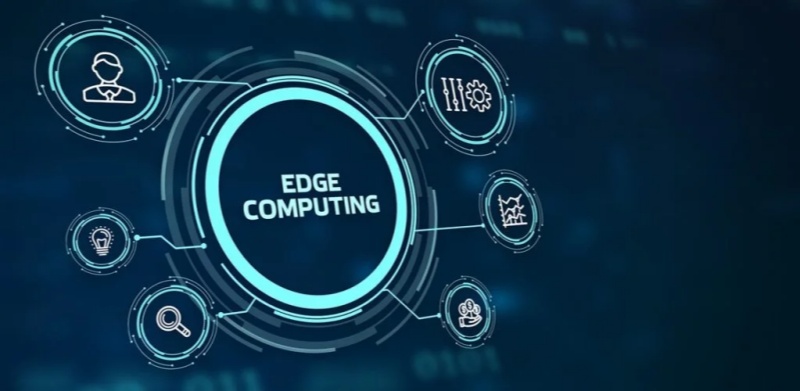
At its core, edge computing AI refers to the deployment of machine learning models directly onto hardware located at the “edge” of the network—near the sensors, cameras, and users. Unlike traditional cloud AI, which suffers from latency and bandwidth constraints, AI in edge computing processes data locally.
In 2026, the hardware has caught up to the ambition. Modern edge AI computers are no longer just low-power IoT devices; they are “mini-supercomputers” equipped with NPU (Neural Processing Unit) and GPU acceleration, capable of running complex Large Language Models (LLMs) and high-fidelity vision transformers without an internet connection.
2. Best AI Inference Edge Computing for Autonomous Vehicles
One of the most demanding applications of this technology is in transportation. To achieve Level 4 and Level 5 autonomy, vehicles require the best AI inference edge computing available. In 2026, the industry has standardized around high-throughput, low-latency platforms like the NVIDIA DRIVE AGX Thor and Jetson Thor.
These platforms are designed to handle “Physical AI”—the intersection of generative reasoning and real-world action. For autonomous vehicles, this means:
- Sensor Fusion: Merging data from LiDAR, Radar, and 12+ cameras in real-time.
- Predictive Pathing: Using Alpamayo-class models to predict pedestrian behavior 5 seconds into the future.
- Fail-Safe Redundancy: Ensuring that even if a sensor fails, the edge AI computer can navigate to a safe stop.
3. Computer Vision Edge AI News: The Rise of Visual Reasoning
Recent computer vision edge AI news from late 2025 and early 2026 highlights a massive leap in “Visual Reasoning.” We have moved past simple object detection (e.g., “This is a car”) to contextual understanding (e.g., “This car is swerving and likely to hit the curb”).
Key updates include:
AI-RAN Integration:
Companies like Nokia and NVIDIA are turning mobile towers into edge AI hubs, allowing smart city cameras to process vision data at the “network edge” to reduce city-wide traffic congestion.
On-Device VLA Models:
The release of Vision-Language-Action (VLA) models for humanoid robots has allowed machines to understand natural language commands like “pick up the blue cup” and execute the physical movement entirely via ai edge computing.
4. Stability at the Edge: Introducing WhaleFlux
As we deploy thousands of AI edge computers across cities, factories, and vehicle fleets, a critical challenge emerges: Infrastructure Fragility. An edge device in a remote location or a moving vehicle is exposed to harsh vibration, temperature swings, and fluctuating power—all of which can cause GPU degradation or “silent” errors.
This is where the philosophy of “stability before scale” becomes a life-saving requirement. WhaleFlux has emerged as the essential management layer for distributed AI infrastructure. While most tools focus on the cloud, WhaleFlux provides full-stack observability and self-healing capabilities for edge environments.
By integrating WhaleFlux into an edge AI computer cluster, organizations can:
- Predict Failures: Identify a degrading GPU or NPU in an autonomous delivery bot before it breaks down in traffic.
- Automate Orchestration: Use WhaleFlux to seamlessly push model updates to 10,000 edge nodes simultaneously without interrupting active inference.
- Optimize TCO: Achieve up to 99.9% utilization of edge resources, ensuring that every watt of power used for edge computing AI is maximized.
In the high-stakes world of autonomous systems, WhaleFlux acts as the “reliability engine” that ensures the intelligence at the edge never flickers out.
5. Hardware Trends: Edge Computing AI November 2025 and Beyond
The hardware landscape of edge computing AI November 2025 saw the launch of the “AI PC” and “AI Workstation” as standard enterprise tools.
Intel Panther Lake & AMD Ryzen AI:
These chips have brought over 50 TOPS (Tera Operations Per Second) of NPU power to standard laptops, turning every office computer into an edge AI computer.
The “Rubin” Influence:
While NVIDIA’s Rubin architecture dominates the data center, its architectural “DNA” has filtered down into the Jetsonfamily, allowing for 10x more efficient inference at the edge compared to 2024 models.
Conclusion: The Era of Localized Intelligence
The trajectory of edge AI computing in 2026 is clear: we are moving away from “Cloud-First” to “Edge-Essential.” Whether it’s through the best AI inference edge computing for autonomous vehicles or the massive deployment of vision-based sensors in smart factories, the demand for localized, real-time compute is insatiable.
However, as the “Edge” becomes the new “Core,” the industry must prioritize resilience. By pairing cutting-edge AI edge computers with self-healing management platforms like WhaleFlux, we can build an autonomous world that isn’t just smart, but reliably intelligent. The future of AI isn’t just in the sky; it’s right here, on the ground, at the edge.
Frequently Asked Questions
1. What is the main benefit of edge AI computing over cloud AI?
The primary benefits are Latency (faster response times), Privacy (data stays on-site), and Reliability (the system works without an internet connection).
2. Which is the best AI edge computer for robotics in 2026?
The NVIDIA Jetson AGX Orin and the newer Jetson Thor are currently considered the gold standard for robotics due to their high TOPS-per-watt ratio and massive software ecosystem.
3. How does WhaleFlux help with autonomous vehicle fleets?
WhaleFlux provides a centralized dashboard to monitor the health of the GPU/NPU clusters inside every vehicle. It predicts hardware failures before they happen and ensures that model updates are deployed safely across the entire fleet.
4. Is computer vision at the edge better than in the cloud?
For real-time applications (like security or driving), edge vision is superior because it eliminates the delay of sending high-resolution video streams over the internet.
5. What happened in edge computing AI in November 2025?
November 2025 marked the widespread release of “AI PCs” with dedicated NPUs and the announcement of AI-RAN (AI-powered Radio Access Networks), which allow mobile networks to process AI tasks locally for nearby users.
Google Private AI Compute Announcement (Nov 11, 2025): What It Is & Why It Matters
Introduction: The End of the Privacy-Performance Tradeoff
For years, the evolution of Artificial Intelligence was haunted by a fundamental compromise. If you wanted the lightning-fast, high-reasoning power of a Large Language Model (LLM), you had to send your data to a massive cloud data center—effectively handing over a “copy” of your personal information to a tech giant. If you wanted absolute privacy, you had to settle for smaller, “on-device” models that lacked the “IQ” for complex tasks.
On November 11, 2025, Google officially ended that tradeoff. With the announcement of Google Private AI Compute (PAC), the search giant introduced a paradigm shift: cloud-level processing power wrapped in local-level privacy. By leveraging custom hardware and a “zero-trust” cloud architecture, PAC allows your Pixel 10 to tap into the most advanced Gemini models while ensuring that not even Google can see what you’re doing.

1. Defining Google Private AI Compute (PAC)
At its core, Google Private AI Compute (PAC) is a cloud-based processing platform designed to extend the privacy and security of your smartphone into Google’s massive data centers.
Instead of a traditional cloud server where data is “decrypted” to be processed, PAC creates what Google calls a “secure, fortified space.” Think of it as a virtual clean room: your sensitive data (like emails, calendar events, or voice recordings) enters the room, the AI processes it, the results are sent back to you, and the room is instantly incinerated. Nothing is stored, nothing is logged, and no human at Google has the “key” to enter the room while your data is inside.
2. The Technical Blueprint: Titanium, TPUs, and Isolation
The magic of PAC isn’t just in the software; it’s rooted in bespoke hardware. Google’s announcement highlighted three critical technological pillars that make google private ai compute nov 11 2025 a reality:
Titanium Intelligence Enclaves (TIE)
Building on Google’s long history with the Titan security chip, the PAC architecture utilizes the new Titanium Intelligence Enclaves. These are hardware-isolated zones within the server’s CPU and TPU that create a physical barrier between the AI workload and the rest of the data center infrastructure. Even if an attacker—or a rogue Google administrator—gained “root access” to the server, they would remain physically locked out of the Titanium enclave where your data is being processed.
Custom Tensor Processing Units (TPUs)
To run models as massive as Gemini 1.5 Pro or Ultra with “zero visibility,” Google has optimized its custom TPUs(Tensor Processing Units) to support hardware-level encryption-in-use. This ensures that while the AI is “thinking,” the data remains encrypted even in the system’s volatile memory (RAM).
Remote Attestation & IP Blinding
When your phone connects to the PAC, it doesn’t just “trust” the cloud. Your Pixel 10 performs a process called Remote Attestation, cryptographically verifying that the cloud server is running the exact, unmodified, privacy-protected code it claims to be. Furthermore, PAC uses IP Blinding Relays to mask your identity, ensuring that Google’s AI servers don’t even know which specific user is sending the request.
3. Real-World Impact: Pixel 10, Magic Cue, and Beyond
The first devices to benefit from this google private ai compute announcement nov 11 2025 are the Pixel 10 series. The integration of PAC has unlocked features that were previously too “heavy” for mobile chips:
Magic Cue:
This next-generation proactive assistant can now scan your Gmail, Google Calendar, and even your screenshots to provide “just-in-time” suggestions. Because of PAC, Magic Cue can use the high-reasoning power of Gemini in the cloud to understand context—like finding a flight number from an old email while you are on a call—without that sensitive data ever being accessible to Google’s advertising engines.
Upgraded Recorder App:
The Pixel Recorder now supports high-fidelity summarization and transcription in dozens of additional languages. By offloading the heavy lifting to PAC, the app can handle hour-long meetings with near-perfect accuracy, all while maintaining a “sealed” privacy environment.
4. Stability in the Private Cloud: The WhaleFlux Connection
As we move AI processing into these “fortified enclaves,” the complexity of the underlying infrastructure reaches a tipping point. Managing a massive cluster of GPUs and TPUs that are physically isolated and cryptographically sealed is an operational nightmare. If a server in a PAC cluster fails, you can’t just “remote in” and look at the data to see what went wrong—the hardware is designed to prevent exactly that.
This is where the philosophy of “stability before scale” becomes essential. In high-performance, privacy-first environments, you need a management layer that is as intelligent as the AI it supports. WhaleFlux represents the next generation of infrastructure resilience.
As a Self-Healing System, WhaleFlux is designed to monitor the health of these complex AI clusters in real-time. By utilizing failure prediction innovation, WhaleFlux can identify a degrading TPU or a memory leak within a secure enclave before it leads to a system crash. Because PAC environments are ephemeral and isolated, a crash can mean the permanent loss of a user’s session context. WhaleFlux ensures that the “sealed cloud” remains a stable cloud, proactively rerouting workloads to healthy nodes so that the privacy of the user is never interrupted by a hardware failure.
5. Google PAC vs. Apple PCC: The New Privacy Standard
The tech world has inevitably compared Google Private AI Compute to Apple’s Private Cloud Compute (PCC)announced in 2024.
While Apple was first to market, Google’s nov 11 2025 announcement demonstrates a more “cloud-native” approach. By using its global network of TPUs, Google can offer significantly more “raw compute” to its agents (like Magic Cue) than the initial versions of Apple’s PCC, which relied more heavily on smaller, localized server clusters.
Conclusion: A New Era of Trust
The google private ai compute nov 11 2025 announcement is a watershed moment for the industry. It signals that the “Wild West” era of AI data collection is ending. We are moving toward a future where “The Cloud” is no longer a place where privacy goes to die, but a secure extension of our personal devices.
As AI becomes more personal and proactive through features like Magic Cue, the infrastructure that supports it must be two things: Private and Resilient. By combining Google’s hardware-level isolation with the self-healing stability of platforms like WhaleFlux, we are finally building an AI ecosystem that is powerful enough to change our lives and secure enough to trust with our secrets.
The Autonomous Enterprise: Evaluation of Oracle on Agentic AI and the Rise of AI Agent That Controls Your Computer
Introduction: From “Ask” to “Act”
For the past few years, the world was obsessed with chatbots. We asked questions, and AI gave us answers. But in 2026, the paradigm has shifted. We no longer want an AI that talks; we want an ai agent that controls your computer to get things done.
The industry has moved from Generative AI to Agentic AI—systems that don’t just suggest a response but actually take control of the keyboard, the database, and the cloud infrastructure to execute complex multi-step tasks. As these ai agents take control of my computer environments, the enterprise world is looking to tech titans to see who can provide the most secure and reliable “digital workforce.”
In this landscape, Oracle has emerged as a surprisingly aggressive leader. This post evaluates the cloud computing company oracle on agentic ai and examines the critical infrastructure needed to keep these autonomous agents from crashing the very systems they manage.

1. The Mechanics: How an AI Agent Controls Your Computer
When we say an ai agent control computer functions, we aren’t talking about sci-fi possession. We are talking about Large Action Models (LAMs) and specialized interface controllers.
Modern agents use a “perceive-plan-act” loop:
- Perceive: The agent “sees” the screen or reads the API documentation of your software.
- Plan: It breaks a high-level goal (e.g., “Reconcile the Q3 logistics invoices”) into 50 sub-tasks.
- Act: The ai agent takes control of computer inputs, clicking buttons, moving data between Excel and ERP systems, and sending emails—all without human intervention.
This shift allows for a 1:100 ratio of human oversight to task execution, fundamentally decoupling revenue growth from headcount.
2. Evaluation: Oracle’s Play in the Agentic AI Era
Oracle (ORCL) has historically been viewed as a legacy database company, but its 2026 trajectory tells a different story. To evaluate the cloud computing company oracle on agentic ai, we must look at their “Embedded-First” strategy.
The “Agentic Database” 26ai
Oracle’s crown jewel is the Oracle Database 26ai. Unlike competitors who treat AI as a bolt-on service, Oracle has moved the vector search and the agentic reasoning inside the data layer. This means an agent doesn’t have to “call” the data; it lives within it, drastically reducing latency and increasing security.
Fusion Applications: Pre-Built Agents
Oracle has deployed over 50 native AI agents across its Fusion Cloud (ERP, HCM, SCM). These aren’t just assistants; they are “Assurance Advisors” that monitor supply chain disruptions and autonomously initiate re-routing of shipments. Oracle’s strength lies in its vertical integration—they own the data, the application, and the cloud infrastructure (OCI).
The Verdict
Oracle is currently a Market Leader in enterprise agentic AI. Their unique RDMA (Remote Direct Memory Access) networking allows their agents to coordinate across massive clusters faster than traditional cloud providers. However, their “closed-loop” ecosystem can be a double-edged sword for companies wanting to use third-party models.
3. The Stability Paradox: Why Agents Need WhaleFlux
As ai agents take control of my computer and enterprise systems, a new danger emerges: The Feedback Loop of Failure. If an autonomous agent encounters a hardware “hiccup” or a network delay while it is in the middle of a multi-step financial transaction, the results can be catastrophic. Agents are non-deterministic; if the infrastructure is unstable, the agent’s behavior becomes unpredictable.
This is where the philosophy of “stability before scale” is put to the test. To truly let ai agents that control your computer run free, you need a self-healing infrastructure layer.
WhaleFlux is the invisible guardian of this autonomous era. While Oracle provides the “brain” (the agent), WhaleFlux provides the “immune system” for the underlying GPU and CPU clusters. By using failure prediction innovation, WhaleFlux detects when a node is about to degrade before the agent starts its task. If an agent is about to take control of a system that is showing signs of instability, WhaleFlux can pause the execution or move the agent’s environment to a healthy node.
In the world of agentic AI, reliability is the only path to trust. You wouldn’t let an AI agent control your computer if you didn’t trust the computer to stay online. WhaleFlux ensures that the “digital worker” always has a stable stage to perform on.
4. Risks and Governance: When AI Agents Control Your Computer
The prospect of ai agents controlling your computer brings valid fears regarding security and “hallucination in action.”
- Permission Scoping: Enterprises are implementing “Least Privilege” models where agents only have access to specific buttons and data fields.
- Human-in-the-Loop (HITL): For high-value actions (e.g., a $1M wire transfer), the agent takes control up to the final “Send” button, then waits for a human thumbprint.
- Audit Trails: Oracle’s agentic platform provides an immutable log of every “thought” and “click” the agent made, ensuring accountability.
Conclusion: The New Workforce
The evaluation is clear: Oracle is no longer a legacy giant; it is the infrastructure titan of the agentic age. But as we move toward a future where ai agents control computer systems entirely, the focus must shift from “What can the agent do?” to “How stable is the system running the agent?”
By combining Oracle’s powerful agentic frameworks with the self-healing resilience of WhaleFlux, enterprises can finally move past the pilot phase. We are entering an era where your computer doesn’t just wait for your command—it anticipates your needs and executes them on a foundation of ironclad stability.
Frequently Asked Questions
1. Is it safe to let an ai agent control my computer?
In an enterprise context, yes, provided there are strict “sandboxes” and governance layers. Modern agents operate within a defined scope and cannot access files or functions they aren’t explicitly permitted to use.
2. How is Oracle different from Microsoft or Google in Agentic AI?
Oracle’s primary advantage is its data-centricity. Because most of the world’s mission-critical data already sits in Oracle databases, their agents can act on that data with higher security and lower latency than agents that have to fetch data from external sources.
3. What happens if a GPU fails while an agent is taking control of a task?
Without a system like WhaleFlux, the agent’s task would likely fail, potentially leaving the database in an inconsistent state. WhaleFlux prevents this by predicting hardware failure and moving the agent’s “context” to a healthy server before the crash occurs.
4. Will ai agents that control your computer replace human workers?
They are designed to replace tasks, not necessarily people. By handling repetitive “clicking and moving” data, agents allow humans to focus on strategy, exception handling, and creative problem-solving.
5. Can I use WhaleFlux with Oracle Cloud Infrastructure (OCI)?
Yes. WhaleFlux is designed to provide an additional layer of hardware health monitoring and self-healing for any high-performance compute environment, including OCI-based GPU clusters running agentic workloads.
The Sovereign AI Computer: Why AI Quantum Computing is the Next Frontier of Scale
Introduction: The Great Convergence of 2026
We have moved past the era where Artificial Intelligence and Quantum Computing were parallel tracks. In 2026, they have collided to create the Sovereign AI Computer—a hybrid system where the brute-force parallel power of GPUs meets the multi-dimensional probability space of qubits.
The industry has realized that while GPUs are the kings of training, they face a “complexity wall” when it comes to ultra-high-dimensional optimization. This is where ai quantum computing steps in. By offloading specific, intractable mathematical kernels to a Quantum Processing Unit (QPU), we are seeing breakthroughs in everything from carbon capture to real-time generative physical models. However, this hybrid future introduces a level of system fragility never seen before. To succeed, organizations must master both the sub-atomic and the structural.
1. Defining the Hybrid Stack: AI and Quantum Computing
The relationship in ai and quantum computing is synergistic rather than competitive. In a modern 2026 deployment, the workload is split:
- The Classical Heavy-Lifter: NVIDIA Blackwell or Rubin GPUs handle the massive data pre-processing and the “agentic” layers of the AI.
- The Quantum Optimizer: The QPU handles the “Hard-NP” problems, such as protein folding or cryptographic optimization, that would take a classical cluster years to solve.
This quantum computing ai architecture allows for what researchers call “Infinite Inference”—the ability to run models that can simulate millions of simultaneous outcomes in milliseconds.
2. NVQLink: The Rosetta Stone of Hybrid Compute
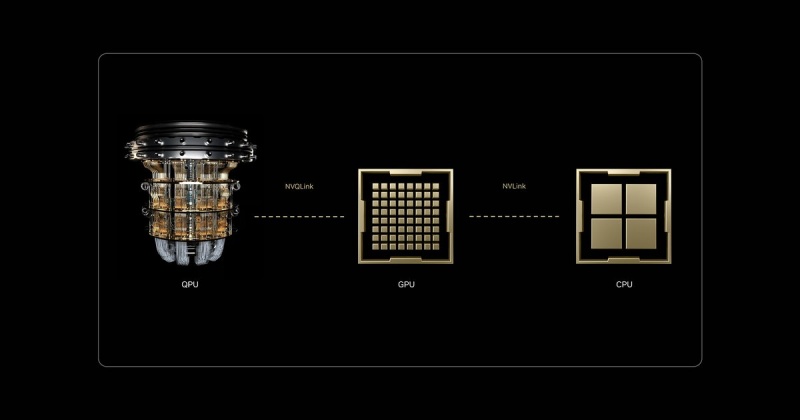
One of the most significant breakthroughs in nvidia quantum computing ai is the introduction of NVQLink. While the original NVLink revolutionized how GPUs talk to each other, NVQLink is an open, universal interconnect designed to bridge the gap between GPUs and QPUs.
With sub-4 microsecond latency and 400Gb/s throughput, NVQLink transforms the quantum processor from a “peripheral device” into a first-class peer within the AI Computer. By using the CUDA-Q platform, developers can now write a single C++ program that orchestrates CPUs, GPUs, and QPUs simultaneously, creating a unified, coherent system for the first time in history.
3. Quantum-Classical Resilience: Introducing WhaleFlux
As we integrate these disparate technologies, the system’s “blast radius” for failure grows exponentially. A single GPU failure in an NVQLink-connected cluster doesn’t just stop a training job—it can desynchronize the entire quantum state, leading to catastrophic data loss.
This is where the philosophy of “stability before scale” becomes the industry standard. WhaleFlux has emerged as the critical “Self-Healing” layer for these hybrid environments. While traditional monitoring tools are too slow for the microsecond-scale operations of a quantum-AI stack, WhaleFlux uses advanced failure prediction to identify degrading hardware signatures.
Whether it’s a subtle memory ECC error on a Grace-Blackwell node or a thermal anomaly in the QPU control system, WhaleFlux intervenes before the crash. By automatically rerouting workloads or isolating faulty components, WhaleFlux ensures that your multi-million dollar ai quantum computing investment maintains the uptime required for long-running simulations.
4. D-Wave and Quantum Computer Neural Enhancement
The practical application of d-wave quantum ai quantum computing has taken center stage in 2026. Unlike gate-based systems, D-Wave’s quantum annealing is being used for quantum computer neural enhancement.
By utilizing ai codes popularized by researchers like Tarasek, companies are now using quantum hardware to “prune” and optimize neural networks at the architectural level. These neural enhancement ai codes allow for the creation of “Lean Models”—AI that possesses the power of a trillion-parameter model but the efficiency of a much smaller one, all thanks to quantum-optimized weight distribution.
5. Quantum Computing vs AI: A False Dichotomy
The old debate of ai vs quantum computing has been replaced by a focus on Quantum-Classical Hybridization.
- Quantum computing vs ai used to be about which would solve the world’s problems first.
- Today, quantum computers and ai are viewed as two parts of the same brain.
The GPU is the “fast-thinking” intuitive engine, while the Quantum unit is the “slow-thinking” deep-logic engine. The companies leading the market in 2026 are those who have stopped choosing between them and started building integrated clusters secured by resilient infrastructure management.
Conclusion: Engineering the Future of Intelligence
The shift toward ai quantum computing represents the most significant architectural change in the history of information technology. By combining nvidia quantum computing ai hardware with D-Wave‘s optimization power and securing the entire stack with WhaleFlux‘s self-healing stability, we are finally building computers that can keep pace with the speed of human thought.
As we move forward, the metric for success is no longer just “number of qubits” or “number of GPUs.” The new gold standard is Resilient Compute—the ability to run the world’s most complex hybrid models with the absolute certainty that the system will not fail.
Frequently Asked Questions
1. What is the main difference between NVLink and NVQLink?
NVLink is used for high-speed communication between GPUs within a cluster. NVQLink is a specialized, open-architecture interconnect designed specifically to link GPUs with Quantum Processing Units (QPUs) at microsecond latencies.
2. Is “quantum computer neural enhancement” available for commercial use?
Yes, in 2026, many enterprise AI labs use quantum annealing (like D-Wave) and specialized ai codes (such as those from the Tarasek framework) to optimize the structure and energy efficiency of their large-scale neural networks.
3. How does WhaleFlux prevent crashes in a quantum-AI hybrid system?
WhaleFlux acts as a “Self-Healing” system. It monitors hardware health at a granular level and uses failure prediction to move workloads away from degrading nodes before a crash occurs, protecting the delicate synchronization between the GPU and QPU.
4. Why is D-Wave often mentioned alongside AI?
D-Wave specializes in “quantum annealing,” which is particularly effective at solving combinatorial optimization problems. These are the same types of problems that AI “agents” struggle with in logistics, finance, and network design.
5. Does an AI Computer require a different type of data center?
Yes. AI quantum computing typically requires a hybrid data center that supports both high-density liquid-cooled GPU racks and specialized cooling (like dilution refrigerators) for quantum processors, all linked via a unified fabric.
The 2026 GPU Cluster Blueprint: Scaling AI Without Breaking the Bank
TL;DR: The 2026 GPU Cluster Scaling Standard
The Scaling Law: Linear performance gains require minimizing Communication Overhead. In clusters of 32+ GPUs, the Interconnect (InfiniBand/RoCE) becomes more critical than the individual GPU’s FLOPS.
The ROI Strategy: Shift from Over-provisioning to Intelligent Resource Pooling. By using WhaleFlux, enterprises eliminate “Idle Silicon” costs, reducing TCO by up to 70% compared to traditional on-prem deployments.
The Interconnect Blueprint: Utilize a Non-blocking Clos Topology with GPUDirect RDMA to ensure multi-node training doesn’t stall during gradient synchronization.
WhaleFlux Advantage: Our platform manages Thermal-aware Orchestration and Job Preemption, maximizing the lifespan and efficiency of H100/H200 clusters at scale.
1. The Architecture of Scaling: Beyond Individual Nodes
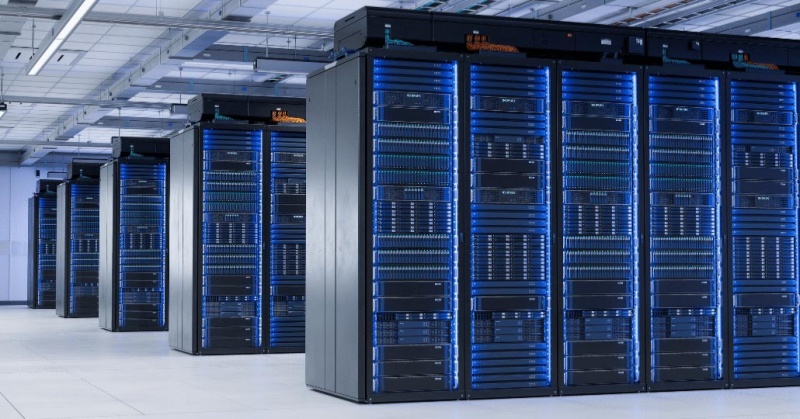
An AI “Cluster” is not a collection of independent servers; it is a Unified Compute Fabric.
Scaling from 8 to 128 GPUs introduces the “Communication Bottleneck.” Without high-speed interconnects like 400Gb/s NDR InfiniBand, your GPUs spend 40% of their time waiting for data from other nodes. At WhaleFlux, we architect our blueprints around Zero-Bottleneck Networking, ensuring that data ingestion never throttles your compute ROI.
2. Cost Optimization: Eliminating the “Compute Tax”
“Breaking the bank” usually happens due to Resource Fragmentation. Most enterprise clusters operate at only 20-30% actual Model Bandwidth Utilization (MBU).
WhaleFlux Intelligent Scaling:
Our platform dynamically partitions workloads, allowing for Fractional GPU usage for inference while reserving full-power clusters for training.
Thermal-Aware Scheduling:
We monitor rack-level thermals via Deep Observability. By proactively migrating tasks from “hot nodes,” we prevent thermal throttling that can silently degrade training performance by 15%.
3. The Blueprint for High-Availability AI
For production-grade Agentic Workflows, downtime is not an option. A robust cluster blueprint must include:
Redundant Storage Fabrics: Utilizing high-performance NVMe tiers for rapid checkpointing.
Automated Node Recovery: WhaleFlux monitors for ECC errors and hardware artifacting. If a node shows pre-failure signatures, it is automatically isolated and replaced.
Observability at Scale: Tracking Time-to-First-Token (TTFT) across the entire cluster to ensure consistent user experience.
4. Cluster Decision Matrix
| Metric | Basic Cloud Setup | WhaleFlux Engineered Cluster |
| Interconnect | Shared 10-25GbE (High Latency) | Dedicated 400Gb/s (Ultra-Low Latency) |
| Scaling Efficiency | Sub-linear (Heavy Overhead) | Near-Linear (RDMA Optimized) |
| Visibility | Surface-level Metrics | Full-stack AI Observability |
| TCO Management | Pay-as-you-go (Expensive) | Predictive Monthly (70% Savings) |
| Reliability | Best-effort | 99.9% Uptime Guarantee |
Expert FAQ
Q: When should an enterprise move from single nodes to a cluster?
A: When your Model Fine-tuning or Large-scale RAG ingestion takes longer than 24 hours on a single 8x GPU node. At this point, the bottleneck shifts to the “Time-to-Market” ROI, necessitating a clustered architecture.
Q: How does WhaleFlux handle multi-tenant isolation in a cluster?
A: Through Virtualized Hardware Enclaves. Each client’s workload is isolated at the networking and memory layer, providing the security of on-prem hardware with the flexibility of a unified platform.
Q: Does WhaleFlux support InfiniBand and RoCE v2?
A: Yes. We tailor the interconnect protocol based on your specific workload. For Monolithic Training, we recommend InfiniBand; for Distributed Inference, RoCE v2 often provides the best balance of cost and performance.
Beyond Binary: Scaling HPC with GPU Parallel Computing and NVQLink Quantum Integration
We are currently witnessing a “Compute Renaissance”—a period of unprecedented transformation where the boundaries of what we can simulate, predict, and build are being rewritten. For decades, Moore’s Law provided a predictable roadmap for performance. But as we push into the frontiers of generative AI and complex molecular modeling, the industry has shifted its focus from single-core speed to massively parallel architectures and quantum-classical hybrid systems.
This evolution isn’t just about adding more raw power; it’s about how that power talks to itself and how it stays alive under pressure. From the ubiquity of GPU Parallel Computing to the cutting-edge promise of NVQLink Quantum-GPU interconnects, the hardware landscape is becoming exponentially more complex. However, in this race for “the next big thing,” many organizations overlook a fundamental truth: Performance is an illusion if it isn’t backed by reliability.In the following sections, we will explore the trajectory of modern acceleration and the critical role of stability-first systems like WhaleFlux in securing our computational future.
1. The Power of GPU Parallel Computing
The shift from serial to parallel computing defines the modern AI era. While a CPU acts as a high-speed “single-lane” processor for complex logic, a GPU functions as a “thousand-lane” highway. By breaking massive problems into smaller, simultaneous tasks, GPU parallel computing has reduced the training time of Large Language Models (LLMs) from years to days. This high-throughput architecture is the bedrock of every modern data center.
2. High-Performance Computing (HPC) and NVLink
As clusters grow, the bottleneck shifts from individual chip speed to interconnect bandwidth. NVIDIA’s NVLink solved this by providing a high-speed, direct GPU-to-GPU bridge that far exceeds standard PCIe limits. In the world of High-Performance Computing (HPC), NVLink allows thousands of GPUs to act as a single, unified computational engine, moving data at terabyte-per-second speeds to keep the “parallel highway” moving without congestion.
3. The Reliability Anchor: WhaleFlux
Even with the fastest interconnects, massive scale introduces massive risk. A single hardware “hiccup” in a DGX cluster can crash a million-dollar training job. This is where WhaleFlux becomes indispensable.
Designed with a “stability before scale” philosophy, WhaleFlux is a Self-Healing System that monitors GPU cluster health in real-time. By innovating in failure prediction, WhaleFlux identifies degraded components before they fail, automatically rerouting tasks to healthy nodes. For teams pushing the limits of HPC, WhaleFlux provides the operational “safety net” that turns raw hardware power into consistent, reliable results.
4. The Future: NVQLink and Quantum-GPU Convergence
The next frontier isn’t just more GPUs; it’s the integration of Quantum Processing Units (QPUs). While GPUs are masters of parallel math, Quantum units excel at specific, hyper-complex optimization problems.
The missing link has been communication, which is where NVQLink enters the frame. Unlike standard interconnects, NVQLink is a dedicated, low-latency link specifically designed for Quantum-GPU computing. It allows the GPU to handle classical data pre-processing while offloading “unsolvable” algorithms to the QPU in real-time. This hybrid architecture, powered by NVQLink, represents the most significant leap in computing history since the invention of the transistor.
Conclusion: Architecting the Future of Resilient Compute
The journey from standard GPU acceleration to the quantum-integrated clusters of tomorrow is not a straight line—it is a leap in complexity. As NVLink and NVQLink continue to dissolve the barriers between different processing units, the “computer” is no longer a box under a desk; it is a sprawling, interconnected living organism.
In this high-stakes environment, the philosophy of “stability before scale” is no longer optional. Innovation without resilience is merely a gamble. By integrating failure prediction and self-healing capabilities through WhaleFlux, we ensure that the next generation of breakthroughs—whether in climate science, medicine, or artificial intelligence—is built on a bedrock of ironclad uptime. The future belongs to those who can not only harness the speed of the quantum era but also master the art of keeping those systems running.
Frequently Asked Questions
1. What is the difference between NVLink and NVQLink?
NVLink is designed for high-speed communication between multiple GPUs. NVQLink is a specialized interconnect designed to bridge the gap between GPUs and Quantum Processing Units (QPUs), enabling hybrid quantum-classical computing.
2. Why is WhaleFlux necessary for these high-speed systems?
The faster and larger a system becomes, the more devastating a single failure is. WhaleFlux provides failure prediction and self-healing, ensuring that the complex web of GPUs and QPUs remains operational without manual intervention.
3. How does “Parallel Computing” benefit AI?
AI involves billions of repetitive math operations (matrix multiplications). Parallel computing allows a GPU to perform thousands of these operations at the exact same time, rather than one by one.
4. Can NVQLink work with existing GPU clusters?
Yes, the goal of NVQLink is to allow existing high-performance GPU environments to integrate Quantum accelerators, creating a hybrid system that can solve problems previously thought impossible.
5. Is High-Performance Computing (HPC) only for big tech companies?
While big tech leads the way, HPC is now essential in medicine (drug discovery), finance (risk modeling), and climate science. Tools like WhaleFlux make this power more accessible by reducing the complexity of maintaining such large systems.
How to Fix “nvcc fatal: unsupported gpu architecture ‘compute_89′” and Optimize Your NVIDIA GPU Computing Toolkit
1. Introduction: When the Hardware Outpaces the Software
You’ve just gained access to the latest NVIDIA Ada Lovelace hardware—perhaps an RTX 4090, an L4, or a powerhouse L40S. You fire up your terminal, ready to compile your latest CUDA kernel or install a new AI library, only to be met with a cryptic, red-text roadblock:
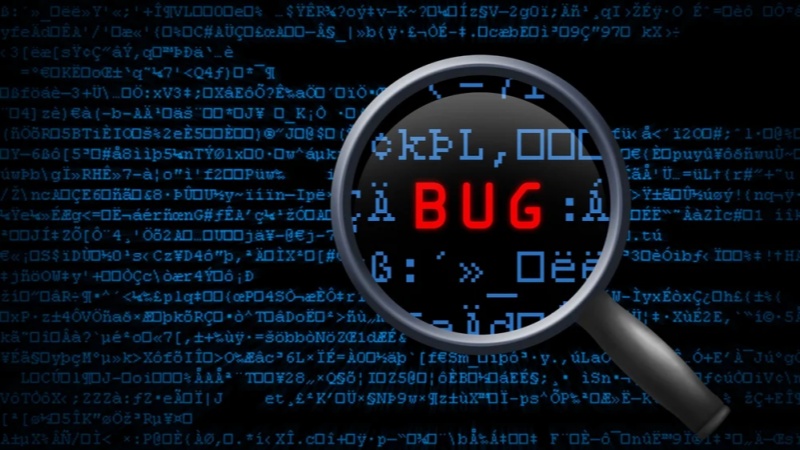
nvcc fatal : unsupported gpu architecture 'compute_89'.
This error is a classic “version mismatch” problem. It signifies that your hardware is speaking a language (Architecture 8.9) that your compiler (the NVIDIA GPU Computing Toolkit) doesn’t yet understand. In the fast-moving world of AI infrastructure, keeping your local environment in sync with the latest silicon is a constant battle.
In this comprehensive guide, we’ll dive into why this error occurs, how to fix it by updating your toolkit, and how to future-proof your development environment so you never have to manually troubleshoot architecture mismatches again.
2. Understanding the Root Cause: What is ‘compute_89’?
Every NVIDIA GPU generation is defined by its compute capability. This version number tells the compiler what hardware features (like Tensor Cores or Ray Tracing units) are available to be exploited.
- Compute 7.x: Volta/Turing (V100, T4)
- Compute 8.0: Ampere (A100)
- Compute 8.6: Ampere Consumer/Pro (RTX 30-series, A6000)
- Compute 8.9: Ada Lovelace (RTX 40-series, L4, L40, L40S)
- Compute 9.0: Hopper (H100)
When you see the compute_89 error, your NVIDIA GPU Computing Toolkit is likely version 11.7 or older. Since support for the Ada Lovelace architecture was only introduced in CUDA 11.8, your compiler simply doesn’t know that ’89’ exists.
3. The Step-by-Step Fix: Resolving the nvcc Fatal Error
Step 1: Verify Your Current CUDA Version
Before making changes, check what your system is currently running. Open your terminal and type:
nvcc –version
If it reports anything lower than 11.8, you have found your culprit.
Step 2: Update the NVIDIA GPU Computing Toolkit
To support compute_89, you must upgrade to at least CUDA 11.8, though we recommend CUDA 12.x for 2026 workflows to take advantage of the latest performance optimizations.
- Visit the NVIDIA CUDA Downloads page.
- Select your Operating System (Linux is standard for most high-performance AI tasks).
- Choose the “runfile (local)” or “deb (network)” installer.
- Follow the prompts to install the new NVIDIA GPU Computing Toolkit.
Step 3: Update Your Environment Variables
Installing the toolkit isn’t enough; you must point your system to it. Ensure your ~/.bashrc or ~/.zshrc reflects the new path:
export PATH=/usr/local/cuda-12.x/bin${PATH:+:${PATH}} export LD_LIBRARY_PATH=/usr/local/cuda-12.x/lib64${LD_LIBRARY_PATH:+:${LD_LIBRARY_PATH}}
WhaleFlux Integration: Ending the “Dependency Hell”
If reading the steps above makes you feel a sense of dread, you aren’t alone. Managing the NVIDIA GPU Computing Toolkit, matching driver versions, and resolving architecture errors like compute_89 is time-consuming “plumbing” work.
This is exactly why we built WhaleFlux. When you spin up a GPU Cluster via WhaleFlux, we handle the environment for you. Our images come pre-configured with the correct CUDA versions and drivers for your specific hardware. Whether you’re on a T4 or an L40S, WhaleFlux ensures the underlying architecture is automatically recognized, so you can focus on your code instead of your compiler.
4. Advanced Configuration: Using Virtual Environments and Docker
To prevent a system-wide update from breaking your other projects, professional AI engineers often use containerization.
Using NVIDIA Container Toolkit
Instead of installing the NVIDIA GPU Computing Toolkit directly on your host machine, you can use Docker. By pulling a specific image (e.g., nvidia/cuda:12.1.0-devel-ubuntu22.04), you encapsulate the entire environment. This ensures that even if your host machine has an old driver, the “container” provides the necessary libraries to support compute_89.
5. Why Proper Toolkit Management Matters for AI Inference
Fixing a compilation error is the first step, but the ultimate goal is Inference performance. A mismatched or poorly configured toolkit can lead to:
- Reduced Throughput: Failing to use the specific Tensor Core optimizations of the Ada Lovelace architecture.
- Memory Leaks: Older CUDA versions may have bugs when interacting with newer hardware memory management.
- Latency Spikes: Inefficient kernel execution.
By keeping your toolkit updated (or using a managed platform like WhaleFlux), you ensure that your Fine-tuning jobs and AI Agents run with the hardware-level speed you paid for.
6. Future-Proofing: Preparing for Compute 9.0 and Beyond
As the industry moves toward the H100 (Hopper) and the upcoming Blackwell architectures, the compute_xx errors will continue to pop up for those using legacy toolkits.
- Stay Updated: Check NVIDIA’s release notes quarterly.
- Automate: Use Infrastructure as Code (IaC) to manage your GPU nodes.
- Managed Services: Consider moving away from “DIY” hardware management.
Why WhaleFlux is the Final Solution
WhaleFlux isn’t just a cloud provider; it’s an AI Observability and management copilot. We proactively monitor the compatibility between your hardware and your software stack. If a new architecture drops, our platform is updated instantly, providing you with a seamless transition. With WhaleFlux, “nvcc fatal” becomes a thing of the past.
Conclusion: Focus on Intelligence, Not Infrastructure
The nvcc fatal : unsupported gpu architecture 'compute_89' error is a rite of passage for many AI developers. While it is solvable by updating your NVIDIA GPU Computing Toolkit, it serves as a reminder of how fragmented the AI stack can be.
By understanding your hardware’s compute capability and maintaining a clean, containerized environment, you can overcome these technical hurdles. And for those who prefer to skip the troubleshooting and get straight to building, WhaleFlux is here to provide the integrated, production-ready environment you need to scale.
5 Frequently Asked Questions (FAQ)
1. Can I fix the compute_89 error without upgrading CUDA?
Technically, no. Support for the 8.9 architecture was physically added in the CUDA 11.8 release. If you stay on 11.7 or lower, the compiler lacks the instructions to talk to your GPU.
2. Does the NVIDIA GPU Computing Toolkit work with non-NVIDIA GPUs?
No. The toolkit is specifically designed for NVIDIA’s proprietary CUDA architecture. For AMD or Intel GPUs, you would need to use different frameworks like ROCm or OneAPI.
3. What is the difference between CUDA Drivers and the CUDA Toolkit?
The Driver allows your OS to talk to the GPU. The Toolkit allows you to build and run applications on the GPU. You generally need a driver version that is equal to or newer than what the toolkit requires.
4. How do I know which ‘compute_xx’ version my GPU belongs to?
You can find this on the official NVIDIA Compute Capability table or by running a simple diagnostic tool like deviceQuery (included in the CUDA samples) on your machine.
5. How does WhaleFlux simplify these technical issues?
WhaleFlux provides pre-configured, optimized environments where the NVIDIA GPU Computing Toolkit, drivers, and libraries are already matched to the specific GPU you are using. This eliminates manual installation errors and ensures your AI Agents and Inference workflows are optimized out of the box.
The Complete Guide to GPU Cloud Computing: Performance, Accessibility, and Enterprise Scaling
The Ultimate Guide to GPU Cloud Computing: Balancing Performance, Cost, and Scalability
1. Introduction: The Silicon Backbone of the AI Era
In the fast-evolving landscape of 2026, the phrase “knowledge is power” has been updated to “compute is power.” For developers, researchers, and enterprise architects, the ability to access high-performance hardware via the internet has transformed from a niche luxury into a fundamental utility.
This transition is driven by gpu cloud computing. Whether you are rendering cinematic 3D environments, simulating molecular structures, or fine-tuning the latest large language model, the traditional local workstation is no longer enough. We have entered the era where the cloud computer with gpu is the primary engine of innovation. In this guide, we will navigate the complexities of the GPU market, from elite nvidia gpu cloud computing setups to the hunt for free gpu cloud computing resources, and show you how to turn raw silicon into business value.
2. What is GPU Cloud Computing?
Standard cloud computing relies on the Central Processing Unit (CPU), the “brain” of the computer designed for versatile, sequential tasks. However, AI and graphics workloads require a different kind of strength: massive parallelism.
GPU cloud computing provides remote access to Graphics Processing Units (GPUs) that can handle thousands of operations simultaneously. When you rent a cloud computer with gpu, you aren’t just getting a server; you’re getting a dedicated accelerator for mathematics and data.
The Role of the Cloud Computer with GPU
The primary advantage of a cloud computer with gpu is elasticity. Instead of spending $40,000 on a physical server that depreciates every year, you can “spin up” an H100 or A100 instance for the duration of your project and shut it down the moment you are finished. This agility is what allows small startups to compete with tech giants.
3. NVIDIA GPU Cloud Computing: The Industry Gold Standard
When we discuss the “how” of AI, we are inevitably discussing nvidia gpu cloud computing. NVIDIA has built more than just hardware; they have built an entire ecosystem known as CUDA (Compute Unified Device Architecture).
Why NVIDIA Dominates the Cloud
- Software Ecosystem: Through the NVIDIA GPU Cloud (NGC), users get access to pre-integrated, optimized containers for PyTorch, TensorFlow, and more.
- Precision Hardware: From the energy-efficient L4 to the powerhouse H200, nvidia gpu cloud computing offers a specific tool for every job.
WhaleFlux Integration: Beyond the Silicon
While nvidia gpu cloud computing provides the raw power, WhaleFlux acts as the essential orchestration layer. Simply having an NVIDIA GPU is like having a jet engine; WhaleFlux is the cockpit that allows you to steer that power. We integrate directly with NVIDIA environments to provide thread-level observability and automated scaling, ensuring your expensive GPU cycles are never wasted on idle processes.
4. The Search for Free GPU Cloud Computing
For students, hobbyists, and those in the early R&D phase, the price tag of elite GPUs can be a barrier. This leads to the frequent search for free gpu cloud computing.
Is “GPU Cloud Computing Free” a Reality?
Yes, but with limitations. You can typically find gpu cloud computing free tiers in the following places:
- Collaborative Notebooks: Platforms like Google Colab provide limited access to GPUs like the T4.
- Cloud Credits: Most major providers offer “start-up credits” that effectively grant you several hundred hours of cloud computing gpu time.
- Academic Grants: Researchers often have access to state-sponsored free gpu cloud computing clusters.
While these are excellent for small-scale testing or learning the basics of Python, they are rarely sufficient for production. When you move from “testing” to “deploying,” the limitations of free gpu cloud computing—such as session timeouts and low memory—make a managed solution like WhaleFlux a necessity to maintain continuity.
5. Optimizing Cloud Computing GPU Resources
Infrastructure is only cost-effective if it is managed correctly. Many companies overspend on cloud computing gpubecause they rent more power than they actually use.
The Three Pillars of GPU Management
- Orchestration: Moving workloads between GPUs to maximize utilization.
- Quantization: Reducing the model size so it fits on cheaper cloud computing gpu instances without losing accuracy.
- Observability: Knowing exactly where your bottlenecks are in real-time.
How WhaleFlux Maximizes Your Investment
This is where WhaleFlux shines. By providing a unified platform that bridges the gap between gpu cloud computing and the application layer, we help our users reduce hardware costs by up to 70%. We don’t just give you a cloud computer with gpu; we give you the tools to monitor every token and every watt, ensuring your AI journey is as lean as it is powerful.
6. Use Cases: From Rendering to AI Agents
The versatility of gpu cloud computing spans across industries:
- Generative AI: Fine-tuning specialized models for legal, medical, or financial sectors.
- Scientific Research: Simulating climate patterns or drug discovery.
- Autonomous Agents: The new frontier. In 2026, the focus has shifted from “chatbots” to “agents” that can take actions. These agents require the low-latency response times that only high-performance cloud computing gpu can provide.
7. Choosing the Right Cloud Provider
When selecting a provider for your cloud computer with gpu, don’t just look at the hourly rate. Look at:
- Network Latency: How fast does data move from your storage to the GPU?
- Security: Does the provider offer hardware-level isolation for your proprietary data?
- Ecosystem: Does it support the specific nvidia gpu cloud computing drivers your team uses?
Conclusion: Navigating the Future with WhaleFlux
As we look toward the remainder of 2026, the reliance on gpu cloud computing will only grow. Whether you are taking your first steps with gpu cloud computing free resources or managing a global fleet of nvidia gpu cloud computingclusters, the goal remains the same: efficiency, security, and results.
At WhaleFlux, we believe that compute should be a catalyst, not a headache. By integrating the world’s most powerful cloud computing gpu hardware with our sophisticated management platform, we empower you to stop worrying about the silicon and start focusing on the intelligence you’re building.
5 Frequently Asked Questions (FAQ)
1. What is the main benefit of using a cloud computer with GPU over a local one?
The main benefit is scalability and cost. A local cloud computer with gpu requires a massive upfront investment and maintenance. In the cloud, you can access the latest NVIDIA chips (like the H200) instantly and only pay for the minutes you use.
2. Can I run NVIDIA GPU cloud computing on any cloud provider?
Most major cloud providers offer nvidia gpu cloud computing instances. However, the level of software support and the availability of specialized chips like the H100 vary. It is important to check if your provider supports the CUDA versions your models require.
3. Is “free gpu cloud computing” safe for proprietary data?
Generally, free gpu cloud computing platforms are shared environments. While they are safe for learning and open-source projects, they often lack the strict “Zero-Trust” security and private enclaves found in enterprise-grade paid services. For sensitive data, a managed platform like WhaleFlux is recommended.
4. How does WhaleFlux improve the performance of my cloud computing gpu?
WhaleFlux provides an “Observability and Auto-Scaling” copilot. It monitors your gpu cloud computing workloads in real-time, automatically adjusting resources and managing model weights to ensure you get the highest possible throughput for the lowest possible cost.
5. What is the difference between “GPU cloud computing” and “GPU virtualization”?
GPU cloud computing is the broad service of providing GPUs over the internet. GPU virtualization is a specific technology used within that service to split one physical GPU into multiple “virtual” GPUs, allowing several users to share the same hardware efficiently.
3 Strategic Moves to Slash OpenClaw Running Costs by 70%
TL;DR: OpenClaw Cost Optimization
The Core Inefficiency: Most OpenClaw deployments waste 40-60% of their budget on Idle VRAM and unoptimized KV Cache storage during agent “thinking” cycles.
Strategic Pivot: Achieve a 70% TCO reduction by shifting from fixed-instance clusters to Intelligent Scaling and leveraging FP8/INT4 Quantization for inference-heavy workflows.
The Interconnect Factor: High-concurrency agents fail on standard cloud networks; WhaleFlux’s 400Gb/s RDMA fabric ensures that data ingestion doesn’t inflate your billable GPU hours.
WhaleFlux Advantage: Our Full-stack AI Observability identifies “Zombie Processes” in your OpenClaw stack, automatically reclaiming resources to ensure you only pay for active token generation.
1. Eliminate “Compute Ghosting” via Intelligent Scaling
The primary driver of high costs in OpenClaw isn’t the GPU price; it’s Compute Ghosting—the practice of keeping a high-performance node (like an H100) active while an agent is idling or waiting for API callbacks.
At WhaleFlux, we solve this via Intelligent Scaling. Our platform monitors the OpenClaw request queue in real-time. When agentic activity drops, the workload is automatically migrated to a high-efficiency L4 or RTX 4090 node. This “Hot-Swapping” of compute tiers can slash monthly burn by 40% without compromising TTFT (Time-to-First-Token).
2. Quantization: Balancing Fidelity and Finance
Running OpenClaw on full FP16 precision is often a “budget killer” for 70B+ parameter models.
The Move:
Implement FP8 or AWQ Quantization. This reduces the VRAM footprint per model by nearly 50%, allowing you to fit larger context windows into a single GPU.
The ROI:
By doubling the density of agents per card, you effectively halve your hardware cost per user. WhaleFlux nodes are pre-optimized for Transformer Engine FP8, ensuring that this precision drop has near-zero impact on agentic reasoning accuracy.
3. Observability-Driven Resource Reclammation
OpenClaw environments are notorious for “leaking” VRAM due to hung Python processes or unoptimized KV Caches in multi-turn conversations.
The WhaleFlux Solution:
Our Deep Observability dashboard tracks Model Bandwidth Utilization (MBU) at the kernel level.
Actionable Fix:
If an OpenClaw instance shows 100% VRAM usage but 0% Compute utilization, WhaleFlux triggers an automated Cache Purge or container restart, preventing “Frozen ROI” scenarios.
4. The OpenClaw Cost Matrix
| Strategy | Traditional Cloud (GCP/AWS) | WhaleFlux Engineered Infrastructure |
| Scaling Model | Slow Auto-scaling Groups | Instant Intelligent Scaling |
| VRAM Management | Manual / Static | Automated KV Cache Orchestration |
| Interconnect | Shared 10-25GbE (Latency Bottleneck) | Dedicated 400Gb/s RDMA Fabric |
| Cost Control | Post-facto Billing Surprises | Real-time Token-per-Dollar Analytics |
| Total Savings | 0% (Baseline) | Up to 70% Reduction |
Expert FAQ
Q: Will reducing costs by 70% impact the latency of my agents?
A: No. The savings come from eliminating Resource Waste, not cutting performance. By using WhaleFlux Intelligent Scaling, we ensure peak H200/H100 power is available instantly for “Prefill” phases while idling on cheaper silicon during “Decode” phases.
Q: How does WhaleFlux handle “Cold Starts” when scaling OpenClaw?
A: We use Distributed NVMe Caching. Model weights are pre-staged in local high-speed buffers, reducing model load times from 60 seconds to under 5 seconds, ensuring your agents remain responsive.
Q: Can I monitor OpenClaw-specific metrics on WhaleFlux?
A: Yes. Our Full-stack AI Observability integrates with common agent frameworks to track Token-to-Token (TBT)latency and Input-Output Ratios, giving you a granular view of your operational efficiency.
10x Productivity: Unlocking the Real Value of Human-AI Collaborative Workflows
For decades, the conversation around automation followed a predictable, fear-driven script: When will the machines take our jobs? As we navigate through 2026, that narrative has shifted from an existential threat to a strategic opportunity. The most successful organizations have realized that AI is not a replacement for human talent, but a profound multiplier of it.
We have moved beyond the “Replacement Era” and entered the “Augmentation Era.” The goal is no longer to automate humans out of the loop, but to architect Human-AI Collaborative Workflows that unlock a 10x leap in productivity. This isn’t just about working faster; it’s about fundamentally redefining what a single human professional is capable of achieving.
1. The Shift from Tool to Teammate
In the early days of AI, we treated models like digital encyclopedias—calculators for words. You asked a question, and it gave you an answer. Today, AI has evolved into a “Teammate” capable of complex reasoning, multi-step execution, and contextual understanding.
A 10x productivity workflow is built on a simple principle: Assign the “Compute” to the machine and the “Intent” to the human.
- The Machine (AI): Excels at pattern recognition, processing massive datasets, 24/7 monitoring, and initial drafting.
- The Human: Excels at strategic judgment, ethical oversight, nuanced empathy, and high-level creative direction.
When these two forces are synchronized, the bottleneck of “manual labor” disappears, leaving only the speed of thought.
2. The Infrastructure of Augmentation
To achieve 10x productivity, the underlying technology must be invisible and frictionless. If a creative professional has to wait three minutes for a model to respond, or if a developer has to manually manage GPU clusters to test an agent, the “flow state” is broken. Collaboration requires instantaneous power.
This is the core mission of WhaleFlux. To truly augment human capability, you need an environment where AI tools are as responsive as a thought. WhaleFlux provides the high-performance “engine” that powers these collaborative workflows. By unifying Surging Compute with Intelligent Scheduling, WhaleFlux ensures that when a human is ready to collaborate, the AI is ready to execute—without latency, without crashes, and without complexity.
3. Designing the 10x Workflow: Three Core Pillars
Successful augmentation isn’t accidental. It requires a deliberate architectural approach to how humans and AI interact.
I. Rapid Iteration Cycles (The “Sandwich” Method)
The most productive workflows follow a “Sandwich” structure:
- Human: Defines the goal and constraints.
- AI: Generates 10 diverse options or a comprehensive first draft.
- Human: Selects the best path, refines the nuances, and adds the “soul.”
WhaleFlux Impact: To make this cycle “10x,” the AI’s “turn” must be near-instant. WhaleFlux’s optimized model management layer allows for rapid-fire iterations. By reducing the time it takes to micro-tune or prompt a model, WhaleFlux keeps the human creator in the “Zone.”
II. Delegated Autonomy (Agentic Workflows)
Productivity explodes when humans stop managing tasks and start managing Agents. Instead of doing the research, you manage a “Research Agent.”
- WhaleFlux Impact: Running a fleet of agents is computationally heavy. WhaleFlux’s Agent Platform allows users to visually orchestrate these agents. More importantly, WhaleFlux’s Intelligent Dispatching ensures that these agents have the GPU “muscle” to work in the background while the human focuses on higher-level strategy.
III. Full-Stack Observability (The Trust Layer)
Collaboration fails without trust. If a human doesn’t know why an AI made a suggestion, they will spend more time double-checking the work than they saved by using the AI.
- WhaleFlux Impact: WhaleFlux provides Full-Stack Observability. It allows humans to “see inside” the AI’s decision process. This transparency is the “Trust Layer” that allows for true 10x scaling—because you can monitor, audit, and refine the AI’s output in real-time.
4. Real-World 10x Transformations
How does this look in practice across different professional domains?
Software Engineering: From Coding to Architecting
In 2026, senior developers aren’t typing every line of boilerplate code. They use AI agents to generate unit tests, document APIs, and refactor legacy code. The developer has become an Architect, overseeing a squad of AI “Junior Devs” powered by WhaleFlux’s low-latency compute. The result? Features that used to take months now ship in days.
Marketing & Content: The “Market-of-One”
Marketing teams are using collaborative workflows to generate personalized content at a scale previously impossible. A human strategist sets the brand voice; the AI generates 5,000 localized versions of a campaign. WhaleFlux manages the massive model-inference load, ensuring that personalized “Private AI” stays secure and cost-effective.
Data Science: From Cleaning to Insight
Data scientists used to spend 80% of their time cleaning data. Now, autonomous agents handle the “janitorial” work. The human spends their time asking the “What if?” questions, running thousands of simulations on WhaleFlux-optimized GPU clusters to find the one insight that changes the business.
5. The Competitive Advantage: Private Intelligence
The ultimate 10x workflow relies on Context. A generic AI tool can only take you so far. The real value is unlocked when the AI knows your data, your brand, and your proprietary methods.
However, moving that sensitive data to public AI clouds is a risk most enterprises can’t take.
WhaleFlux enables Private AI Intelligence. By allowing you to host and refine your own models on your own terms, WhaleFlux ensures that your collaborative workflows are fueled by your unique competitive secrets—safely. This hardware-level isolation means your 10x productivity boost doesn’t come at the cost of your data sovereignty.
6. Conclusion: The Rise of the “Centaur”
In chess, a “Centaur” is a team consisting of a human and a computer. These teams consistently beat both the best human players and the best computer programs.
The business world of 2026 belongs to the Centaurs.
By embracing Human-AI collaborative workflows, you aren’t just “cutting costs.” You are expanding the horizon of what is possible. You are allowing your team to move from the mundane to the monumental.
But a Centaur is only as fast as its fastest half. To unlock 10x productivity, you need an AI infrastructure that is as agile, powerful, and intelligent as your people.
WhaleFlux is that infrastructure. We provide the “Surging power” and the “Smart Scheduling” required to turn AI from a tool into a teammate.
Stop fearing the machine. Start building with it.
Ready to 10x your team’s output?
Discover WhaleFlux and see how our integrated AI platform can turn your human talent into a superhuman force.