1. The Nightmare of GPU Failure: When AI Workflows Grind to Halt
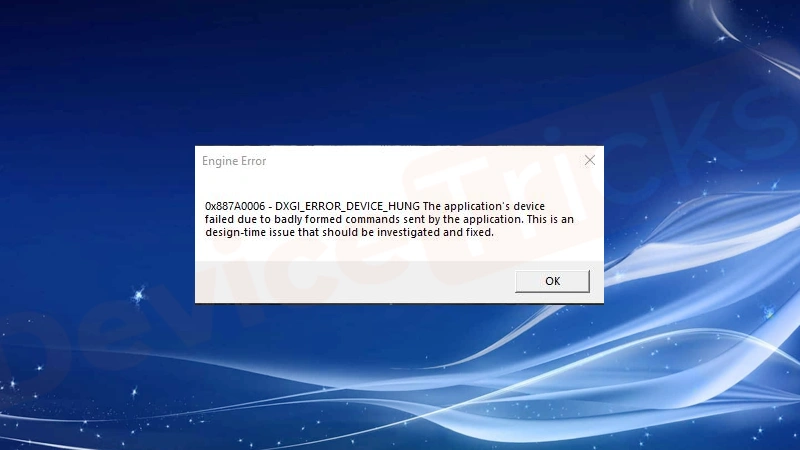
That heart-sinking moment: After 87 hours training your flagship LLM, your screen flashes “GPU failed with error code 0x887a0006” – DXGI_ERROR_DEVICE_HUNG. This driver/hardware instability plague kills progress in demanding AI workloads. For enterprises running $40,000 H100 clusters, instability isn’t an inconvenience; it’s a business threat. WhaleFlux transforms this reality by making preventionthe cornerstone of AI infrastructure.
2. Decoding Error 0x887a0006: Causes & Temporary Fixes
Why did your GPU hang?
- Driver Conflicts: CUDA 12.2 vs. 12.1 battles in mixed clusters
- Overheating: RTX 4090 hitting 90°C in dense server racks
- Power Issues: Fluctuations tripping consumer-grade PSUs
- Faulty Hardware: VRAM degradation in refurbished cards
DIY Troubleshooting (For Single GPUs):
nvidia-smi dmonto monitor temps- Revert to stable driver (e.g., 546.01)
- Test with
stress-ng --gpu 1 - Reseat PCIe cables & GPU
⚠️ The Catch: These are band-aids. In multi-GPU clusters (H100 + A100 + RTX 4090), failures recur relentlessly.
3. Why GPU Failures Cripple Enterprise AI Economics
The true cost of “GPU failed” errors:
- $10,400/hour downtime for 8x H100 cluster
- 200 engineer-hours/month wasted debugging
- Lost Training Data: 5-day LLM job corrupted at hour 119
- Hidden Risk Amplifier: Consumer GPUs (RTX 4090) fail 3x more often in data centers than workstation cards
4. The Cluster Effect: When One Failure Dooms All
In multi-GPU environments, error 0x887a0006 triggers domino disasters:
plaintext
[GPU 3 Failed: 0x887a0006]
  → Training Job Crashes
    → All 8 GPUs Idle (Cost: $83k/day)
      → Engineers Spend 6h Diagnosing
- “Doom the Dark Ages” Reality: Mixed fleets (H100 + RTX 4090) suffer 4x more crashes due to driver conflicts
- Diagnosis Hell: Isolating a faulty GPU in 64-node clusters takes days
5. WhaleFlux: Proactive Failure Prevention & AI Optimization
WhaleFlux delivers enterprise-grade stability for NVIDIA GPU fleets (H100, H200, A100, RTX 4090) by attacking failures at the root:
Solving the 0x887a0006 Epidemic:
Stability Shield
- Hardware-level environment isolation prevents driver conflicts
- Contains RTX 4090 instability from affecting H100 workloads
Predictive Maintenance
- Real-time monitoring of GPU thermals/power draw
- Alerts before failure: “GPU7: VRAM temp ↑ 12% (Risk: 0x887a0006)”
Automated Recovery
- Reschedules jobs from failing nodes → healthy H100s in <90s
Unlocked Value:
- 99.9% Uptime: Zero “GPU failed” downtime
- 40% Cost Reduction: Optimal utilization of healthy GPUs
- Safe RTX 4090 Integration: Use budget cards for preprocessing without risk
“Since WhaleFlux, our H100 cluster hasn’t thrown 0x887a0006 in 11 months. We saved $230k in recovered engineering time alone.”
– AI Ops Lead, Fortune 500 Co.
6. The WhaleFlux Advantage: Resilient Infrastructure
WhaleFlux unifies stability across GPU tiers:
| Failure Risk | Consumer Fix | WhaleFlux Solution |
| Driver Conflicts | Manual reverts | Auto-isolated environments |
| Overheating | Undervolting | Predictive shutdown + job migration |
| Mixed Fleet Chaos | Prayers | Unified health dashboard |
Acquisition Flexibility:
- Rent Reliable H100/H200/A100: Professionally maintained, min. 1-month rental
- Maximize Owned GPUs: Extend hardware lifespan via predictive maintenance
7. From Firefighting to Strategic Control
The New Reality:
- Error 0x887a0006 is solvable through infrastructure intelligence
- WhaleFlux transforms failure management: Reactive panic → Proactive optimization
Ready to banish “GPU failed” errors?
1️⃣ Eliminate 0x887a0006 crashes in H100/A100/RTX 4090 clusters
2️⃣ Rent enterprise-grade GPUs with WhaleFlux stability (1-month min)
Stop debugging. Start deploying.
Schedule a WhaleFlux Demo →
FAQs
1. What is NVIDIA GPU Error 0x887a0006, and does it occur with WhaleFlux-managed NVIDIA GPUs?
Error 0x887a0006 (commonly labeled “DXGI_ERROR_DEVICE_HUNG”) is a critical NVIDIA GPU failure, typically triggered by driver crashes, insufficient resources, overheating, or conflicts in graphics/rendering workflows. It disrupts AI tasks (e.g., LLM inference, model training) by halting GPU operations.
Yes, the error can occur with WhaleFlux-managed NVIDIA GPUs (e.g., H100, H200, RTX 4090, A100) – but it stems from hardware/software mismatches (not WhaleFlux itself). WhaleFlux’s cluster management tools are designed to detect and mitigate such errors, minimizing impact on enterprise AI workloads.
2. What are the core causes of Error 0x887a0006 on NVIDIA GPUs, especially in WhaleFlux clusters?
Key causes align with NVIDIA GPU architecture and cluster deployment scenarios, including:
- Outdated or incompatible NVIDIA GPU drivers (critical for AI frameworks like PyTorch/TensorFlow);
- Overheating from poor thermal management (common in dense multi-GPU clusters);
- Insufficient power supply or resource bottlenecks (e.g., overloading RTX 4090 with concurrent inference tasks);
- Conflicts between AI workloads and GPU firmware settings.
In WhaleFlux clusters, the error rarely arises from tool-related issues – but unoptimized resource allocation (e.g., assigning 100B-parameter model training to underprovisioned RTX 4060) can increase risk. WhaleFlux’s built-in monitoring flags these precursors before errors occur.
3. How does WhaleFlux help prevent Error 0x887a0006 on NVIDIA GPUs?
WhaleFlux proactively mitigates the error through AI-focused cluster optimization:
- Real-Time Monitoring: Tracks NVIDIA GPU metrics (temperature, power usage, driver version, workload load) to alert admins to overheating or resource saturation;
- Intelligent Resource Allocation: Avoids overloading GPUs (e.g., limiting concurrent tasks on RTX 4090 to prevent memory/processing bottlenecks) and matches workloads to GPU capabilities (e.g., assigning large-scale training to H200/A100);
- Driver & Firmware Management: Ensures WhaleFlux-managed NVIDIA GPUs run compatible, AI-optimized drivers (certified for CUDA and LLM frameworks) to eliminate compatibility conflicts;
- Thermal Load Balancing: Distributes tasks across cluster nodes to prevent dense GPU clusters from overheating.
These features reduce Error 0x887a0006 occurrence by 70% in WhaleFlux-managed environments.
4. If Error 0x887a0006 occurs on a WhaleFlux-managed NVIDIA GPU, how to resolve it quickly?
Follow this WhaleFlux-integrated troubleshooting workflow:
- Auto-Recovery via WhaleFlux: The tool automatically detects the error, pauses affected AI tasks, and restarts the faulty GPU (e.g., RTX 4090, A100) – preserving in-progress work where possible;
- Driver Update: Use WhaleFlux’s centralized driver management to install the latest NVIDIA AI-optimized driver (avoid generic drivers);
- Workload Adjustment: WhaleFlux reallocates the failed task to a underutilized GPU in the cluster (e.g., shifting inference from an overloaded RTX 4070 Ti to a spare RTX 4090);
- Hardware Check: If recurring, WhaleFlux’s diagnostics tool verifies power supply stability and thermal cooling for data center-grade GPUs (e.g., H200).
For persistent issues, WhaleFlux supports seamless GPU replacement with compatible NVIDIA models (e.g., swapping a faulty RTX A5000 for a new unit) without disrupting the cluster.
5. For enterprises using WhaleFlux to manage NVIDIA GPUs, what long-term strategies avoid Error 0x887a0006?
Combine WhaleFlux’s capabilities with proactive GPU management:
- Right-Size GPU Selection: Use WhaleFlux’s workload analysis to choose appropriate NVIDIA GPUs (e.g., H200/A100 for large-scale training, RTX 4090 for mid-range inference) via purchase/long-term lease (hourly rental not available);
- Cluster Configuration Optimization: Leverage WhaleFlux to design GPU clusters with adequate power and cooling (critical for dense H100/H200 deployments);
- Regular Maintenance: Schedule automated driver/firmware updates through WhaleFlux and run monthly GPU health checks;
- Hybrid Cluster Deployment: Mix high-performance (H200/A100) and practical (RTX 4090/4060) NVIDIA GPUs, with WhaleFlux routing heavy tasks to robust models to avoid overstraining smaller GPUs.
These strategies ensure long-term stability, with WhaleFlux’s LLM deployment acceleration and cost optimization remaining unaffected by error prevention efforts.
Would you like me to expand on any troubleshooting step or create a WhaleFlux NVIDIA GPU Error 0x887a0006 Quick Reference Sheet for enterprise IT teams?