Introduction
It’s a moment every AI developer dreads. You’ve assembled what seems like a powerful setup, your code is ready, and you launch the training job for your latest model. Then, it happens: the dreaded “CUDA Out of Memory” error flashes on your screen, halting progress dead in its tracks. Or perhaps the training runs, but it’s agonizingly slow, not living up to the potential of the expensive hardware you’ve provisioned. You check your GPU usage, and it’s spiking, but something still feels off.
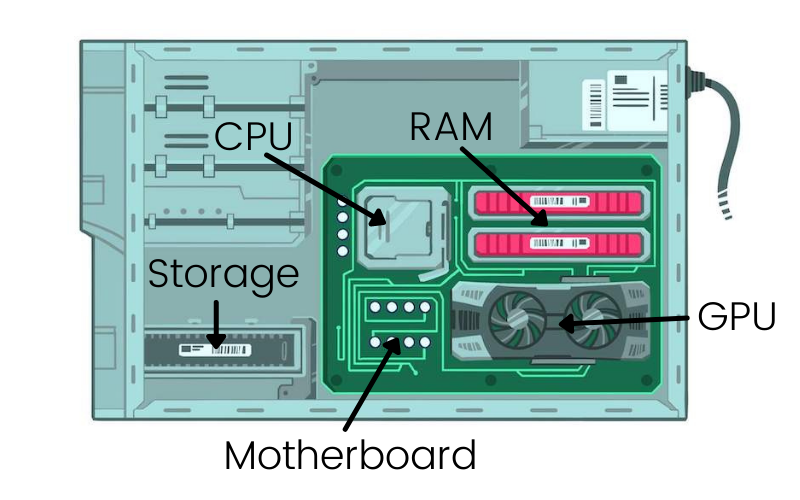
If this sounds familiar, the culprit might not be your GPU’s raw processing power. More often than not, the bottleneck lies in the critical, yet often overlooked, partnership between your GPU and your system’s RAM (Random Access Memory). In the world of AI, the Central Processing Unit (CPU) with its RAM and the Graphics Processing Unit (GPU) with its Video RAM (VRAM) are not isolated islands of performance. They form a dynamic, tightly coupled pipeline. When this pipeline is inefficient, your most powerful NVIDIA GPUs are left waiting, burning budget and time.
This blog post will demystify this essential relationship. We’ll clarify how GPU VRAM and system RAM work in concert during AI workloads, explore how to match your needs with the right NVIDIA hardware, identify the common inefficiencies that plague multi-GPU clusters, and finally, introduce how WhaleFlux—our intelligent GPU resource management platform—orchestrates this entire ecosystem to boost efficiency, slash costs, and accelerate your path from model idea to stable deployment.
Part 1: The Indivisible Partnership – GPU and RAM in the AI Workflow
To understand the bottleneck, we must first understand the roles in this performance duet.
The Specialized Roles:
System RAM (The Grand Coordinator):
This is your CPU’s domain. Think of System RAM as the mission control center. It holds everything your system needs to operate: the entire operating system, your Python environment, the AI framework code (like PyTorch or TensorFlow), and crucially, the entire raw dataset you’re working with. It’s a vast, general-purpose workspace where data is prepared and queued up for its trip to the GPU.
GPU VRAM (The High-Speed Workshop):
This is the GPU’s dedicated, ultra-fast memory. If RAM is mission control, VRAM is the specialized factory floor. Its sole purpose is to feed data to the GPU’s thousands of cores at lightning speed. When running a Large Language Model (LLM), VRAM holds the model’s entire set of parameters (weights), the specific batch of training data currently being processed, and all the intermediate calculations (activations)generated during that process. VRAM bandwidth is staggering, designed for the parallel chaos of matrix multiplications that define AI.
The Crucial Data Pipeline:
The AI training of inference process is a continuous dance between these two memory spaces:
- Load: Data is fetched from slow storage (like SSDs) into the expansive System RAM.
- Prepare & Dispatch: The CPU prepares a manageable “batch” of this data (e.g., resizing images, tokenizing text) and launches a high-speed transfer from RAM over the PCIe bus into the GPU VRAM.
- Compute: The GPU springs into action, its cores performing trillions of operations per second on the data now resident in its VRAM.
- Return & Repeat: Results (updated weights, predictions) are sent back to System RAM for logging, evaluation, or to start the next cycle. This loop runs millions of times.
The Bottleneck: This constant, high-volume shuttling of data is where problems arise. If the transfer between RAM and VRAM is slower than the GPU can compute, the GPU stalls, waiting for its next meal—a state called “underutilization.” The most common and critical failure point, however, is insufficient VRAM. If your model’s parameters and a single batch of data can’t physically fit into the GPU’s VRAM, the job simply cannot run. No amount of processing power can compensate for this.
Part 2: Navigating the NVIDIA GPU Landscape – Matching GPU VRAM to Your Needs
Your choice of GPU is fundamentally a choice about memory. The size of the model you want to train or serve dictates the minimum VRAM requirement.
Here’s a quick guide to key NVIDIA GPUs and the AI tasks they are tailored for, primarily through the lens of their VRAM:
- NVIDIA RTX 4090 (24GB GDDR6X): The powerhouse of the desktop. With 24GB of fast memory, it’s excellent for researchers and small teams. It’s perfect for fine-tuning mid-sized models, running robust inference endpoints, and prototyping workloads that don’t yet require a full data center card.
- NVIDIA A100 (40GB/80GB HBM2e): The undisputed industry workhorse for serious AI. The 80GB version, in particular, has been the backbone of large-scale model training for years. Its high memory capacity and bandwidth make it ideal for training large models and heavy High-Performance Computing (HPC) simulations.
- NVIDIA H100 (80GB HBM3): The current flagship for cutting-edge AI. While it also has 80GB like the A100, its HBM3 technology provides a massive leap in memory bandwidth. This means it can feed its even faster compute cores more efficiently, making it the go-to for training the largest next-generation LLMs and achieving the fastest possible training times.
- NVIDIA H200 (141GB HBM3e): This GPU is about pushing the boundary of the possible. With a colossal 141GB of ultra-fast HBM3e memory, it’s engineered for memory-intensive tasks that bring other GPUs to their knees. Think of the largest frontier models, massive scientific simulations, and complex generative AI tasks where model size and context length are paramount.
Key Takeaway: Choosing your GPU isn’t just about comparing TFLOPS (theoretical compute power). VRAM capacity and bandwidth are decisive, non-negotiable factors. Under-provisioning memory will stop your project before it starts, while over-provisioning leads to wasted capital.
Part 3: The Challenge – GPU & RAM Inefficiency in Multi-GPU Clusters
When you scale from a single workstation to a multi-GPU cluster—a rack of NVIDIA H100s or a pod of A100s—the coordination problem between GPU and RAM multiplies in complexity. Managing this by hand becomes a full-time, frustrating job. Here are the compounded inefficiencies:
- Idle Resources: A GPU is only as fast as the data it can access. If the CPU-RAM-to-GPU pipeline is congested (due to slow data loading/preprocessing or network bottlenecks in distributed setups), your expensive GPUs sit idle, “starved” for data, despite being 100% booked.
- Memory Fragmentation: Imagine a GPU with 80GB of VRAM. Small, short jobs come and go, leaving scattered blocks of free memory that are too small for a large, new model—even though the total free memory might be sufficient. This is fragmentation, leaving precious VRAM unusable and forcing you to acquire more hardware than you technically need.
- Underutilization & Poor Scheduling: In a shared cluster, how do you decide which job gets which GPUs? Without intelligent scheduling, a small inference task might occupy a full H100, while a critical training job waits in queue. This leads to poor overall utilization, where your most powerful assets are tied up in tasks that don’t need their full capability.
- The Cost Consequence: This inefficiency has a direct, painful translation: wasted cloud spend (paying for idle or underused time) or stranded capital in underperforming on-premise investments. Your infrastructure costs soar while your team’s productivity and innovation speed stagnate.
Part 4: The Solution – Intelligent Orchestration with WhaleFlux
This is precisely the challenge WhaleFlux was built to solve. WhaleFlux is an intelligent GPU resource management platform designed specifically for AI enterprises. It acts as the central nervous system for your multi-GPU cluster, ensuring that the vital partnership between RAM and GPU VRAM operates at peak efficiency.
How WhaleFlux Optimizes the GPU-RAM Workflow:
- Smart Scheduling & Orchestration: WhaleFlux doesn’t just see GPUs; it sees resources with specific attributes. When you submit a job, WhaleFlux analyzes its compute and memoryrequirements. It then intelligently places it on the most suitable NVIDIA GPU in your fleet—whether that’s an H200 for its massive memory, an H100 for balanced speed, an A100 for cost-effective training, or an RTX 4090 for lightweight tasks. This ensures an optimal pairing between the job’s needs and the hardware’s capabilities, preventing both overallocation and underutilization.
- Unified Resource Pool: WhaleFlux virtualizes your physical infrastructure. Instead of manually managing individual servers, you see a single, cohesive pool of GPU and CPU/RAM resources. This breaks down silos, eliminates “GPU hoarding,” and allows the platform to dynamically allocate system RAM and CPU cores in harmony with the GPU schedule, streamlining that crucial data pipeline.
- Efficiency Boost: By packing jobs intelligently, cleaning up fragmented memory, and keeping the data pipeline flowing, WhaleFlux maximizes the utilization of every single GPU’s precious VRAM and compute cycles. This directly translates to reduced idle time and accelerated project timelines. Jobs finish faster because resources are used smarter, not harder.
The Direct Business Benefit: The outcome is transformative for your bottom line and your agility. By dramatically improving the efficiency of your GPU cluster—often doubling or tripling effective utilization—WhaleFlux helps AI companies significantly lower their cloud computing costs.Simultaneously, it accelerates the deployment speed and enhances the stability of large language models and other AI workloads by providing a reliable, optimally configured environment. You move from managing infrastructure chaos to focusing on AI innovation.
Part 5: Getting Started with the Right Resources
The journey to optimized AI infrastructure starts with understanding your own needs.
- Profile Your Workloads: Before investing, take time to profile your key AI models. How much VRAM do they require at peak? What are their compute patterns? This data is your blueprint.
- Embrace Flexible Infrastructure: The “one GPU fits all” approach is inefficient. The ideal setup matches the GPU (and its VRAM) to the specific task at hand, from prototyping to large-scale training to high-volume inference.
- Explore WhaleFlux’s Integrated Solution: WhaleFlux provides not just the management intelligence, but also streamlined access to the physical hardware. We offer a curated fleet of the latest NVIDIA GPUs, including H100, H200, A100, and RTX 4090. You can purchase these for your own data center or rent them flexibly through our cluster. Our rental model is designed for sustained AI development, with terms starting at a minimum of one month, providing the cost-effective stability needed for serious projects without the unpredictable billing of hourly cloud GPUs.
Stop letting invisible bottlenecks between your GPU and RAM dictate your pace and budget.
Conclusion
The synergy between GPU VRAM and System RAM is the unsung foundation of AI performance. It’s a dynamic pipeline where inefficiency at any point wastes immense value. As models grow and clusters scale, managing this relationship manually becomes impossible.
WhaleFlux provides the essential intelligent layer that transforms complex, costly GPU clusters into a streamlined, predictable, and cost-effective AI powerhouse. It ensures your prized NVIDIA H100s, A200s, and other GPUs are always busy doing what they do best—driving your AI ambitions forward—rather than waiting idle.
Ready to optimize your NVIDIA GPU resources, eliminate bottlenecks, and accelerate your AI projects? Contact the WhaleFlux team today to discuss a tailored solution for your needs.