1. Introduction: The GPU Comparison Maze
“Which GPU is best for your needs?” – whether you’re a gamer chasing 144Hz, a video editor rendering 8K footage, or an AI engineer training LLMs, this question defines your tech journey. Tools like PassMark and UL Benchmarks help compare consumer cards, but they miss a critical shift: industrial AI doesn’t need just great GPUs – it needs intelligently orchestrated clusters. That’s where solutions like WhaleFlux transform raw hardware into efficient, cost-saving powerhouses.
2. Gaming & Creator GPU Compare: Key Metrics
Let’s break down what matters for gamers and creators:
Performance Benchmarks
- PassMark GPU Scores:
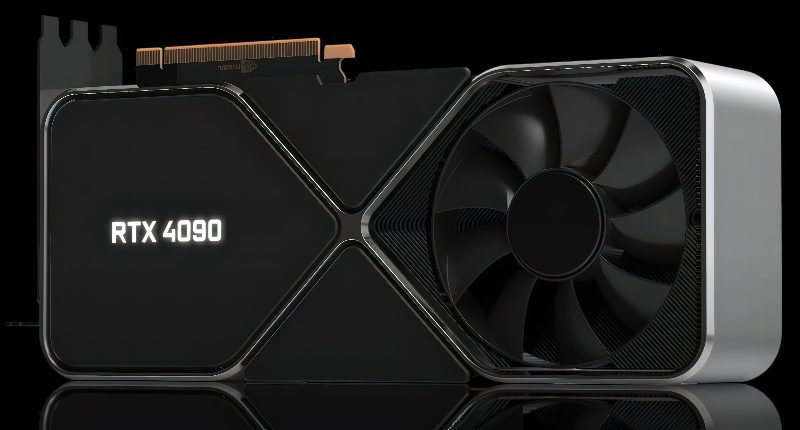
RTX 4090 (35,000): 4K/120fps beast
VRAM Needs
- Gaming: 12GB for 1440p (RTX 4070 Super) → 24GB for modded 4K (RTX 4090)
- Creators: 24GB+ for 8K video/3D rendering
Price-to-Performance Kings
| GPU | Price | Target |
| RTX 4060 | $299 | 1080p Gaming |
| Intel Arc A770 | $280 | Budget Creator |
3. When Consumer Comparisons Fail: AI’s Demanding Reality
Try running a 70B-parameter LLM on a “top-tier” gaming GPU, and the limits hit hard:
The AI Performance Chasm
TFLOPS FP16:
- RTX 4090: 1,300
- H100: 4,000 (+3X memory bandwidth)
VRAM Wall:
- Gaming max: 24GB
- AI minimum: 80GB (H100/A100) → 141GB for H200 trillion-param models
Multi-GPU Scaling
- ❌ Gaming Cards: No NVLink = 4x RTX 4090s ≠ 4x speed
- ✅ Industrial Giants: H100’s 900GB/s NVLink enables near-perfect scaling
4. Industrial GPU Compare: H100, H200, A100, RTX 4090
AI Workload Comparison Chart:
| GPU Model | TFLOPS FP16 | VRAM | Best For | Cost Efficiency |
| H200 | 4,500 | 141GB | Giant model inference | ★★★★☆ |
| H100 | 4,000 | 80GB | LLM training | ★★★★★ |
| A100 | 1,500 | 40/80GB | Budget AI scaling | ★★★★☆ |
| RTX 4090 | 1,300 | 24GB | Prototyping only | ★★☆☆☆ |
*Key Insight: $/TFLOPS reveals H100 > A100 > RTX 4090 for production AI.*
5. The Hidden Factor: Cluster Management (Where WhaleFlux Wins)
Here’s the brutal truth: An idle H100 wastes $4,000/month. Unoptimized fleets bleed 40%+ resources.
WhaleFlux: Your AI Efficiency Engine
Our platform solves this by intelligently managing your GPU clusters (H100/H200/A100/RTX 4090):
Intelligent Compare & Assign:
- Automatically matches workloads to ideal GPUs:
*H100 for training • H200 for inference • A100 for cost-sensitive jobs*
- Dynamic load balancing slashes idle time by 60%+
Cost Slayer:
- Rent/purchase enterprise GPUs monthly (no hourly billing)
- Utilization optimization cuts cloud spend by 50-70%
Stability Engine:
- 24/7 health monitoring + auto-failover for uninterrupted jobs
- Maximizes HBM memory bandwidth across fleets
*”WhaleFlux turns GPU specs into real-world ROI – transforming $30k H100s from shelfware into AI powerplants.”*
6. Conclusion: Beyond the Single Card
Consumer GPU comparisons obsess over FPS and ray tracing – but industrial AI lives and dies by cluster efficiency. While tools like PassMark help gamers choose an RTX 4060, AI teams need solutions that optimize fleets of H100s and H200s.
Final Takeaway:
“Consumer tools compare GPU cards.
WhaleFlux compares and optimizes entire clusters for maximum AI value.”
Stop Guessing – Start Optimizing
Ready to turn NVIDIA H100/H200/A100/RTX 4090 clusters into cost-efficient AI engines?
Discover WhaleFlux’s Smart GPU Solutions →
FAQs
1. What’s the main difference between gaming GPUs like RTX 4090 and AI powerhouses like H100?
While both use NVIDIA architecture, gaming GPUs prioritize graphics rendering and real-time performance, whereas AI data center GPUs like H100 feature specialized tensor cores, larger memory with ECC protection, and optimized interconnects for sustained computational throughput in multi-GPU environments.
2. How important is VRAM when comparing GPUs for AI work?
VRAM is crucial – it determines the size of AI models you can run. The RTX 4090’s 24GB is excellent for prototyping, but for large language models, you’ll need data center GPUs like the A100 (80GB) or H100 (94GB) available through WhaleFlux‘s managed clusters.
3. Can I use multiple gaming GPUs together for AI training?
While technically possible, effectively managing multiple gaming GPUs for AI requires sophisticated orchestration. WhaleFlux specializes in optimizing multi-GPU clusters, automatically distributing workloads across mixed NVIDIA setups from RTX 4090s to H100s to maximize efficiency and reduce training time.
4. Which offers better value: buying high-end gaming GPUs or renting AI-optimized GPUs?
For individual developers and prototyping, gaming GPUs provide great value. For enterprise AI production, WhaleFlux‘s rental program offers better TCO by providing access to optimized NVIDIA data center GPUs without upfront hardware costs, while ensuring optimal utilization through intelligent resource management.
5. How can my team access NVIDIA’s latest data center GPUs without major capital investment?
WhaleFlux provides flexible access to the full NVIDIA stack – from RTX 4090s to H100 and H200 systems – through monthly rental plans. Our intelligent management platform ensures you get maximum performance from these AI powerhouses while maintaining predictable operational costs.