Introduction: The Gamer’s Quest for Perfection
Scroll through Reddit, PC gaming forums, or tech subreddits, and you’ll find endless debates about one holy grail: the “best gpu for 1440p” at high refresh rates (120Hz, 144Hz, even 240Hz). Enthusiasts obsess over benchmarks, comparing frames per second (FPS) in Cyberpunk 2077 or Horizon: Zero Dawn. In 2025, cards like the NVIDIA RTX 4090 dominate these discussions, praised for maxing out 1440p settings while hitting buttery-smooth frame rates. Gamers celebrate raw power—but what happens when these consumer-grade GPUs enter the enterprise AI world? The stakes change dramatically, and so do the challenges.
The Gaming Champion in the AI Arena: RTX 4090’s Double Life
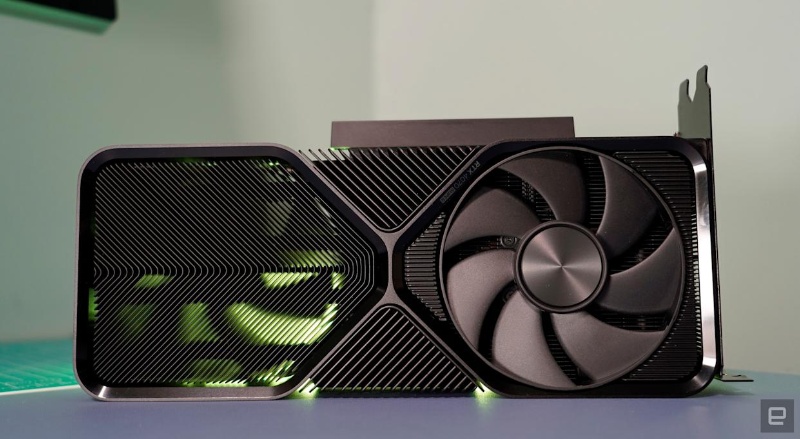
The RTX 4090 isn’t just a Reddit-revered “best gpu for 1440p 240hz” contender. It’s emerging as a cost-effective workhorse for AI tasks. With 24GB of VRAM and 82.6 TFLOPS of compute power, it handles:
- Inference workloads (e.g., real-time LLM responses)
- Model fine-tuning (adapting pre-trained models)
- Small-scale training (for domain-specific models)
But here’s the pain point: Running one 4090 in a gaming rig is simple. Managing fleets of them—mixed with specialized AI GPUs like H100s or A100s—creates chaos. Unlike gaming bursts, AI workloads run 24/7, demanding stability, efficient resource splitting, and thermal management. A card built for peak FPS isn’t natively built for sustained distributed compute.
Beyond Single GPU Performance: The AI Cluster Challenge
Enterprise AI operates at a different scale:
- Gaming = Optimizing one GPU.
- Enterprise AI = Orchestrating dozens (or hundreds) of GPUs across clusters.
Critical issues emerge that gamers never face:
- Resource Fragmentation: Idle RTX 4090s (or H100s) waste $1,000s/month. A “best amd gpu for 1440p” like the RX 9070 XT might sit unused.
- Orchestration Complexity: Scheduling tasks across mixed GPUs (H100s for training + 4090s for inference) requires dynamic load balancing.
- Stability Demands: AI labs need 24/7 reliability—not tolerance for driver crashes or thermal throttling.
- Cost Amplification: Underutilization scales brutally. One idle 4090 wastes $200/month; 100 idle GPUs waste $20,000.
WhaleFlux: Unlocking Enterprise Value from Your GPU Fleet (Including 4090s)
WhaleFlux isn’t another cloud portal. It’s an intelligent GPU resource management layer built for AI enterprises. Its core mission? Transform raw GPU power—whether from H100s, A100s, or repurposed “best gpu for 1440p 165hz” champs like the RTX 4090—into reliable, cost-efficient AI capacity.
Key Capabilities:
Intelligent Orchestration:
Dynamically assigns AI tasks across any mix of GPUs (H100, H200, A100, RTX 4090). Trains LLMs on H100s while offloading inference to 4090s—maximizing utilization, eliminating idle waste.
Unified Management:
Single dashboard to monitor H100 clusters and fleets of RTX 4090s. No more juggling scripts for NVIDIA drivers or AMD ROCm stacks.
Stability Optimization:
Prevents thermal throttling/crashes under 24/7 AI loads. Real-time health checks adjust workloads before GPUs overheat.
Cost Control:
Converts high FPS performance into ROI. A 4090 generating 240 FPS in Call of Duty can also slash inference costs—if WhaleFlux keeps it 95% utilized.
The WhaleFlux Advantage: Power + Efficiency + Choice
WhaleFlux turns GPU heterogeneity into a strategic benefit, not a liability:
Hardware Flexibility:
Mix/match GPUs for optimal cost-performance:
- H100/H200: Cutting-edge training
- A100: Versatile workhorse
- RTX 4090: Cost-efficient inference/scaling
Procurement Simplicity:
Buy or rent GPUs monthly (no hourly billing). Deploy 50 RTX 4090s for a 3-month project without cloud markup.
Tangible Outcomes:
- 30–50% lower cloud costs via utilization optimization
- 2x faster deployments with automated resource tuning
- Zero compatibility headaches when adding next-gen GPUs
💡 Real-World Impact: One customer reduced idle GPU time from 40% to <5%, saving $250K/month on a 200-GPU cluster—while speeding up Llama 3 fine-tuning by 35%.
Conclusion: Think Beyond the “Best 1440p GPU” List
The “best 1440p GPU” debate focuses on peak performance—but enterprise AI thrives on sustained efficiency. Raw teraflops mean little if your GPUs idle, crash, or can’t share workloads.
WhaleFlux is the essential platform to extract maximum value from any GPU investment:
- Repurpose consumer champs like the RTX 4090 or RX 9070 XT
- Integrate bleeding-edge H200s
- Manage all seamlessly in one system
Stop managing GPUs. Start maximizing AI output.
➡️ Discover how WhaleFlux optimizes mixed fleets (H100s to 4090s): Explore WhaleFlux Solutions
FAQs
1. Why are popular gaming GPU recommendations (like for 1440p) often inadequate or misleading for serious AI work?
Gaming benchmarks prioritize frame rates (FPS) and visual fidelity at specific resolutions, which depend heavily on GPU core clock speeds and rasterization performance. AI workloads, however, are dominated by parallel matrix operations and have completely different bottlenecks:
- Primary Need: VRAM Capacity & Bandwidth. Training or inferring with large models requires fitting the entire model (often tens of billions of parameters) into GPU memory. A card great for 1440p gaming may only have 8-12GB VRAM, which is insufficient for many modern LLMs.
- Key Hardware: Tensor Cores. Performance hinges on the throughput of dedicated AI accelerators (Tensor Cores), not just traditional gaming shader cores.
Therefore, a GPU like the NVIDIA GeForce RTX 4060 Ti might be a top Reddit pick for 1440p gaming due to its value, but its 8GB or 16GB VRAM and consumer-grade Tensor Cores make it a entry-level option at best for AI, unable to handle larger models that a data-center NVIDIA A100 (80GB) with high-bandwidth memory and advanced Tensor Cores can easily manage.
2. How should I evaluate an NVIDIA GeForce RTX 40 Series card (from 4060 to 4090) specifically for AI, not gaming?
Look beyond gaming reviews and focus on these AI-specific specs, in order of importance:
- VRAM Size: The absolute ceiling for the model size you can run. The RTX 4090 (24GB) stands out in the consumer lineup here.
- Memory Bandwidth: Measured in GB/s, this determines how fast data can be fed to the Tensor Cores. Higher is better for training speed.
- Tensor Core Generation & Count: All RTX 40 Series feature 4th Gen Tensor Cores, but higher-tier models have more of them, accelerating AI math.
- Power Limit & Cooling: Sustained AI training loads the GPU continuously. Robust cooling prevents thermal throttling, maintaining performance over long runs.
While the RTX 4090 is the undisputed consumer AI performance king, scaling beyond a single card’s limits requires a managed infrastructure approach.
3. What are the real-world limitations of trying to “scale” multiple consumer gaming GPUs (like multiple RTX 4090s) for larger AI models?
Scaling isn’t as simple as adding more cards. Key limitations include:
- Lack of NVLink: Most consumer NVIDIA RTX 40 Series cards (including the 4090) do not support NVLink, the high-speed direct GPU-to-GPU interconnect. Communication must go through the slower PCIe bus, creating a major bottleneck for model parallelism.
- Inefficient Resource Pooling: Without specialized cluster software, you cannot easily treat multiple GPUs as a single, unified compute resource. Managing memory and workload distribution becomes a complex manual task.
- Power & Thermal Chaos: Multiple high-TDP cards (like 4090s) in one system create enormous heat and power demands, risking stability and requiring expert-level system integration.
This DIY approach hits a wall quickly, creating operational headaches that tools like WhaleFluxare specifically designed to solve at scale.
4. For an AI team starting with a local RTX 4090, what is the logical and cost-effective path to scaling their compute power?
The most strategic path moves from owning consumer hardware to accessing managed enterprise infrastructure:
- Local Prototyping: Use a high-VRAM consumer card like the RTX 4090 for development, small model fine-tuning, and proof-of-concept work.
- Managed Cloud Scaling: When projects demand larger models, more data, or faster iteration, seamlessly transition to a platform like WhaleFlux. Instead of buying more 4090s and dealing with scaling limits, you can rent or purchase access to optimized clusters of professional NVIDIA GPUs like the H100 or A100.
- Focus on AI, not IT: This path lets your team focus on research and models, while WhaleFluxhandles the provisioning, orchestration, reliability, and cost-optimization of the underlying high-performance GPU infrastructure.
5. How does WhaleFlux directly address the “scaling” challenge that a Reddit DIY build cannot?
WhaleFlux transforms scaling from a hardware engineering problem into a managed service:
- From PCIe to Optimized Fabrics: It provides clusters built with proper high-speed interconnects (like NVLink within servers and InfiniBand between them) that consumer builds lack, enabling efficient multi-GPU and multi-node training.
- Intelligent Orchestration: Its software dynamically schedules and partitions AI workloads across a pool of NVIDIA GPUs (from RTX 4090s for dev to H100s for massive training), maximizing utilization and simplifying the scaling process.
- Enterprise-Grade Stability & Cost Control: It offers the reliability and monitoring needed for multi-day training jobs, with a predictable monthly cost model. This eliminates the unpredictability of hourly cloud billing and the high total cost of ownership of an underutilized, self-maintained multi-GUV rig.